SMT Divergence
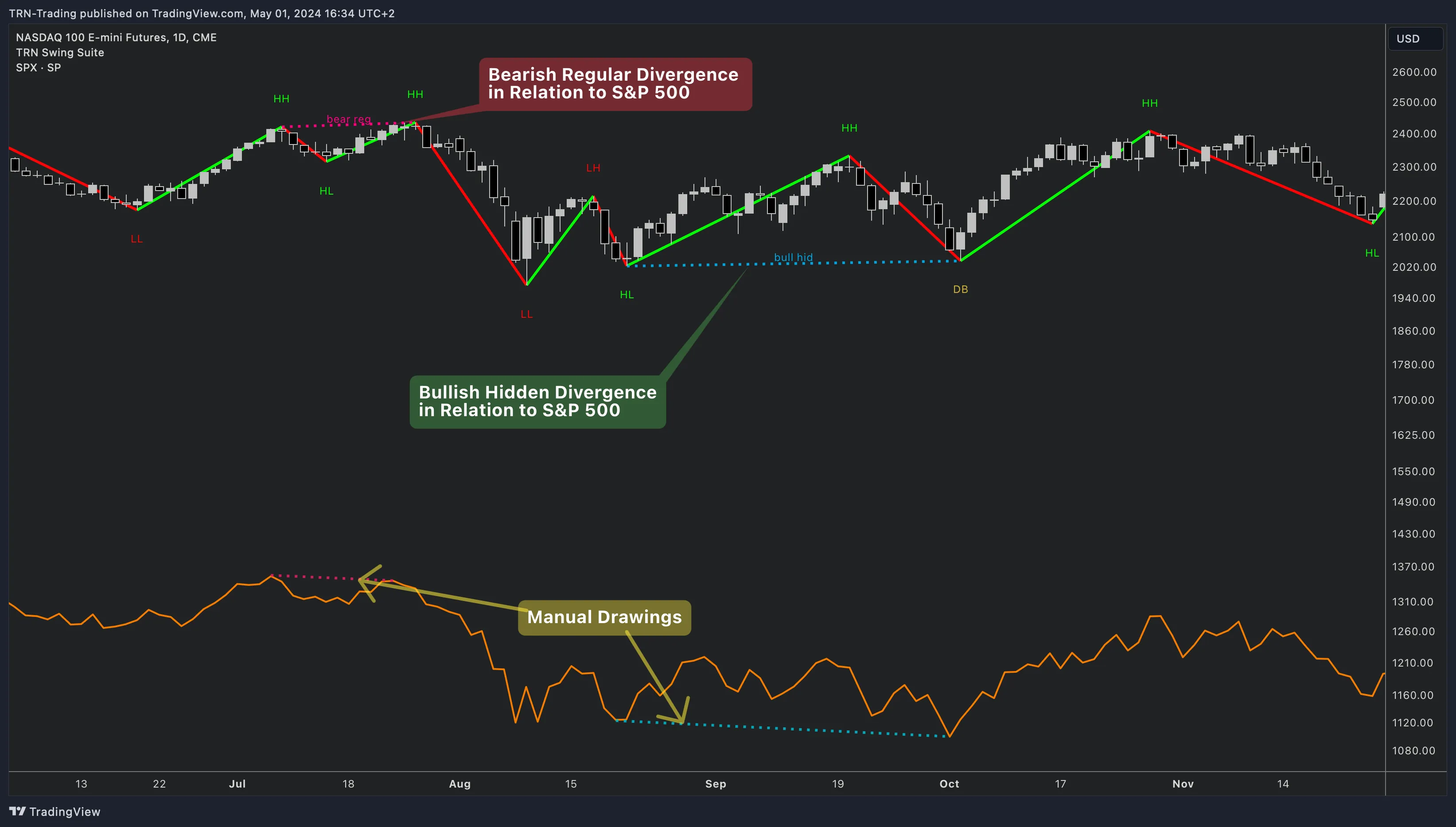
SMT (Smart Money Technique) divergence detects structural disagreement between correlated instruments — a concept from institutional trading that reveals hidden positioning. The Swing Suite's key advantage over the SMT/Divergence Suite is dual-symbol support: monitor two reference instruments simultaneously on a single chart. When NQ makes a new high but both ES and YM fail to confirm, you have stronger institutional evidence than a single-symbol comparison provides.
Dual-Symbol Architecture
The Swing Suite monitors two independent SMT symbols, each with full divergence detection:
| Setting | Symbol 1 | Symbol 2 |
|---|---|---|
| Enabled | Yes (default) | No (default) |
| Default Symbol | NQ1! | ES1! |
| Divergence Types | 4 independent toggles | 4 independent toggles |
| Colors | Independent per type | Independent per type |
| Label Text | Independent per type | Independent per type |
| Line Style | Independent | Independent |
| Line Width | Independent | Independent |
| Text Offset | Independent | Independent |
This gives you 8 divergence types per symbol and 16 total divergence settings — full control over how each symbol's SMT signals appear on your chart.
How SMT Mode Works
When SMT is enabled, the Swing Suite compares swing points on the current chart symbol against swing points on each reference symbol. Instead of comparing price against an oscillator, SMT mode compares price structure against another instrument's price structure.
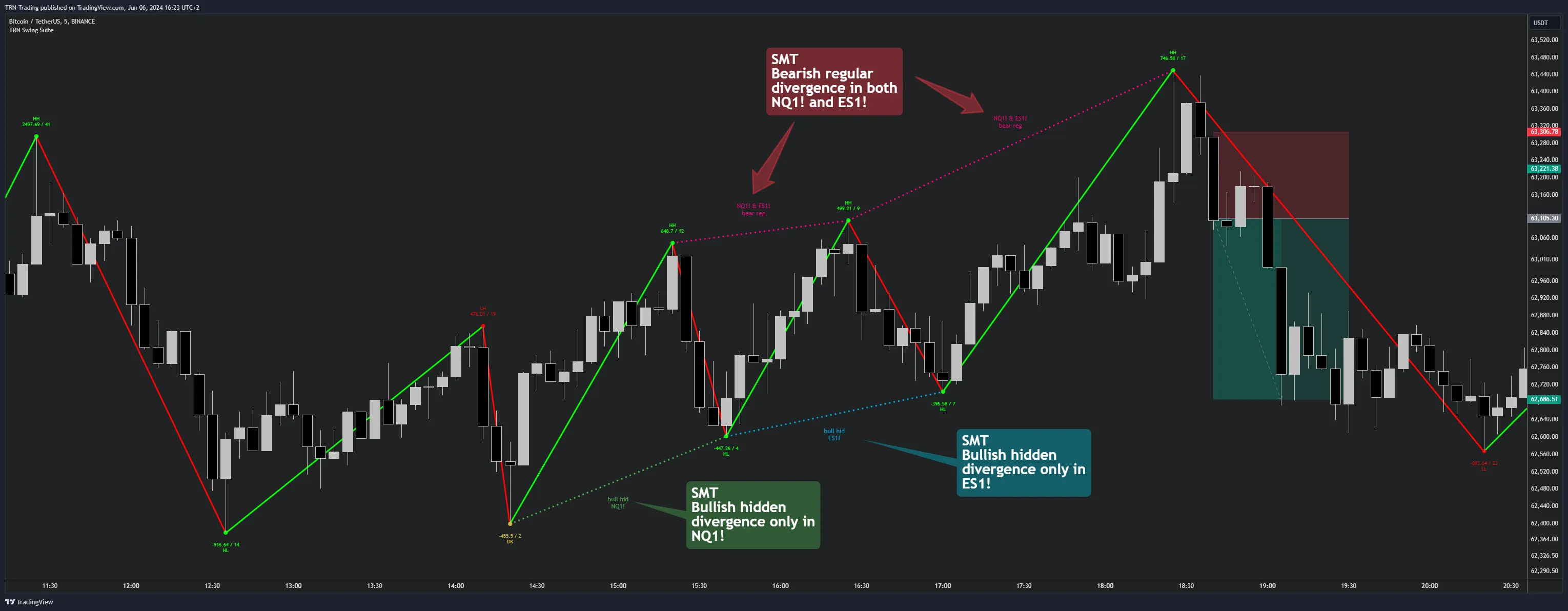
The Swing Suite detects the same four divergence types in SMT mode:
| Type | Current Symbol | Reference Symbol | Meaning |
|---|---|---|---|
| Regular Bullish | Lower low | Higher low | Reference shows strength while current makes a new low |
| Hidden Bullish | Higher low | Lower low | Current holds structure while reference dips |
| Regular Bearish | Higher high | Lower high | Reference shows weakness while current makes a new high |
| Hidden Bearish | Lower high | Higher high | Current stays weak while reference bounces |
Setting Up SMT Mode
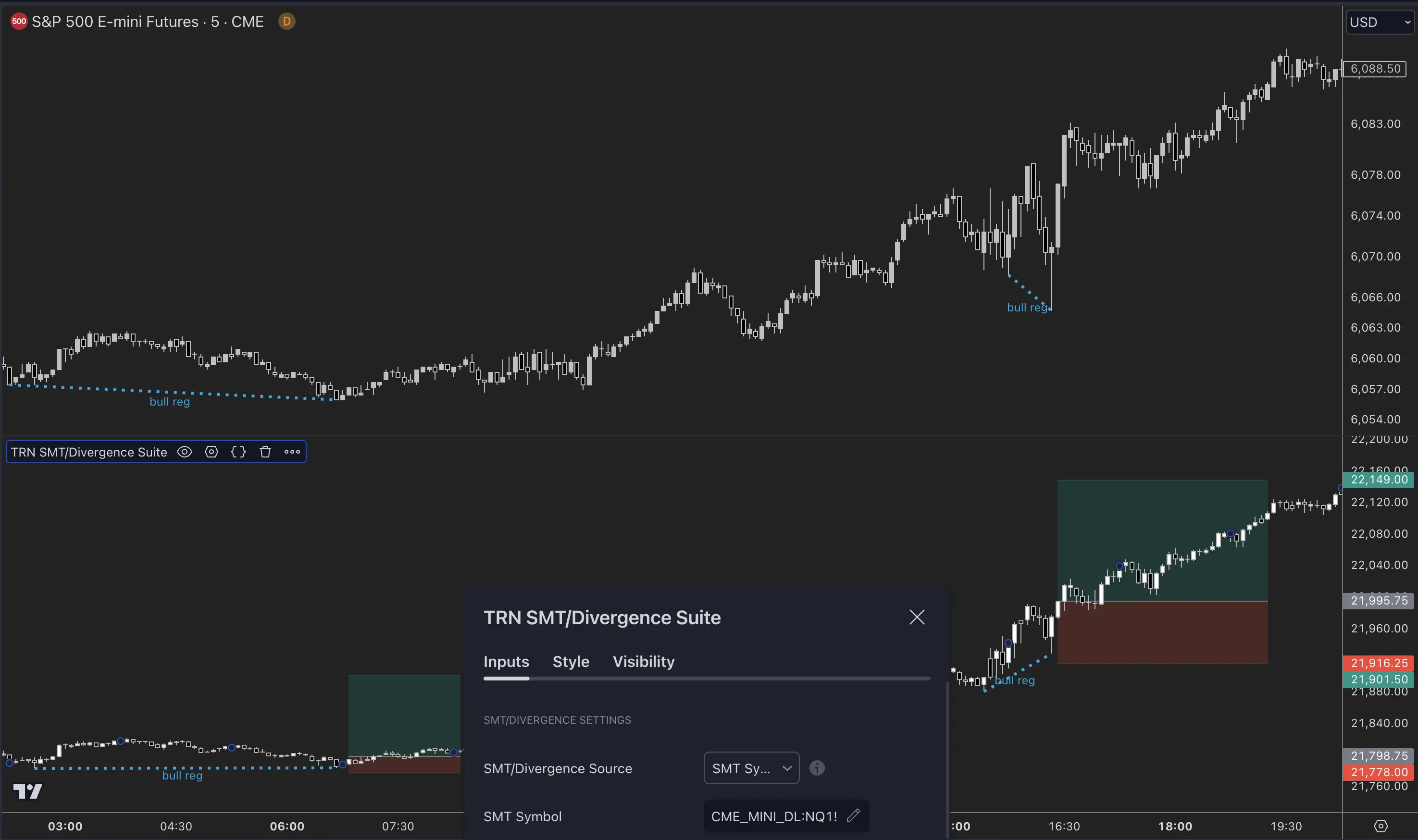
Step 1: Enable SMT Symbols
Open the Swing Suite settings. In the SMT Divergences group, Symbol 1 is enabled by default. Toggle Symbol 2 on to activate dual-symbol monitoring.
Step 2: Configure Reference Symbols
Set each SMT Symbol input to your reference instrument. Common reference symbol combinations:
| Current Chart | Symbol 1 | Symbol 2 | Use Case |
|---|---|---|---|
| NQ (Nasdaq) | ES (S&P 500) | YM (Dow) | Triple index confirmation |
| ES (S&P 500) | NQ (Nasdaq) | RTY (Russell) | Broad market divergence |
| BTCUSDT | ETHUSDT | SOLUSDT | Crypto major/alt divergence |
| EURUSD | GBPUSD | DXY | Forex correlation check |
Step 3: Select Divergence Types
Each symbol has four independent divergence type toggles:
- Regular Bullish — reversal signal at lows
- Hidden Bullish — continuation signal in uptrends
- Regular Bearish — reversal signal at highs
- Hidden Bearish — continuation signal in downtrends
Enable only the types you want to monitor. Disabling unused types keeps the chart clean and reduces alert noise.
Step 4: Adjust Swing Parameters
SMT divergence uses the same swing detection settings as oscillator divergence. The Swing Size parameter controls how large the swing points must be. For SMT analysis on daily charts, a Swing Size of 10-15 typically works well. For intraday, reduce to 5-8 for more responsive detection.
When to Use Dual-Symbol SMT
Single-symbol SMT shows when one correlated instrument disagrees. Dual-symbol SMT shows when multiple correlated instruments disagree — a stronger institutional signal. The Swing Suite's dual-symbol mode is most powerful when:
- Triple confirmation — chart symbol plus two references all normally move together, so disagreement from both references carries more weight
- Cross-sector validation — compare against instruments in related but distinct sectors (e.g., NQ vs ES for tech vs broad market)
- Crypto ecosystem analysis — BTC vs ETH vs a third major shows whether weakness is asset-specific or market-wide
Use Price Action Suite market structure to confirm the trend context and Trend Bars Pro for entry timing when the Swing Suite flags an SMT divergence. The Trend and Reversal Scanner can monitor divergences across 20 symbols — when it flags a divergence, switch to the Swing Suite for dual-symbol SMT confirmation.
Swing Suite vs SMT/Divergence Suite
| Feature | Swing Suite | SMT/Divergence Suite |
|---|---|---|
| SMT Symbols | 2 simultaneous | 1 |
| Total SMT Alerts | 16 (8 per symbol) | 8 |
| Divergence Settings | 16 (independent per symbol) | 8 |
| Bar Coloring | Not included | Custom candle colors in SMT mode |
| Integration | Shares swing detection with zig-zag, trends, statistics, S&R | Standalone divergence tool |
| Best For | Multi-symbol confirmation within structural analysis | Single-symbol SMT with detailed visualization |
Alerts
The Swing Suite provides 16 SMT alerts — 8 per symbol, covering all four divergence types in both confirmed and early states:
Symbol 1 Alerts
| Alert | Default | What It Fires On |
|---|---|---|
| Confirmed Regular Bullish (S1) | On | Bar-close-validated regular bullish SMT divergence |
| Confirmed Hidden Bullish (S1) | On | Bar-close-validated hidden bullish SMT divergence |
| Confirmed Regular Bearish (S1) | On | Bar-close-validated regular bearish SMT divergence |
| Confirmed Hidden Bearish (S1) | On | Bar-close-validated hidden bearish SMT divergence |
| Early Regular Bullish (S1) | Off | Intrabar regular bullish SMT divergence |
| Early Hidden Bullish (S1) | Off | Intrabar hidden bullish SMT divergence |
| Early Regular Bearish (S1) | Off | Intrabar regular bearish SMT divergence |
| Early Hidden Bearish (S1) | Off | Intrabar hidden bearish SMT divergence |
Symbol 2 Alerts
| Alert | Default | What It Fires On |
|---|---|---|
| Confirmed Regular Bullish (S2) | On | Bar-close-validated regular bullish SMT divergence |
| Confirmed Hidden Bullish (S2) | On | Bar-close-validated hidden bullish SMT divergence |
| Confirmed Regular Bearish (S2) | On | Bar-close-validated regular bearish SMT divergence |
| Confirmed Hidden Bearish (S2) | On | Bar-close-validated hidden bearish SMT divergence |
| Early Regular Bullish (S2) | Off | Intrabar regular bullish SMT divergence |
| Early Hidden Bullish (S2) | Off | Intrabar hidden bullish SMT divergence |
| Early Regular Bearish (S2) | Off | Intrabar regular bearish SMT divergence |
| Early Hidden Bearish (S2) | Off | Intrabar hidden bearish SMT divergence |
To create an alert: enable the desired types in settings, right-click the indicator, select Add alert on Swing Suite, and choose Any alert() function call.
FAQ
How many SMT symbols can the Swing Suite monitor simultaneously?
The Swing Suite supports 2 simultaneous SMT symbols, compared to 1 in the SMT/Divergence Suite. Symbol 1 (default NQ1!) is enabled by default, and Symbol 2 (default ES1!) is disabled by default. Each symbol has fully independent divergence type toggles, colors, label text, and line styles — giving the Swing Suite 16 total SMT divergence settings across both symbols.
What is SMT divergence and how does the Swing Suite detect it?
SMT (Smart Money Technique) divergence occurs when correlated instruments make conflicting swing points — one makes a new high while the other fails to confirm it. The Swing Suite compares the current chart symbol's swing points against one or two configurable reference symbols and draws divergence lines when structural disagreement is detected. This reveals institutional positioning that single-instrument analysis misses.
Which symbol pairs work best for SMT divergence in the Swing Suite?
The Swing Suite works best with highly correlated instrument pairs. Common setups include NQ vs ES (Nasdaq vs S&P 500), BTCUSDT vs ETHUSDT (crypto majors), EURUSD vs GBPUSD (forex majors), and DXY vs gold. With the Swing Suite's dual-symbol capability, you can monitor NQ vs ES and NQ vs YM simultaneously on a single chart.
How many SMT alerts does the Swing Suite provide?
The Swing Suite provides 16 SMT alerts total — 8 per symbol. Each symbol has 4 divergence types (regular bullish, hidden bullish, regular bearish, hidden bearish) with both confirmed and early detection states. This gives traders granular control over which SMT signals trigger notifications from the Swing Suite.
Next Steps
Divergence Detection
Learn about oscillator divergence types, confirmation states, and value condition filters in the Swing Suite.
SMT/Divergence Suite
Compare with the standalone SMT/Divergence Suite for single-symbol SMT with detailed oscillator visualization.
Usage Guide
Step-by-step trading workflows combining Swing Suite divergences with other TRN system indicators.