Trend Bars Pro
Trend Bars Pro is the Entry indicator in the TRN Trading System. All system indicators work together as one unified trading framework — Context, Bias, Structure, and Entry.
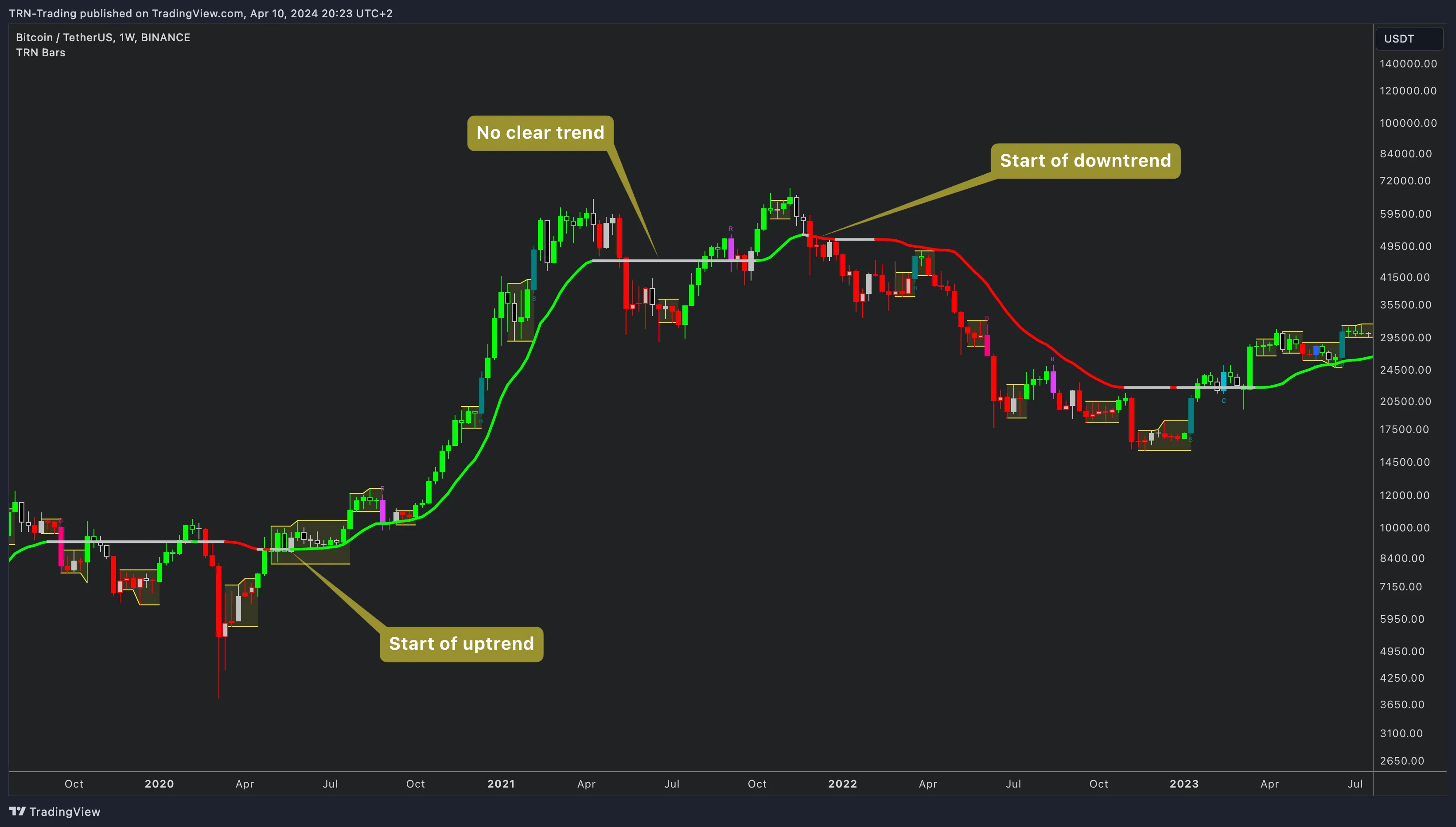
TRN Trend Bars Pro turns raw price bars into a momentum-readable chart. Every bar is colored by trend direction — green for bullish momentum, red for bearish momentum, and neutral when the market lacks conviction. On top of that foundation, Trend Bars Pro detects five signal bar types, plots a volatility-adaptive dynamic trend line, identifies consolidation ranges with breakout confirmation, and overlays higher-timeframe candles — giving traders a complete entry-timing framework from a single TradingView indicator.
Core Features
Bar Coloring at a Glance
Trend Bars Pro replaces standard candlestick colors with momentum-driven coloring. When momentum favors the bulls, bars turn green. When momentum shifts bearish, bars turn red. Bars that lack directional conviction appear in neutral tones — silver for up closes, black for down closes.
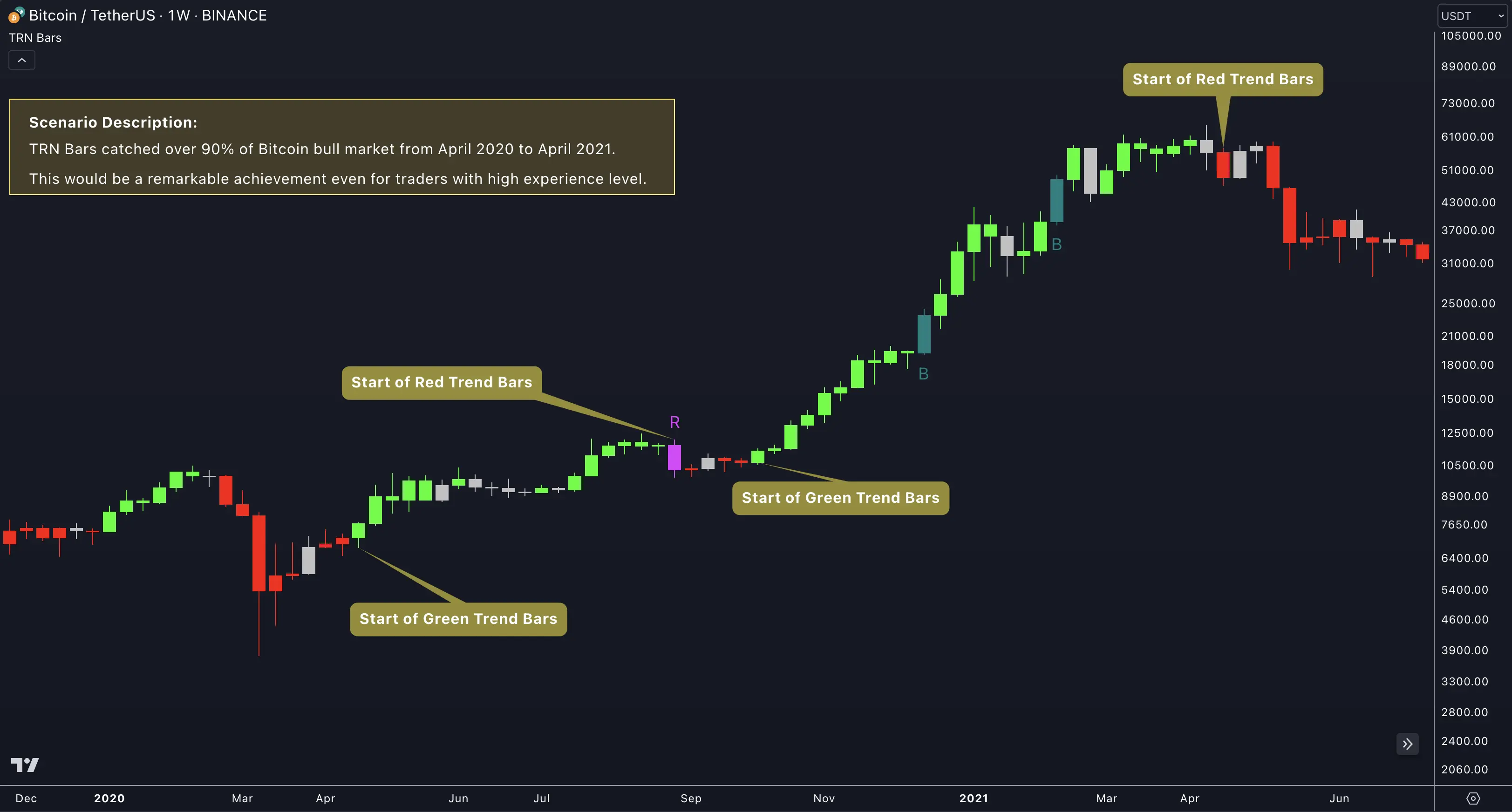
Signal bars take priority over trend coloring. When Trend Bars Pro detects a reversal, breakout, or continuation pattern, that bar receives its own distinct color and label — making high-probability entry points immediately visible without scanning every candle.
Quick Setup
Getting started with Trend Bars Pro takes under a minute:
- Add the indicator — Search "TRN Trend Bars Pro" in TradingView's indicator panel and add it to your chart.
- Review bar coloring — Green and red bars appear immediately, replacing default candle colors with momentum-based coloring.
- Enable signal bars — Open Settings and toggle the signal bar types relevant to your strategy. Strong Reversal and Continuation bars are a solid starting pair.
- Adjust the Dynamic Trend — Select a sensitivity level that matches your trading timeframe. Extra High suits swing traders; Extra Low suits scalpers.
- Set alerts — Configure alerts for the signal types and trend changes that matter to your trading plan.
Trend Bars Pro delivers the sharpest entries when combined with the full TRN system. Use Price Action Suite for supply and demand context, Opening Range Pro for session directional bias, Swing Suite for structural confirmation, and the Trend and Reversal Scanner for multi-symbol monitoring. Entry signals from Trend Bars Pro gain conviction when context, bias, and structure already agree on direction.
FAQ
What does Trend Bars Pro do on TradingView?
Trend Bars Pro colors every bar by momentum direction — green for uptrend, red for downtrend, and neutral when no trend is active. The indicator detects five signal bar types (Strong Reversal, Morning/Evening Star, Range Breakout, Three Line Strike, and Continuation), plots a volatility-adaptive dynamic trend line, identifies consolidation ranges with breakout confirmation, and overlays higher-timeframe candles. Trend Bars Pro fills the Entry role in the TRN Trading System.
How many signal bar types does Trend Bars Pro detect?
Trend Bars Pro detects five distinct signal bar types. Strong Reversal bars flag high-conviction reversals. Morning Star and Evening Star bars identify classic three-bar candlestick reversals. Range Breakout bars fire when price exits a consolidation zone. Three Line Strike bars catch four-bar reversal sequences. Continuation bars confirm trend-following momentum. Each type has independent toggle, custom colors, label text, and ten label shape options.
What is the Dynamic Trend line in Trend Bars Pro?
The Dynamic Trend is a volatility-adaptive trend line that smoothly follows price action. The Dynamic Trend line changes color based on trend direction — green for uptrend, red for downtrend, gray for neutral. Traders choose from five sensitivity levels ranging from Extra Low (most responsive, reverses quickly) to Extra High (most persistent, fewest reversals). The Dynamic Trend line serves as a visual trend filter and pullback reference.
Does Trend Bars Pro support higher-timeframe analysis?
Yes. The HTF PO3 feature overlays higher-timeframe candles directly on the chart with up to four configurable timeframes. Trend Bars Pro includes auto-timeframe scaling that selects appropriate HTF levels based on the current chart resolution, plus an HTF status table displaying trend state across timeframes.