Custom Indicator Integration
The Swing Suite is not limited to its built-in oscillators. The External Indicator option connects any TradingView indicator output to the Swing Suite's divergence detection engine, enabling divergence analysis on custom Pine Script indicators, community scripts, and third-party tools. Because the Swing Suite integrates divergence detection into its swing analysis framework, external indicators benefit from the same swing parameters that drive zig-zag lines, trend identification, and support/resistance levels.
Setting Up an External Indicator
Step 1: Add Both Indicators
Add the Swing Suite and your custom indicator to the same TradingView chart. The custom indicator must be visible on the chart for its output to appear in the source selector dropdown.
Step 2: Select External Indicator Mode
Open the Swing Suite settings. In the Divergence On Oscillators group, change the oscillator dropdown to External Indicator. This tells the Swing Suite to look for an external source rather than computing an internal oscillator.
Step 3: Connect the Source Inputs
Two source input fields become active:
| Input | Purpose | When to Use |
|---|---|---|
| External Indicator (High) | Primary oscillator output | Connect this for all indicators — single or dual output |
| External Indicator Low | Secondary oscillator output | Only for dual-output indicators (e.g., Stochastic RSI %K/%D). Set to the same value as High for single-output indicators |
Click the External Indicator (High) dropdown and select your custom indicator's output from the source list. TradingView displays all available indicator outputs as selectable sources.
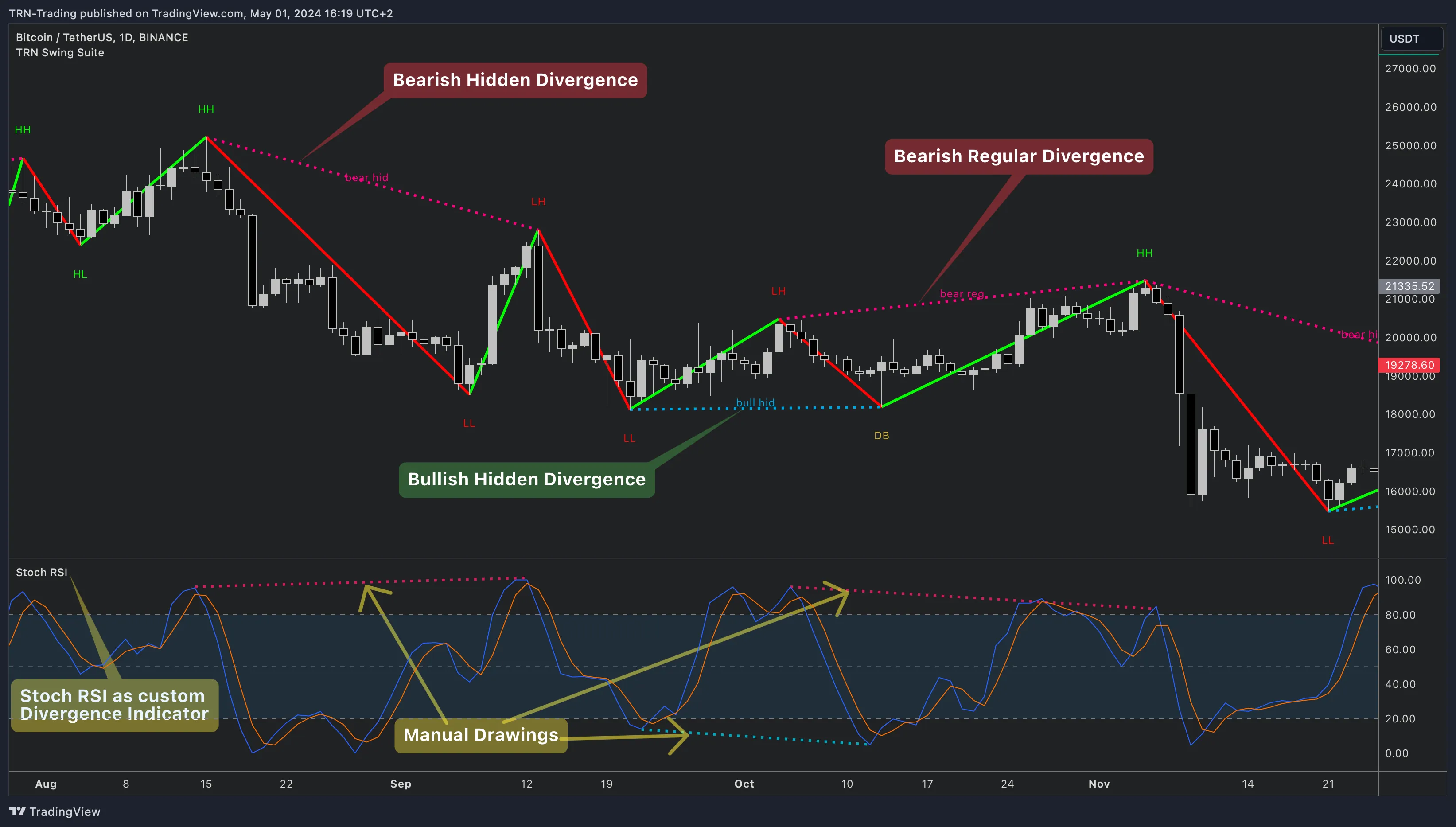
Step 4: Verify Detection
The Swing Suite immediately begins detecting divergences on the connected indicator. Divergence lines appear on the oscillator pane and on the price chart if Show on Main Chart is enabled.
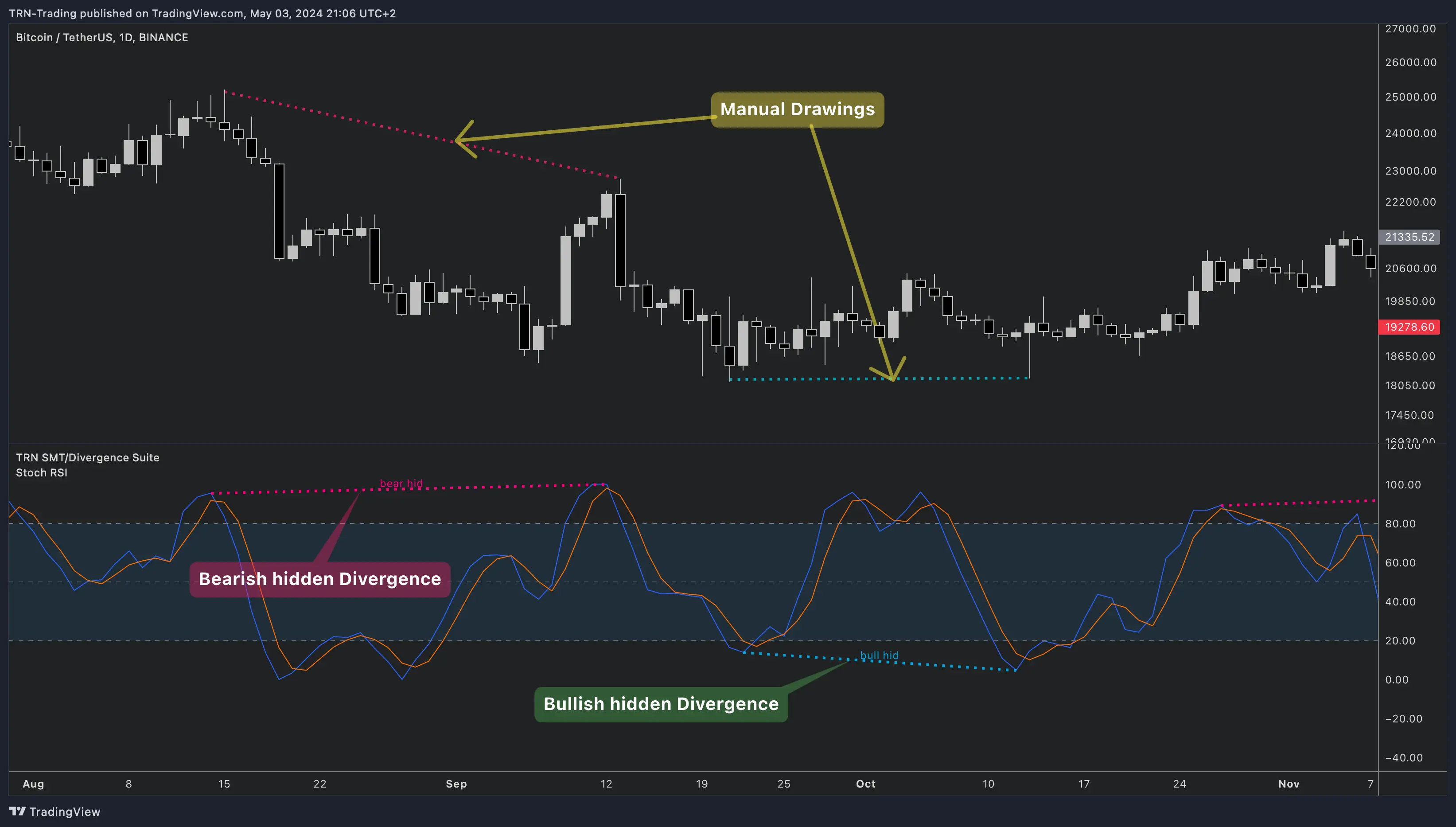
Common custom indicators to connect include Stochastic RSI, ADX, ATR-based oscillators, Cumulative Delta bars, and proprietary momentum tools. Any indicator that plots an output line on TradingView works as a source for the Swing Suite's divergence detection.
Dual-Series Indicators
Some indicators produce two related output series — for example, Stochastic RSI has a %K (fast) and %D (slow) line. The Swing Suite uses these differently:
- External Indicator (High) — used to identify swing high points on the oscillator
- External Indicator Low — used to identify swing low points on the oscillator
For most custom indicators, set both inputs to the same source. Use separate inputs only when your indicator has distinct high and low series (like Cumulative Delta bars with separate high/low values or Bollinger Bands with upper/lower lines).
Swing Detection on External Sources
The Swing Suite applies the same swing detection engine to external indicators as it does to built-in oscillators. The Swing Style (Standard, Gann, Ticks, Percent), Swing Size, and DTB Strength parameters all affect how the Swing Suite identifies swing points on your custom indicator's output.
If the external indicator produces noisy or volatile output, increase the Swing Size to reduce false divergences. For smooth oscillators, a smaller Swing Size captures more divergence opportunities. This is the same swing detection that powers the Swing Suite's zig-zag, statistics, and support/resistance features — external indicators participate in the full swing analysis framework.
Swing Suite vs SMT/Divergence Suite
Both the Swing Suite and SMT/Divergence Suite support external indicator integration. The key difference: the Swing Suite integrates divergence detection into a broader swing analysis framework that includes zig-zag lines, trend identification, swing statistics, and support/resistance levels. The SMT/Divergence Suite provides a standalone divergence tool with more detailed oscillator visualization options. Choose the Swing Suite when you want external indicator divergences alongside structural swing analysis.
FAQ
Can the Swing Suite detect divergences on any custom indicator?
Yes, the Swing Suite accepts any TradingView indicator as a divergence source through the External Indicator option. In the Divergence On Oscillators settings group, set the oscillator dropdown to "External Indicator," then connect your custom indicator's output through the External Indicator (High) source selector. The Swing Suite works with Pine Script indicators, community scripts, and third-party tools — any indicator that produces a plotted output on the chart.
How do I connect a dual-series indicator like Stochastic RSI to the Swing Suite?
The Swing Suite provides two source inputs for dual-series indicators. Connect the primary output (e.g., %K line) to External Indicator (High) and the secondary output (e.g., %D line) to External Indicator Low. The Swing Suite uses the High input for swing high detection and the Low input for swing low detection. For single-output indicators, set both inputs to the same source.
Does the Swing Suite apply its swing parameters to external indicators?
Yes, the Swing Suite applies the same swing detection parameters to external indicator output as it does to built-in oscillators. Swing Style, Swing Size, and DTB Strength all control how the Swing Suite identifies pivots on the connected source. This means external indicators benefit from the same configurable swing detection that powers the zig-zag, trend identification, and statistics features.
Do I need to scale or normalize my custom indicator before connecting it to the Swing Suite?
No, the Swing Suite automatically adapts to any value range. The divergence detection engine compares swing point relationships rather than absolute values, so indicators ranging from -100 to 100 work the same as those ranging from 0 to 1. No normalization or scaling is required before connecting a custom indicator to the Swing Suite.
Next Steps
Built-In Oscillators
Compare your custom indicator against the Swing Suite's built-in oscillators including RSI, MACD, and Cumulative Delta.
Divergence Detection
Learn about all four divergence types, confirmation states, and value condition filters in the Swing Suite.
SMT Divergence
Detect structural divergence between correlated instruments using the Swing Suite's dual-symbol SMT mode.