SMT Divergence
SMT (Smart Money Technique) divergence detects structural disagreement between correlated instruments — a concept from institutional trading that most divergence tools ignore entirely. When NQ makes a new high but ES fails to confirm it, or when BTCUSDT breaks down but ETHUSDT holds support, the SMT/Divergence Suite identifies these inter-market divergences and draws them directly on your chart.
Video Tutorial
Watch this tutorial to see how SMT divergence detection works in the SMT/Divergence Suite:
How SMT Mode Works
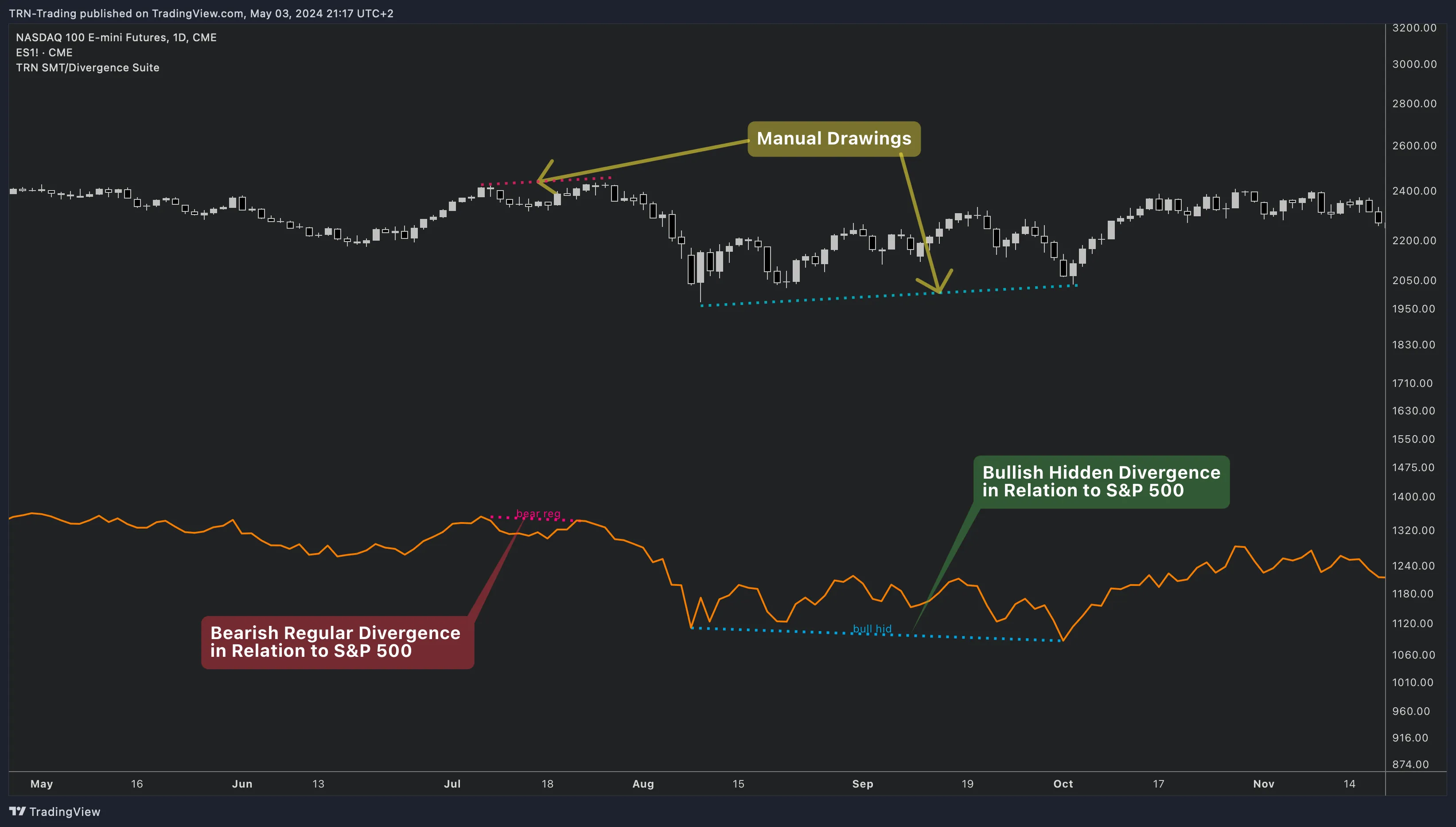
When SMT Symbol is selected as the Divergence Indicator, the SMT/Divergence Suite compares swing points on the current chart symbol against swing points on a configurable reference symbol. Instead of comparing price against an oscillator, SMT mode compares price structure against another instrument's price structure.
The SMT/Divergence Suite detects the same four divergence types in SMT mode:
| Type | Current Symbol | Reference Symbol | Meaning |
|---|---|---|---|
| Regular Bullish | Lower low | Higher low | Reference symbol shows strength while current symbol makes a new low |
| Hidden Bullish | Higher low | Lower low | Current symbol holds structure while reference symbol dips |
| Regular Bearish | Higher high | Lower high | Reference symbol shows weakness while current symbol makes a new high |
| Hidden Bearish | Lower high | Higher high | Current symbol stays weak while reference symbol bounces |
Setting Up SMT Mode
Step 1: Select SMT Symbol Source
Open SMT/Divergence Suite settings. In the SMT/Divergence Settings group, set the Divergence Indicator to SMT Symbol.
Step 2: Configure the Reference Symbol
Set the SMT Symbol input to your reference instrument. The default is NQ1! (Nasdaq 100 futures). Common reference symbols:
| Current Chart | Reference Symbol | Correlation |
|---|---|---|
| NQ (Nasdaq) | ES (S&P 500) | US Index pair |
| ES (S&P 500) | NQ (Nasdaq) | US Index pair |
| BTCUSDT | ETHUSDT | Crypto majors |
| EURUSD | GBPUSD | Forex majors |
| Gold (GC) | DXY (Dollar Index) | Inverse correlation |
Step 3: Adjust Swing Parameters
SMT divergence uses the same swing detection settings as oscillator divergence. The Swing Size parameter controls how large the swing points must be. For SMT analysis on daily charts, a Swing Size of 10–15 typically works well. For intraday, reduce to 5–8.
SMT Bar Coloring
When SMT mode is active, the SMT/Divergence Suite replaces the default candle colors on the main chart with custom bar coloring from the Bars Visualization (CVD + SMT) settings group. This provides a visual cue that SMT analysis is active and helps distinguish SMT-mode charts from standard oscillator charts.
| Setting | Default | What It Controls |
|---|---|---|
| Body Up | White | Bullish candle body color during SMT mode |
| Body Down | Black | Bearish candle body color during SMT mode |
| Border | Gray | Candle border color during SMT mode |
| Wick | Gray | Candle wick color during SMT mode |
When to Use SMT Divergence
SMT divergence is most powerful when:
- Correlated instruments normally move together — structural disagreement is meaningful only when correlation is typically strong
- Major swing points diverge — intrabar noise is less significant; focus on confirmed swing highs and lows
- Combined with other TRN indicators — use Price Action Suite market structure to confirm the trend context and Trend Bars Pro for entry timing
The Trend and Reversal Scanner monitors divergences across 20 symbols using a single oscillator. When the scanner flags a divergence, switch to the SMT/Divergence Suite on that instrument's chart to check whether correlated instruments confirm or contradict the signal — adding an institutional-level filter to your analysis.
FAQ
What is SMT divergence and how does the SMT/Divergence Suite detect it?
SMT (Smart Money Technique) divergence occurs when correlated instruments make conflicting swing points — one makes a new high while the other fails to confirm it. The SMT/Divergence Suite compares the current chart symbol's swing points against a configurable reference symbol and draws divergence lines when structural disagreement is detected. This reveals institutional activity that single-instrument analysis misses.
Which symbol pairs work best for SMT divergence?
The SMT/Divergence Suite works best with highly correlated instrument pairs. Common setups include NQ vs ES (Nasdaq vs S&P 500), BTCUSDT vs ETHUSDT (crypto majors), EURUSD vs GBPUSD (forex majors), and DXY vs gold. The key is strong historical correlation — when correlated instruments diverge structurally, it signals institutional positioning.
How is SMT divergence different from regular oscillator divergence?
Regular divergence in the SMT/Divergence Suite compares price against an oscillator (e.g., RSI) on the same instrument. SMT divergence compares price structure between two different instruments. Regular divergence shows momentum weakening within one market. SMT divergence reveals structural disagreement between correlated markets, which often indicates larger institutional flows.
Does the SMT/Divergence Suite apply custom bar coloring in SMT mode?
Yes, when SMT Symbol is selected as the divergence source, the SMT/Divergence Suite applies custom bar coloring to the main chart. The bar colors in the Bars Visualization settings group — body, border, and wick — replace the default candle colors during SMT mode, providing a visual cue that SMT analysis is active.