Swing Suite Statistics Tables
The TRN Swing Suite includes two built-in statistics tables that transform raw swing data into actionable trading intelligence. Rather than guessing where price might travel next, you can reference historical swing behavior directly on your chart to set realistic stop-loss levels, take-profit targets, and validate trade setups with probability data.
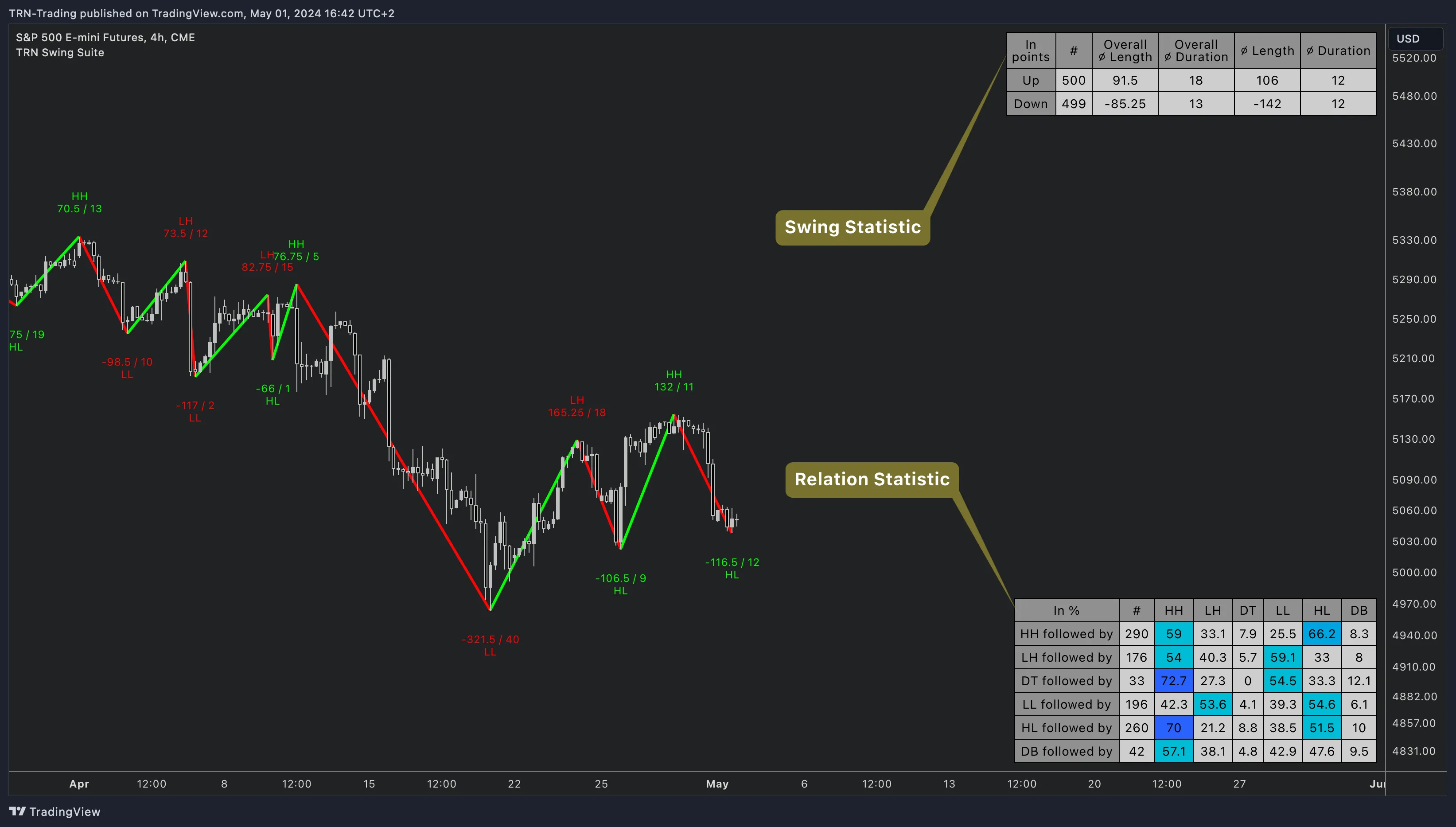
Setting Up Statistics Tables
Both tables are configured in the Statistics section of the Swing Suite indicator settings. Each table can be positioned independently on your chart or turned off entirely.
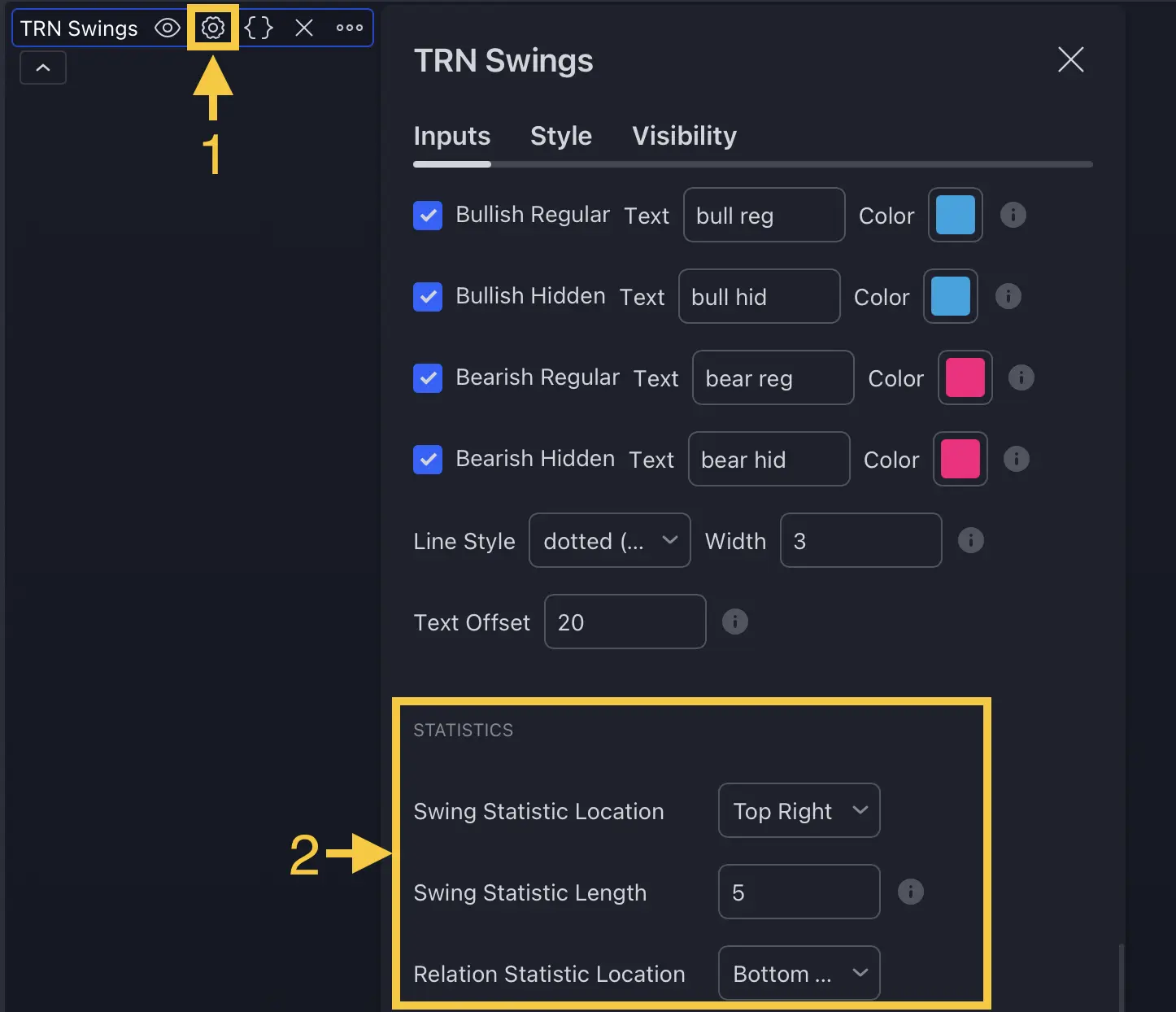
Configuration Options
- Swing Statistics Position: Choose from nine chart positions (Top Left, Top Center, Top Right, Middle Left, Middle Center, Middle Right, Bottom Left, Bottom Center, Bottom Right) or turn it off.
- Relation Statistics Position: Same nine position options, or off. Place it separately from the Swing Statistics table for a clear layout.
- Styling Preset: Dark or Light theme to match your chart background.
- Statistic Length: Controls how many recent swings feed into the custom average columns. Range is 2 to 20 with a default of 5. Lower values track recent behavior; higher values smooth the data.
- Header / Cell Text Size: Adjustable from 8 to 50 pixels for readability on any screen size.
Position the Swing Statistics table in a corner that does not overlap your price action. Use the Relation Statistics table in the opposite corner so both remain visible without cluttering your chart.
Swing Statistics Table
The Swing Statistics table breaks down the behavior of up swings and down swings separately. Each row represents one direction with the following columns.

| Column | Label | Description |
|---|---|---|
| 1 | Type | Up or Down swing direction |
| 2 | # | Total number of swings analyzed on the visible chart |
| 3 | Overall Avg Length | Average swing length in points across all swings |
| 4 | Overall Avg Duration | Average swing duration in bars across all swings |
| 5 | Custom Avg Length | Average length using only the most recent N swings (set by Statistic Length) |
| 6 | Custom Avg Duration | Average duration using only the most recent N swings |
Practical Application
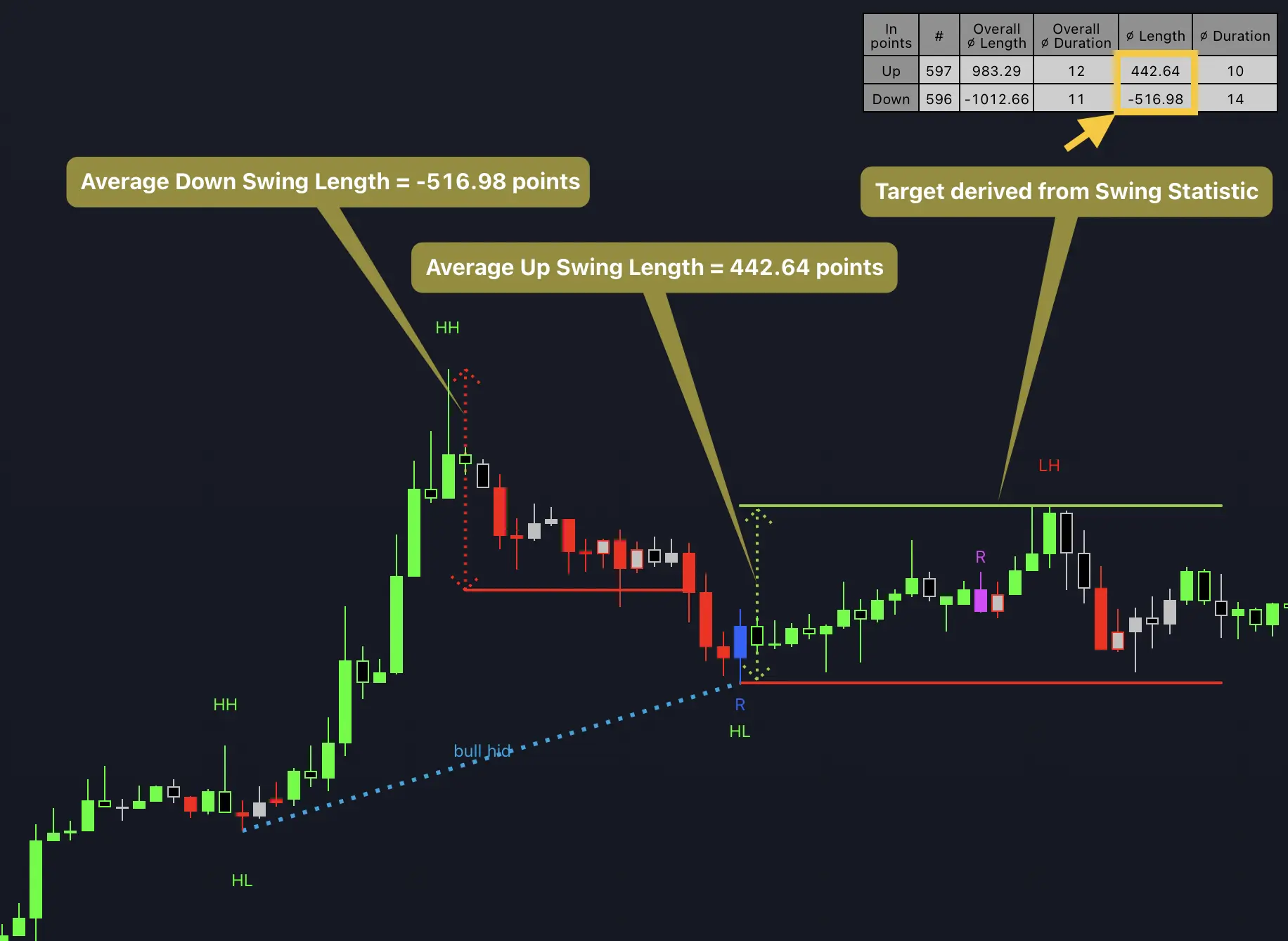
Use the custom average columns for day-to-day trade management. If the average up swing length over the last 5 swings is 85 points, you have a data-backed reference for where a current up swing might exhaust. Compare this against your intended take-profit to determine whether your target is realistic or overly ambitious.
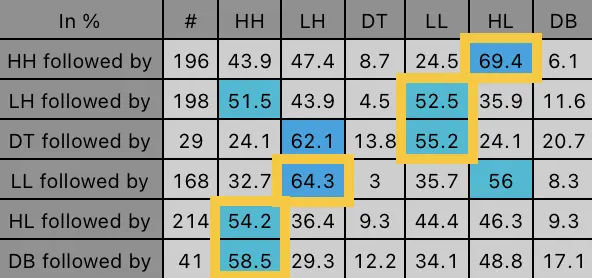
For stop placement, reference the average down swing length. If down swings average 60 points, a stop placed 70 points below your entry accounts for normal pullback behavior with a small buffer.
Relation Statistics Table
The Relation Statistics table reveals what typically happens after each type of swing point. It displays a matrix of transition probabilities between six swing point types: HH (Higher High), LH (Lower High), DT (Double Top), LL (Lower Low), HL (Higher Low), and DB (Double Bottom).
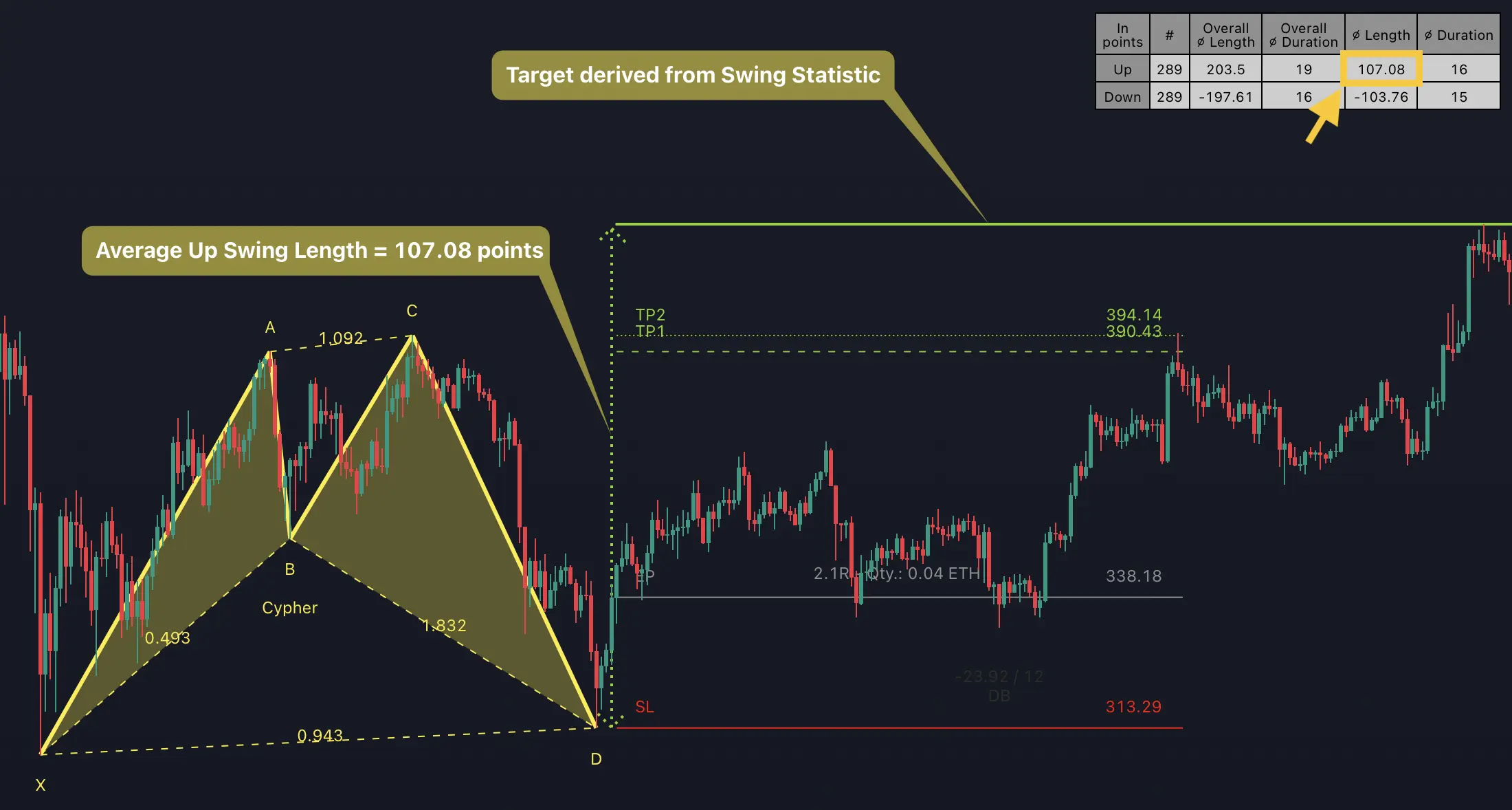
Reading the Matrix
Each row starts with a swing point type and shows what followed it historically. The # column indicates the sample size for that row. The remaining columns display the percentage of times each swing point type appeared next.
For example, a row labeled HH followed by might show:
- HH: 44% -- price continued making higher highs
- LH: 47% -- a lower high formed, signaling potential weakness
- DT: 9% -- a double top appeared
- HL: 69% -- the subsequent low was higher, confirming the uptrend
- LL: 25% -- a lower low formed
- DB: 6% -- a double bottom appeared
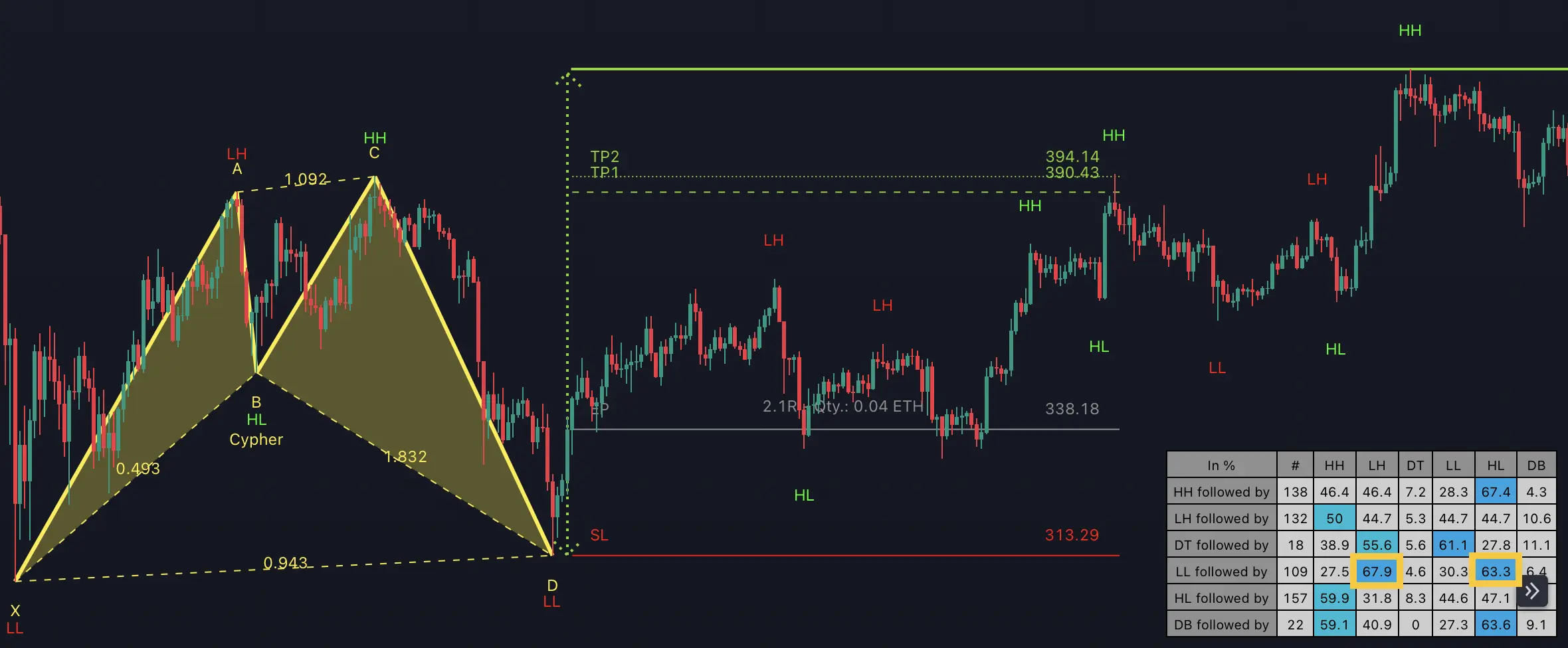
Cells highlighted in blue represent transitions that occurred in over 50 percent of cases. Darker blue indicates higher probability. These are the dominant market patterns for your current symbol and timeframe.
Common Patterns
The six most frequently dominant transitions across many assets and timeframes are:
- HH followed by HL -- trending continuation in an uptrend
- LH followed by LL -- trending continuation in a downtrend
- DT followed by LL -- double top resolving bearish
- LL followed by LH -- downtrend continuation
- HL followed by HH -- uptrend continuation
- DB followed by HH -- double bottom resolving bullish
These patterns form the structural backbone of most trending and reversing markets.
Combining Statistics with Trade Execution
Target Validation
After identifying a trade entry, check the Swing Statistics table for the average swing length in your trade direction. If your take-profit exceeds the average swing length by a wide margin, consider scaling out at the average level and trailing the remainder.
Setup Confirmation with Probabilities
Before entering a trade based on a swing point, consult the Relation Statistics table. If you are buying after a Higher Low and the table shows HH follows HL in 65 percent or more of cases, the probability supports your directional thesis. If the probability is below 40 percent, you may want additional confirmation from Trend Bars Pro before committing.
Duration-Based Timing
The average swing duration columns tell you how many bars a typical swing lasts. If the current swing has already exceeded the average duration, the move may be nearing exhaustion. Use this as a filter rather than a standalone signal.
Combine the Relation Statistics probabilities with divergence detection signals. A bearish divergence at a swing high where the table shows LH follows HH in over 50 percent of cases creates a high-conviction setup.
FAQ
What do the Swing Suite statistics tables show?
The Swing Suite provides two built-in statistics tables. The Swing Statistics table displays the count, average length, and average duration for both up and down swings. The Relation Statistics table shows transition probabilities between swing point types, revealing how often each swing type follows another. Together, these tables give you a data-driven foundation for planning entries, stops, and targets.
How does the Statistic Length setting affect Swing Suite averages?
The Statistic Length setting in the Swing Suite controls how many recent swings are used to calculate the custom averages shown in the rightmost columns of the Swing Statistics table. A lower value like 3 reflects only the most recent market behavior, while a higher value like 15 smooths the averages over a larger sample. The overall averages in the left columns always use the full history on the chart.
How should I interpret the blue-highlighted cells in the Relation Statistics table?
Blue-highlighted cells in the Swing Suite Relation Statistics table indicate transition sequences that occurred in over 50 percent of cases. Darker shades represent higher probabilities. For example, if the HH row shows a dark blue cell under HL, it means a higher high was followed by a higher low in the majority of observed swings, which is a strong trending signal you can incorporate into your trade planning.
Can stock splits distort the Swing Suite statistics?
Yes. For assets that have undergone stock splits, the overall average swing length column in the Swing Suite may appear inflated because it includes pre-split price data. Focus on the custom average columns, which use only the most recent swings defined by your Statistic Length setting. These columns reflect current price levels and give you actionable data for stop and target placement.