Divergence Detection
The Swing Suite detects four divergence types — regular bullish, hidden bullish, regular bearish, and hidden bearish — with both confirmed and early detection states. Unlike standalone divergence tools, the Swing Suite integrates divergence detection into its swing analysis framework. The same swing detection engine that powers zig-zag lines, trend identification, and support/resistance also identifies divergence swing points, giving you structural context alongside every divergence signal.
Divergence Types
Regular Divergences
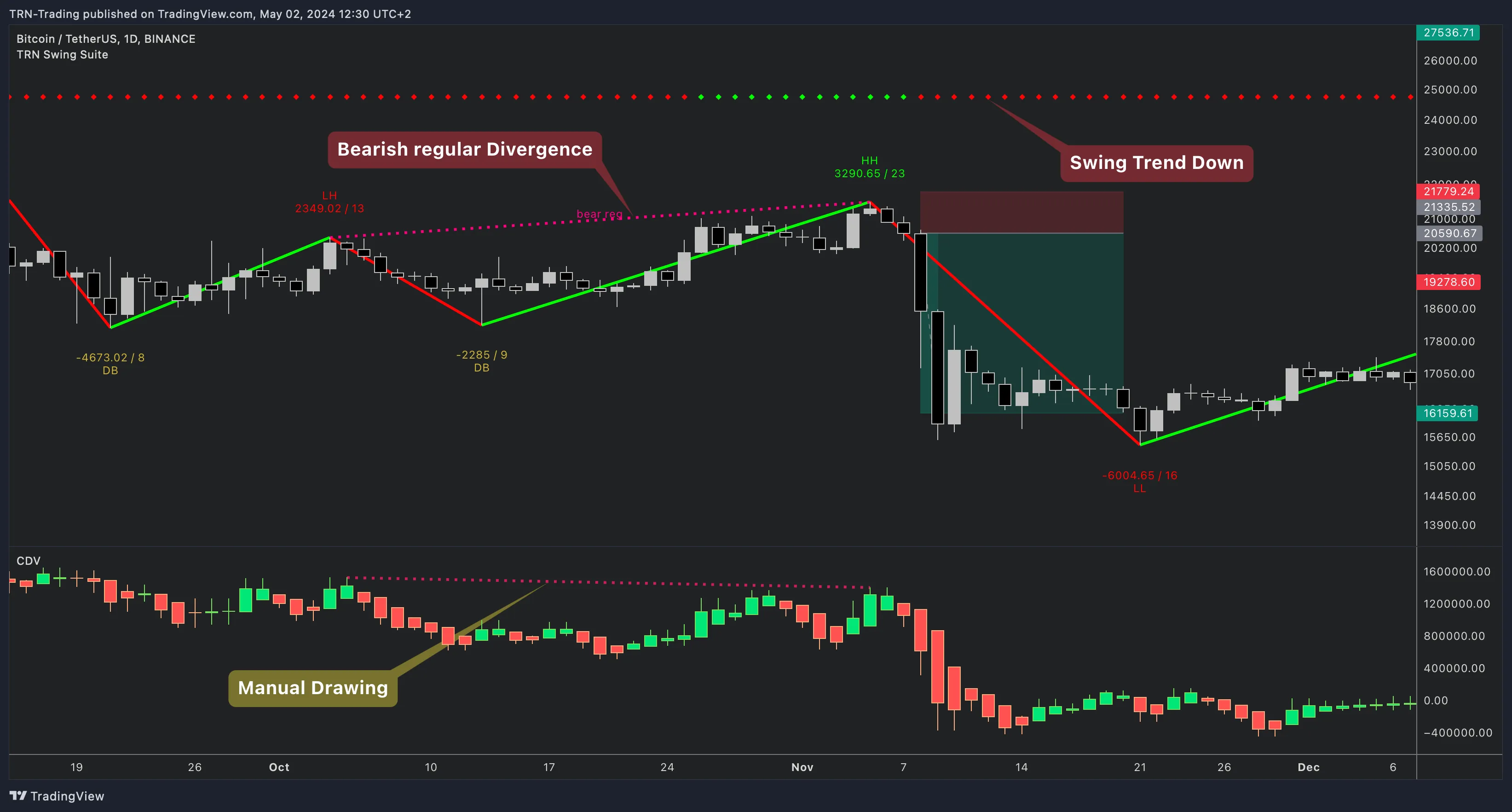
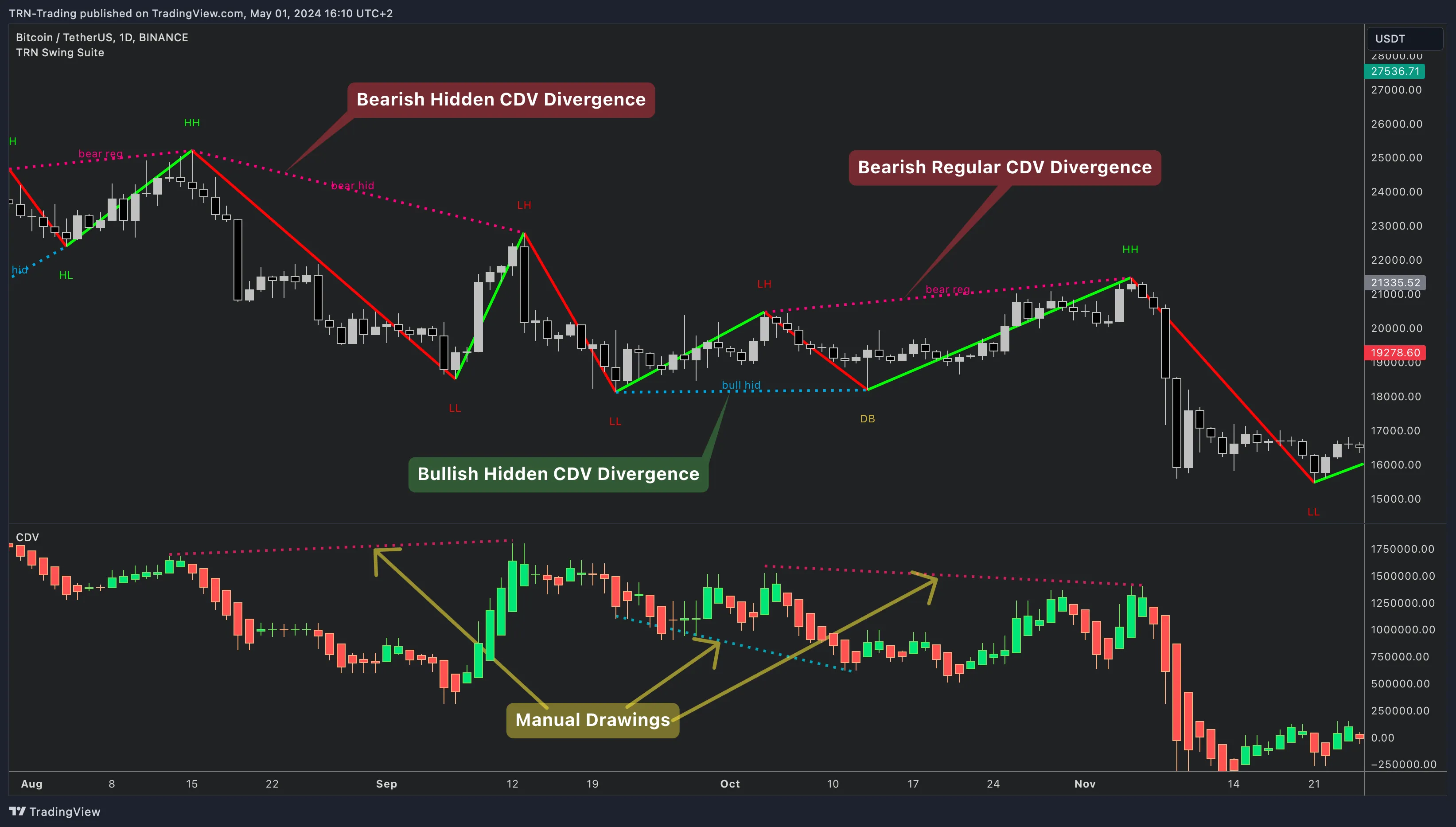
Regular divergences signal that the current trend is losing momentum and a reversal may be approaching.
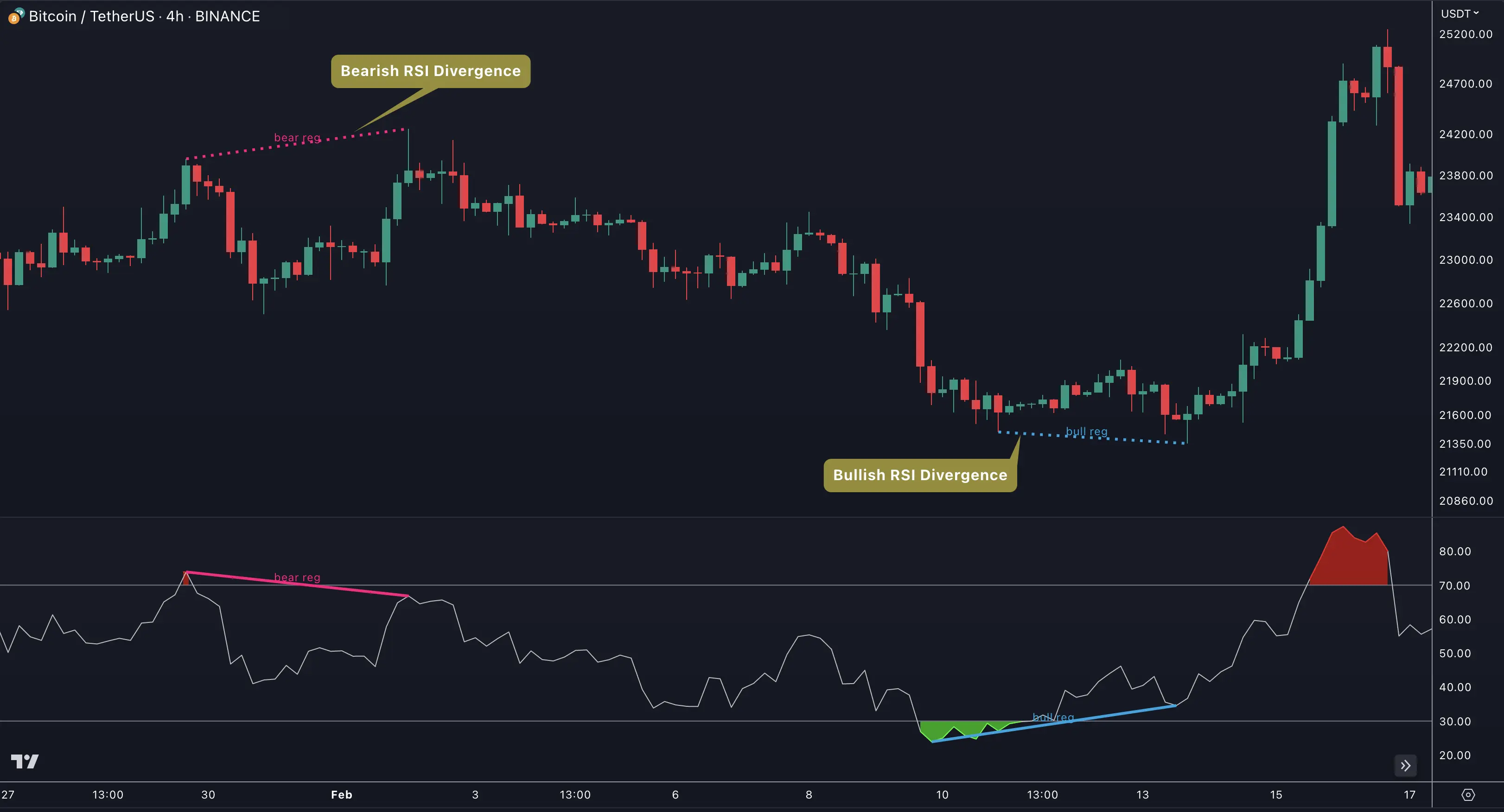
Regular Bullish: Price makes a lower low while the oscillator makes a higher low. The Swing Suite draws a bullish divergence line connecting the two swing lows on both the oscillator and the price chart. This pattern suggests selling pressure is weakening despite lower prices.
Regular Bearish: Price makes a higher high while the oscillator makes a lower high. The Swing Suite connects the swing highs with a bearish divergence line. This pattern indicates buying momentum is fading despite higher prices.
Hidden Divergences
Hidden divergences signal that the current trend has underlying strength and is likely to continue.
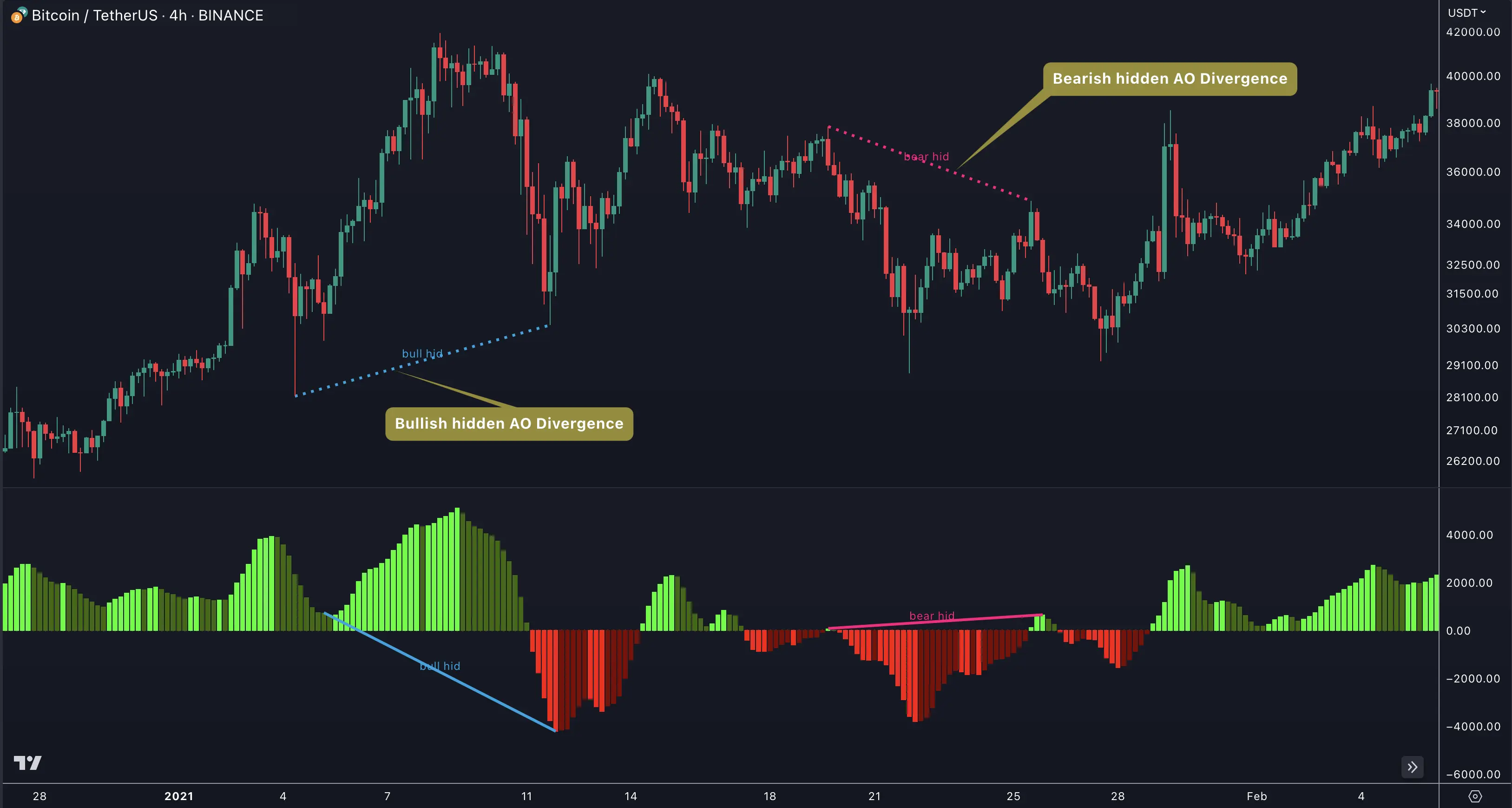
Hidden Bullish: Price makes a higher low while the oscillator makes a lower low. The trend is up, and despite the oscillator dip, price holds above the previous swing low — a sign of hidden buying strength.
Hidden Bearish: Price makes a lower high while the oscillator makes a higher high. The trend is down, and despite the oscillator rise, price stays below the previous swing high — a sign of hidden selling pressure.
All Four Types at a Glance

| Type | Price Action | Oscillator | Signal |
|---|---|---|---|
| Regular Bullish | Lower low | Higher low | Potential reversal up |
| Hidden Bullish | Higher low | Lower low | Trend continuation up |
| Regular Bearish | Higher high | Lower high | Potential reversal down |
| Hidden Bearish | Lower high | Higher high | Trend continuation down |
Each type is independently togglable with its own color, label text (e.g., "bull reg," "bear hid"), and line style settings.
Confirmation States
The Swing Suite tracks two detection states for every divergence:
| State | When It Fires | Reliability | Alert Type |
|---|---|---|---|
| Early (Unconfirmed) | During bar formation, before close | Lower — signal may not hold | Early Bullish / Early Bearish |
| Confirmed | After bar close validates the swing point | Higher — swing point is finalized | Confirmed Bullish / Confirmed Bearish |
Early divergence signals give advance notice but can disappear if the bar closes differently. The Swing Suite marks confirmed divergences only after the bar closes and the swing point is validated. Use confirmed signals for trade decisions and early signals for watchlist preparation.
Value Condition Filters
Available for bounded oscillators (CCI, RSI, MFI, Stochastic, Williams %R), Value Condition filters restrict divergence detection to specific oscillator zones. The Swing Suite only triggers divergences when the oscillator meets the zone requirement.
| Filter | What It Does |
|---|---|
| Anytime (Off) | No zone restriction — divergences detected anywhere |
| Above Overbought | Only detect divergences when oscillator is above the OB threshold |
| Below Oversold | Only detect divergences when oscillator is below the OS threshold |
| Between Thresholds | Only detect divergences when oscillator is between OB and OS |
Point Matching
Point Matching controls which part of the divergence must meet the Value Condition:
| Option | What It Means |
|---|---|
| Only Start | The first swing point must be in the restricted zone |
| Only End | The second (current) swing point must be in the restricted zone |
| Both | Both swing points must be in the restricted zone |
Combine Value Condition "Below Oversold" with Point Matching "Only End" on RSI to detect bullish divergences only when the current RSI reading is in oversold territory. This filters out divergences that form in neutral zones where the Swing Suite's signals carry less predictive weight.
Visualization Settings
The Swing Suite provides granular control over how divergences appear on the chart:
| Setting | Default | What It Controls |
|---|---|---|
| Show on Main Chart | On | Draws divergence lines on the price chart in addition to the oscillator pane |
| Line Style | Dotted | Style for divergence connecting lines (Solid, Dotted, Dashed) |
| Line Width | 3 | Thickness of divergence lines |
| Text Offset | 20 | Distance of divergence labels from the swing point — increase for busy charts |
Each divergence type has independent settings for:
- Enable/Disable toggle
- Label text (customizable per type)
- Color (blue for bullish, pink for bearish by default)
Swing Suite vs SMT/Divergence Suite
Both indicators detect divergences, but they serve different roles:
| Feature | Swing Suite | SMT/Divergence Suite |
|---|---|---|
| Integration | Divergence shares swing detection with zig-zag, trends, statistics, S&R | Standalone divergence-focused tool |
| SMT Symbols | 2 simultaneous symbols | 1 symbol |
| Oscillator Visualization | Minimal (divergence lines only) | Detailed oscillator pane with thresholds |
| Best For | Structural swing analysis with divergence context | Dedicated divergence and SMT scanning |
For detailed comparison of oscillator options, see Built-In Oscillators. For inter-market divergence, see SMT Divergence.
Alerts
The Swing Suite provides 8 oscillator divergence alerts — one confirmed and one early alert for each divergence type:
| Alert | Default | What It Fires On |
|---|---|---|
| Confirmed Regular Bullish | On | Bar-close-validated regular bullish divergence |
| Confirmed Hidden Bullish | On | Bar-close-validated hidden bullish divergence |
| Confirmed Regular Bearish | On | Bar-close-validated regular bearish divergence |
| Confirmed Hidden Bearish | On | Bar-close-validated hidden bearish divergence |
| Early Regular Bullish | Off | Intrabar regular bullish divergence before bar close |
| Early Hidden Bullish | Off | Intrabar hidden bullish divergence before bar close |
| Early Regular Bearish | Off | Intrabar regular bearish divergence before bar close |
| Early Hidden Bearish | Off | Intrabar hidden bearish divergence before bar close |
To create an alert: enable the desired types in settings, right-click the indicator, select Add alert on Swing Suite, and choose Any alert() function call.
FAQ
What is the difference between regular and hidden divergence in the Swing Suite?
Regular divergences in the Swing Suite signal potential trend reversals — price makes a new extreme while the oscillator fails to confirm it. Hidden divergences signal trend continuation — price holds a higher low (bullish) or lower high (bearish) while the oscillator moves against the trend. The Swing Suite detects all four combinations independently, each with its own toggle, color, label text, and line style.
How does the Swing Suite confirm a divergence signal?
The Swing Suite tracks two confirmation states for every divergence. An early (unconfirmed) divergence appears during bar formation before the close. A confirmed divergence fires after the bar closes and the swing point is validated. The Swing Suite provides separate alerts for each state — use confirmed signals for trade decisions and early signals for advance watchlist alerts.
What do the Value Condition filters do in the Swing Suite?
Value Condition filters in the Swing Suite restrict divergence detection to specific oscillator zones. "Above Overbought" only detects divergences when the oscillator is above the overbought threshold. "Below Oversold" restricts to oversold zones. "Between Thresholds" requires the oscillator between OB and OS levels. These filters are available for CCI, RSI, MFI, Stochastic, and Williams %R.
How is Swing Suite divergence detection different from the SMT/Divergence Suite?
The Swing Suite integrates divergence detection into its broader swing analysis framework — the same swing detection engine that powers zig-zag lines, trend identification, statistics, and support/resistance also drives divergence matching. The SMT/Divergence Suite is a standalone divergence tool with more detailed oscillator visualization. Choose the Swing Suite when you want divergences contextualized within a complete structural analysis.
Can I get alerts for Swing Suite divergences?
Yes, the Swing Suite provides 8 oscillator divergence alerts — one confirmed and one early alert for each of the four divergence types (regular bullish, hidden bullish, regular bearish, hidden bearish). Enable the desired types in the Swing Suite settings, right-click the indicator, select "Add alert on Swing Suite," and choose "Any alert() function call."
Next Steps
Built-In Oscillators
Explore all built-in oscillators with parameter guides — choose the best one for your instruments.
Custom Indicator
Connect any TradingView indicator to the Swing Suite's divergence detection engine.
SMT Divergence
Detect inter-market divergence between two correlated instruments with dual-symbol SMT mode.