Swings, Zig-Zag Styles & Swing Trends
The TRN Swing Suite detects swing highs and lows using four distinct zig-zag styles, displays detailed swing values on every leg, and layers up to three independent swing trends on a single chart. The Swing Suite swing detection operates without look-ahead, producing non-repainting zig-zag lines in real time.
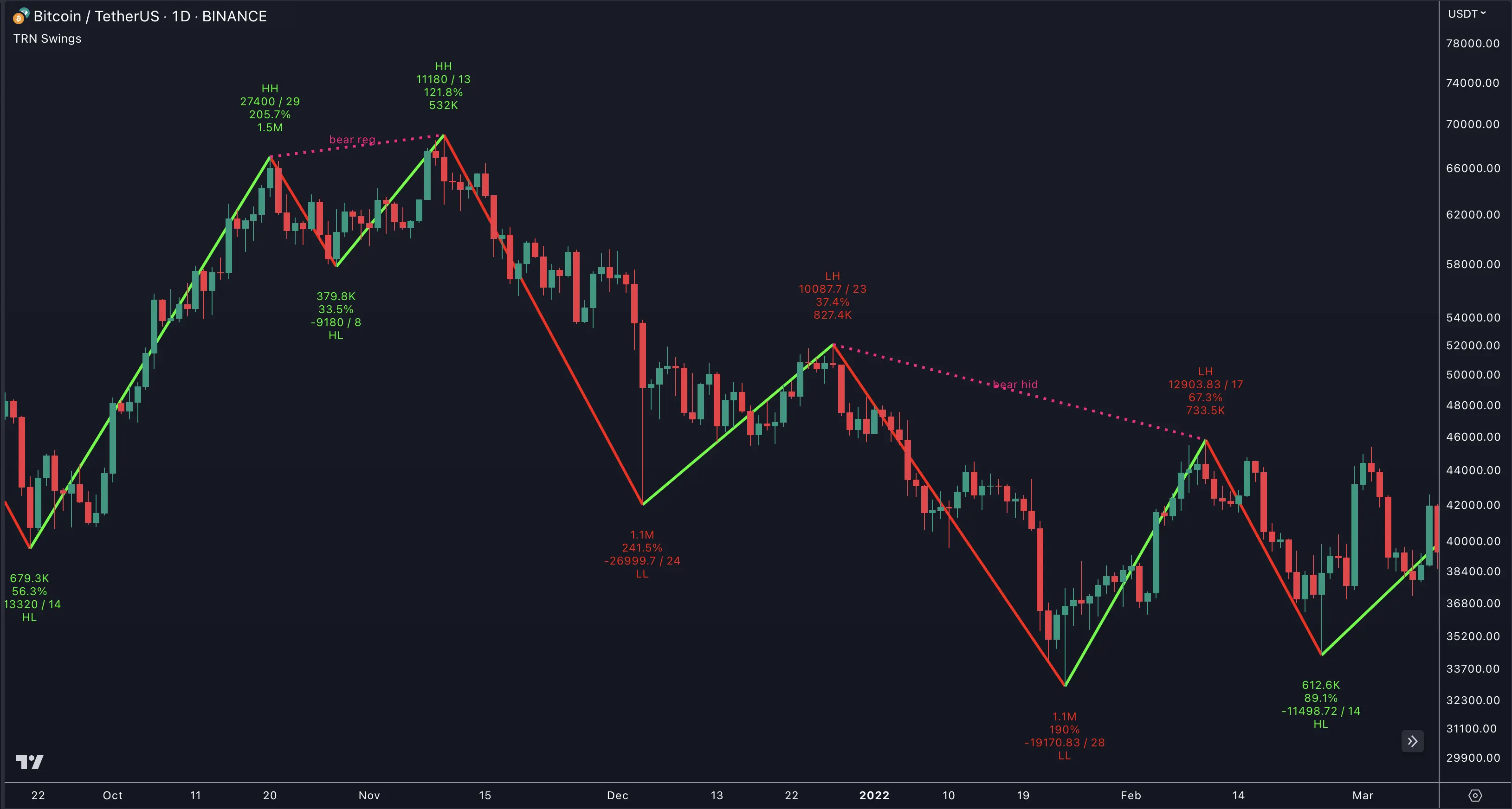
Swing Detection Styles
The Swing Suite offers four zig-zag calculation styles. Each style determines how the indicator identifies valid swing points — the underlying detection method changes, but the output is always a clean zig-zag connecting confirmed highs and lows.
Standard (TRN Swing Algorithm)
The default style uses a bar-count pivot method. The Swing Suite identifies a swing high when a specified number of bars form lower highs on both sides of the pivot. Swing lows follow the inverse logic. The Standard style is the most versatile choice and works reliably across all instruments and timeframes.
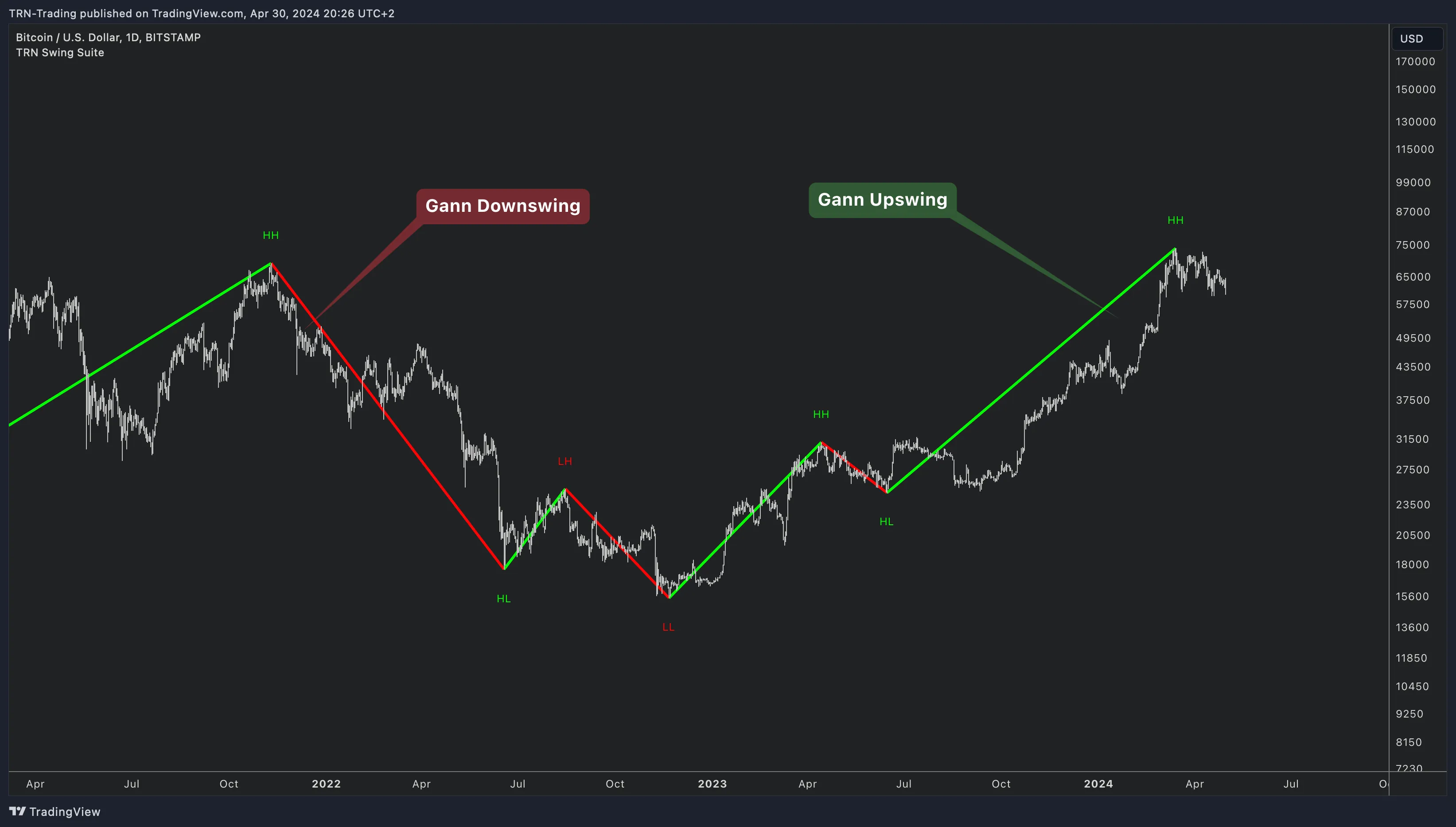
Gann Swings
The Gann style follows W.D. Gann's methodology for swing identification. The Swing Suite provides four configurable combinations that control how inside bars and breakout bars are handled — allowing traders to fine-tune Gann swing sensitivity to match their analysis preference.
Ticks
The Ticks style triggers a new swing when price moves a specified number of ticks from the last swing point. The Swing Suite measures the raw tick distance, making the Ticks style particularly useful for futures and instruments where tick size carries structural meaning.
Percent
The Percent style triggers a new swing when price moves a specified percentage from the last swing point. The Swing Suite calculates the percentage based on price, which naturally adapts to instruments at different price levels without manual adjustment.
Core Swing Parameters
Swing Size (range: 1–300, default: 10) controls the sensitivity of swing detection across all styles. A lower swing size detects more frequent, smaller swings. A higher swing size filters out minor fluctuations and highlights only major structural turns. The optimal Swing Suite swing size depends on instrument volatility and the trader's timeframe.
DTB Strength (default: 20) sets the tolerance for double top and double bottom detection. When two swing points fall within the DTB Strength threshold, the Swing Suite classifies them as equal — labeling them DB (Double Bottom) or DT (Double Top) instead of HH/HL/LL/LH.
Swing Values Visualization
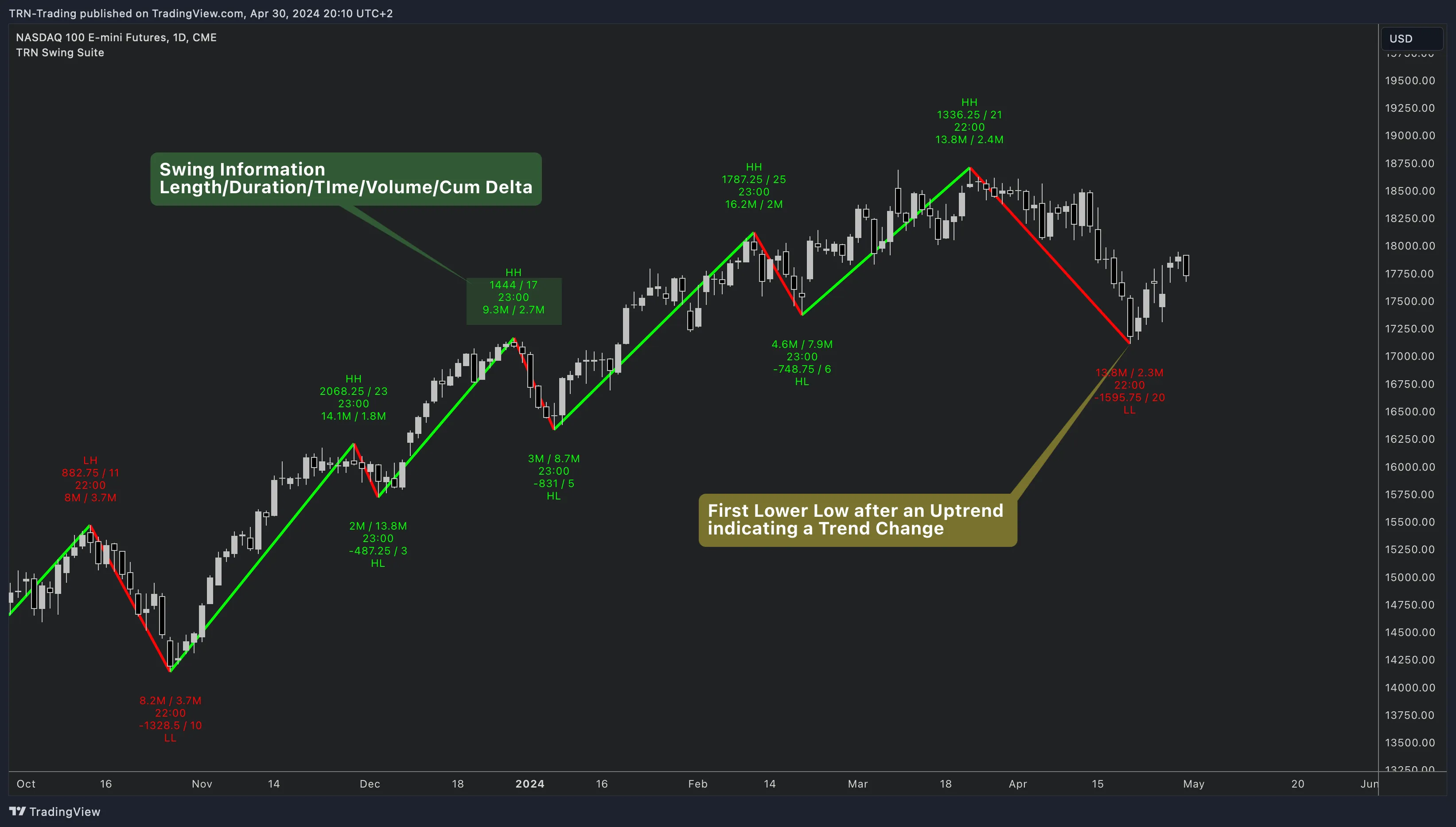
The Swing Suite prints detailed metrics directly on each zig-zag leg. Every value type toggles independently, so traders see only the data relevant to their method.
Length
The Swing Suite measures swing length in nine formats — Off, Ticks, Points, Price, Percent, Ticks + Price, Points + Price, Price + Ticks, and Price + Points. Combination formats display two measurements simultaneously, giving traders both absolute and relative context on swing magnitude without switching settings.
Duration
Duration tracks how long each swing lasted. The Swing Suite offers eight formats — Off, Bars, MM:SS, HH:MM, Seconds, Minutes, Hours, and Days. Shorter timeframe traders typically use Bars or MM:SS, while higher-timeframe analysis benefits from Hours or Days.
Time
Time stamps the start or end of each swing. The Swing Suite provides five formats — Off, HH:MM, HH:MM:SS, DD:MM, and Integer. Time values help traders correlate swing turns with session boundaries, news events, or specific time-of-day patterns.
Volume
Volume displays the total traded volume during each swing leg. The Swing Suite shows volume in two active modes — Absolute (raw volume) and Relative (percentage compared to the previous swing). Relative volume highlights whether participation increased or decreased between consecutive swings.
Cumulative Delta
Cumulative Delta reveals net buying versus selling pressure within each swing. The Swing Suite calculates cumulative delta in Absolute (net delta value) and Relative (percentage comparison) modes. A rising swing with declining cumulative delta exposes weakening buyer commitment — a potential reversal signal.
Swing Labels
The Swing Suite classifies every confirmed swing point with a structural label:
| Label | Meaning | Trend Implication |
|---|---|---|
| HH | Higher High | Bullish continuation |
| HL | Higher Low | Bullish continuation |
| LL | Lower Low | Bearish continuation |
| LH | Lower High | Bearish continuation |
| DB | Double Bottom | Potential reversal zone |
| DT | Double Top | Potential reversal zone |
Percentage
The Swing Suite displays each swing's length as a percentage relative to the previous swing. A current swing at 50% of the prior leg suggests a measured pullback. Values above 100% indicate the current move exceeds the prior swing — useful for gauging momentum expansion or exhaustion.
Swing Trends
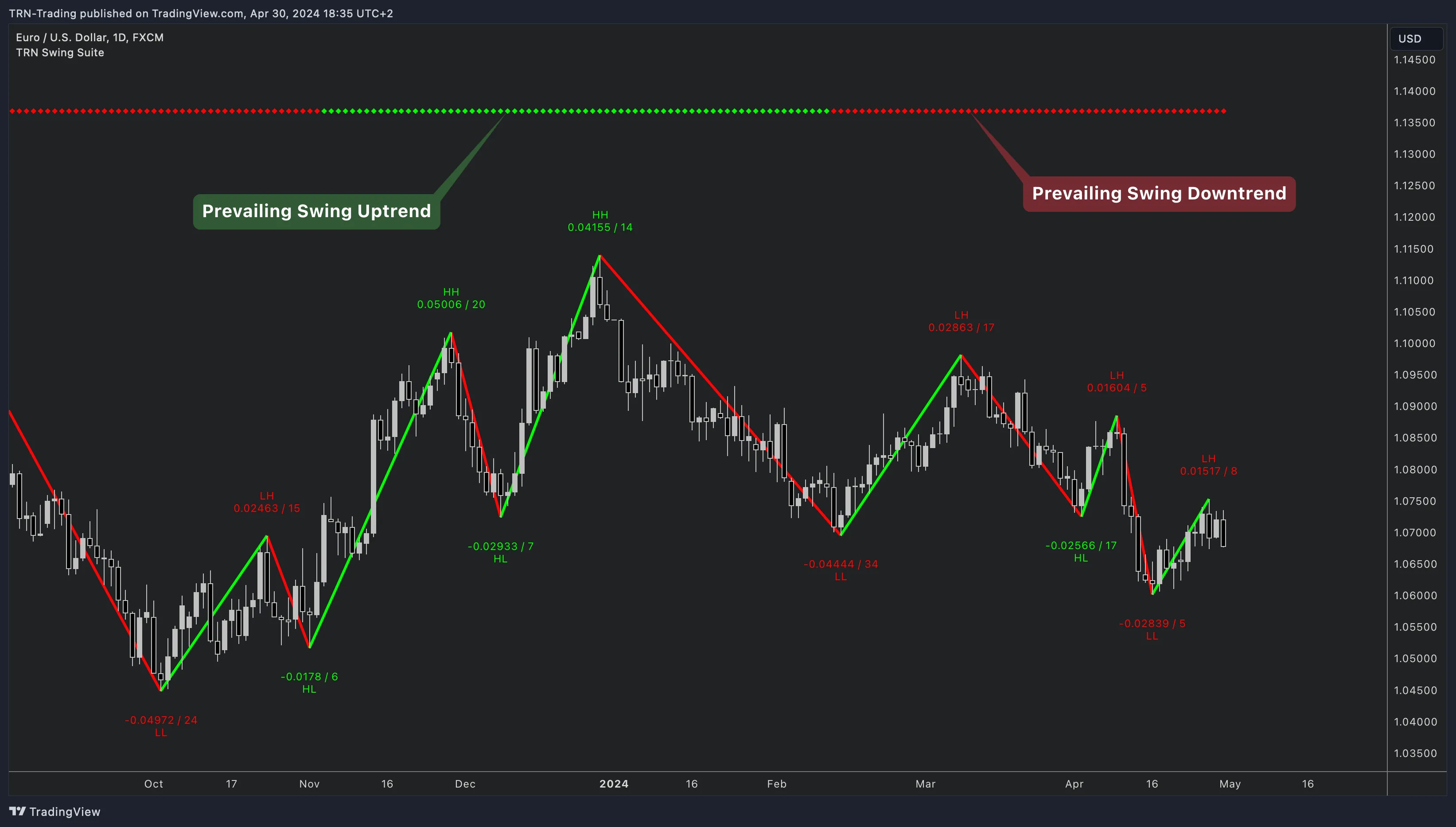
The Swing Suite provides three independent swing trend layers. Each trend evaluates the sequence of swing highs and lows to determine whether the market is in an uptrend, downtrend, or transition.
Trend 1 (Default)
Trend 1 uses the main chart swing parameters (swing style, swing size, DTB strength) and is enabled by default. The Swing Suite displays Trend 1 as colored dots along the top or bottom of the chart — green for uptrend, red for downtrend. Trend 1 provides the primary structural trend reading.
Trend 2 and Trend 3
Trends 2 and 3 are disabled by default. Each has its own independent swing style, swing size, and DTB strength settings. When enabled, the Swing Suite runs separate swing calculations for each trend layer and displays additional colored dots alongside Trend 1.
Multi-Trend Structural Confirmation
Using multiple trends allows traders to see both fine and broad structure on a single chart. For example, set Trend 1 to a swing size of 5 for short-term structure and Trend 2 to a swing size of 20 for the larger structural trend. When all enabled trends align in the same direction, the Swing Suite provides stronger structural confirmation for trade decisions.
Combine Swing Suite trend readings with Trend Bars Pro momentum coloring. When the Swing Suite trend dots confirm an uptrend and Trend Bars Pro shows bullish momentum bars, the structural and momentum perspectives align — strengthening the case for directional entries.
FAQ
What are the four swing detection styles in the TRN Swing Suite?
The TRN Swing Suite offers four zig-zag detection styles. Standard uses a bar-count pivot method for general-purpose swing detection. Gann follows W.D. Gann's inside-bar and breakout rules. Ticks measures swings by a fixed tick distance. Percent calculates swings as a percentage of price. Each style in the Swing Suite produces different zig-zag structures on the same chart.
How do the three swing trends work in the TRN Swing Suite?
The TRN Swing Suite provides three independent swing trend layers. Trend 1 uses the main chart swing parameters and is enabled by default. Trends 2 and 3 each have their own swing style, swing size, and DTB strength settings — effectively giving traders multi-timeframe structural analysis on a single chart. Each Swing Suite trend displays as colored dots at the top or bottom of the chart.
What swing values can the TRN Swing Suite display on each leg?
The TRN Swing Suite displays up to seven value categories on each swing leg — Length (9 formats including ticks, points, price, percent, and combinations), Duration (8 formats from bars to days), Time (5 formats), Volume (absolute or relative), Cumulative Delta (absolute or relative), Swing Labels (HH, HL, LL, LH, DB, DT), and Percentage relative to the previous swing. Each value type in the Swing Suite can be toggled independently.
What is DTB Strength in the TRN Swing Suite and how does it affect double tops and bottoms?
DTB Strength in the TRN Swing Suite controls the tolerance for detecting double tops and double bottoms. A higher DTB Strength value allows the Swing Suite to classify swing points as equal (DB or DT) even when they differ by a small amount. The default DTB Strength is 20. The Swing Suite labels these as DB (Double Bottom) and DT (Double Top) in the swing label display.