SMT/Divergence Suite
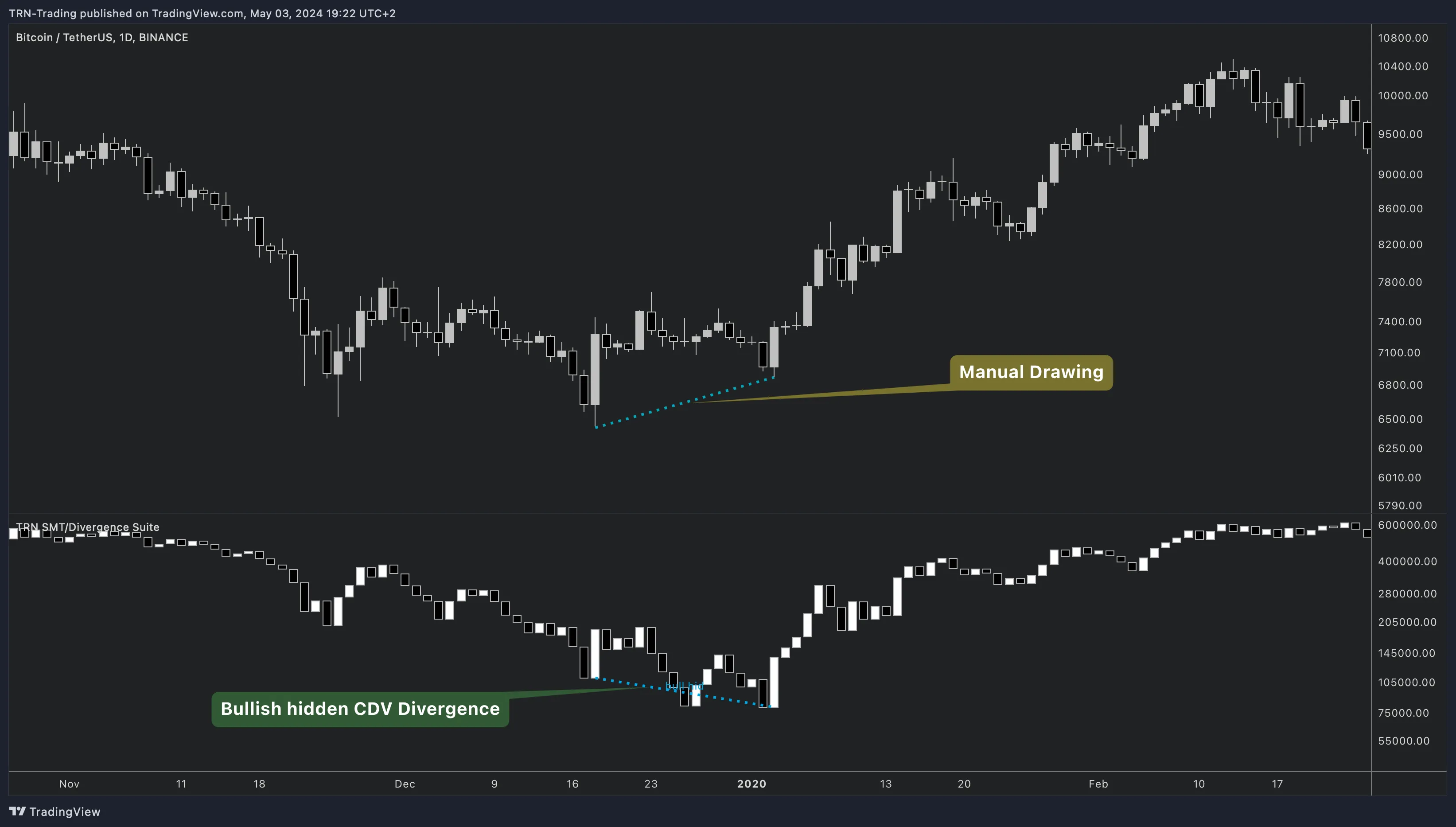
The SMT/Divergence Suite detects regular and hidden divergences using any indicator — 13 built-in oscillators, external indicator input, or Smart Money Technique (SMT) comparison between correlated instruments. Unlike divergence tools locked to RSI or MACD, the SMT/Divergence Suite accepts any TradingView indicator as a source and draws divergence lines on both the oscillator pane and the price chart simultaneously.
Key Features
13 Built-In Oscillators
RSI, MACD, Cumulative Delta, CCI, Stochastic, CMF, MFI, OBV, Momentum, Williams %R, and Awesome Oscillator — each with configurable parameters.
External Indicator Input
Connect any TradingView indicator output for divergence detection — custom scripts, third-party tools, or proprietary oscillators.
SMT Divergence
Detect structural divergence between correlated instruments like NQ vs ES — a Smart Money concept most tools ignore.
Divergence Detection
Regular and hidden divergences in bullish and bearish directions with confirmed and early detection, plus advanced value condition filters.
Show on Main Chart
Divergence lines drawn on both the oscillator pane and the price chart — no more looking away from price to check for setups.
Trading Strategies
Step-by-step divergence trading workflows combining the SMT/Divergence Suite with Trend Bars Pro for entry confirmation.
How the SMT/Divergence Suite Works
The SMT/Divergence Suite renders as a separate pane below the price chart. The selected oscillator displays as a colored histogram with directional strength — strong/weak up and strong/weak down — providing visual momentum context alongside divergence detection. When divergences are detected, the SMT/Divergence Suite draws connecting lines between the relevant swing points on the oscillator.
Divergence on the Price Chart
Enable Show on Main Chart to draw matching divergence lines directly on the price chart overlay. The SMT/Divergence Suite renders both the oscillator-level and price-level divergence lines simultaneously, eliminating the context-switching problem of oscillator-only visualization.
Four Divergence Types
| Type | Price Action | Oscillator | What It Means |
|---|---|---|---|
| Regular Bullish | Lower low | Higher low | Momentum weakening behind the downtrend — potential reversal up |
| Hidden Bullish | Higher low | Lower low | Hidden strength in the uptrend — potential continuation |
| Regular Bearish | Higher high | Lower high | Momentum weakening behind the uptrend — potential reversal down |
| Hidden Bearish | Lower high | Higher high | Hidden weakness in the downtrend — potential continuation down |
Each divergence type can be independently enabled or disabled with custom colors, label text, and line styling.
Quick Setup
- Add SMT/Divergence Suite to your TradingView chart
- The default source is SMT Symbol (NQ1!) — change to your preferred oscillator in the SMT/Divergence Settings group
- All four divergence types are enabled by default
- Enable Show on Main Chart to see divergence lines on the price overlay
- Configure alerts for confirmed and early divergence signals
Use the SMT/Divergence Suite as a dedicated divergence analysis tool alongside the TRN Trading System. Pair divergence signals with Trend Bars Pro for entry confirmation and Swing Suite for structural context. The Trend and Reversal Scanner monitors divergences across your watchlist — switch to the SMT/Divergence Suite on individual charts for deeper analysis.
FAQ
What makes the SMT/Divergence Suite different from other divergence indicators?
The SMT/Divergence Suite works with any indicator — not just built-in oscillators. It accepts external indicator input via TradingView's source selector, making it compatible with custom or third-party tools. Additionally, SMT mode detects divergence between correlated instruments (e.g., NQ vs ES), a Smart Money concept most divergence tools ignore entirely.
How many oscillators does the SMT/Divergence Suite support?
The SMT/Divergence Suite includes 13 built-in oscillators: Awesome Oscillator, CCI, Cumulative Delta, CMF, MACD, MFI, Momentum, OBV, RSI, Stochastic %K, Stochastic %D, and Williams %R. Additionally, the External Indicator option connects to any TradingView indicator output, and SMT Symbol mode compares swing points between correlated instruments.
Can the SMT/Divergence Suite draw divergence lines on the price chart?
Yes, the SMT/Divergence Suite includes a Show on Main Chart option that draws divergence lines directly on the price chart overlay in addition to the oscillator pane. This lets traders see divergence context without looking away from price action — both the oscillator-level and price-level divergence lines appear simultaneously.
What divergence types does the SMT/Divergence Suite detect?
The SMT/Divergence Suite detects four divergence types: Regular Bullish (price lower low, oscillator higher low), Hidden Bullish (price higher low, oscillator lower low), Regular Bearish (price higher high, oscillator lower high), and Hidden Bearish (price lower high, oscillator higher high). Each type can be independently enabled or disabled with custom colors and label text.
Does the SMT/Divergence Suite support alerts?
The SMT/Divergence Suite provides four alert inputs: Confirmed Bullish, Confirmed Bearish, Bullish (early), and Bearish (early). Confirmed alerts fire after bar close validates the divergence, while early alerts trigger during bar formation. Enable the desired alert types in settings, then create a single TradingView alert using "Any alert() function call."