Signal Bars
Signal bars are the core entry mechanism in Trend Bars Pro. Five distinct signal bar types detect reversals, breakouts, and trend continuations — each rendered with its own color and label directly on the chart. Signal bars transform a standard candlestick chart into a visual entry map where high-probability setups are immediately identifiable.
Bar Coloring Priority
Trend Bars Pro assigns colors using a strict hierarchy. Understanding this hierarchy clarifies why certain bars display one color over another.
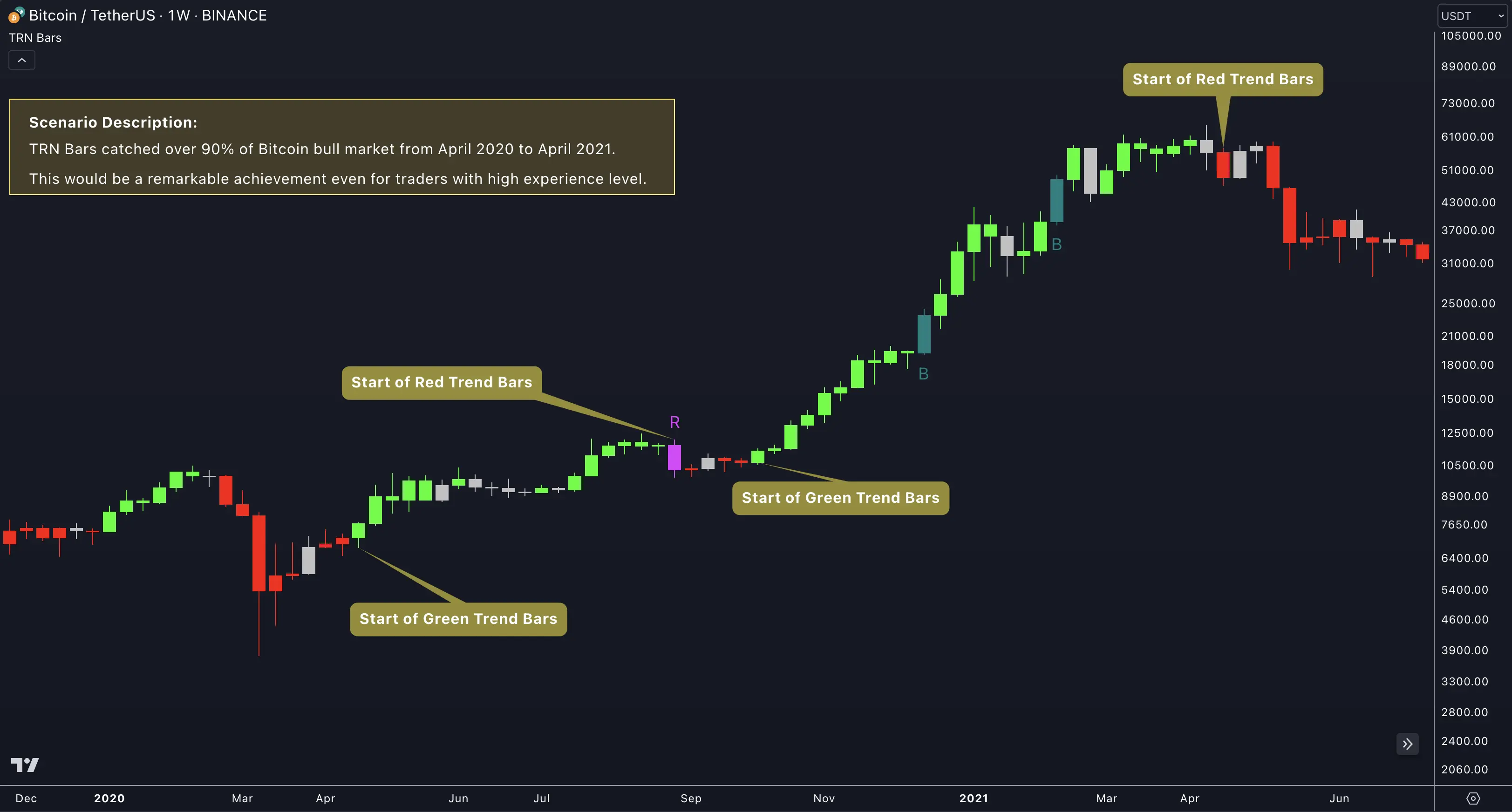
Priority order (highest to lowest):
- Signal bars — When Trend Bars Pro detects a signal pattern, that bar receives the signal type's color regardless of the underlying trend state.
- Trend bars — Bars in an active trend display momentum coloring: Green (#04FF04) for uptrend, Red (#FF0404) for downtrend.
- Neutral bars — Bars outside a recognized trend show neutral coloring: Silver (#C1C1C1) for up closes, Black (#000000) for down closes.
This layered approach ensures that the most actionable information — signal bars — always stands out visually. Traders never need to guess whether a colored bar represents a trend state or an entry signal.
Strong Reversal Bars (R)
Strong Reversal bars flag high-conviction reversal points. Trend Bars Pro marks these bars with the default label "R" and uses distinctive colors that separate them from standard trend coloring.
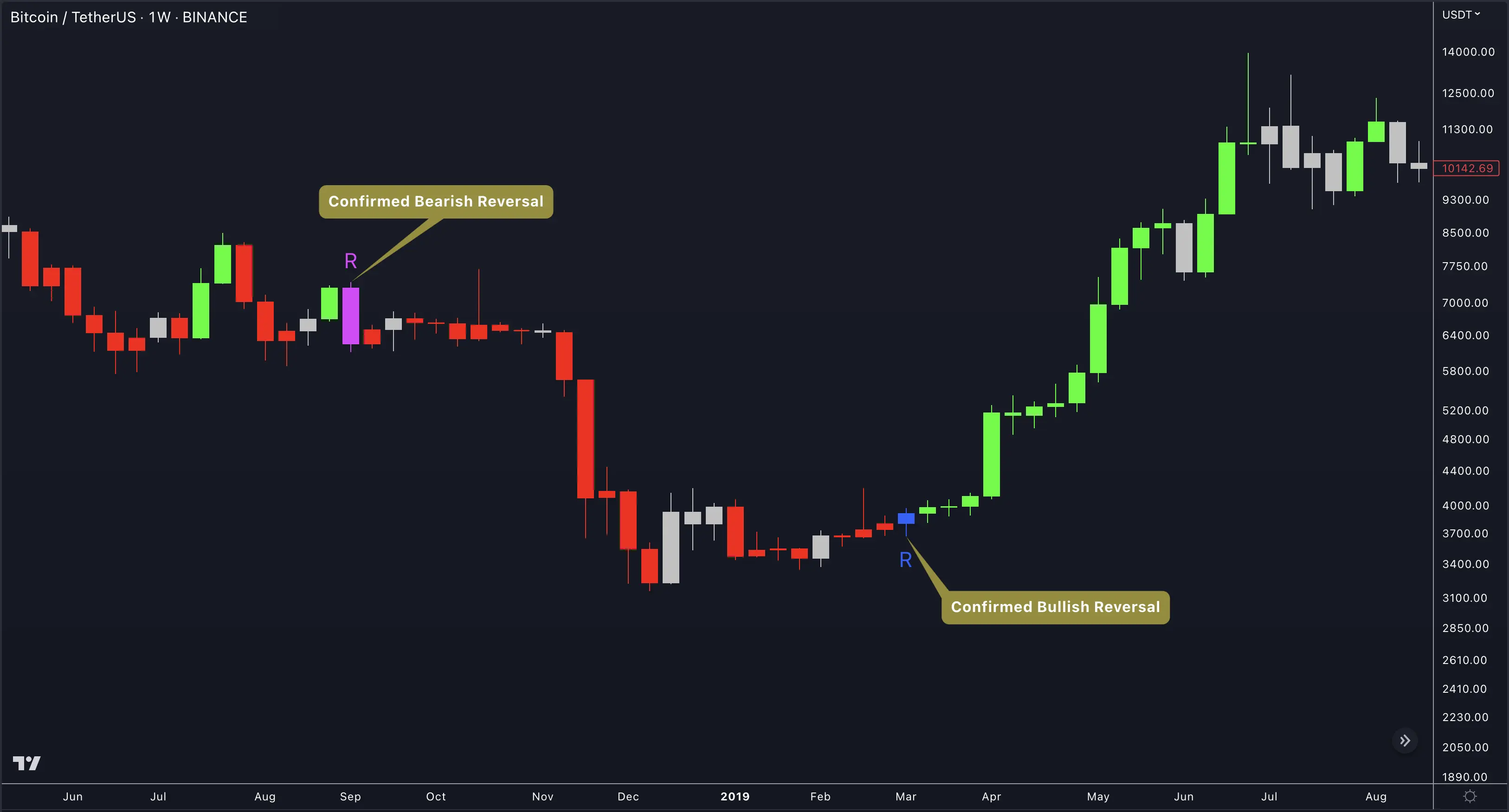
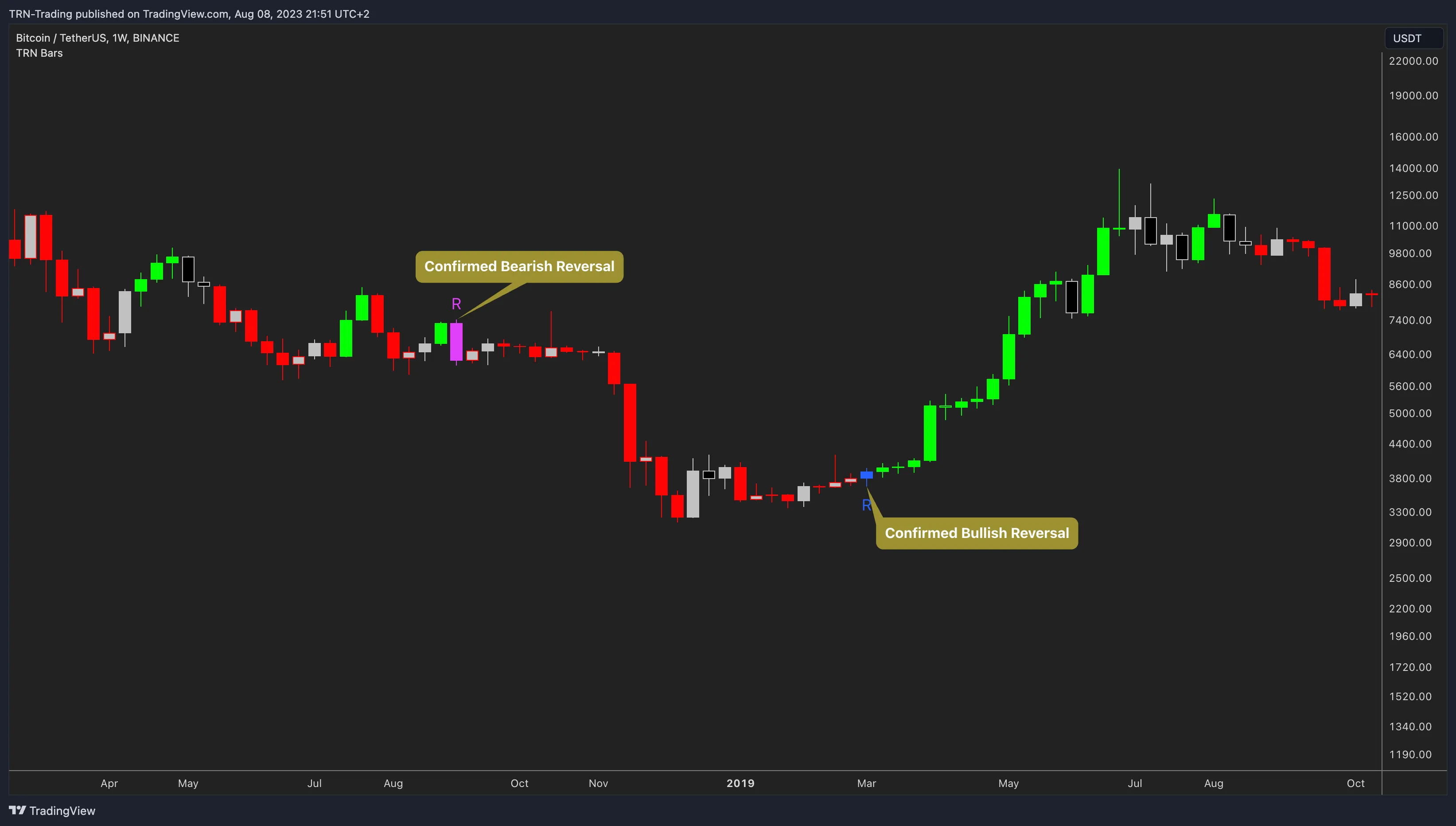
- Bullish Reversal — Blue (#2962FF) bar with "R" label, indicating a potential shift from bearish to bullish momentum.
- Bearish Reversal — Fuchsia (#FF1493) bar with "R" label, indicating a potential shift from bullish to bearish momentum.
Strong Reversal bars carry the highest conviction among the five signal types. When a Strong Reversal bar appears at a key structural level — such as a Swing Suite swing point or a supply/demand zone — the probability of a genuine reversal increases substantially.
Morning Star / Evening Star (MS / ES)
Morning Star and Evening Star bars detect classic three-bar candlestick reversal patterns. These patterns have been recognized by traders for decades, and Trend Bars Pro automates their detection across every timeframe.
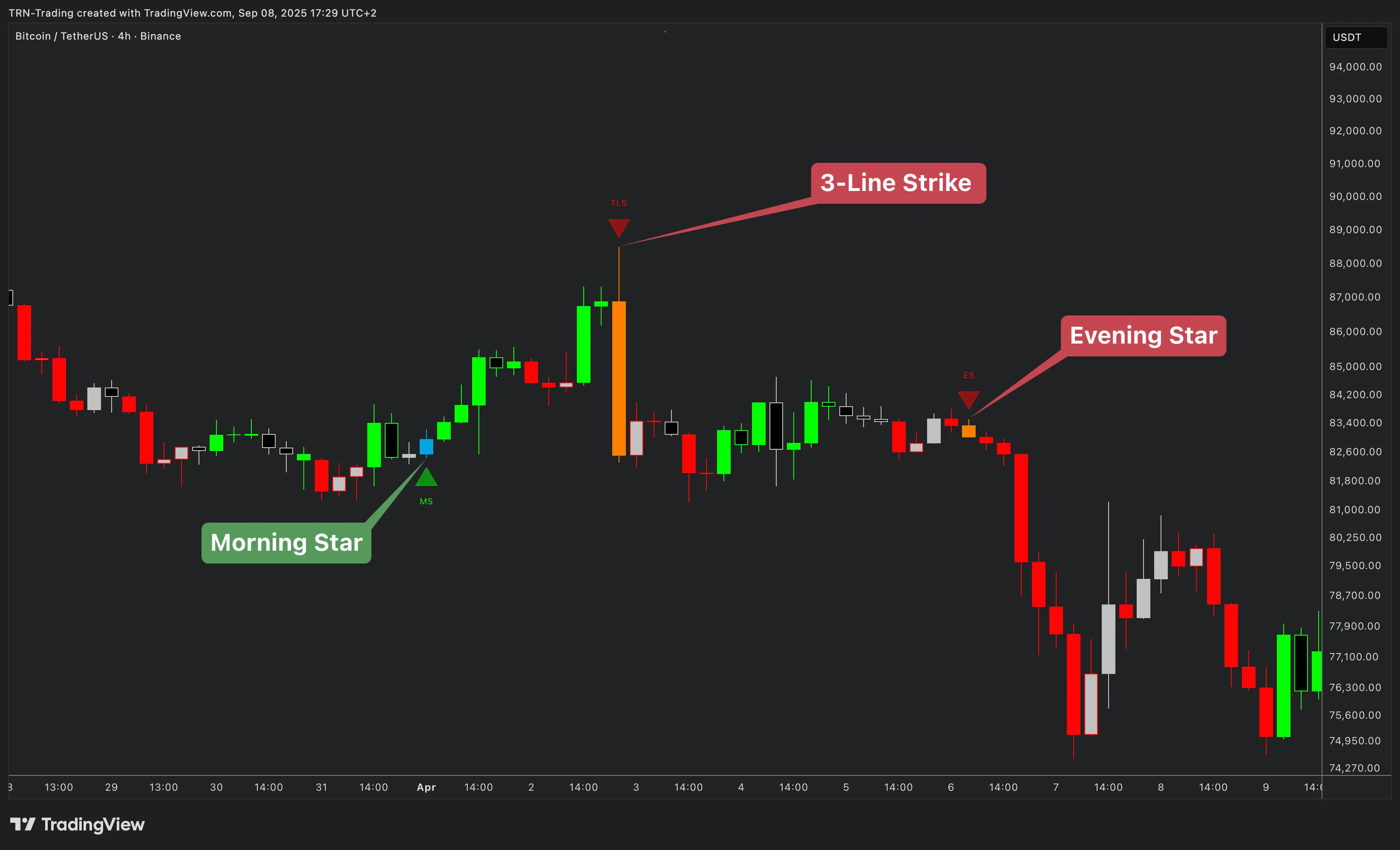
- Morning Star (MS) — Blue (#536DFE) bar with "MS" label. A bullish reversal pattern: a large bearish candle, followed by a small-bodied indecision candle, followed by a strong bullish candle that closes well into the first candle's range.
- Evening Star (ES) — Purple (#E040FB) bar with "ES" label. The bearish mirror: a large bullish candle, followed by indecision, followed by a strong bearish candle closing into the first candle's range.
Morning Star and Evening Star patterns tend to appear at trend exhaustion points. Traders often watch for these signals after extended moves, particularly when the Dynamic Trend line confirms weakening momentum in the prior direction.
Range Breakout Bars (B)
Range Breakout bars fire when Trend Bars Pro detects a breakout from a consolidation range. The Bar Range feature identifies compression zones, and breakout bars mark the moment price exits that range with conviction.
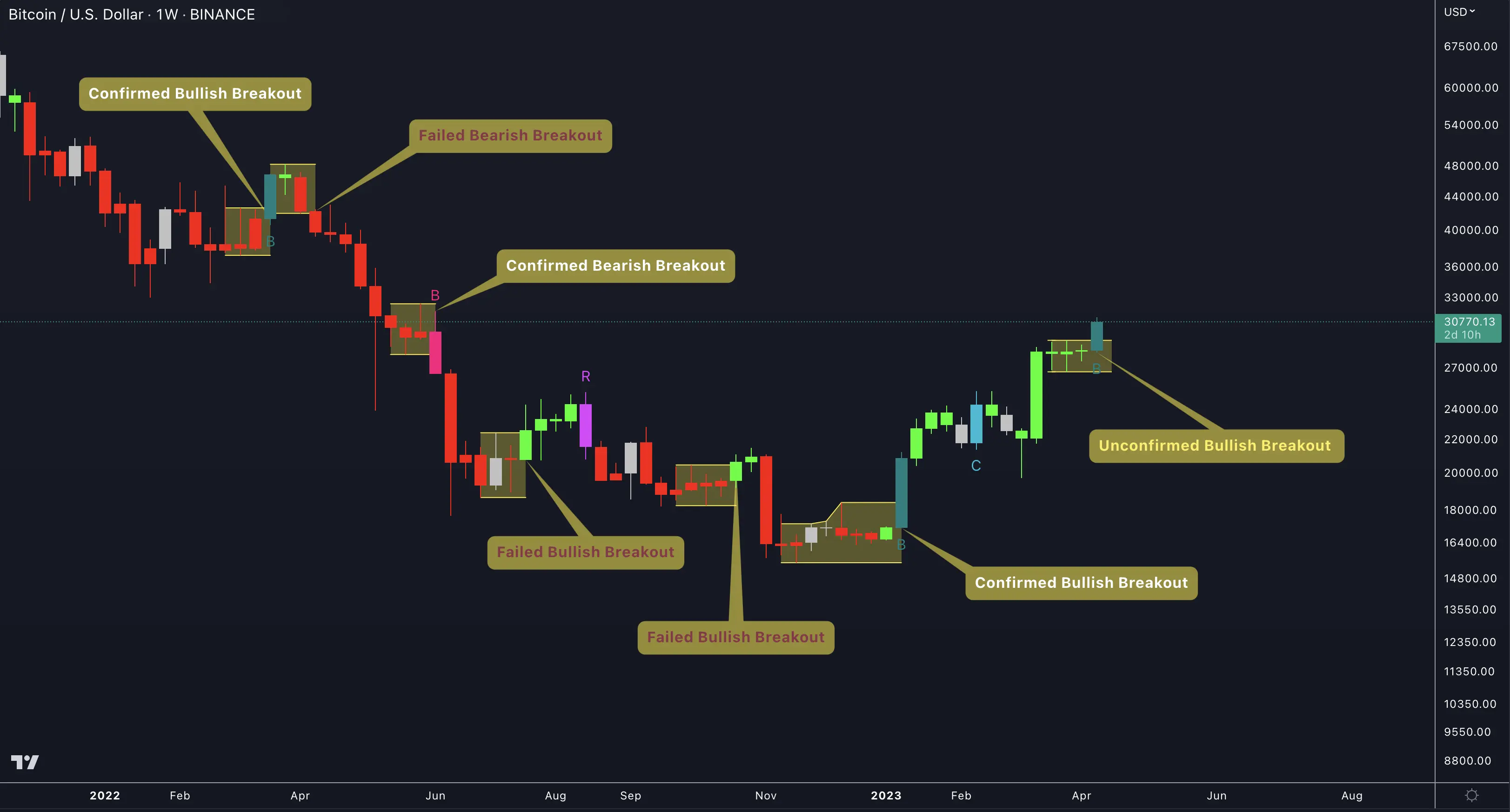
- Bullish Breakout — Cyan (#00BCD4) bar with "B" label, signaling an upside breakout from consolidation.
- Bearish Breakout — Pink (#EC407A) bar with "B" label, signaling a downside breakout from consolidation.
Range Breakout bars excel in markets that alternate between compression and expansion phases. The breakout bar itself marks the transition — the moment when accumulated energy releases into a directional move. Combining breakout bars with the Bar Range visualization makes the entire consolidation-to-breakout lifecycle visible on the chart.
Three Line Strike (T)
Three Line Strike bars detect four-bar reversal patterns where three consecutive directional bars are followed by a single bar that engulfs the entire three-bar range. Trend Bars Pro labels these with "T" by default.
- Bullish Three Line Strike — Blue (#448AFF) bar with "T" label. Three consecutive bearish bars followed by a bullish bar that opens below the third bar's close and closes above the first bar's open.
- Bearish Three Line Strike — Pink (#F06292) bar with "T" label. Three consecutive bullish bars followed by a bearish bar that engulfs all three.
Three Line Strike patterns represent aggressive reversals. The engulfing fourth bar signals that the opposing side has overwhelmed the prior trend in a single period. These patterns often appear at significant turning points when institutional participants drive rapid price reversal.
Continuation Bars (C)
Continuation bars confirm that momentum is persisting in the current trend direction. Unlike the reversal-focused signal types, Continuation bars validate that an existing move has the strength to keep going.
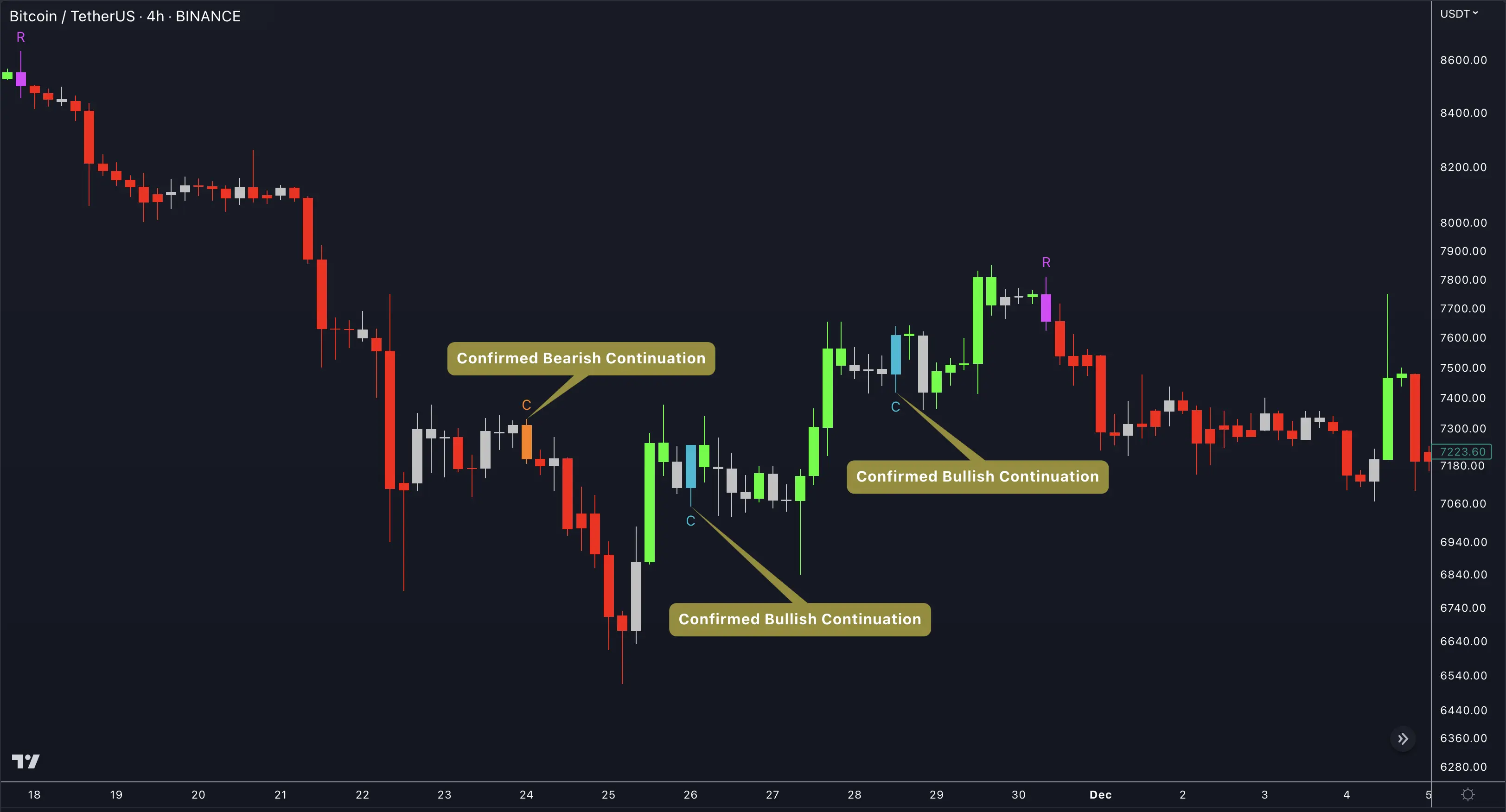
- Bullish Continuation — Light Blue (#82B1FF) bar with "C" label, confirming sustained upward momentum.
- Bearish Continuation — Light Pink (#FF80AB) bar with "C" label, confirming sustained downward momentum.
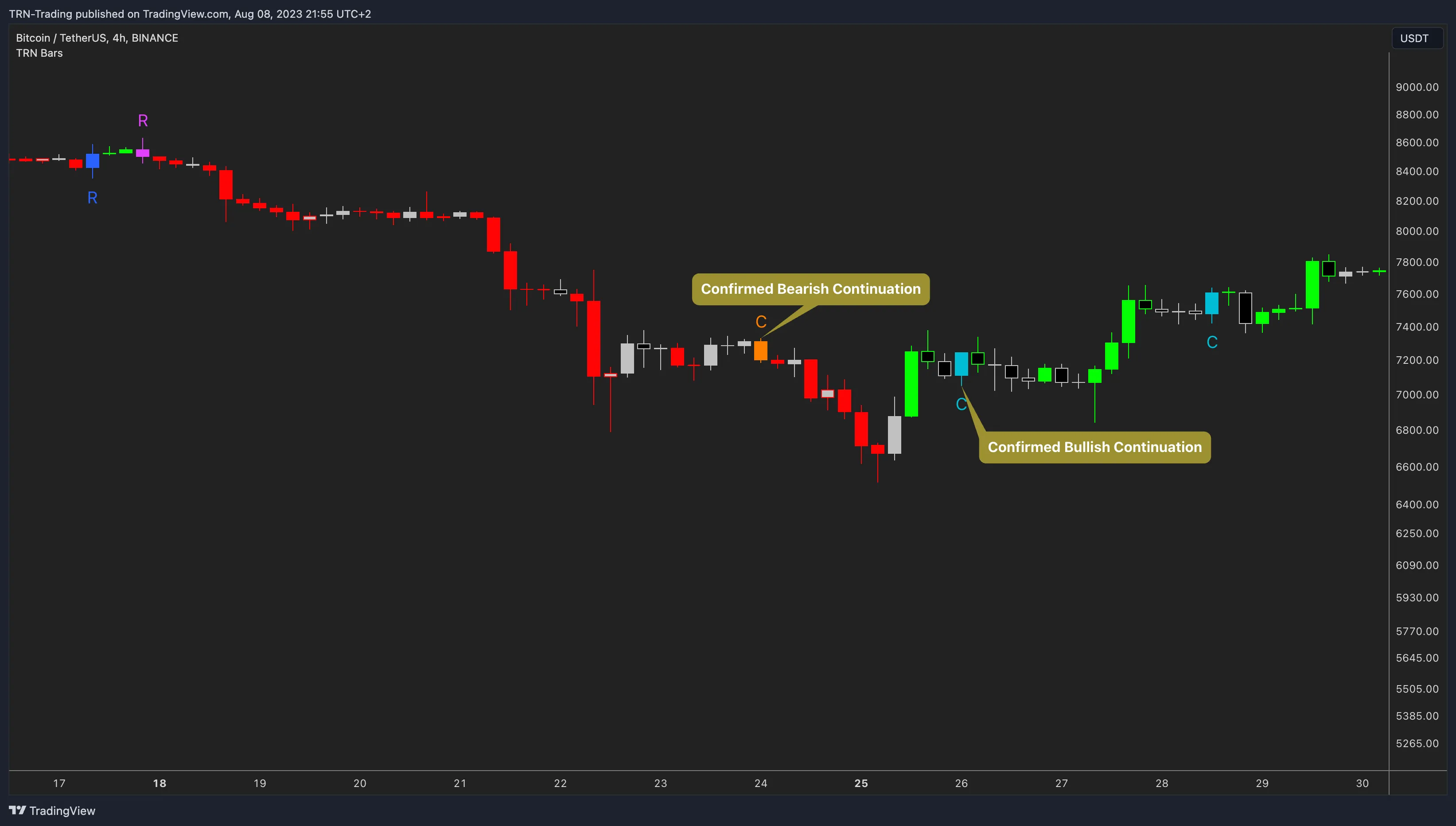
Continuation bars are particularly valuable for traders who enter on pullbacks and need confirmation that the trend has resumed. When a Continuation bar fires after a pullback toward the Dynamic Trend line, it confirms that the retracement is over and the primary direction is reasserting itself.
Expert Settings
Every signal bar type in Trend Bars Pro offers the same set of customization controls. Traders can adapt the visual presentation to match their chart style and trading methodology.
Per-signal-type controls:
- Toggle — Enable or disable each signal type independently. Run only the signals relevant to your strategy.
- Custom label text — Change the default letter ("R", "MS", "ES", "B", "T", "C") to any string. Some traders use emoji or abbreviations that match their trade journal categories.
- Custom colors — Set independent up and down colors for each signal type. The defaults are chosen for maximum contrast, but any color scheme works.
- 10 label shape options — No Shape, Arrow, Triangle, Flag, Circle, Cross, Square, Diamond, Label, Label Center. Each shape changes how the signal marker renders on the chart.
Master controls (apply to all signal types):
- showLabelsInput — Global toggle for all signal bar labels. Disable to see colored bars without text markers.
- showHtfLabelsInput — Toggle for higher-timeframe signal labels when HTF PO3 is active.
- labelSizeInput — Adjustable from 8 to 50 pixels. Increase for high-resolution monitors or decrease for dense multi-indicator layouts.
Start with Strong Reversal (R) and Continuation (C) bars enabled, and the other three disabled. Strong Reversals catch turning points; Continuations confirm follow-through. Once comfortable with those two, add Morning/Evening Star or Range Breakout bars to capture additional pattern types. Running all five simultaneously can produce visual noise on volatile instruments — selective activation keeps the chart clean and decision-making focused.
FAQ
How does Trend Bars Pro prioritize bar colors when multiple conditions overlap?
Trend Bars Pro uses a strict color priority hierarchy. Signal bar colors always override trend bar colors, and trend bar colors always override neutral bar colors. When a bar qualifies as both a signal bar and a trend bar, the signal color takes precedence — making entry-relevant bars visually distinct from standard trend-colored bars.
Can traders customize the labels and colors for each signal bar type?
Yes. Every signal bar type in Trend Bars Pro offers full customization. Traders can change the label text (for example, replacing "R" with any custom string), set independent up and down colors, and choose from ten label shape options including arrows, triangles, flags, circles, crosses, squares, diamonds, and two label styles. A master toggle controls label visibility, and label size is adjustable from 8 to 50 pixels.
What is the difference between Strong Reversal bars and Morning Star or Evening Star bars?
Strong Reversal bars are single-bar, high-conviction reversal signals that Trend Bars Pro marks with the label "R" by default. Morning Star and Evening Star bars are classic three-bar candlestick reversal patterns — the Morning Star signals a bullish reversal after a downtrend, and the Evening Star signals a bearish reversal after an uptrend. Both types detect reversals, but they use different structural criteria and appear at different stages of trend exhaustion.
Do signal bars work on all timeframes in TradingView?
Signal bars in Trend Bars Pro fire on any timeframe that TradingView supports. The same detection logic applies whether the chart is set to 1-minute, 15-minute, 1-hour, daily, or weekly bars. Traders often combine lower-timeframe signal bars with higher-timeframe trend context for stronger confirmation.