Price Action Suite Trading Strategies
The Price Action Suite provides the context layer of the TRN system — market structure, supply and demand zones, Fair Value Gaps, and key levels. This guide walks through four structured strategies that combine these features into repeatable trade setups, followed by a complete breakdown of the alert system.
Strategy 1: FVG Pullback Entry
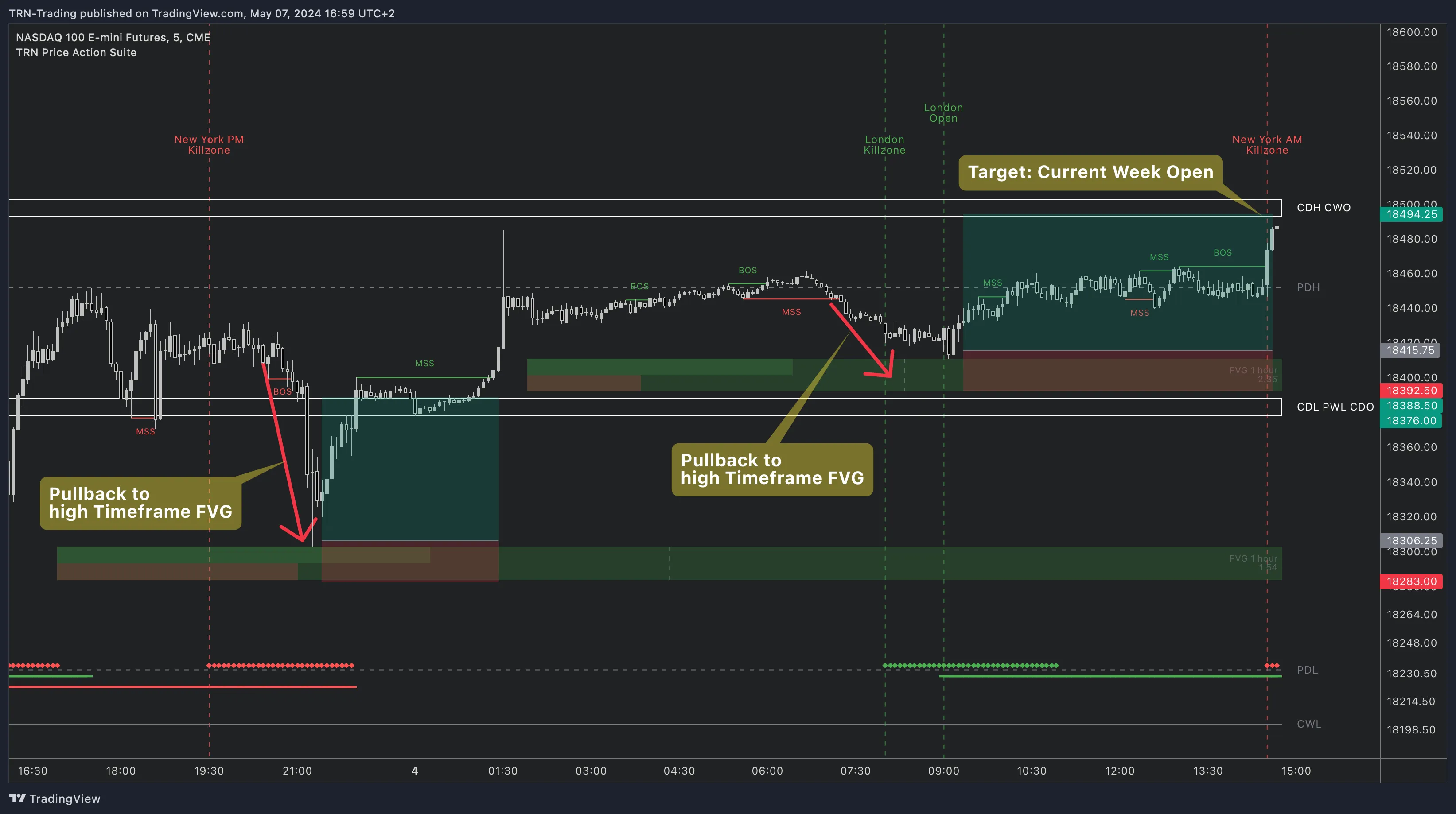
The FVG Pullback Entry uses higher-timeframe Fair Value Gaps as supply and demand zones, then waits for lower-timeframe price to pull back into the zone before entering.
How to Execute
- Identify an HTF FVG — Use the TF1 or TF2 timeframe layer to spot a Fair Value Gap acting as a supply or demand zone. Bullish FVGs below price act as demand, bearish FVGs above price act as supply.
- Wait for price to pull back — Switch to your execution timeframe and wait for price to retrace into the FVG zone. The middle line of the FVG often acts as a magnet for price.
- Enter on reaction — Look for a rejection candle or Trend Bars Pro signal at the FVG boundary or middle line. This confirms that the zone is holding.
- Set your target — The opposite side of the FVG provides a natural first target. The next key level beyond the FVG offers an extended target.
Higher-timeframe FVGs that align with key levels like the previous day high or current week open produce the highest-probability pullback entries. The level adds a second layer of institutional interest at that price.
Strategy 2: Order Block Reversal
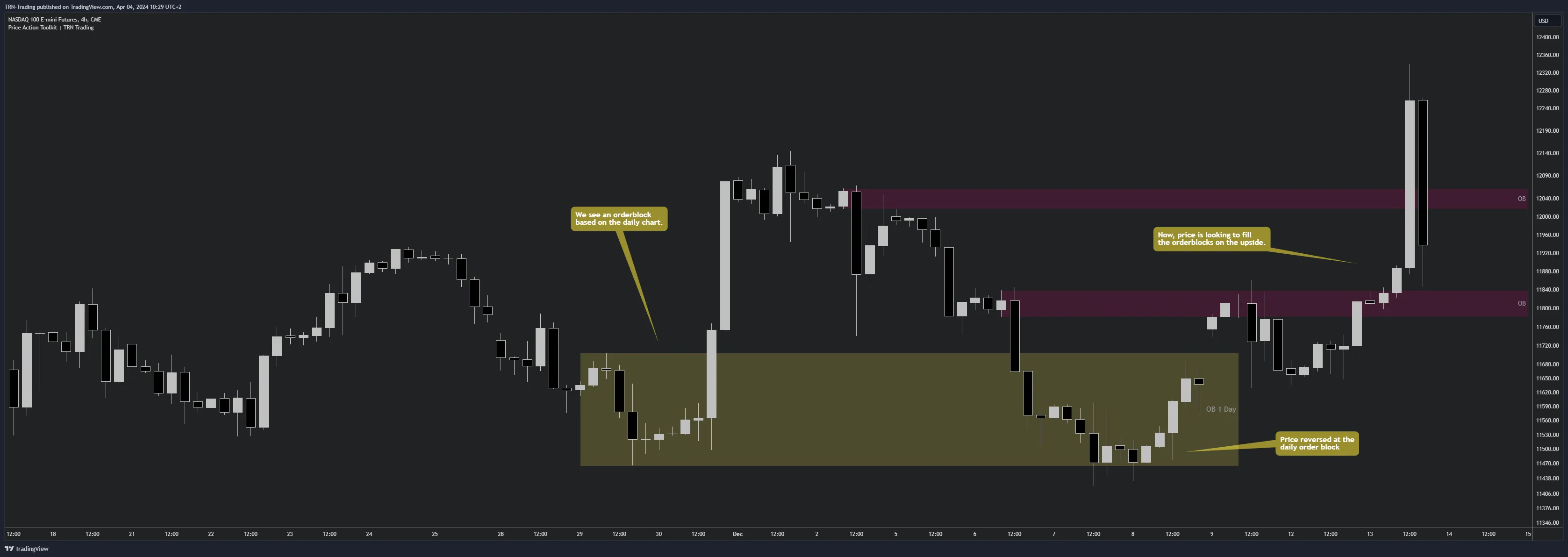
Order Blocks mark institutional supply and demand zones where large participants built or liquidated positions. The Order Block Reversal strategy trades the reaction when price returns to these zones.
How to Execute
- Locate an HTF Order Block — Use the TF1 or TF2 layer to identify an Order Block at a significant market structure swing point. Bullish OBs form at swing lows, bearish OBs form at swing highs.
- Wait for price to reach the OB zone — Price must trade into the Order Block zone on your execution timeframe. Partial fills at the edge of the zone count.
- Confirm with structure — Look for a Market Structure Shift (MSS) or Break of Structure (BOS) on the lower timeframe as price enters the OB. This confirms that the institutional zone is producing a reaction, not just a brief pause.
- Enter with defined risk — Place your entry after the MSS/BOS confirmation with your stop beyond the OB zone. The zone boundary provides a clear invalidation level.
Order Block zones can be swept before reversing. Always wait for the lower-timeframe structure confirmation before committing. A stop placed just beyond the OB zone protects against sweep scenarios.
Strategy 3: Silver Bullet (Killzone + FVG)
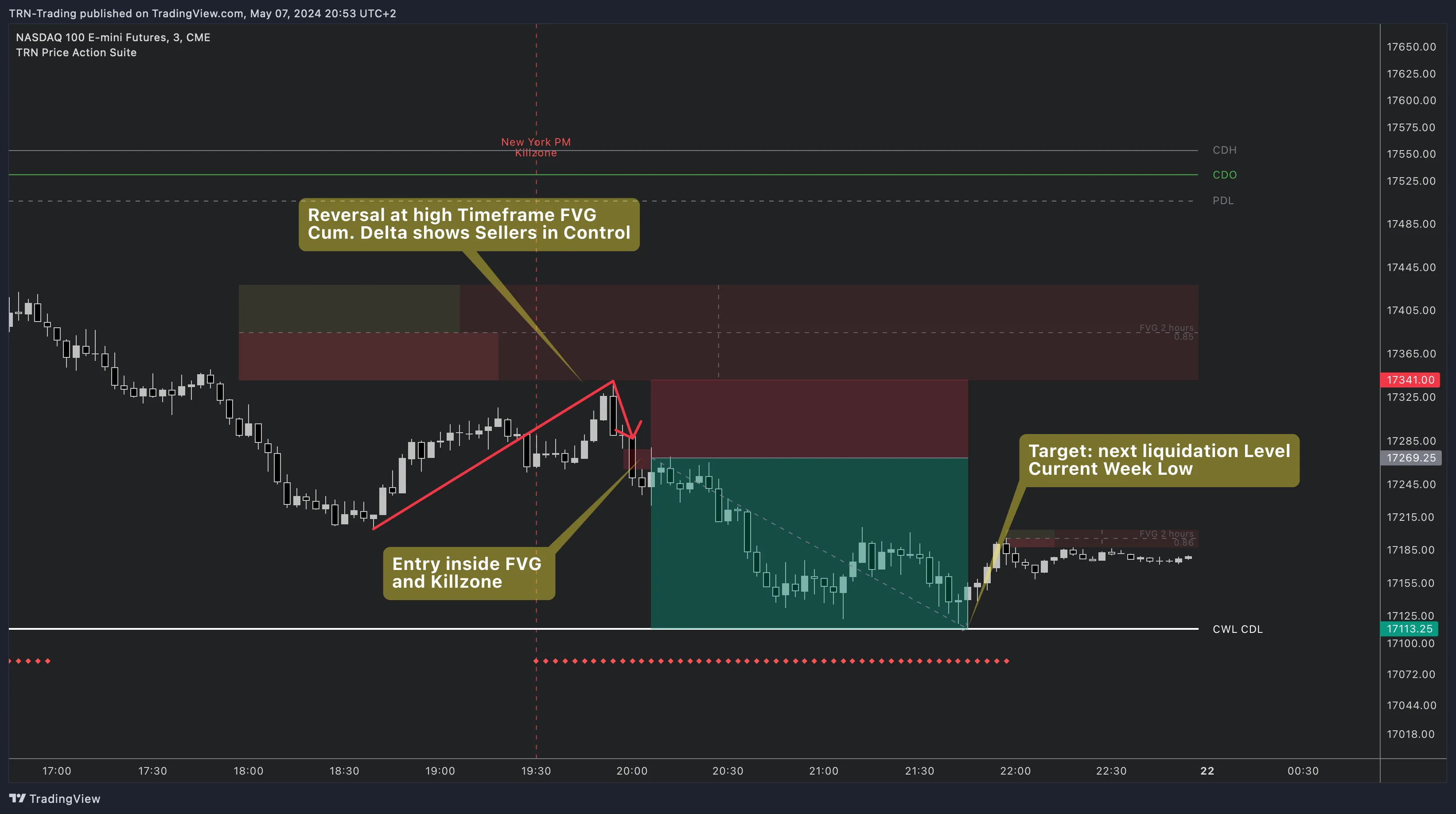
The Silver Bullet combines killzone timing with Fair Value Gap analysis. By restricting entries to killzone windows and requiring an FVG as the entry vehicle, this strategy filters out low-probability setups that occur during off-peak hours.
How to Execute
- Wait for killzone activation — Monitor the killzone overlay and only look for setups during active killzone windows. The NY AM killzone and London killzone produce the cleanest Silver Bullet setups.
- Identify an FVG within the killzone — A Fair Value Gap that forms during the killzone window carries institutional significance because it was created during peak liquidity.
- Enter on FVG retest — After the FVG forms, wait for price to retrace back to the gap. Enter when price touches the FVG zone with a stop beyond the opposite side of the gap.
- Target the next liquidity level — Set your target at the nearest liquidity level: previous day high/low (PDH/PDL), session high/low, or the next HTF level visible on your chart.
Strategy 4: Level Confluence
Level confluence occurs when multiple independent levels cluster at the same price. The Price Action Suite auto-merges nearby labels when levels overlap, showing you exactly where confluence exists on your chart.
How It Works
The Price Action Suite plots levels from multiple timeframes — current day (CDH/CDL), previous day (PDH/PDL), current week open (CWO), previous week high/low (PWH/PWL), and monthly equivalents. When two or more of these levels land at nearby prices, the indicator merges their labels into a single confluence marker.
Why Confluence Matters
Each level represents a price where a specific timeframe established a boundary. When multiple timeframes agree on a level, institutional interest at that price multiplies. A level where the current day low aligns with the previous week high and the current week open carries far more weight than any single level alone.
How to Trade Confluence Zones
- Scan for merged labels — Confluence zones appear as labels showing multiple level names stacked together.
- Wait for price to approach — Let price trade into the confluence zone rather than anticipating the reaction.
- Confirm the reaction — Use a Trend Bars Pro signal bar or a Swing Suite divergence at the confluence zone to confirm that the level is holding.
- Define your trade — Enter on the confirmation signal with a stop beyond the confluence cluster and target the next level or structure point.
Alert System
The Price Action Suite provides 20 alert combinations across five categories. Each alert fires in real time when the specified condition triggers, allowing you to monitor setups across multiple charts and timeframes without watching every screen.
FVG Alerts (6 Inputs)
| Alert | Timeframe | Direction |
|---|---|---|
| FVG Found — Chart TF | Execution timeframe | Bullish / Bearish |
| FVG Found — TF1 | First HTF layer | Bullish / Bearish |
| FVG Found — TF2 | Second HTF layer | Bullish / Bearish |
Order Block Alerts (6 Inputs)
| Alert | Timeframe | Direction |
|---|---|---|
| OB Found — Chart TF | Execution timeframe | Bullish / Bearish |
| OB Found — TF1 | First HTF layer | Bullish / Bearish |
| OB Found — TF2 | Second HTF layer | Bullish / Bearish |
Volume Imbalance Alerts (6 Inputs)
| Alert | Timeframe | Direction |
|---|---|---|
| VIB Found — Chart TF | Execution timeframe | Bullish / Bearish |
| VIB Found — TF1 | First HTF layer | Bullish / Bearish |
| VIB Found — TF2 | Second HTF layer | Bullish / Bearish |
Market Structure Alerts (2 Inputs)
| Alert | Description |
|---|---|
| Market Structure Shift | Fires when price confirms an MSS — a potential trend reversal point |
| Break of Structure | Fires when price confirms a BOS — trend continuation through a swing point |
Set FVG and OB alerts on your HTF timeframe layers (TF1 and TF2) to catch new zones forming. Then use MSS and BOS alerts on your execution timeframe to catch confirmation signals. This two-layer alert approach mirrors the multi-timeframe analysis process without requiring you to watch multiple charts simultaneously.
Cross-Indicator Confirmation
Each Price Action Suite strategy benefits from confirmation by other TRN system indicators. The system is designed so each indicator fills a distinct role without overlap.
- Trend Bars Pro provides ENTRY confirmation — momentum-based signal bars validate that price is committing to the direction your setup suggests.
- Swing Suite provides STRUCTURE confirmation — divergence detection at key levels warns you when momentum disagrees with price, filtering out traps.
FAQ
How many alert combinations does the Price Action Suite support?
The Price Action Suite supports 20 alert combinations across five categories. Fair Value Gaps, Order Blocks, and Volume Imbalances each offer 6 alerts covering chart timeframe plus two higher timeframe layers in both bullish and bearish directions. Market Structure Shift and Break of Structure each provide 1 alert input.
What is the Silver Bullet trading strategy?
The Silver Bullet strategy combines killzone timing with Fair Value Gap analysis. You wait for a killzone to activate, identify an FVG formed within that killzone, then enter on the FVG retest targeting the next liquidity level such as the previous day high or low or session high or low.
How does level confluence improve trade probability?
Level confluence occurs when multiple independent levels cluster at the same price, such as the current day low aligning with the previous day high and the current week open. The Price Action Suite auto-merges nearby labels to show these clusters. Confluence zones represent areas where multiple timeframes agree on a support or resistance level.
Can I combine Price Action Suite strategies with other TRN indicators?
Each strategy benefits from cross-indicator confirmation. Trend Bars Pro provides momentum confirmation on entries and Swing Suite divergence detection adds a structural filter. The TRN system is designed so each indicator fills a specific role without overlap.
Next Steps
Fair Value Gaps
Deep dive into FVG types, CVD validation, and multi-timeframe analysis.
Order Blocks
Institutional supply and demand zones with higher-timeframe overlay.
Market Structure
MSS and BOS detection for trend identification and shift confirmation.
Key Levels
Previous day, week, and month levels with auto-merge confluence.
Killzones
High-probability trading windows for timing your entries.
Trading Sessions
Asia, London, and New York session markers for market context.