Killzones — High-Probability Trading Windows
Killzones isolate the specific windows within each trading session where institutional order flow concentrates. The Price Action Suite offers three killzone types — Forex, Indices/Futures, and Opening Range — so you can match your killzone overlay to the asset class you trade.
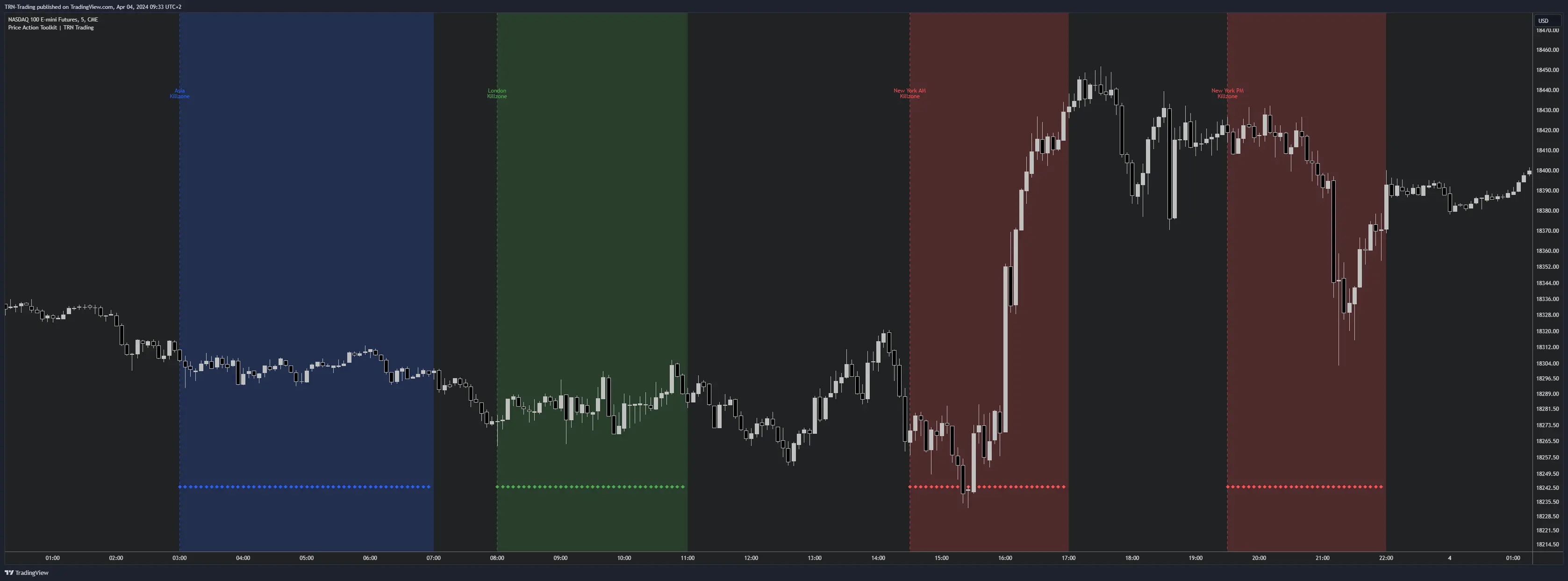
Why Killzones Matter
Most institutional order flow concentrates in narrow windows rather than spreading evenly across a session. Entries taken during killzones have higher follow-through because liquidity is deepest — tighter spreads, faster fills, and stronger directional commitment from large participants. Trading outside killzones often means lower volume and choppier price action.
Killzones only display on chart timeframes below 2 hours. On 2H charts and above, killzone markers auto-hide because each candle already spans an entire killzone window or more.
Forex Killzones
Forex killzones follow the ICT standard timing and align with the periods when currency pairs see the highest volume and cleanest price delivery.
| Killzone | Timezone | Window |
|---|---|---|
| Asia | Asia/Tokyo | 10:00 – 14:00 |
| London | Europe/London | 07:00 – 10:00 |
| NY AM | America/New_York | 07:00 – 10:00 |
| NY Lunch/PM | America/New_York | 10:00 – 12:00 |
The London and NY AM killzones overlap in real time, creating a high-confluence period for major forex pairs like EUR/USD and GBP/USD. The NY Lunch/PM killzone captures the "Silver Bullet" window where price often revisits levels established in the morning session.
Indices/Futures Killzones
Indices killzones use adjusted times that reflect equity futures market structure. The NY AM window opens at 08:30 to coincide with US economic data releases, while the NY PM window captures the afternoon session when London closes and US equities drive into the final hour.
| Killzone | Timezone | Window |
|---|---|---|
| Asia | Asia/Tokyo | 10:00 – 14:00 |
| London | Europe/London | 07:00 – 10:00 |
| NY AM | America/New_York | 08:30 – 11:00 |
| NY PM | America/New_York | 13:30 – 16:00 |
The NY PM killzone from 13:30 to 16:00 aligns with the London-New York overlap and the final push into the equity close. This is where afternoon reversals and trend continuations on ES, NQ, and YM tend to accelerate.
Opening Range Killzones
The Opening Range captures the first 30 minutes after each session opens. This window represents the initial auction where institutional participants establish their positioning for the session. The duration is configurable in the indicator settings.
| Session | Default Opening Range |
|---|---|
| Asia | 09:30 – 10:00 (Asia/Tokyo) |
| London | 08:00 – 08:30 (Europe/London) |
| New York | 09:30 – 10:00 (America/New_York) |
The opening range high and low often act as intraday support and resistance levels. A break above the opening range high suggests bullish momentum for the session, while a break below the low suggests bearish momentum.
Visual Display Options
Each killzone provides the same visual controls as trading sessions, giving you full customization over how killzones appear on your chart.
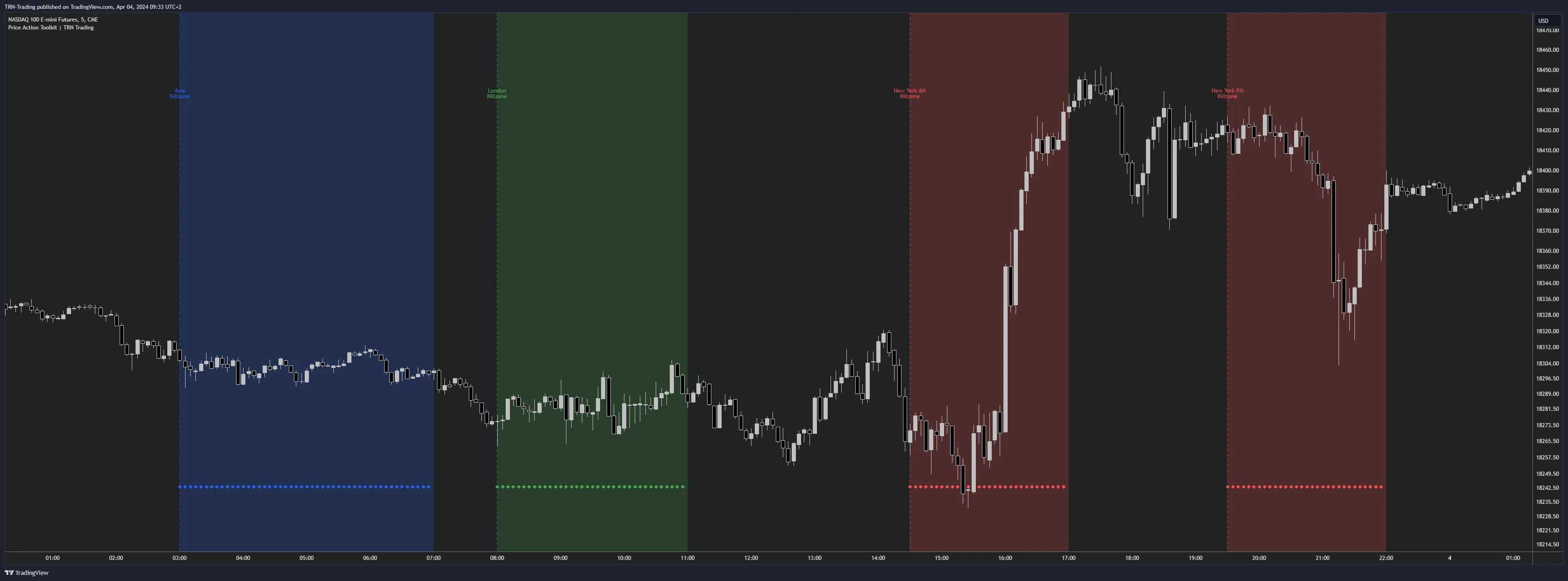
Available Options Per Killzone
- Bottom Dots — Diamond-shaped markers at the chart bottom during the active killzone window. Quick visual confirmation of which killzone is currently in play.
- Opening Label — Full Label (e.g., "NY AM Killzone") or Short Label (e.g., "NYAM") at the killzone start.
- Closing Label — Full or Short Label at the killzone end.
- Opening Line — Vertical dashed line at the killzone start.
- Closing Line — Vertical dashed line at the killzone end.
- Background Fill — Colored background across the entire killzone window for unmistakable visual boundaries.
Default Colors
| Killzone | Dots & Lines | Fill |
|---|---|---|
| Asia | Blue | Blue (translucent) |
| London | Green | Green (translucent) |
| NY AM | Red | Red (translucent) |
| NY PM | Red | Red (translucent) |
All colors are independently configurable per killzone so you can differentiate AM and PM zones or match your chart theme.
Combining Killzones With Other Features
Killzones define when to trade. Layer them with Price Action Suite structure features to define where and how to trade.
- Killzones + FVGs — Fair Value Gaps formed during killzones carry higher significance because they represent institutional imbalances created during peak liquidity.
- Killzones + Levels — Key levels like previous day high/low tested during a killzone are more likely to produce a reaction than the same level tested during off-hours.
- Killzones + Sessions — Sessions provide the broad context while killzones narrow your focus to the actionable windows within each session.
FAQ
What is the difference between sessions and killzones?
Sessions cover the full trading hours of each market center while killzones mark only the highest-activity windows within those sessions. Killzones represent concentrated periods of institutional order flow where price moves tend to have stronger follow-through and cleaner setups.
Which killzone type should I use for trading ES or NQ futures?
The Indices/Futures killzones are designed for equity index products like ES, NQ, and YM. They use adjusted times that align with futures market structure including the 08:30 NY AM open and the 13:30 NY PM session when the London-New York overlap drives afternoon volume.
Why do killzones disappear on my 4-hour chart?
Killzones auto-hide on chart timeframes of 2 hours and above. Killzone windows are typically 2 to 4 hours long so they lose granularity on higher timeframes where each candle spans an entire killzone or more. Switch to a sub-2H timeframe to see killzone markers.
What is the Opening Range killzone?
The Opening Range killzone covers the first 30 minutes after each session opens. This configurable window captures the initial auction where institutional participants establish positioning. The opening range high and low often act as support and resistance for the remainder of the session.