Fair Value Gaps (FVG) — Multi-Timeframe with CVD
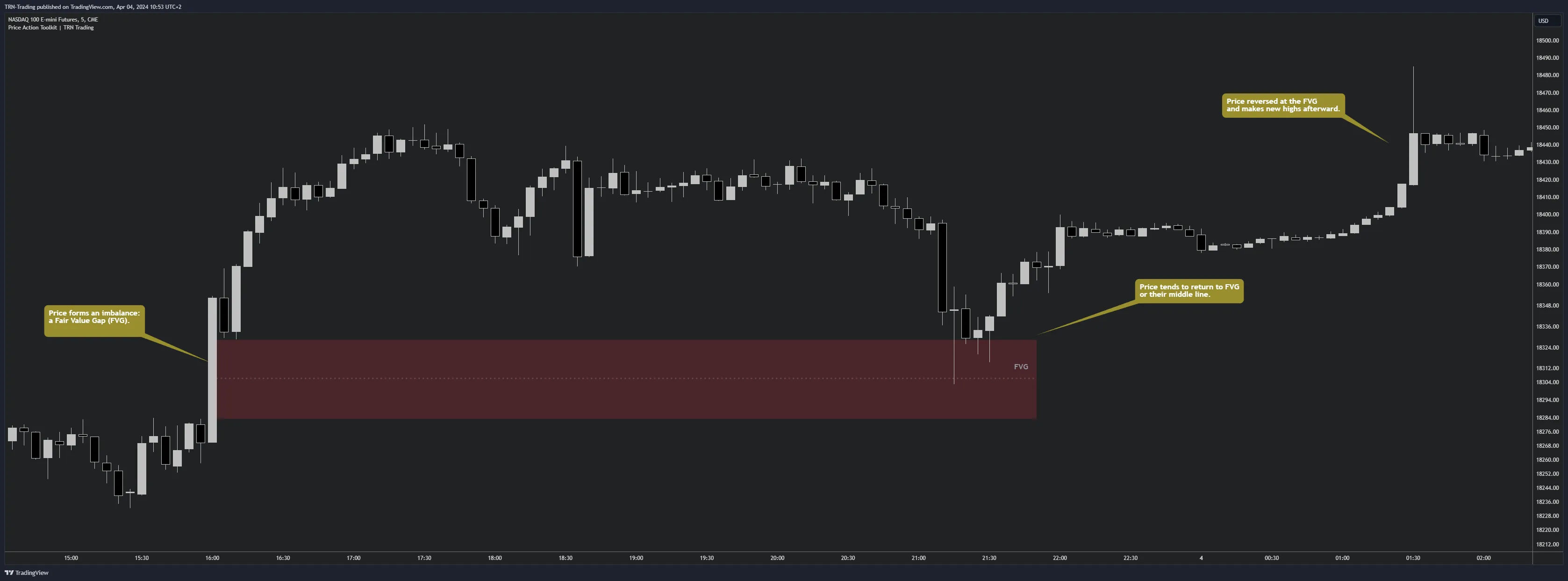
Fair Value Gaps are the flagship feature of Price Action Suite. A Fair Value Gap forms when a strong candle creates a three-bar pattern where the wicks of the first and third candles do not overlap — leaving a visible imbalance zone on the chart. Price tends to return to these gaps, making them reliable structural reference points for trade planning.
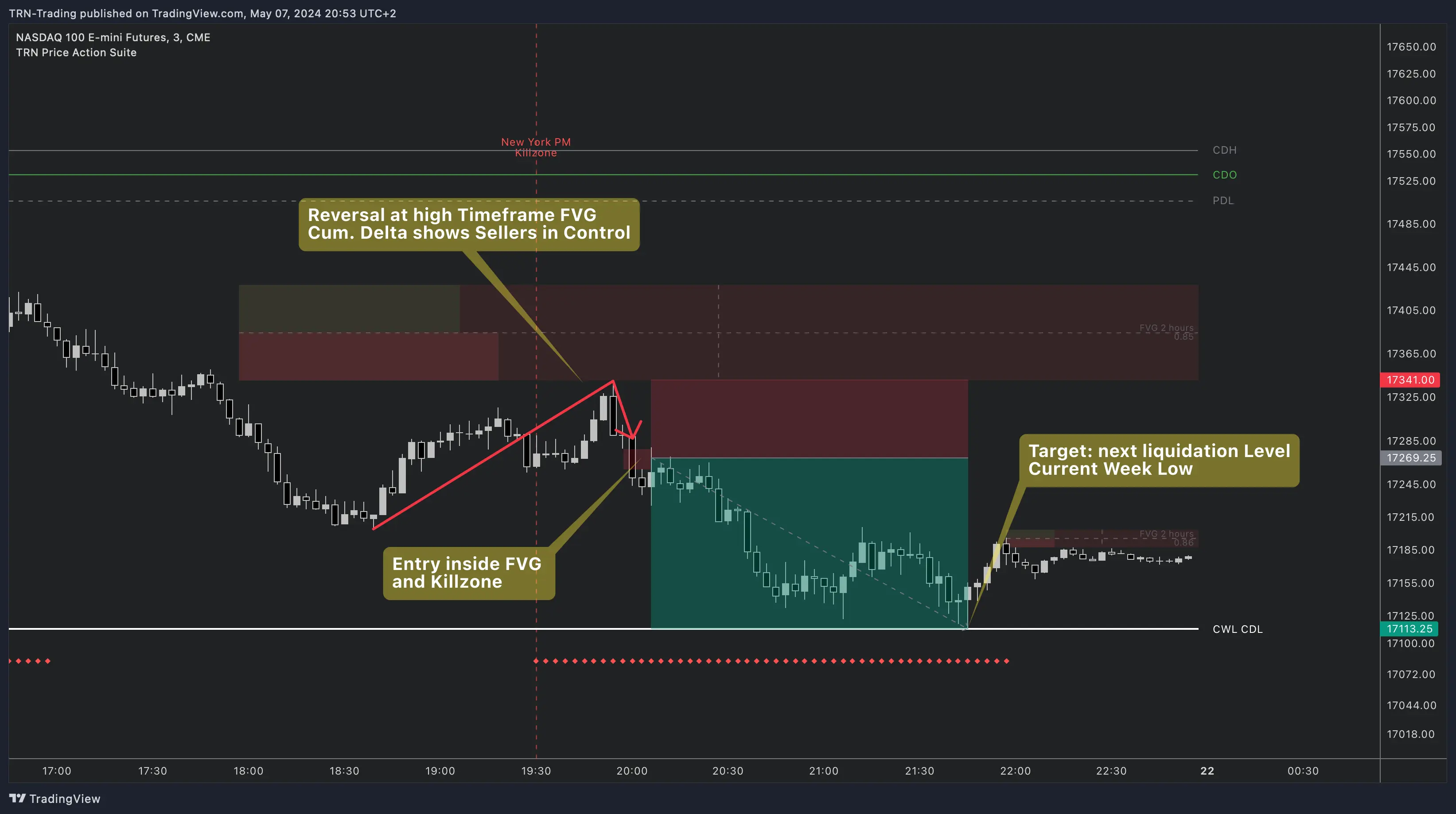
Price Action Suite detects FVGs across three simultaneous timeframes, filters them by size, tracks overlapping (inverse) FVGs, and layers Cumulative Volume Delta on each zone. The result is a complete FVG framework that goes well beyond simple gap detection.
How Fair Value Gaps Form
A Fair Value Gap requires three consecutive candles. The first candle establishes the initial price range. The second candle drives a strong move in one direction. The third candle continues in that direction but leaves a gap — the wicks of candle one and candle three fail to overlap. That unfilled space between the wicks is the Fair Value Gap.
Bullish FVG: The low of candle three sits above the high of candle one. The gap represents an area where buying pressure was so dominant that sellers never had an opportunity to transact.
Bearish FVG: The high of candle three sits below the low of candle one. The gap reflects a zone where selling pressure overwhelmed buyers entirely.
How Fair Value Gaps Resolve
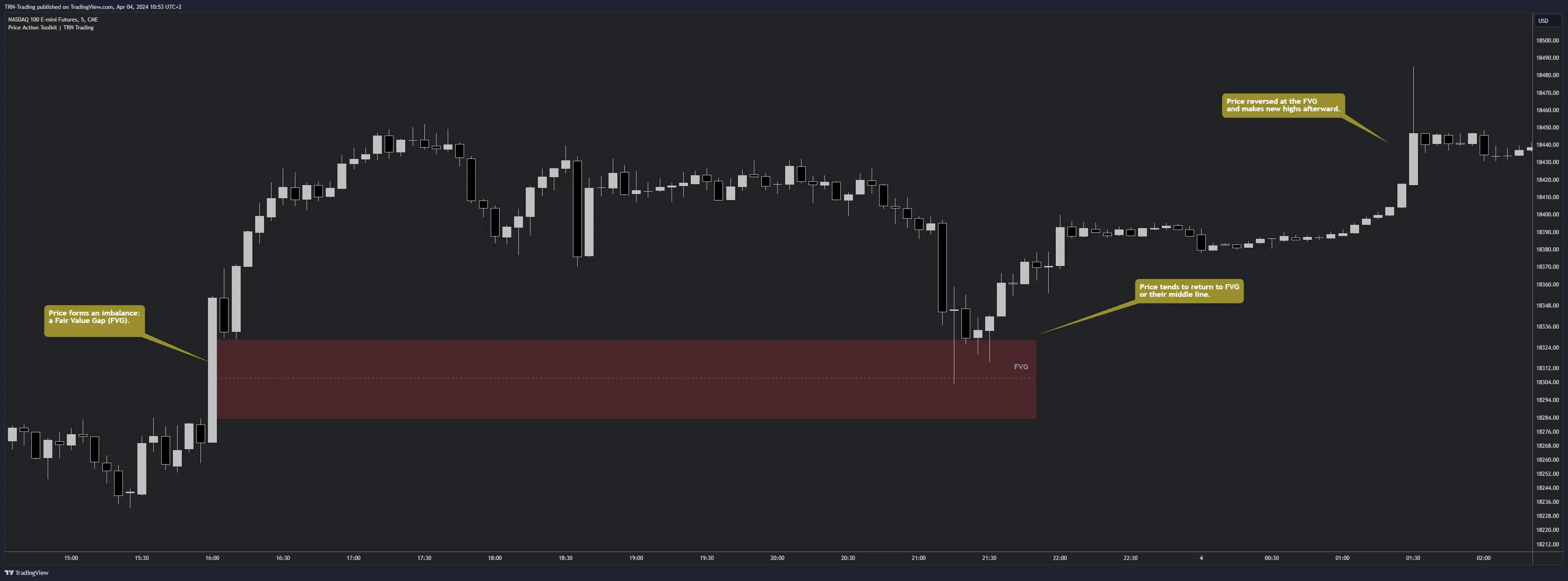
Fair Value Gaps act as structural magnets. Price tends to return to the gap zone — or at minimum to the middle line — before the trend continues. Price Action Suite tracks each FVG and automatically removes it when one of two conditions is met:
- Full fill — Price trades completely through the FVG zone, closing the imbalance.
- Expiration — The FVG exceeds the configured maximum duration in bars without being revisited.
The middle line within each FVG serves as a partial-fill reference. Many traders use the middle line as a minimum target for gap fills, treating a reaction at the midpoint as a valid structural response even when the full gap remains open.
Multi-Timeframe FVG Analysis
Price Action Suite displays Fair Value Gaps from three timeframes on a single chart:
- Chart Timeframe — FVGs detected on whatever timeframe the chart is set to.
- Timeframe 1 (TF1) — Defaults to 4H. Configurable to any higher timeframe.
- Timeframe 2 (TF2) — Defaults to 1D. Configurable to any higher timeframe.
Each timeframe has independent up/down colors, and FVGs from higher timeframes display a label identifying their source. This lets traders see daily FVGs directly on a 15-minute execution chart without switching timeframes.
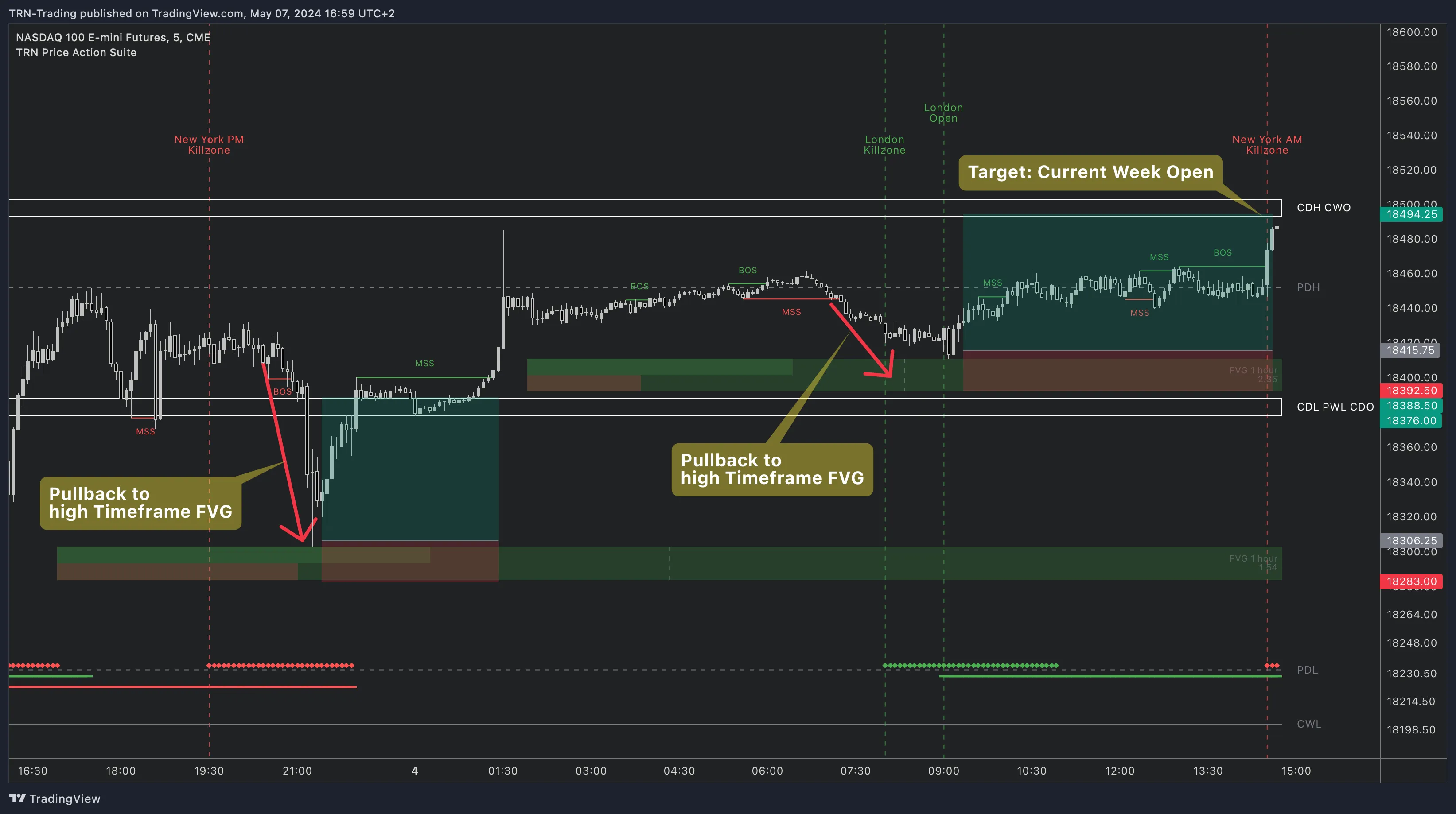
Higher-timeframe FVGs that align with chart-timeframe FVGs produce the strongest confluence zones. A 15-minute bullish FVG sitting inside a daily bullish FVG carries significantly more structural weight than either gap alone. Useful timeframe pairs include Weekly to 4H, Daily to 1H, 4H to 15m, and 1H to 5m.
Overlapping FVG (Inverse FVG)
An overlapping FVG — also called an inverse FVG or iFVG — forms when a new Fair Value Gap in the opposite direction overlaps with an existing FVG. These zones represent areas where opposing forces have directly contested the same price space. When price revisits an overlapping FVG, the reaction is frequently sharp because the zone has already proven itself as a battleground between buyers and sellers.
Price Action Suite identifies overlapping FVGs automatically when the Show Overlapping FVG toggle is enabled. A separate Overlapping Size Threshold (ATR-based, default 15) controls the minimum size required for iFVG detection, letting traders filter out minor overlaps and focus on structurally significant contested zones.
Cumulative Volume Delta on FVGs
Cumulative Volume Delta adds volume context to every Fair Value Gap. Rather than treating each gap as equal, CVD reveals the buying and selling pressure that created the imbalance.
Each FVG displays CVD information in two components:
- Volume bars (left side) — Green bar shows cumulative buying volume, red bar shows cumulative selling volume within the gap zone.
- Volume ratio (right side) — The ratio of buy volume to sell volume. A ratio above 1 (for example 1.5) indicates buying dominance. A ratio below 1 (for example 0.66) indicates selling pressure.
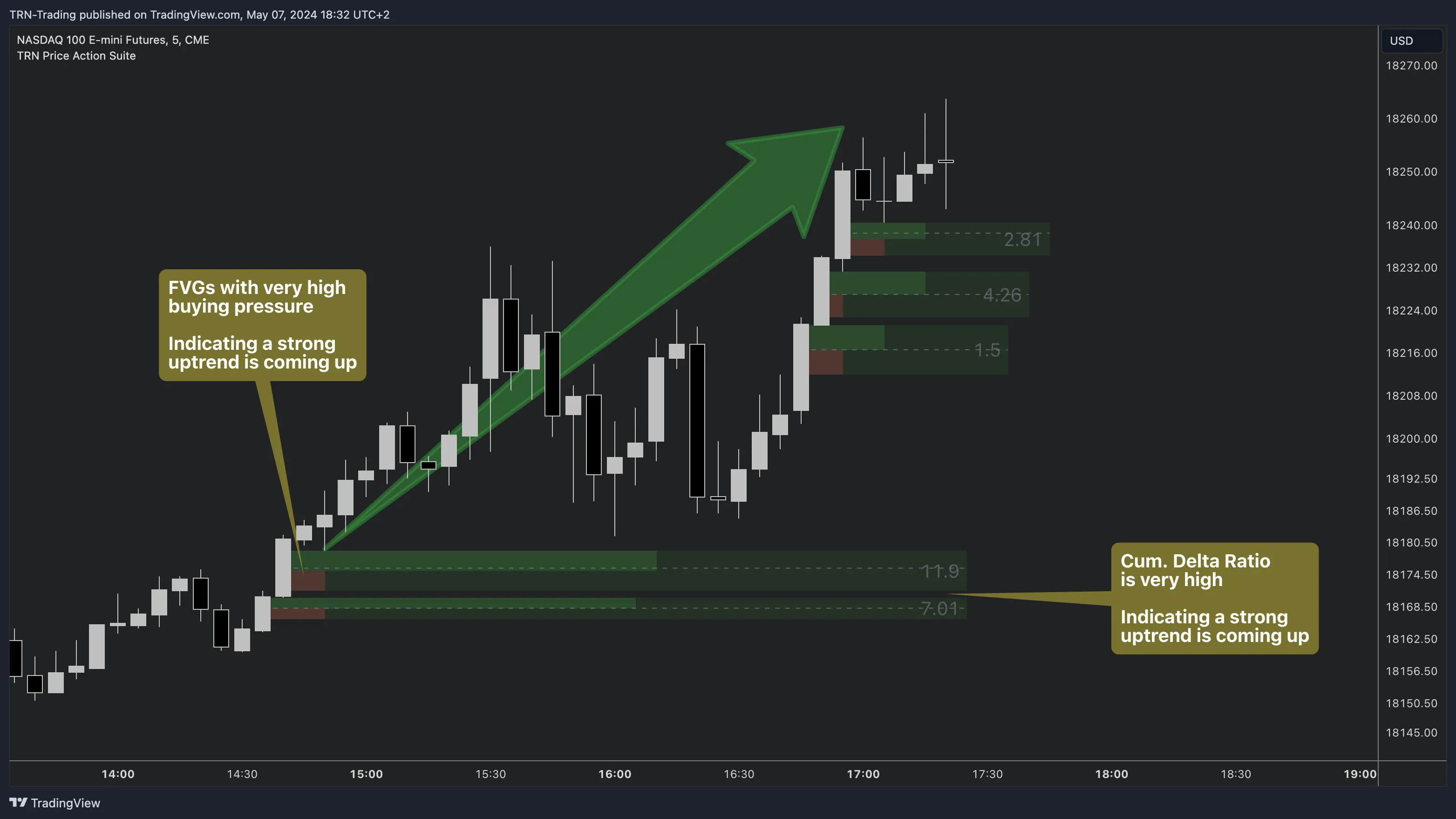
CVD display modes are configurable: Off, Boxes + Ratios, Boxes only, or Ratios only. Traders who prefer a cleaner chart can show ratios alone while still benefiting from volume-confirmed gap analysis.
FVG Settings Reference
Price Action Suite provides granular control over FVG detection and display:
| Setting | Default | Description |
|---|---|---|
| Max Duration | 100 bars | FVGs older than this value are automatically removed from the chart |
| Max Occurrences | 25 | Maximum number of FVGs displayed simultaneously per timeframe |
| Size Threshold | 20 | ATR-based minimum gap size (0-100). Filters out small, less significant FVGs |
| Overlapping Size Threshold | 15 | ATR-based minimum size for inverse FVG detection (0-100) |
| Show Overlapping FVG | Toggle | Enables detection and display of inverse (overlapping) FVGs |
| Middle Line | Toggle | Shows the midpoint line within each FVG with configurable color and style |
| CVD Display | Off | Options: Off, Boxes + Ratios, Boxes only, Ratios only |
| Labels | Toggle | Show/hide FVG labels with timeframe identification, configurable color and size |
| Historic FVGs | Toggle | When enabled, expired FVGs repaint to their original size for historical reference |
Each of the three timeframes (Chart, TF1, TF2) has its own toggle and independent up/down color settings, so traders can visually distinguish gap sources at a glance.
FAQ
What is a Fair Value Gap in trading?
A Fair Value Gap is a three-candle price pattern where the wicks of the first and third candles do not overlap, creating a visible imbalance zone on the chart. Price tends to return to these gaps before continuing its trend, making FVGs reliable areas to watch for potential reactions.
How does multi-timeframe FVG analysis work in Price Action Suite?
Price Action Suite displays FVGs from three timeframes simultaneously — the chart timeframe plus two configurable higher timeframes (TF1 defaults to 4H, TF2 defaults to 1D). Each timeframe has independent color settings and labels that identify which timeframe produced each gap, so traders can spot higher-timeframe confluence directly on their execution chart.
What is an overlapping or inverse FVG?
An overlapping FVG (also called inverse FVG or iFVG) forms when a new fair value gap in the opposite direction overlaps with an existing FVG. These zones represent contested price areas where opposing forces collided, and they frequently produce strong reactions when price revisits them.
How does Cumulative Volume Delta improve FVG trading?
CVD measures the net difference between buying and selling volume within each FVG zone. A ratio above 1 indicates buying dominance while a ratio below 1 shows selling pressure. This volume context helps traders distinguish between high-conviction gaps backed by institutional flow and weaker gaps that may fill without producing a reaction.
When is a Fair Value Gap considered invalidated?
Price Action Suite removes a Fair Value Gap when price fully fills through the zone or when the gap exceeds its maximum duration setting in bars. The default maximum duration is 100 bars, and traders can adjust this value to match their trading timeframe and style.