Volume Imbalances (VIBs)
A Volume Imbalance (VIB) identifies gaps between the bodies of two consecutive candles where the wicks still overlap. Unlike Fair Value Gaps that measure wick-to-wick inefficiencies across three bars, Volume Imbalances isolate the more aggressive form of directional imbalance — a gap in the actual traded range (body) that occurs within a single bar transition. The Price Action Suite detects VIBs automatically across multiple timeframes.
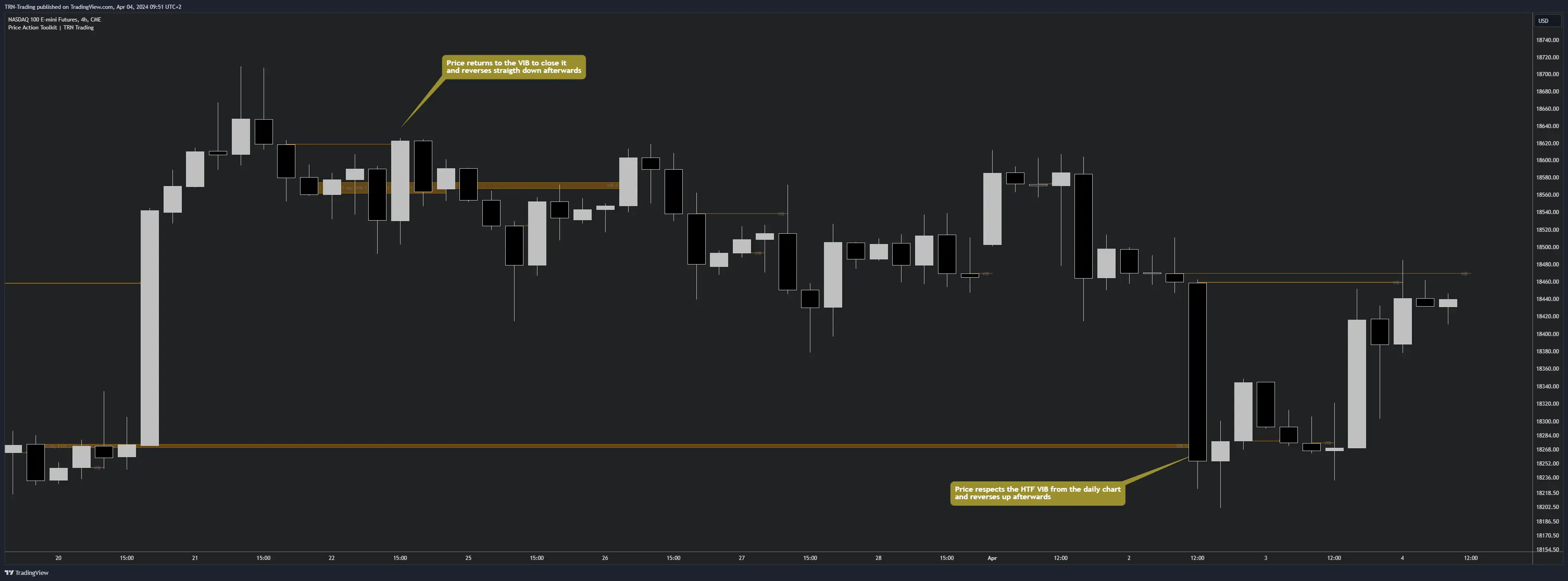
How Volume Imbalances Form
A Volume Imbalance forms when the close of one candle and the open of the next candle leave a gap between their bodies, while the wicks of both candles still overlap. The body gap represents a price range where aggressive buying or selling pushed price so forcefully that the actual traded range skipped a zone entirely. Bullish VIBs form when the second candle opens above the first candle's close. Bearish VIBs form when the second candle opens below the first candle's close.
The wick overlap is what distinguishes VIBs from traditional gaps. Price technically traded through the zone on a tick level (visible in the wicks), but the dominant side controlled the body range so thoroughly that the candle bodies never occupied the same price area.
How Volume Imbalances Resolve
Volume Imbalances act as zones where price is likely to return. When price revisits the VIB zone and closes through the body gap, the imbalance is considered filled and the Price Action Suite removes it from the chart. This fill behavior reflects the market rebalancing the aggressive directional move that created the VIB in the first place.
VIBs that remain unfilled for an extended period lose relevance. The Max Duration setting controls how many bars a VIB stays visible before the indicator automatically expires it. This keeps the chart focused on actionable zones rather than stale historical imbalances.
Volume Imbalances vs Fair Value Gaps
Traders often ask how VIBs differ from Fair Value Gaps, since both represent market inefficiencies. The distinction lies in their formation criteria and the precision of the resulting zone.
- Fair Value Gaps use the high of candle one and the low of candle three (or vice versa) in a three-bar pattern. The resulting zone tends to be wider and captures the full range of the inefficiency.
- Volume Imbalances use the open and close (body) of two consecutive candles. The resulting zone is tighter and pinpoints where aggressive volume specifically displaced the traded range.
VIBs and FVGs complement each other well. When a VIB sits inside a larger FVG, that overlap zone represents an area of concentrated institutional interest — a strong candidate for reaction.
Multi-Timeframe VIBs
The Price Action Suite displays Volume Imbalances from up to three timeframes simultaneously: the chart timeframe, TF1, and TF2. Higher-timeframe VIBs carry more structural weight because they represent larger imbalances that took more volume to create. The multi-timeframe system for VIBs follows the same framework used by FVGs and Order Blocks, keeping the analysis consistent across features.
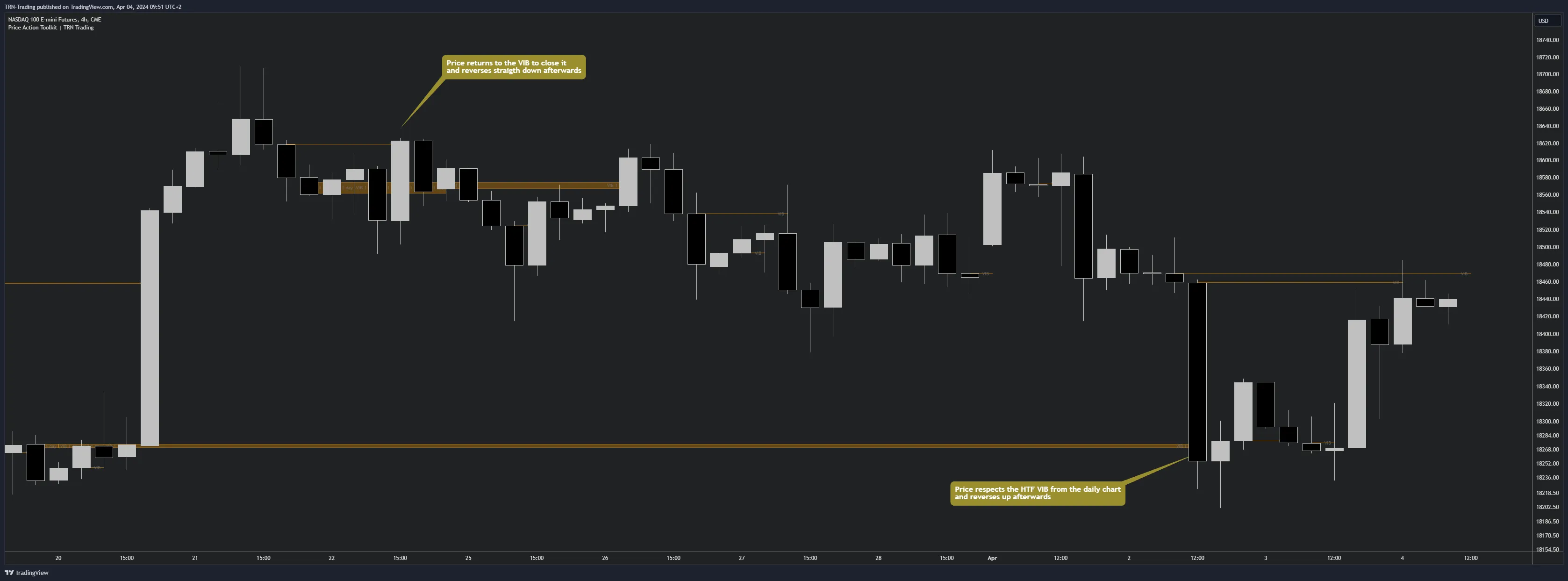
Each timeframe has independent color settings for bullish (up) and bearish (down) VIBs. This visual separation makes it straightforward to identify which timeframe generated each zone, even when multiple VIBs cluster in the same price area.
When a chart-timeframe VIB aligns with a higher-timeframe VIB at the same price level, the confluence strengthens the zone significantly. These overlapping imbalances represent aggressive volume on multiple scales pointing to the same price area.
Volume Imbalance Settings
The VIB settings provide control over how many zones appear, how long they persist, and how they display on the chart.
Zone Management
- Max Duration (default 100): The maximum number of bars a VIB remains visible before expiring. Lower values keep only recent, relevant zones. Higher values preserve older VIBs for broader structural analysis.
- Max Occurrences (default 25): The maximum number of VIB zones displayed simultaneously. When the limit is reached, the oldest VIBs are removed as new ones form.
Labels
- Label Toggle: Show or hide VIB labels on the chart.
- Show Timeframe: Display the source timeframe on each VIB label, useful when running multi-timeframe analysis.
- Label Color: Customize the label color independently of the zone color.
- Label Size: Adjust label text size for readability at different zoom levels.
Historic VIBs
Enabling Historic VIBs repaints partially filled Volume Imbalances back to their original size. By default, VIBs shrink in real time as price partially fills them, showing only the remaining unfilled portion. With Historic mode on, the full original zone remains visible, which is useful for backtesting and studying how price interacted with VIB zones over their lifetime.
Practical Application
Volume Imbalances provide the most value when combined with other structural context from the Price Action Suite. An unfilled VIB sitting at a market structure level — particularly where an MSS event occurred — becomes a high-interest reaction zone. The VIB defines the precise price area, while the structural context provides the directional bias.
For detailed workflow examples showing VIBs integrated with other Price Action Suite features, see the Usage Guide.
Related Features
FAQ
What is the difference between a Volume Imbalance and a Fair Value Gap?
A Fair Value Gap uses the high and low of candles one and three in a three-bar pattern, creating a gap where the wicks do not overlap. A Volume Imbalance uses the open and close (body) of two consecutive candles, requiring a gap between the bodies while the wicks still overlap. VIBs identify tighter, more precise zones of aggressive directional volume.
How does a Volume Imbalance get resolved?
A Volume Imbalance resolves when price returns to fill through the body gap between the two consecutive candles. Once price closes through the VIB zone, the indicator removes it from the chart. VIBs also expire when they exceed the Max Duration setting without being filled.
Can I track Volume Imbalances from higher timeframes?
Yes. The Price Action Suite supports up to three simultaneous VIB timeframes — the chart timeframe plus two additional higher timeframes (TF1 and TF2). Each timeframe has independent color settings for bullish and bearish VIBs, making it straightforward to distinguish their origin at a glance.
What does the Historic VIBs setting do?
Historic VIBs repaints partially filled Volume Imbalances back to their original size. This shows the full extent of each VIB as it first appeared, which helps traders study how price interacted with VIB zones over time. When disabled, VIBs shrink as price partially fills them.