Important Levels
The Price Action Suite draws over 30 configurable price levels from daily, weekly, and session timeframes directly on the chart. Important Levels provide the structural reference points that institutional and professional traders monitor — previous day highs and lows, weekly opens, session extremes, and more. Each level is independently customizable, making it straightforward to build a clean, focused chart that shows only the levels relevant to your trading method.
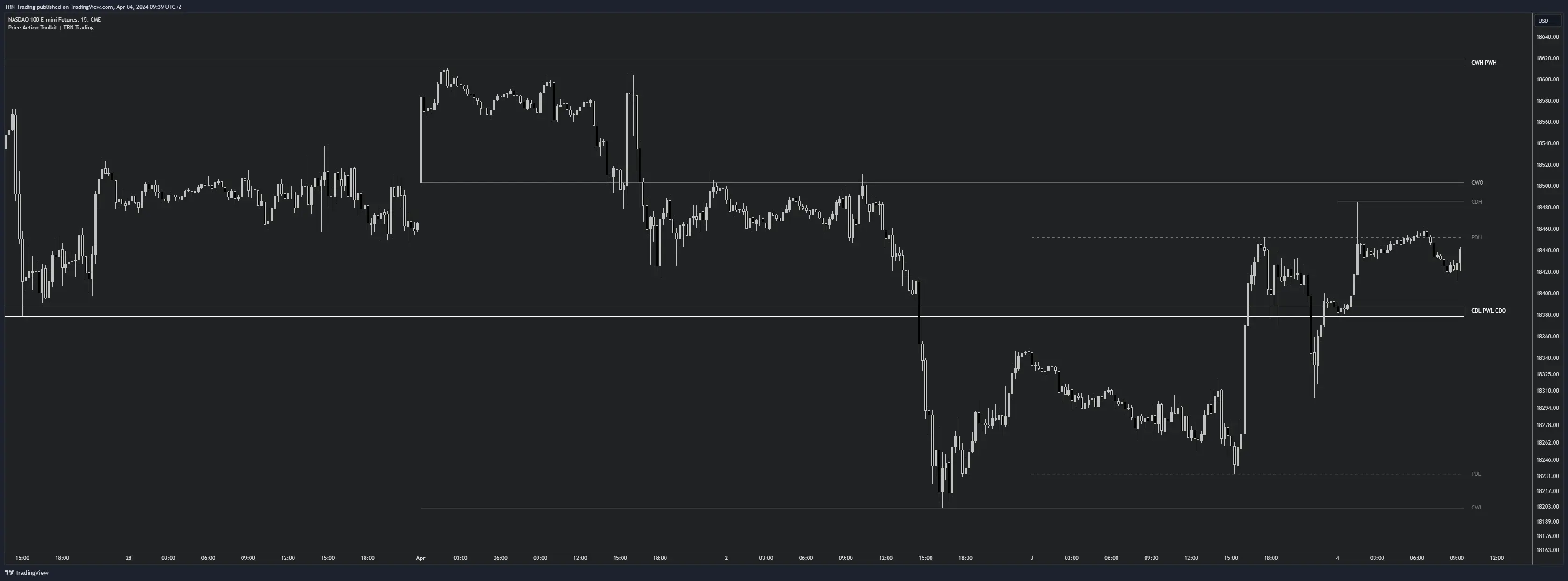
Daily Levels
Daily levels track the high, low, open, and close of the current and previous trading day. These levels form the foundation of intraday analysis because they represent the price boundaries that the broadest range of market participants are watching.
- CDH — Current Day High
- CDL — Current Day Low
- CDO — Current Day Open
- PDH — Previous Day High
- PDL — Previous Day Low
- PDC — Previous Day Close
Previous day high and low (PDH/PDL) are among the most widely referenced levels across all trading styles. Price reactions at these levels often produce tradeable moves because they represent the range boundaries where the prior session's participants established their positions. The current day open (CDO) serves as an intraday directional reference — trading above the open suggests bullish control, while trading below suggests bearish control.
Weekly Levels
Weekly levels provide a broader structural framework that adds context to daily and intraday price action. Because weekly levels represent larger participant positioning, reactions at these levels tend to be more sustained.
- CWH — Current Week High
- CWL — Current Week Low
- CWO — Current Week Open
- PWH — Previous Week High
- PWL — Previous Week Low
- PWC — Previous Week Close
The previous week high and low (PWH/PWL) act as key decision zones for swing traders. A break and hold above PWH signals weekly-scale bullish expansion, while a break below PWL confirms bearish continuation. The current week open (CWO) functions similarly to CDO but on a wider timeframe, providing weekly directional bias.
Session Levels
Session levels track the highs, lows, and closes of the three major trading sessions — Asia, London, and New York. These levels are particularly valuable for traders who follow session-based analysis and killzone frameworks, since session boundaries define where liquidity concentrates during each part of the trading day.
Asia Session
- CAH — Current Asia High
- CAL — Current Asia Low
- PAH — Previous Asia High
- PAL — Previous Asia Low
The Asia session range often defines the consolidation zone that London and New York sessions break out of. PAH and PAL serve as liquidity targets that the later sessions frequently sweep before establishing direction.
London Session
- CLH — Current London High
- CLL — Current London Low
- PLH — Previous London High
- PLL — Previous London Low
London session levels mark where the European market established its range. The London session typically generates the first major directional move of the day, making PLH and PLL important reference points for New York session traders looking for continuation or reversal setups.
New York Session
- CNH — Current New York High
- CNL — Current New York Low
- PNH — Previous New York High
- PNL — Previous New York Low
- PNC — Previous New York Close
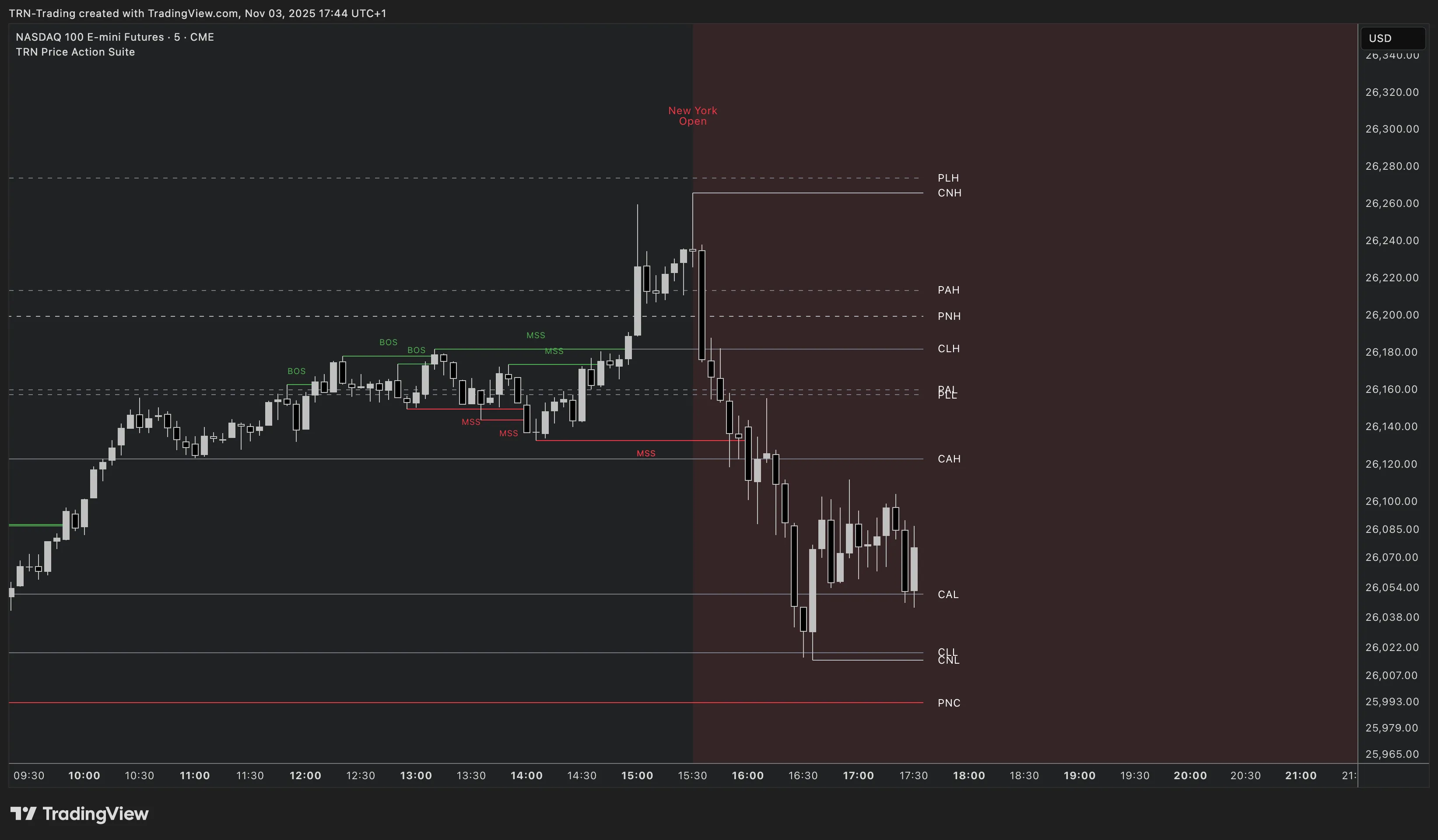
New York session levels carry significant weight because the NY session handles the highest daily volume in most markets. The previous NY close (PNC) is especially useful as a settlement reference — price positioning relative to PNC indicates whether the market opened with bullish or bearish bias in the current session.
Per-Level Customization
Every level in the Price Action Suite has its own independent settings, giving traders full control over the visual presentation.
- Toggle: Show or hide each individual level. Disable levels you do not monitor to keep the chart clean.
- Color: Choose a custom color for each level line and label.
- Line Style: Select Solid, Dashed, or Dotted. Differentiate level categories visually — for example, solid for daily levels and dashed for session levels.
- Width: Control the thickness of each level line for emphasis or subtlety.
This per-level approach means traders can highlight the three or four levels most important to their strategy while dimming or hiding everything else. A clean chart with only relevant levels visible produces faster, more confident decision-making.
Advanced Features
Color Flip
Color Flip changes the color of a level line based on whether price is currently trading above or below it. When price breaks above a level, the line turns a bullish color (green). When price breaks below, the line turns bearish (red). Color Flip provides instant visual feedback on price positioning relative to key levels without needing to compare exact values.
Merge Nearby Labels
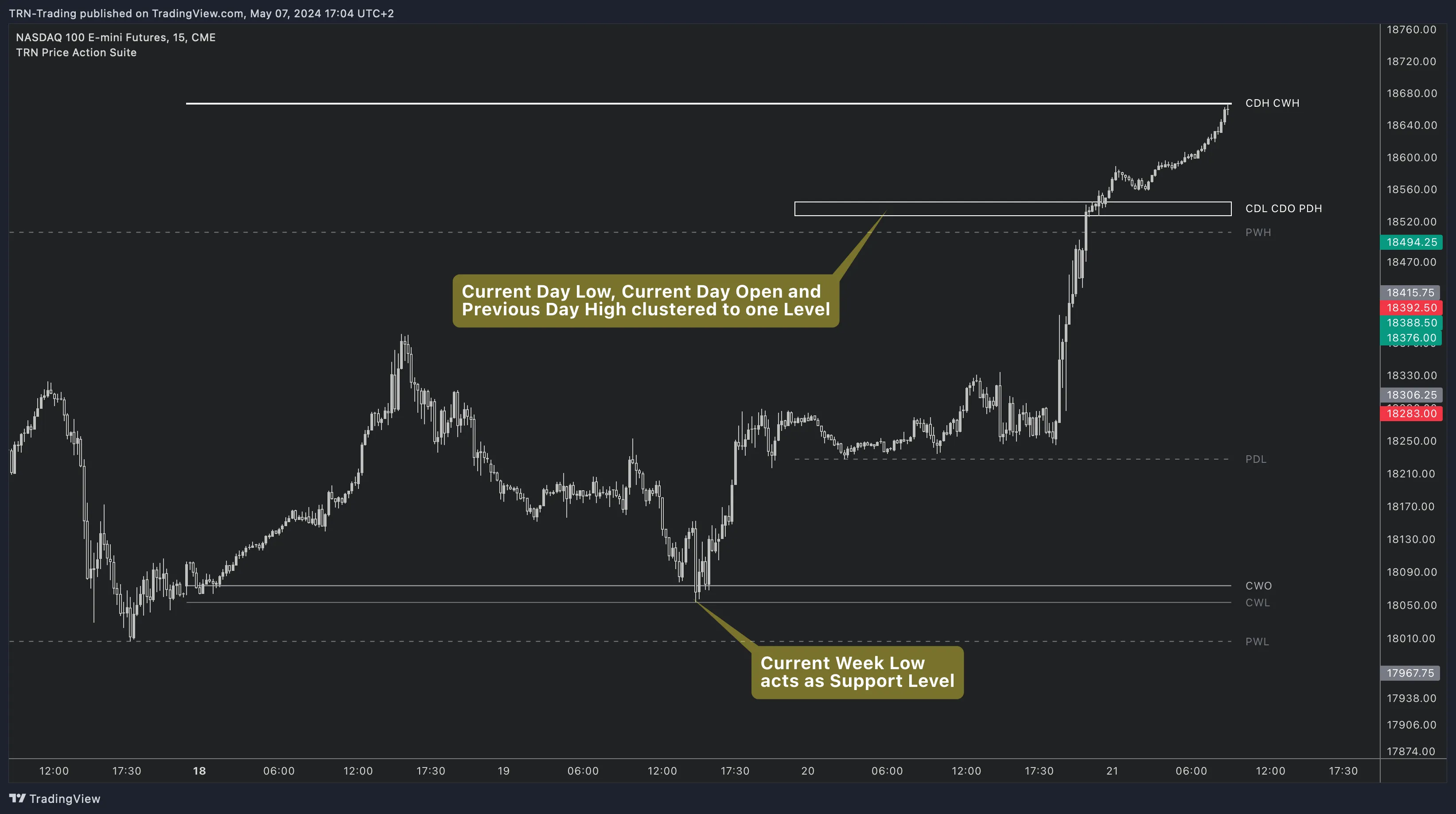
When multiple levels converge at similar prices, their labels can overlap and clutter the chart. Merge Nearby Labels detects when level labels are within a configurable proximity and combines them into a single grouped label. The sensitivity is controlled by a numeric value — 0 disables merging, and 10 to 20 is the recommended range for most instruments and timeframes.
The merge calculation adapts to current market volatility using ATR, so the same sensitivity value produces appropriate grouping whether you are trading a volatile cryptocurrency or a stable forex pair. Clustered levels often represent strong confluence zones, so the merged label itself becomes a useful visual signal that multiple structural references align at the same price area.
Draw Bars in Future
The Draw Bars in Future setting extends level lines beyond the current bar, creating space between price action and the level labels. This separation improves label readability on charts where price sits close to active levels. Increasing the value pushes labels further right, which is especially helpful on compressed chart views or when many levels are active simultaneously.
When three or more levels from different categories (daily, weekly, session) cluster at the same price, the Merge Nearby Labels feature creates a single combined label. These confluence zones represent areas where multiple participant groups are watching the same price — high-probability reaction points for entries and exits.
Combining Levels with Structure
Important Levels become most powerful when layered with market structure events. An MSS occurring at a previous week high, or a BOS confirming through a previous day level, adds structural conviction to the level itself. For traders using the full TRN system, levels also pair naturally with Swing Suite support and resistance to build a complete map of the price levels that matter most on any given trading day.
For workflows showing how to integrate Important Levels into a complete trading process, see the Usage Guide.
Related Features
FAQ
How many price levels does the Price Action Suite support?
The Price Action Suite supports over 30 configurable price levels spanning daily, weekly, and session timeframes. These include current and previous day highs, lows, opens, and closes, current and previous week levels, and session levels for Asia, London, and New York. Each level can be toggled on or off independently.
What does the Color Flip feature do?
Color Flip changes the color of a level line when price breaks through it. The line turns bullish green when price trades above the level and bearish red when price trades below. This provides an instant visual reference for whether price is currently above or below each key level without checking exact values.
How does the Merge Nearby Labels feature work?
When multiple level lines cluster in a tight price range, Merge Nearby Labels groups their labels into a single combined label to reduce chart clutter. The sensitivity is controlled by a numeric value where 0 disables merging and 10 to 20 is the recommended range. The feature adapts to current volatility using ATR to determine what counts as nearby.
Can I customize each level independently?
Yes. Every level has its own toggle to show or hide it, a color picker, a line style selector with Solid, Dashed, or Dotted options, and a width control. This per-level customization lets traders highlight the levels most relevant to their strategy while dimming or hiding the rest.