Trend Bars Pro Trading Strategies
TRN Trend Bars Pro provides multiple features that each serve a distinct purpose in trade execution. This guide presents four structured strategies that combine those features into repeatable trading frameworks. Each strategy defines the bias filter, entry trigger, and stop placement so traders can apply them systematically.
Trend Bars Pro serves as the ENTRY component of the TRN Trading System. These strategies become more effective when combined with Price Action Suite for context and Swing Suite for structure.
Strategy 1: Dynamic Trend + Signal Bars
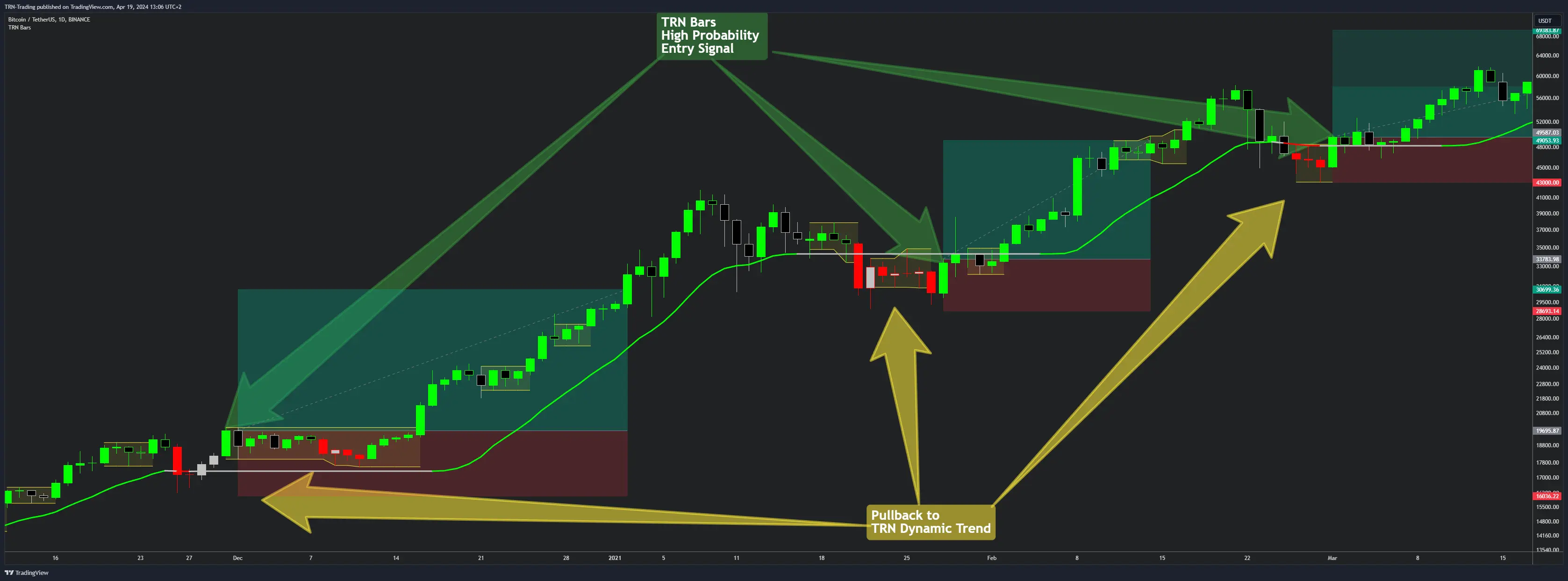
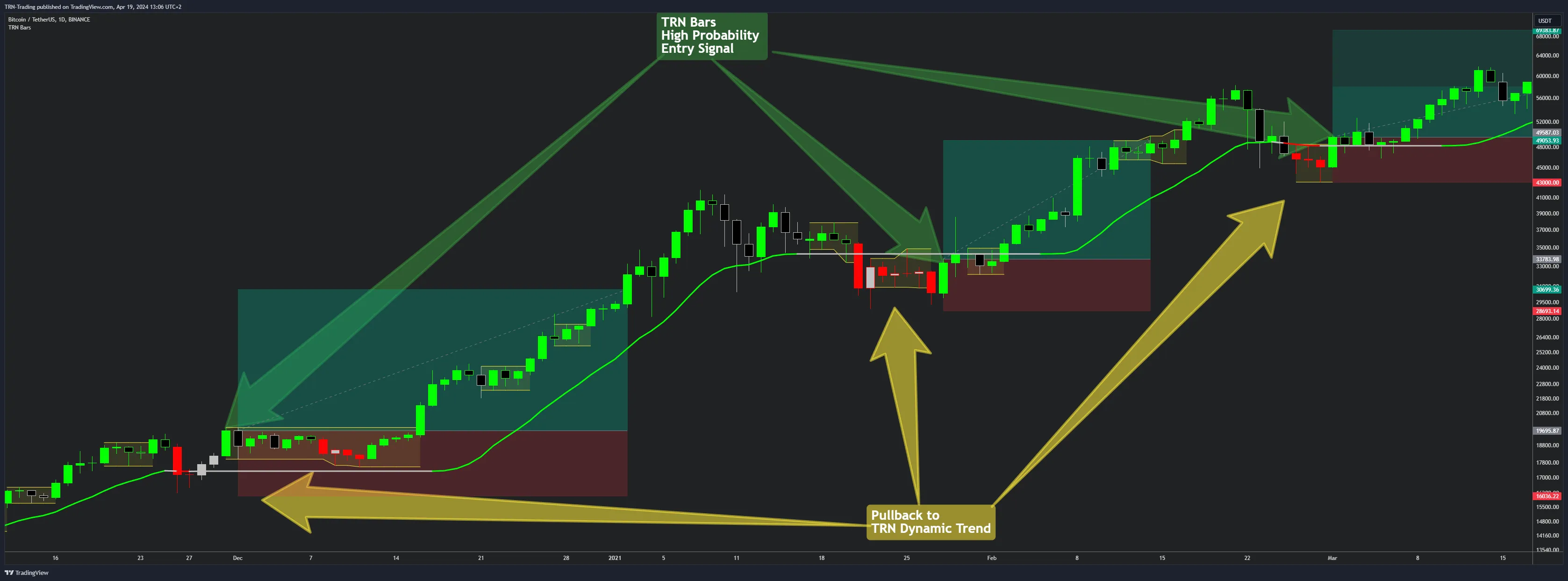
The most direct approach uses the Dynamic Trend as a directional filter and signal bars as the entry trigger. When both elements agree on direction, the resulting setup carries a structural edge.
How It Works
- Identify Dynamic Trend direction -- green (up) or red (down) determines the only direction you trade
- Wait for a qualifying signal bar -- Reversal (R), Continuation (C), or Breakout (B) bars that align with the Dynamic Trend direction
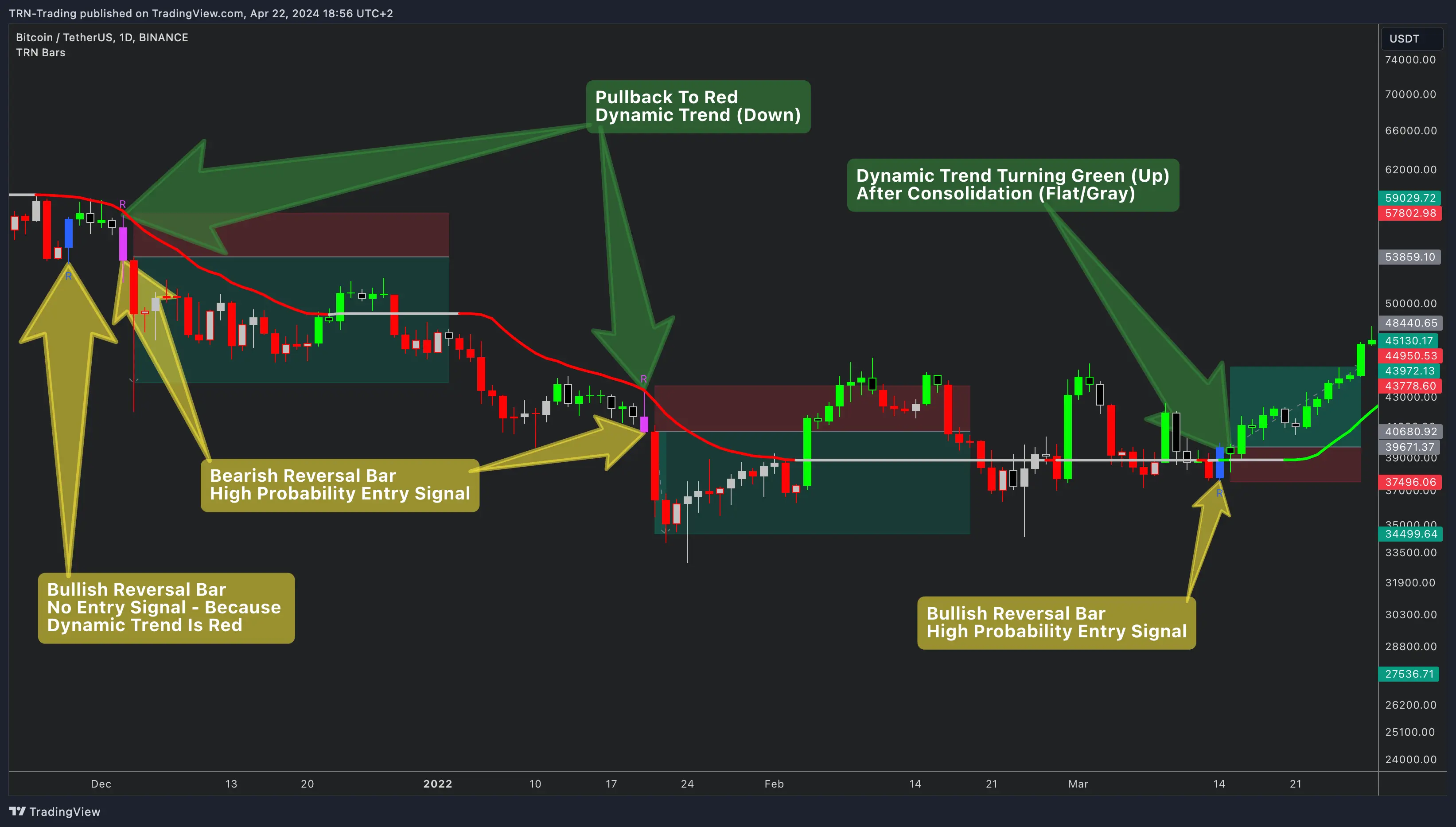
- Ignore counter-trend signals -- a bullish reversal bar when the Dynamic Trend is red represents a low-probability setup
- Enter on bar close when trend and signal agree
Key Rules
- Only take bullish signal bars (blue reversal, turquoise continuation, dark green breakout) when the Dynamic Trend is green
- Only take bearish signal bars (fuchsia reversal, orange continuation, pink breakout) when the Dynamic Trend is red
- The Dynamic Trend line itself serves as a trailing stop reference after entry
Breakout bars (B) that appear immediately after the Dynamic Trend changes color often mark the strongest moves. These bars confirm both momentum shift and trend establishment in a single bar.
Strategy 2: HTF PO3 Bias + LTF Entry
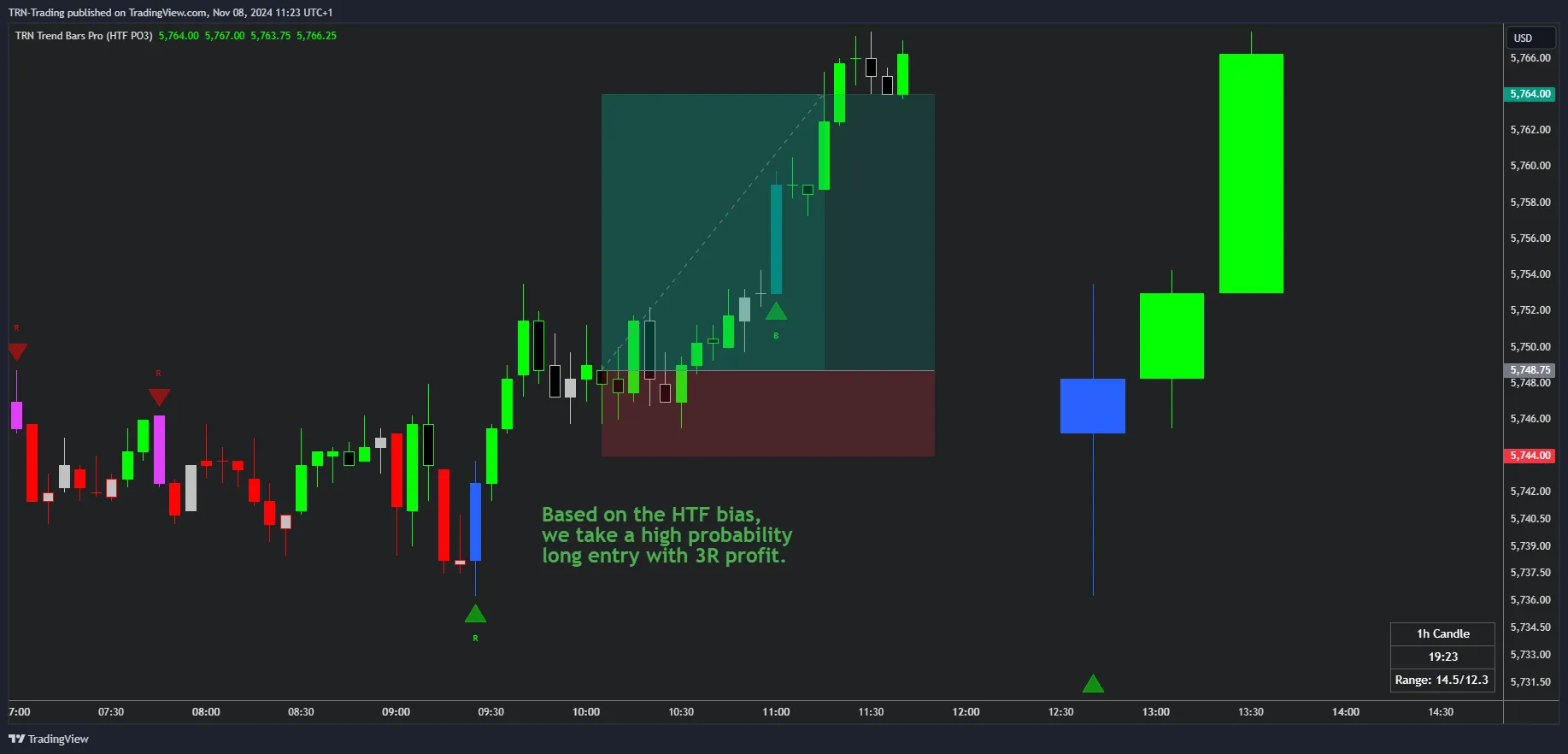
This multi-timeframe strategy uses the HTF Power of Three candle structure on a higher timeframe to establish directional bias, then drops to a lower timeframe for precision entries with signal bars.
The PO3 Framework
The Power of Three candle structure follows three phases: Accumulation, Manipulation, and Distribution. Identifying which phase the HTF candle is in determines where price is likely headed next.
Execution Steps
- Read the HTF candle -- identify the current PO3 phase and determine directional bias
- Drop to the LTF -- look for price to retrace to key levels (0.5 or 0.618 of the HTF candle range)
- Enter with a qualifying signal bar on the LTF that aligns with the HTF bias
- Target 3R or more based on the HTF candle structure and remaining distribution potential
Timeframe Pairing
| LTF (Entry) | HTF (Bias) |
|---|---|
| 1m--5m | 15m--1H |
| 15m | 4H |
| 1H | Daily |
| 4H | Weekly |
The HTF bias determines position sizing confidence. When the HTF candle shows a clear PO3 structure with room for distribution, the setup warrants fuller position sizing compared to ambiguous HTF conditions.
Strategy 3: Range Breakout + Dynamic Trend
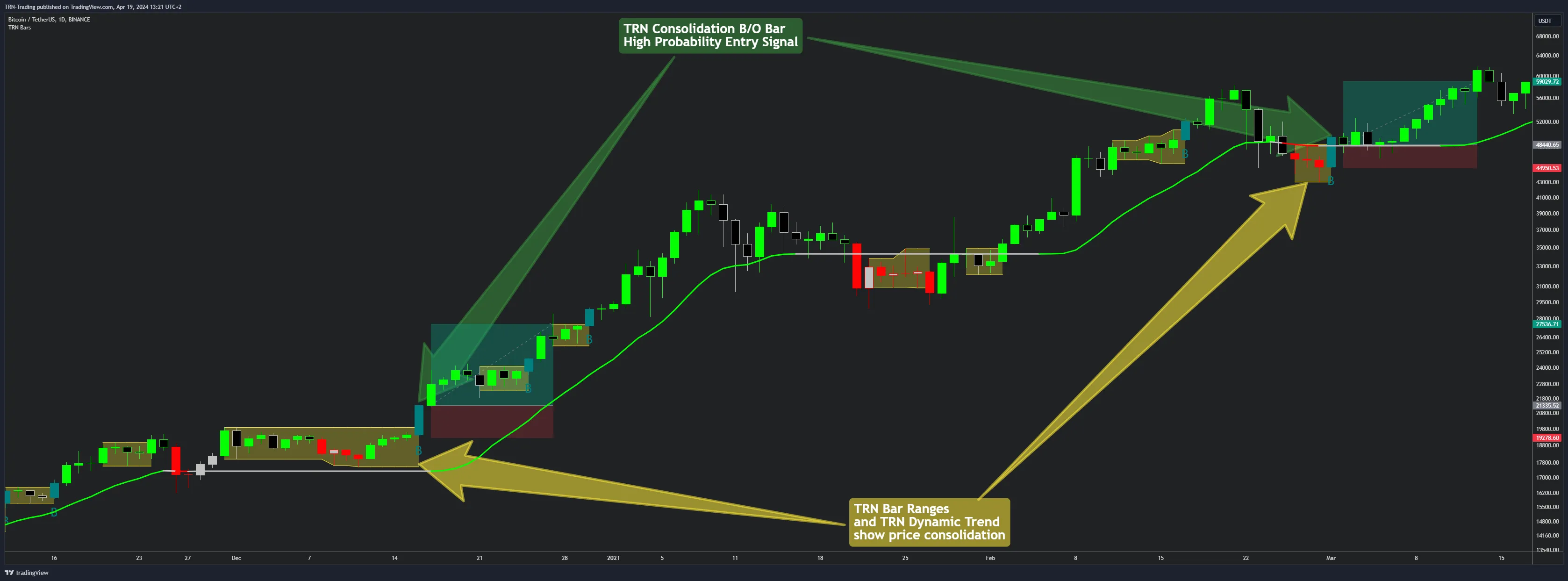
The bar range feature highlights consolidation zones where price compresses before expanding. This strategy combines range detection with Dynamic Trend direction to filter breakout trades.
Execution Steps
- Identify the consolidation range -- the yellow zone on your chart marks the compression area
- Check the Dynamic Trend direction before the breakout occurs
- Enter on a confirmed Breakout bar (B) that fires in the same direction as the Dynamic Trend
- Place stops below the range for long entries, above the range for short entries
What Makes a Valid Breakout
A valid breakout requires the Dynamic Trend to agree with the breakout direction. A breakout bar firing above a consolidation range while the Dynamic Trend remains red is a lower-probability trade. Wait for alignment before committing capital.
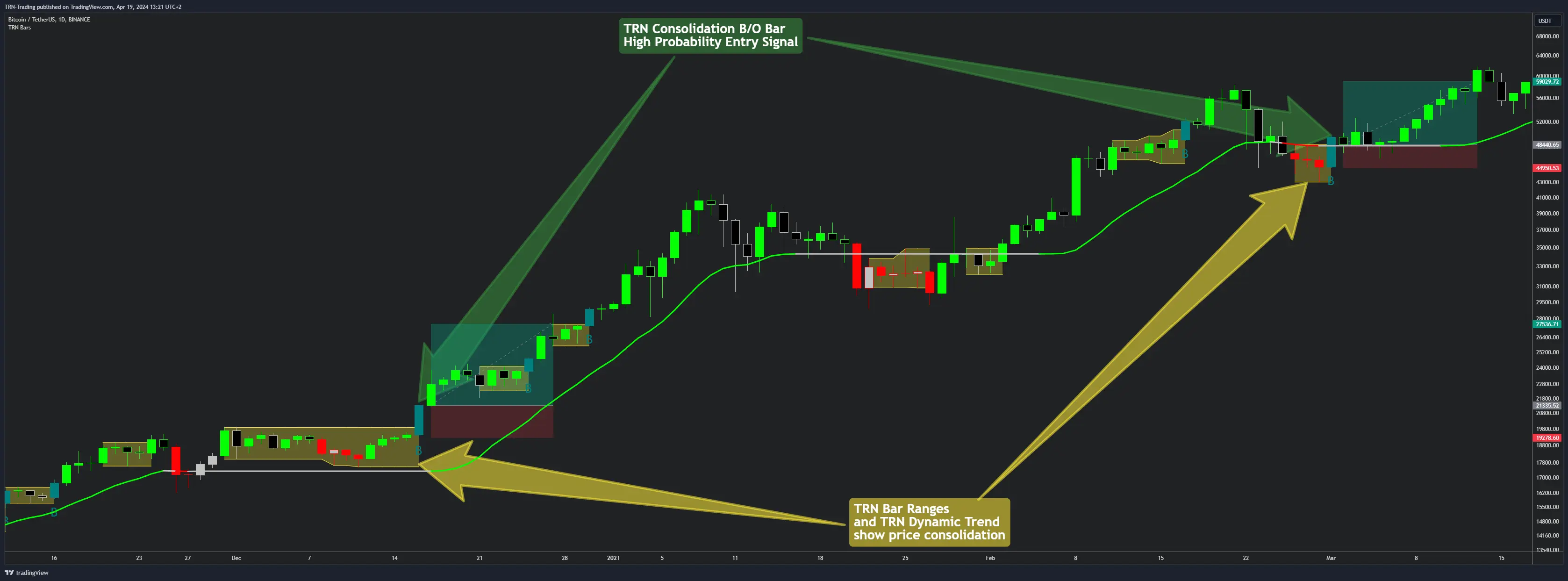
Ranges that form near Price Action Suite supply or demand zones carry additional context. A breakout from a range that sits at a demand zone and fires a bullish breakout bar with a green Dynamic Trend represents a three-factor alignment.
Strategy 4: Multi-Signal Confirmation
The highest-conviction setups occur when multiple TRN system components agree simultaneously. This strategy combines Trend Bars Pro features with Swing Suite divergence and Price Action Suite market structure for maximum confirmation.
Confirmation Stack
For a long entry, all of the following should align:
- Signal bar -- bullish R, C, or B bar appears on the chart
- Dynamic Trend -- green, confirming the uptrend
- Swing structure -- higher highs and higher lows established, or bullish divergence present on the Swing Suite
- Price Action context -- price sits at or near a demand zone or support level
For a short entry, reverse all conditions.
When to Use This Strategy
Multi-signal confirmation suits traders who prefer fewer trades with higher win rates. The trade-off is clear: waiting for full alignment means missing moves that only partially confirm. This strategy works particularly well on the 15-minute to 4-hour timeframes where all system components have enough data to produce reliable readings.
Risk Management Framework
Every strategy in this guide shares the same risk management principles. The entry method changes, but capital protection stays consistent.
Stop Placement
- Structure-based stops at range boundaries or recent swing points provide the most logical invalidation levels
- Dynamic Trend line serves as a trailing stop reference once a trade moves favorably
- Avoid arbitrary pip or point-based stops -- let the market structure define where the trade idea is wrong
Position Sizing
- HTF-aligned trades (Strategy 2, Strategy 4) warrant larger position sizes because the directional edge has multi-timeframe support
- Single-timeframe trades (Strategy 1, Strategy 3) should use standard position sizing
- Never risk more than your predefined maximum per trade regardless of conviction level
Trade Management
- Scale out partially at 1R to reduce risk, then let the remainder run to the full target
- Use the Dynamic Trend line as a trailing reference -- close the position if price breaks back through it
- Signal bars that appear against your position (counter-trend R or B bars) serve as early warning to tighten stops
FAQ
Which Trend Bars Pro strategy works best for beginners?
Strategy 1 (Dynamic Trend + Signal Bars) offers the most straightforward framework for newer traders. The Dynamic Trend provides a clear directional filter, and signal bars provide defined entry points. Traders only need to confirm that the signal bar type aligns with the Dynamic Trend direction before executing.
How many confirmations should I wait for before entering a trade?
A minimum of two confirming factors produces reliable results. For example, a signal bar aligned with the Dynamic Trend direction counts as two factors. Strategy 4 (Multi-Signal Confirmation) uses three or more factors for the highest conviction setups, combining Trend Bars Pro with Swing Suite divergence and Price Action Suite levels.
What risk management approach works with these strategies?
Structure-based stops placed at range boundaries or recent swing points provide the most logical protection. The Dynamic Trend line serves as a trailing stop reference once a trade moves in your favor. Position sizing should reflect the confidence level of the setup, with HTF-aligned trades warranting larger positions than LTF-only setups.
Can I combine multiple strategies from this guide?
Yes. These strategies overlap by design because each one emphasizes a different Trend Bars Pro feature. A range breakout (Strategy 3) that also aligns with HTF PO3 bias (Strategy 2) and shows multi-signal confirmation (Strategy 4) represents the highest-quality setup available within the system.