Dynamic Trend
The Dynamic Trend is a volatility-adaptive trend line built into Trend Bars Pro. The Dynamic Trend line smoothly follows price action, adjusting its behavior to current market volatility and changing color based on trend direction. Traders use the Dynamic Trend as a visual trend filter, a pullback reference, and a crossover signal generator.
Trend Direction and Color
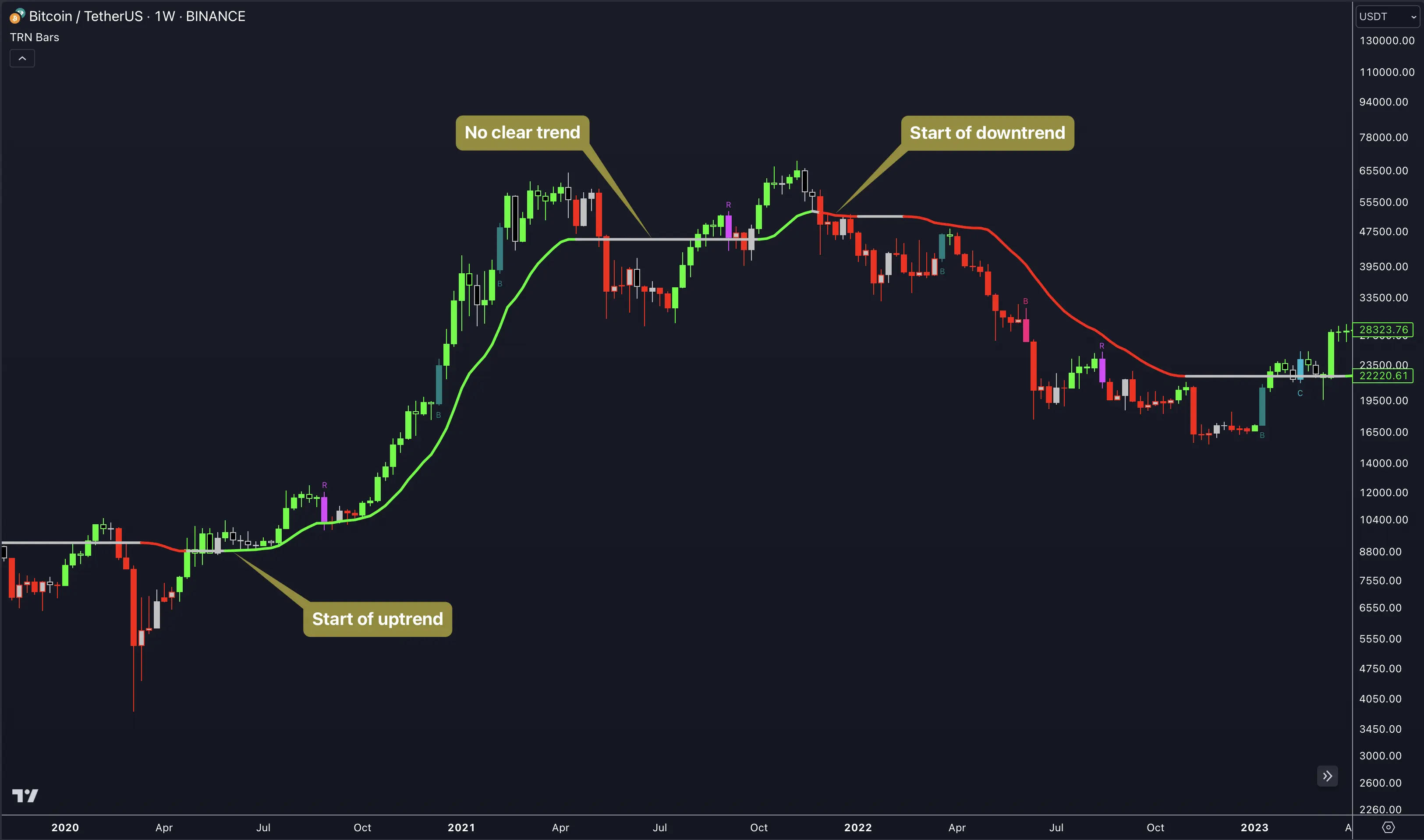
The Dynamic Trend line communicates trend state through color. A single glance tells traders whether momentum currently favors bulls, bears, or neither side.
- Green — The trend is bullish. Price is trading above the Dynamic Trend line and the line itself is rising. Bullish signal bars carry higher conviction when the Dynamic Trend agrees.
- Red — The trend is bearish. Price is trading below the Dynamic Trend line and the line is falling. Bearish signal bars align with the dominant direction.
- Gray — The trend is neutral or transitional. The Dynamic Trend line has not committed to a direction, often during choppy or range-bound conditions.
The color transitions are not arbitrary flips. The Dynamic Trend adapts to volatility, which means the line gives the current trend room to breathe before signaling a reversal. How much room depends on the sensitivity setting.
Five Sensitivity Levels
Sensitivity controls how quickly the Dynamic Trend line responds to price changes. Trend Bars Pro offers five levels, each calibrated for different trading styles and holding periods.
| Sensitivity | Behavior | Best For |
|---|---|---|
| Extra High | Trend persists longest, fewest reversals | Position trading, swing trading |
| High (default) | Balanced responsiveness | Swing trading, intraday trends |
| Medium | Moderate response speed | Day trading, multi-hour holds |
| Low | Quicker trend reversals | Day trading, short-term setups |
| Extra Low | Most responsive, reverses quickly | Scalping, fast entries and exits |
The naming follows trend persistence, not reactivity. Extra Low means the trend reverses quickly — the threshold for a reversal is low. Extra High means the trend requires a substantial move to reverse — giving the current direction more room to continue. Think of the setting as "how much room does the trend get before flipping."
Higher sensitivity levels filter out noise from minor pullbacks, keeping traders positioned through temporary retracements. Lower sensitivity levels capture shorter moves but produce more frequent reversals and potentially more whipsaws in choppy conditions.
Traders should match their sensitivity level to their typical holding period. A scalper on a 1-minute chart benefits from Extra Low sensitivity that reacts to every meaningful move. A swing trader on a 4-hour chart needs Extra High sensitivity that ignores intraday noise and holds the trend reading across multiple sessions.
Settings
The Dynamic Trend settings are straightforward — one dropdown and a handful of visual controls.
- Sensitivity — Dropdown with five options: Extra High, High (default), Medium, Low, Extra Low.
- Line Width — Default 3. Increase for high-resolution monitors or when the trend line needs to stand out against dense bar data.
- Colors:
- Up: Green (#04FF04)
- Down: Red (#FF0404)
- Neutral: Silver (#C1C1C1)
All three colors are independently customizable. Traders who use non-standard chart backgrounds or color schemes can adjust the Dynamic Trend colors to maintain visual clarity.
Trading Applications
The Dynamic Trend line supports three primary trading approaches. Each approach uses the same line but reads it differently.
Trend Crossings
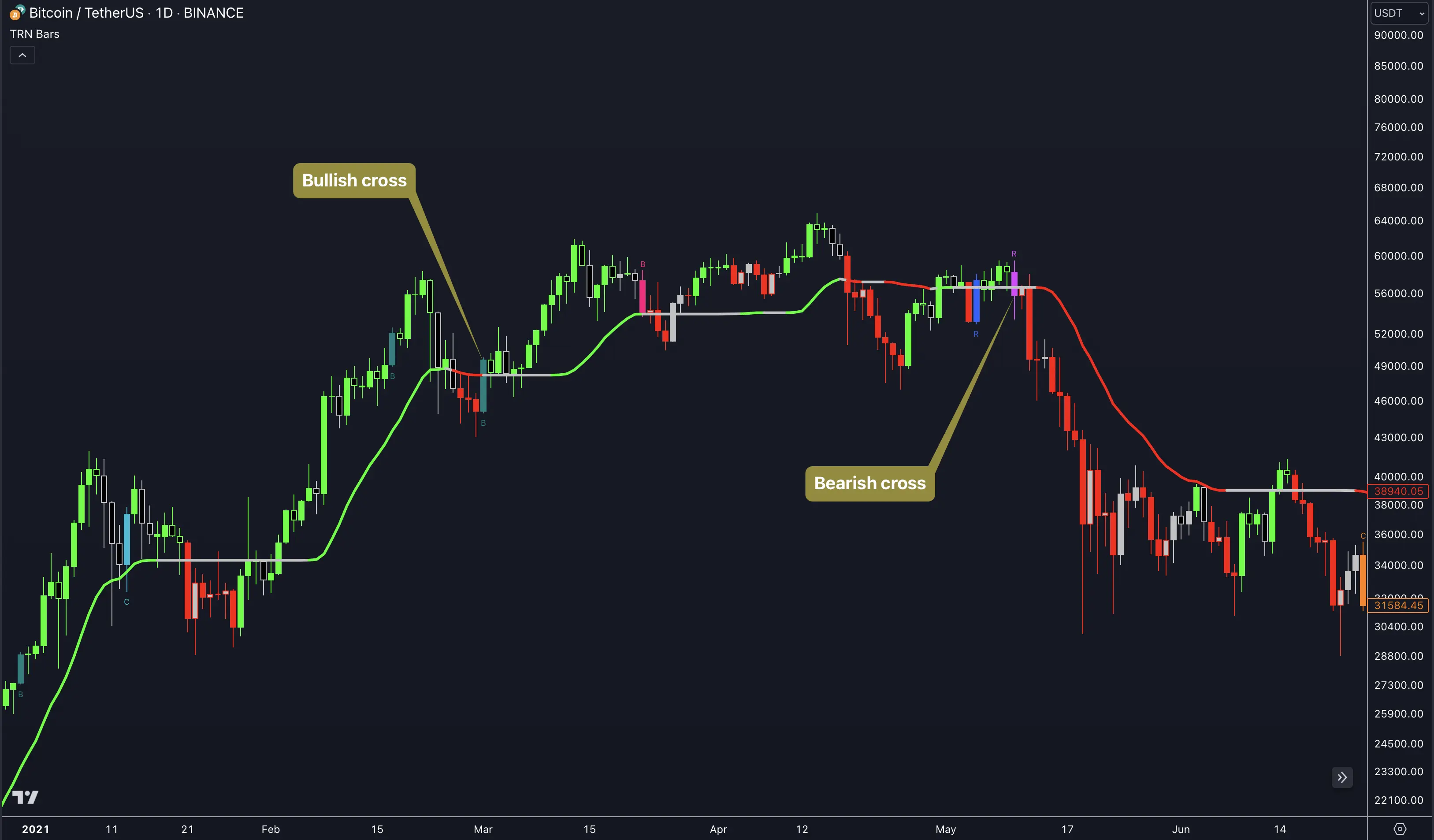
When price crosses above the Dynamic Trend line and the line turns green, a bullish crossing has occurred. When price crosses below and the line turns red, a bearish crossing has occurred. These crossings represent trend-state transitions and can serve as standalone entry triggers or confirmation filters.
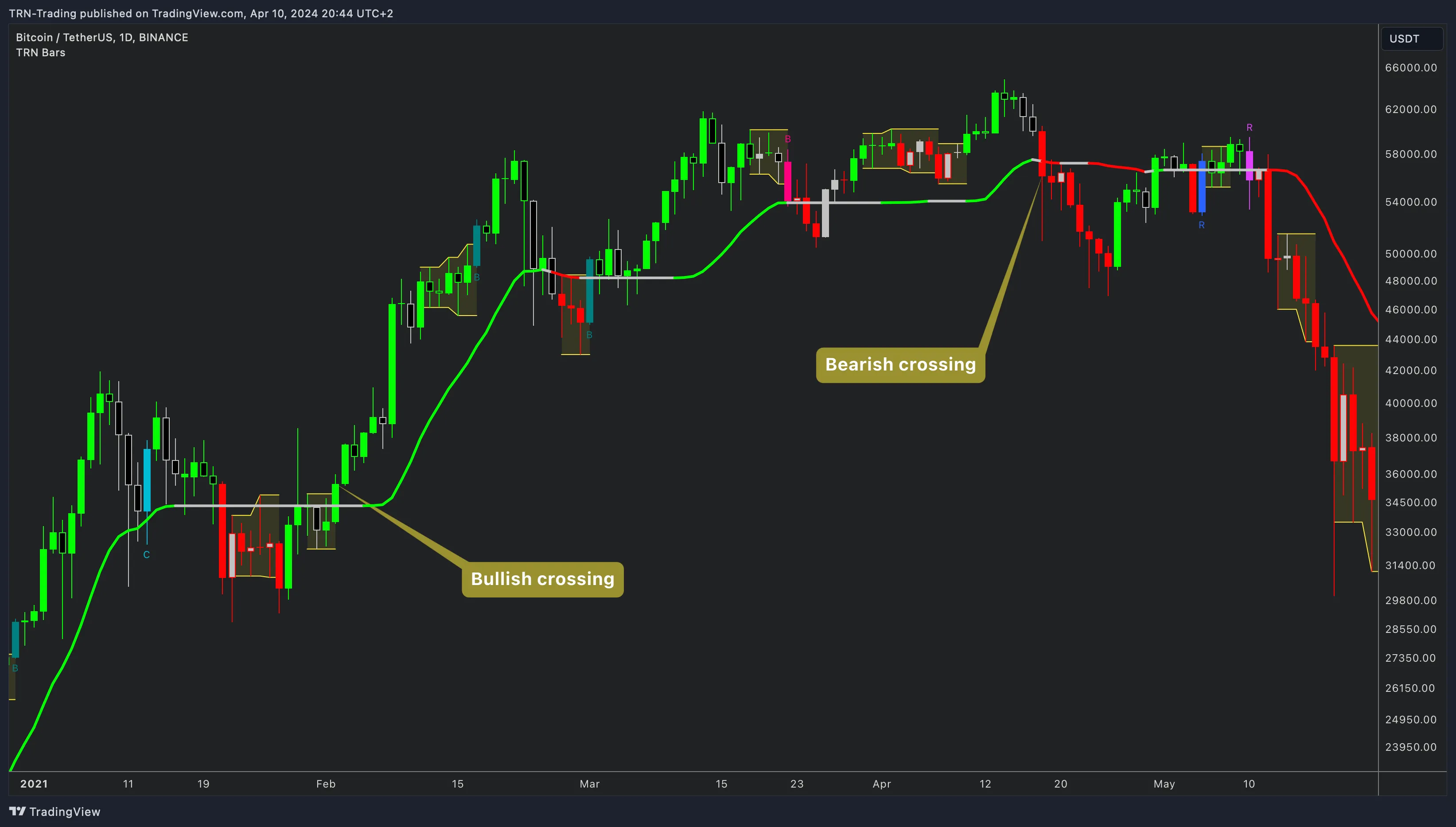
Crossings work best on higher timeframes or with higher sensitivity settings where each signal carries more weight. On lower timeframes with low sensitivity, crossings fire frequently and require additional confirmation from signal bars or Swing Suite structure to filter noise.
Trend Filter for Signal Bars
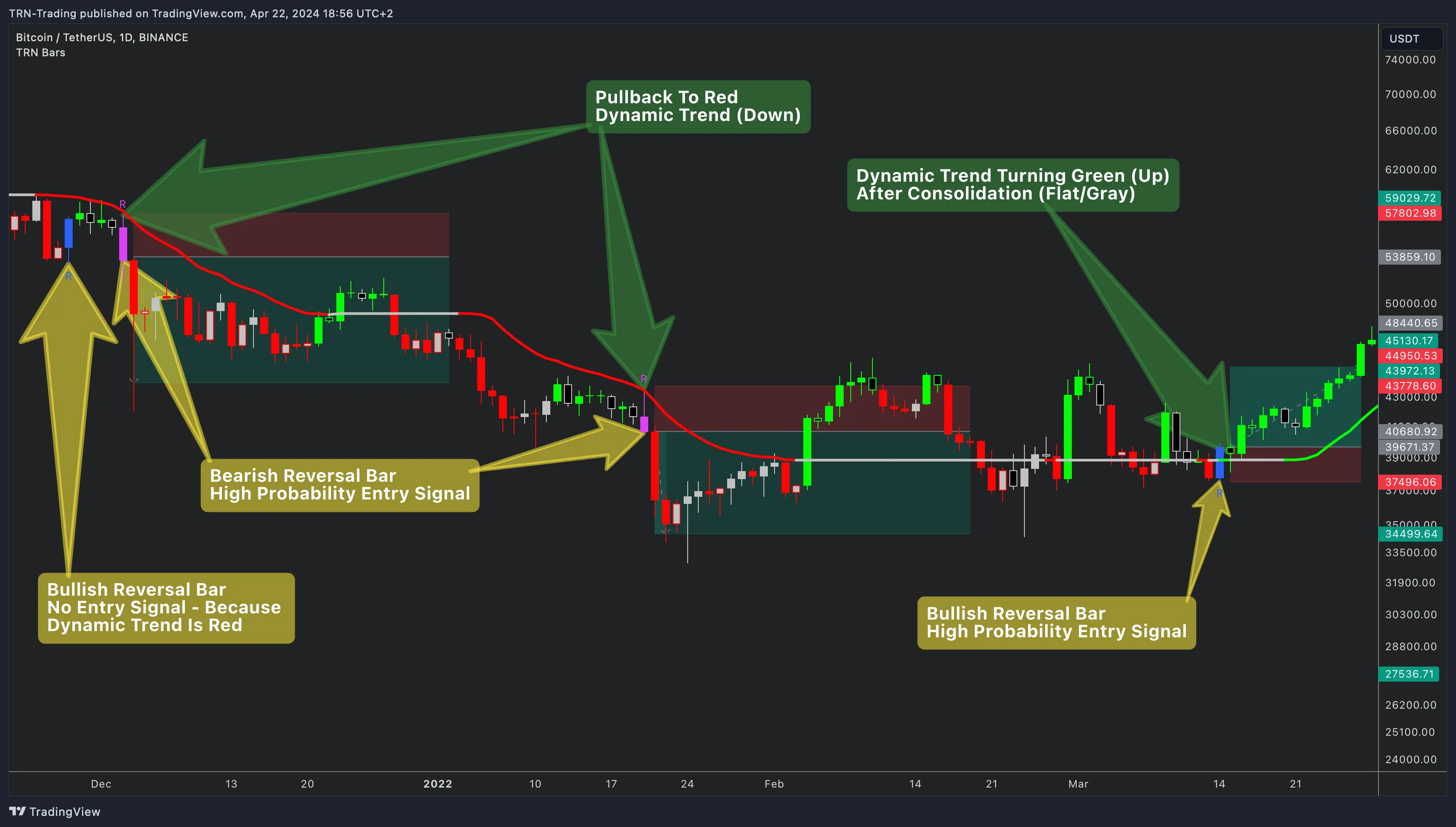
The Dynamic Trend's most powerful application is as a directional filter for signal bars. The rule is simple: only act on signal bars that align with the Dynamic Trend direction.
- Dynamic Trend green — Take bullish Strong Reversals, Morning Stars, Breakouts, and Continuations. Ignore bearish signals.
- Dynamic Trend red — Take bearish Strong Reversals, Evening Stars, Breakouts, and Continuations. Ignore bullish signals.
- Dynamic Trend gray — Exercise caution with any signal. Neutral trend state means the market lacks directional commitment, and signals in either direction carry lower probability.
This filter eliminates a significant portion of counter-trend entries that would otherwise result in poor trade outcomes. Counter-trend signals still appear on the chart — Trend Bars Pro detects them regardless of trend state — but the Dynamic Trend provides the discipline layer for deciding which signals deserve execution.
Pullback Entries
The Dynamic Trend line acts as a dynamic support level in uptrends and dynamic resistance in downtrends. When price pulls back toward the line during an active trend, that retest creates a potential entry zone.
The pullback entry method works in three steps:
- Confirm trend — The Dynamic Trend line is green (or red for shorts) and has been trending for multiple bars.
- Wait for pullback — Price retraces toward the Dynamic Trend line without causing a color change.
- Enter on confirmation — A bullish Continuation bar or Strong Reversal bar fires near the Dynamic Trend line, confirming the pullback is complete.
Pullback entries align with the path of least resistance. The Dynamic Trend line quantifies where "the trend" lives, and signal bars provide the timing for re-entry. This combination is particularly effective on trending instruments where pullbacks are shallow and the Bar Range feature shows no consolidation forming.
The Dynamic Trend works on a momentum basis, while the Swing Suite works on a structural basis. When both agree on direction — Dynamic Trend green and Swing Suite in structural uptrend — entries carry the highest conviction. Disagreement between the two often signals a transition phase where reduced position sizing or patience is warranted.
FAQ
What are the five sensitivity levels for the Dynamic Trend line?
The Dynamic Trend offers five sensitivity levels — Extra High, High, Medium, Low, and Extra Low. Extra High means the trend persists longest with the fewest reversals, making it best suited for position and swing trading. High is the default balanced setting. Medium offers moderate responsiveness. Low produces quicker reversals. Extra Low is the most responsive level where the trend reverses quickly, best suited for scalping and day trading.
How does the Dynamic Trend line change color?
The Dynamic Trend line changes color based on the current trend direction. The line turns green when the trend is bullish, red when the trend is bearish, and gray during neutral or transitional phases. Default colors are Green (#04FF04) for uptrend, Red (#FF0404) for downtrend, and Silver (#C1C1C1) for neutral. All three colors are customizable in settings.
Can the Dynamic Trend be used as a trade filter for signal bars?
Yes. Filtering signal bars through the Dynamic Trend direction is one of the most effective ways to use Trend Bars Pro. When the Dynamic Trend is green, traders focus exclusively on bullish signal bars — Strong Reversals, Morning Stars, Breakouts, and Continuations. When the Dynamic Trend is red, only bearish signals receive attention. This directional filter eliminates counter-trend entries that carry lower probability.
Which sensitivity level should traders choose for the Dynamic Trend?
The right sensitivity level depends on trading style and timeframe. Scalpers and day traders typically use Extra Low or Low for faster trend reversals that match short holding periods. Swing traders find High or Extra High more appropriate because the trend persists through minor pullbacks without flipping prematurely. The default High setting works well as a starting point across most timeframes.