Trend Bars Pro Alerts
Trend Bars Pro provides 14 configurable alert types that notify you when signal bars, trend changes, and dynamic trend turns occur. All alerts fire once per bar on confirmation, delivering actionable notifications across your entire watchlist without requiring constant chart monitoring.
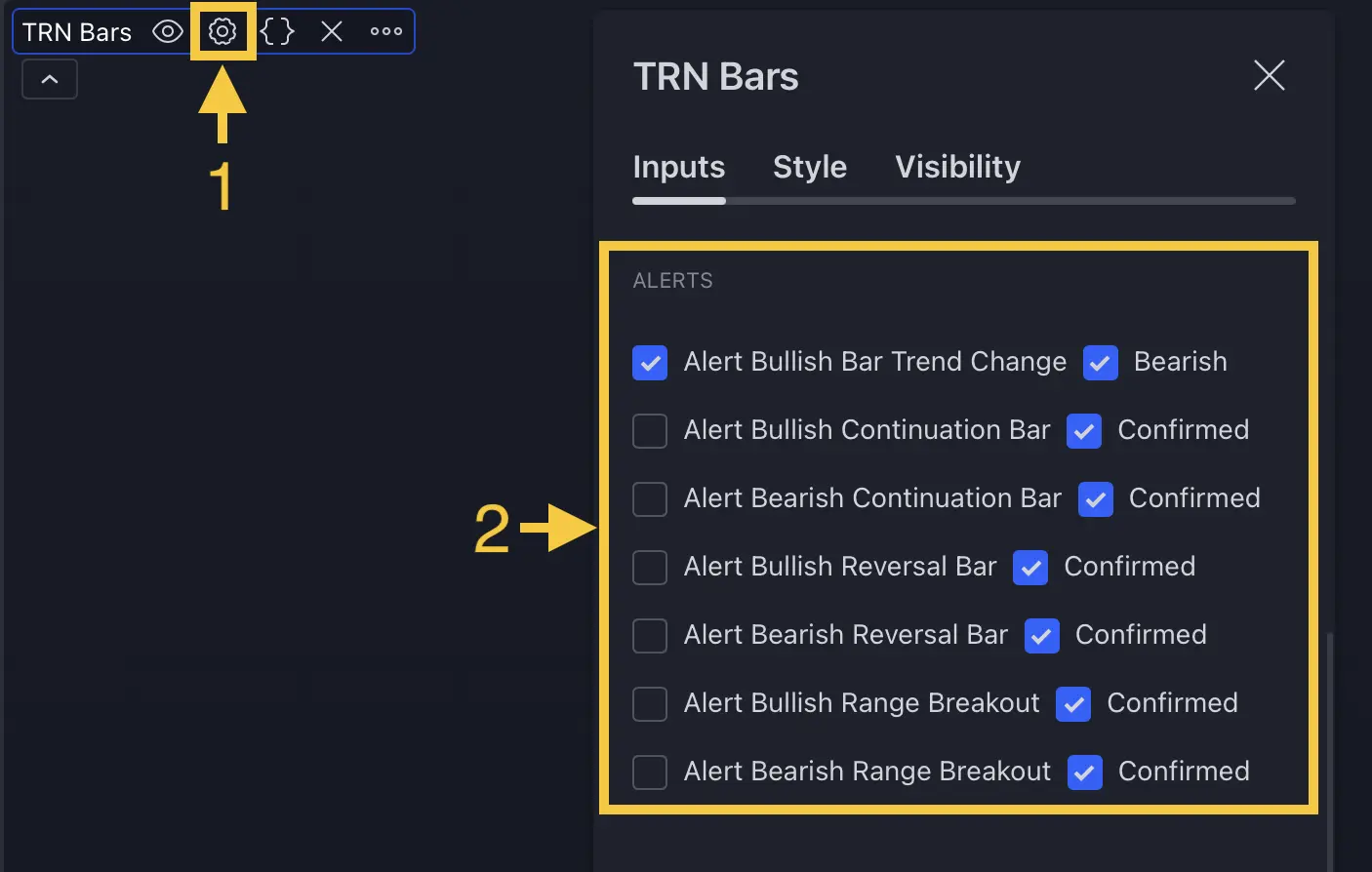
Alert Categories
Trend Bars Pro organizes its 14 alerts into three categories based on the feature that generates them. Each alert fires at bar close when the condition is confirmed, ensuring you act on validated signals rather than intrabar noise.
Bar Trend Alerts
Bar Trend alerts fire when the overall trend direction changes, marking the transition from bullish to bearish conditions or vice versa.
| Alert Name | Trigger |
|---|---|
| Bullish Bar Trend Found | Trend shifts from bearish or neutral to bullish |
| Bearish Bar Trend Found | Trend shifts from bullish or neutral to bearish |
Bar Trend alerts are disabled by default. Enable them through the Bar Trend Up and Bar Trend Down input toggles when you want notifications for broader trend direction changes rather than individual signal bars.
Signal Bar Alerts
Signal Bar alerts cover the five signal bar types in Trend Bars Pro. Each type has both a bullish and bearish variant, producing 10 alerts total. These are the most frequently used alerts because they correspond directly to actionable trade setups.
Breakout Bar Alerts
| Alert Name | Trigger |
|---|---|
| Bullish Breakout Bar Confirmed | Confirmed bullish breakout from a range or consolidation zone |
| Bearish Breakout Bar Confirmed | Confirmed bearish breakout from a range or consolidation zone |
Breakout Bar alerts pair naturally with Bar Range detection. When a range boundary is broken and confirmed on bar close, the alert fires.
Continuation Bar Alerts
| Alert Name | Trigger |
|---|---|
| Bullish Continuation Bar Confirmed | Confirmed bullish trend continuation signal |
| Bearish Continuation Bar Confirmed | Confirmed bearish trend continuation signal |
Continuation alerts are valuable for adding to existing positions or entering trend-following trades during pullbacks.
Reversal Bar Alerts
| Alert Name | Trigger |
|---|---|
| Bullish Reversal Bar Confirmed | Confirmed bullish reversal signal |
| Bearish Reversal Bar Confirmed | Confirmed bearish reversal signal |
Reversal alerts identify potential trend changes early, making them useful for counter-trend entries or as exit warnings for existing positions.
Morning Star and Evening Star Alerts
| Alert Name | Trigger |
|---|---|
| Bullish Morning Star Confirmed | Confirmed bullish Morning Star pattern |
| Bearish Evening Star Confirmed | Confirmed bearish Evening Star pattern |
These multi-bar pattern alerts detect classic candlestick formations that often precede significant directional moves.
Three Line Strike Alerts
| Alert Name | Trigger |
|---|---|
| Bullish Three Line Strike Confirmed | Confirmed bullish Three Line Strike pattern |
| Bearish Three Line Strike Confirmed | Confirmed bearish Three Line Strike pattern |
Three Line Strike alerts capture momentum continuation patterns where a single bar reverses the preceding three bars, indicating strong directional conviction.
Dynamic Trend Alerts
Dynamic Trend alerts fire when the adaptive trend line changes direction, marking structural shifts in trend momentum.
| Alert Name | Trigger |
|---|---|
| Bullish Dynamic Trend Turn | Dynamic Trend turns from bearish to bullish |
| Bearish Dynamic Trend Turn | Dynamic Trend turns from bullish to bearish |
Dynamic Trend alerts are disabled by default. Enable them through the Dynamic Trend Bull and Dynamic Trend Bear input toggles.
Alert Message Format
Every Trend Bars Pro alert follows a consistent message format:
{SYMBOL} - {TIMEFRAME} - {Signal Description}
For example: AAPL - 15m - Bullish Reversal Bar Confirmed
This format provides the instrument, timeframe, and signal type in a single line, making alerts immediately actionable whether they arrive as TradingView push notifications, email, or webhook payloads.
All alerts use freq_once_per_bar frequency, meaning each condition triggers at most one notification per bar close. This prevents duplicate alerts on the same bar while ensuring every confirmed signal is captured.
Configuring Alerts
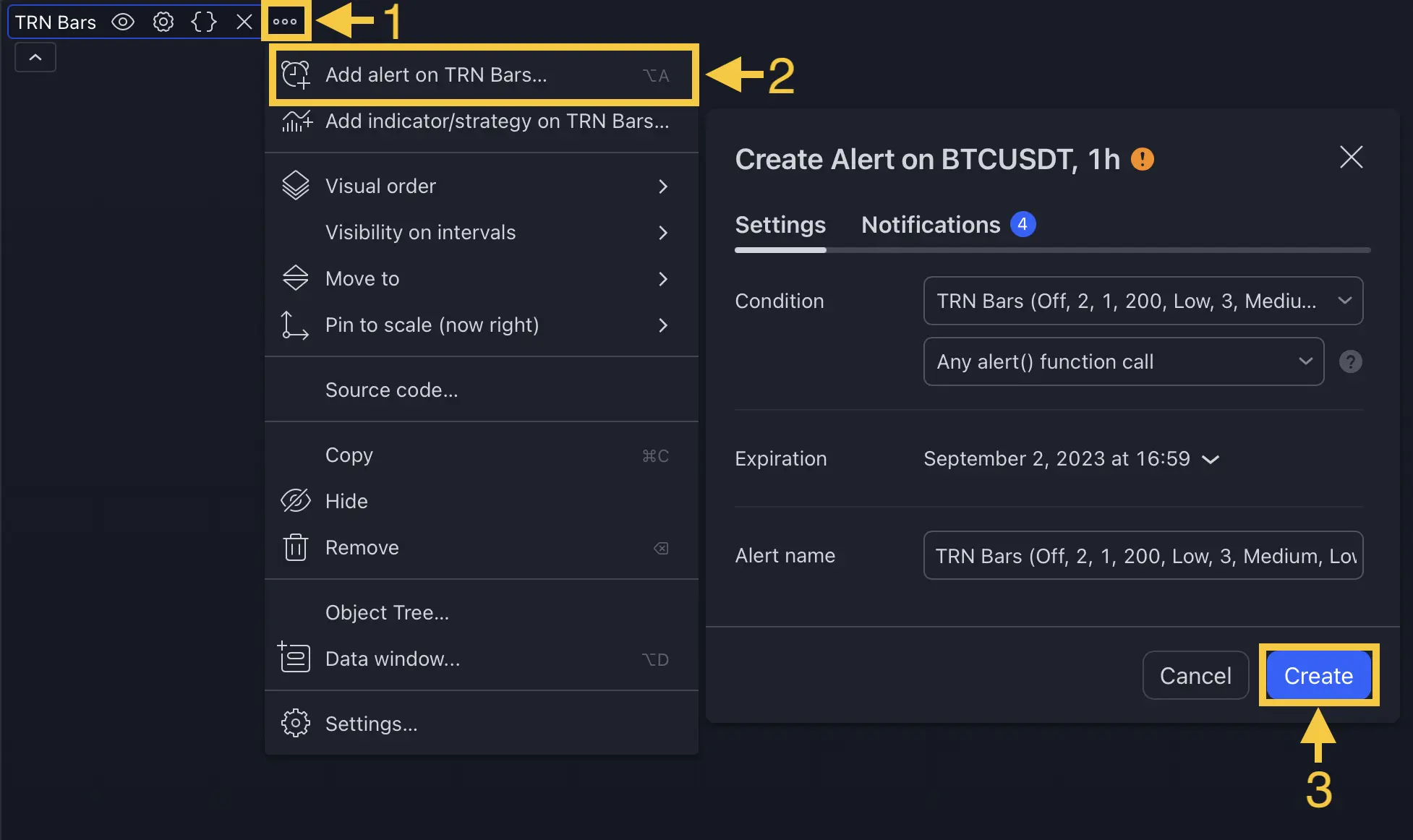
Alert Input Toggles
Trend Bars Pro provides six input toggles that control which alert categories are active:
| Input | Controls | Default |
|---|---|---|
| Signal Bar Up | All bullish signal bar alerts (Breakout, Continuation, Reversal, Morning Star, Three Line Strike) | On |
| Signal Bar Down | All bearish signal bar alerts (Breakout, Continuation, Reversal, Evening Star, Three Line Strike) | On |
| Bar Trend Up | Bullish Bar Trend Found alert | Off |
| Bar Trend Down | Bearish Bar Trend Found alert | Off |
| Dynamic Trend Bull | Bullish Dynamic Trend Turn alert | Off |
| Dynamic Trend Bear | Bearish Dynamic Trend Turn alert | Off |
Setup Steps
- Open indicator settings on your chart and navigate to the alert inputs section
- Enable the desired toggles for the alert categories you want to monitor
- Create a TradingView alert on the chart (Alt+A or the alert button)
- Select Trend Bars Pro as the alert condition source
- Choose your notification method — push notification, email, webhook, or any combination
- Set the alert to fire once per bar close to match the indicator's confirmation logic
Start with Signal Bar Up and Signal Bar Down enabled (the defaults) to receive notifications for all five signal types in both directions. Add Bar Trend and Dynamic Trend alerts once you have a workflow for processing the additional notifications. Running all 14 alerts across a large watchlist generates significant volume — focus on the signals that match your trading method.
FAQ
How many alert types does Trend Bars Pro offer?
Trend Bars Pro provides 14 distinct alert types organized into three categories. Bar Trend alerts (2) fire on trend direction changes. Signal Bar alerts (10) cover five signal types — Breakout, Continuation, Reversal, Morning Star/Evening Star, and Three Line Strike — each with a bullish and bearish variant. Dynamic Trend alerts (2) fire on trend line direction turns.
How often do Trend Bars Pro alerts fire?
All Trend Bars Pro alerts fire once per bar using the freq_once_per_bar frequency. This means each alert condition triggers at most one notification per bar close, preventing duplicate alerts on the same bar while ensuring you receive every confirmed signal across your monitored instruments and timeframes.
Can I enable only bullish or only bearish alerts?
Yes. Signal Bar alerts are controlled by two master toggles — Signal Bar Up enables all bullish signal bar alerts while Signal Bar Down enables all bearish signal bar alerts. Bar Trend and Dynamic Trend alerts have separate bullish and bearish toggles as well, giving you full control over which direction you receive notifications for.
What information does the alert message contain?
Every Trend Bars Pro alert message follows a consistent format that includes the trading symbol, the timeframe, and the specific signal type. For example, a bullish breakout alert on ES futures on the 15-minute chart would read "ES - 15m - Bullish Breakout Bar Confirmed." This format makes alerts immediately actionable across multiple watchlist instruments.