Market Structure (BOS & MSS)
The Price Action Suite market structure detection identifies two critical events that define how trends develop and reverse. Break of Structure (BOS) confirms that a trend remains intact, while a Market Structure Shift (MSS) warns that the prevailing trend may be ending. Together, these events give traders a structured framework for reading directional bias directly from price.
Break of Structure (BOS)
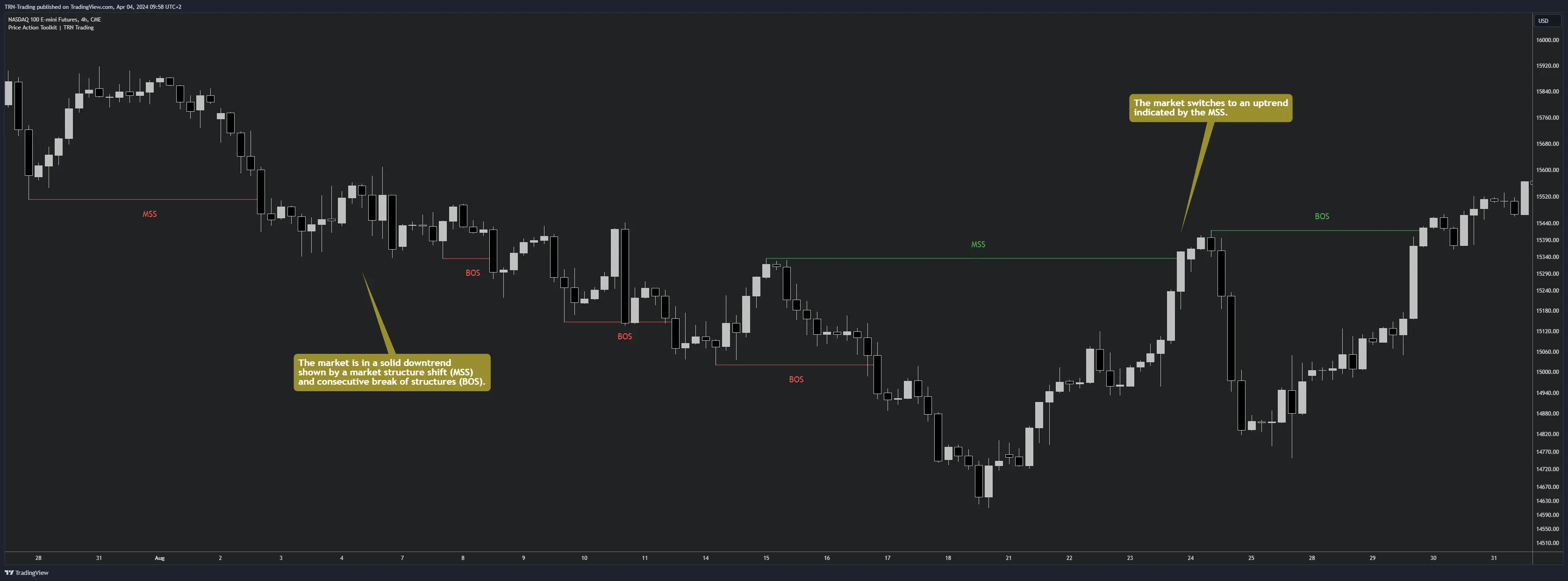
A Break of Structure occurs when price breaks a swing high or swing low in the direction of the current trend. BOS events confirm that the existing trend has enough momentum to continue, making them valuable for traders who want to stay positioned with the dominant move. Each BOS label appears at the level where the structural break happened, providing a clear visual trail of trend progression across the chart.
When price prints consecutive BOS events in the same direction, the trend is healthy. Traders often use BOS confirmations to add to positions or re-enter after pullbacks, since each break validates that the prior swing level has been overcome.
Market Structure Shift (MSS)
A Market Structure Shift, also known as a Change of Character (CHoCH), occurs when price breaks a swing point against the current trend direction. MSS events are early reversal warnings that the market may be transitioning from bullish to bearish or vice versa. The Price Action Suite labels MSS events distinctly from BOS, making it straightforward to spot when structural character changes on the chart.
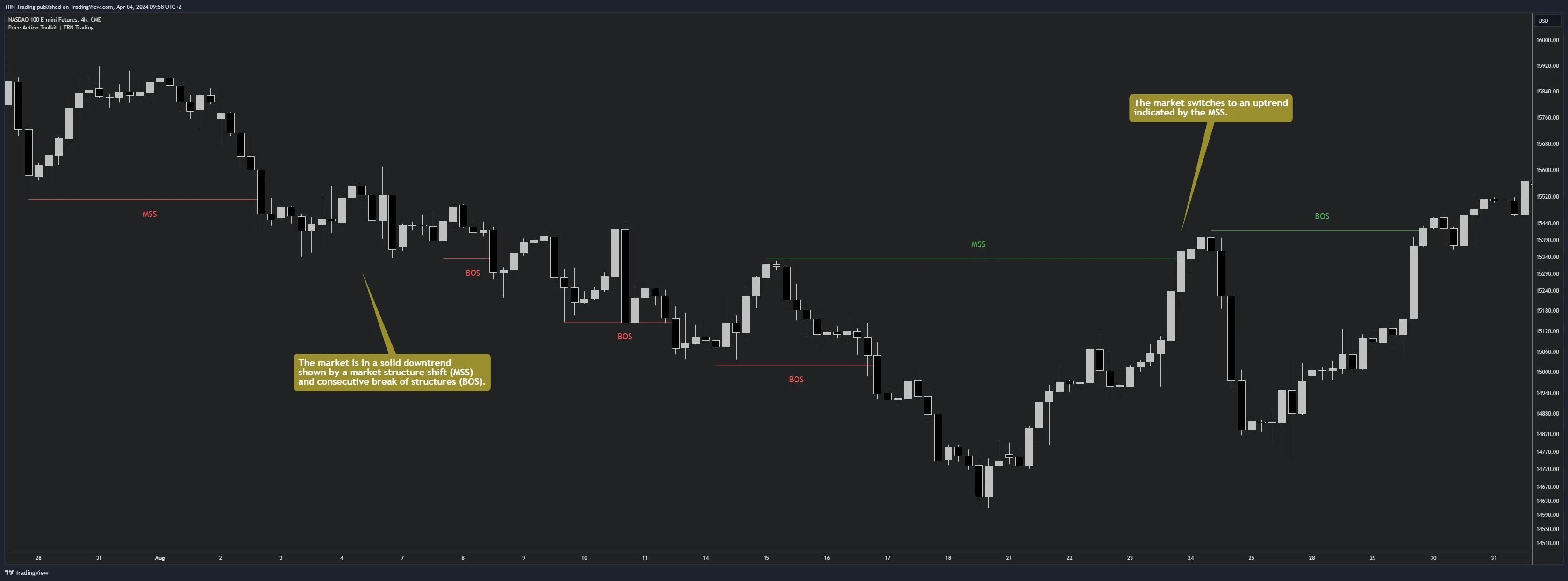
MSS events carry more weight when they appear near supply and demand zones or Fair Value Gaps, since structural shifts at these levels often lead to sustained reversals rather than false breaks.
Internal and External Structure
The Price Action Suite provides two independent structure layers that run simultaneously on the same chart. Internal Structure uses a smaller swing size to capture short-term structural changes, while External Structure uses a larger swing size to reveal higher-timeframe structure without switching charts. This dual-layer approach gives traders both granular and macro views of trend health in one pane.
Internal Structure
Internal Structure tracks market structure using the Internal Size parameter. The default value of 5 detects swings that reflect short-term price action behavior. Internal BOS and MSS events respond quickly to price movement, making them suitable for timing entries and identifying early shifts in momentum. Traders focused on intraday or short-term swing setups typically rely on Internal Structure as their primary structural reference.
External Structure
External Structure activates through a separate toggle and uses a larger swing size (default 10). Because External Structure requires more significant price movement to register a swing point, BOS and MSS events on the external layer represent higher-conviction structural changes. When Internal Structure shows an MSS but External Structure still prints BOS, the broader trend remains intact despite the short-term shift.
When both Internal and External MSS events fire in the same direction, the reversal signal carries significantly more weight. A single Internal MSS alone may just be a pullback within the larger trend confirmed by External BOS.
Market Structure Settings
Each structure layer provides independent controls for both BOS and MSS events, giving traders full control over what appears on the chart.
Structure Size
- Internal Size (default 5): Controls the swing sensitivity for internal structure detection. Lower values detect more frequent, smaller structural events. Higher values filter out minor swings.
- External Size (toggle + default 10): Enables the second structure layer with its own swing sensitivity. Only active when the External toggle is enabled.
Display Controls
- MSS Toggle: Show or hide Market Structure Shift labels. Separate color settings for bullish MSS (up) and bearish MSS (down). Custom label text (default "MSS") lets traders use their preferred terminology.
- BOS Toggle: Show or hide Break of Structure labels. Separate color settings for bullish BOS (up) and bearish BOS (down). Custom label text (default "BOS") supports personalized labeling.
- Text Size: Auto, Huge, Large, Normal, Small, or Tiny. Auto scales with chart zoom level.
- Line Style: Solid, Dashed, or Dotted lines connect the structural break to the swing point.
- Line Width: Controls the thickness of structure lines for visibility preference.
Market Structure Alerts
The Price Action Suite provides dedicated alerts for both market structure event types. The MSS Alert fires when a Market Structure Shift is detected on the chart timeframe. The BOS Alert fires when a Break of Structure is confirmed. Both alerts operate on the chart timeframe only, keeping alert logic aligned with the visible structure on screen.
Set up alerts through TradingView's alert dialog by selecting the Price Action Suite and choosing the desired condition. For step-by-step setup, see the Usage Guide.
Market structure events become more actionable when combined with important price levels and Swing Suite structure. An MSS at a previous day high or weekly level carries more conviction than one occurring in open space.
Related Features
FAQ
What is the difference between BOS and MSS?
A Break of Structure (BOS) confirms trend continuation when price breaks a swing point in the direction of the current trend. A Market Structure Shift (MSS) signals a potential reversal when price breaks a swing point against the current trend direction. Both events are detected automatically by the Price Action Suite.
How do Internal and External Structure work together?
Internal Structure uses a smaller swing size to track short-term market structure changes, while External Structure uses a larger swing size to monitor higher-timeframe structure on the same chart. Running both simultaneously gives traders a dual-layer view of trend health without switching timeframes.
Can I receive alerts for market structure events?
Yes. The Price Action Suite provides separate alerts for BOS and MSS events. Both alert types fire on the chart timeframe, allowing traders to monitor trend continuations and potential reversals without watching the screen continuously.
What swing size should I use for Internal vs External Structure?
The default Internal Size of 5 works well for tracking short-term structure on most timeframes. The default External Size of 10 captures broader structural shifts. Increasing either value filters out minor swings and shows only more significant structural events.