Harmonic Patterns Usage Guide
This guide covers practical trading strategies and workflows for the Harmonic Patterns Suite. Each strategy includes recommended settings and step-by-step execution.
Strategy 1: Full Confirmation Trading
Full confirmation trading uses the strongest breakout condition to maximize win rate — accepting later entries in exchange for higher-quality signals.
Setup
- Set Breakout Condition to TRN Bars Signals + Trend (default)
- Set Min RR Ratio to 1.5 for quality filtering
- Enable all 7 patterns in Long & Short mode
- Enable the Statistics table to validate performance
Execution
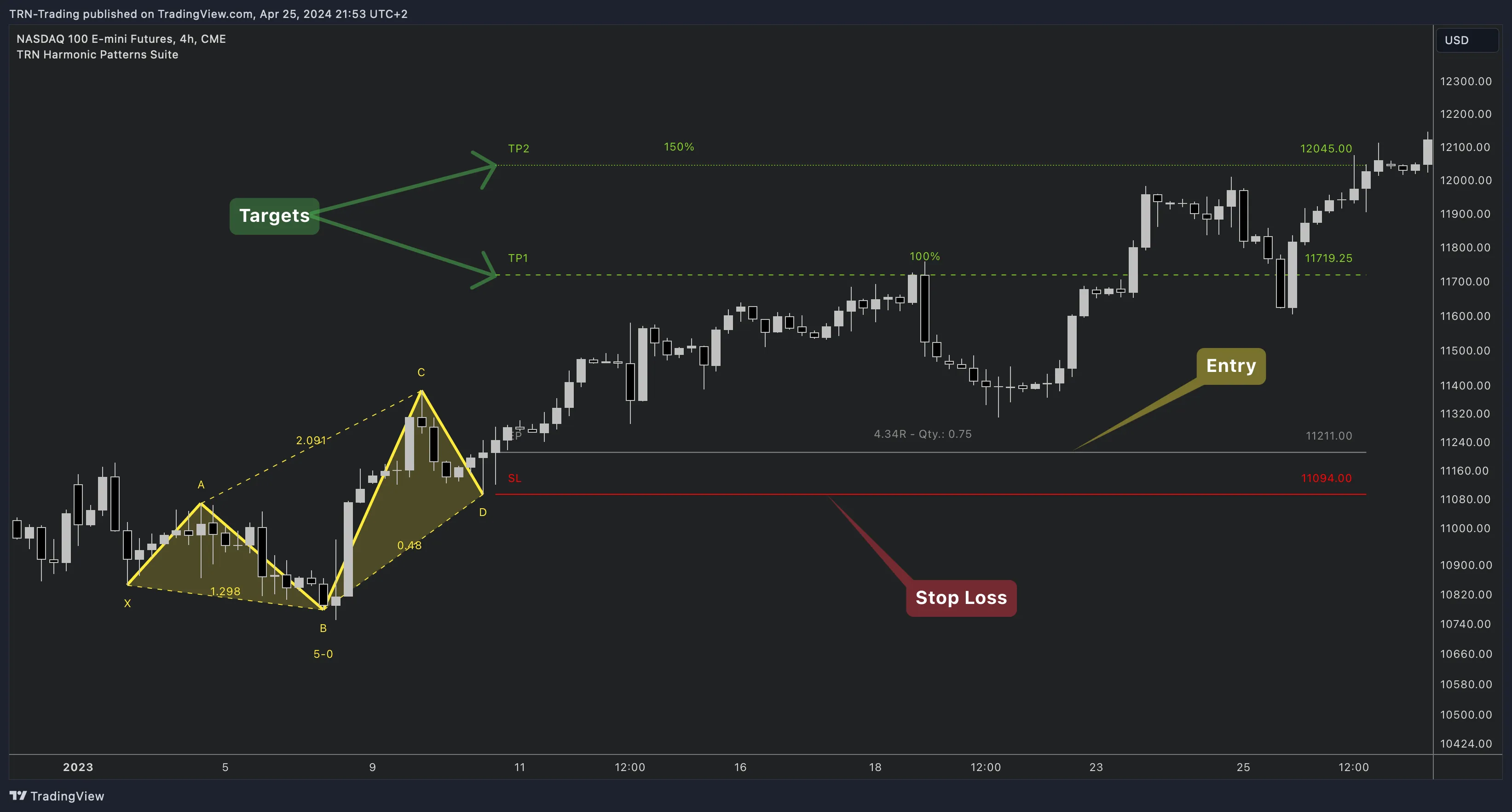
- Wait for the Harmonic Patterns Suite to detect a complete XABCD pattern
- The indicator monitors for the breakout condition from point D
- When TRN Bars confirms a signal bar plus trend alignment, the breakout triggers
- The indicator displays entry, stop loss, TP1, and TP2 levels automatically
- Monitor the trade against the projected targets
If you don't have Trend Bars Pro, use Swing Flip or Close 3 Lows/Highs as alternative breakout conditions for strong confirmation without TRN Bars integration.
Strategy 2: Fast Entry Trading
Fast entry trading uses simpler breakout conditions for earlier entries — accepting more false signals in exchange for better entry prices on winning trades.
Setup
- Set Breakout Condition to Close Below/Above 2 Lows/Highs
- Set Min RR Ratio to 1.1 (allow more setups)
- Focus on 2-3 strongest patterns (e.g., Gartley, Bat, Butterfly)
- Use tighter TP percentages (TP1: 80%, TP2: 120%)
Execution
- The indicator enters faster after pattern completion at D
- Expect a lower win rate but better average entry prices
- Compare performance against Full Confirmation in the Statistics table
Strategy 3: Pattern-Selective Trading
Disable underperforming patterns and focus only on the ones that produce results on your instrument.
Setup
- Enable the Statistics table with "Separate Long & Short" mode
- Run the indicator for a period with all patterns enabled
- Identify which patterns have the highest TP1 hit rates
- Disable underperforming patterns (set to "Off")
Execution
- Fewer but higher-quality signals from proven patterns
- Regularly review statistics as market conditions change
- Consider enabling different patterns for different market phases
Alert Setup
The Harmonic Patterns Suite provides 6 alert types.
| Alert | Default | When It Fires |
|---|---|---|
| Pattern Active | Off | A complete XABCD pattern has been detected |
| Pattern Buildup | Off | An incomplete pattern is forming (X, A, B points established) |
| B/O Up Confirmed | On | Bullish breakout confirmed by the selected breakout condition |
| B/O Down Confirmed | On | Bearish breakout confirmed by the selected breakout condition |
| B/O Up Unconfirmed | Off | Bullish breakout intra-bar — not yet confirmed |
| B/O Down Unconfirmed | Off | Bearish breakout intra-bar — not yet confirmed |
Setting Up Alerts
- Enable the desired alert types in the indicator's Alerts settings group
- Right-click the indicator on your chart → select Add Alert
- In the Condition dropdown, select Any Alert Function Call
- Configure your notification method — popup, email, or webhook
The Harmonic Patterns Suite uses runtime alert() calls. Always select Any Alert Function Call as the condition type when creating alerts.
Recommended Settings by Trading Style
| Style | Pattern Size | Breakout Condition | Min RR | Patterns |
|---|---|---|---|---|
| Day Trading (5-15min) | Very Small (5) | Close 2 Lows/Highs | 1.1 | All 7 |
| Swing Trading (1H-4H) | Small (8) | Swing Flip | 1.5 | All 7 |
| Conservative | Medium (12) | TRN Bars + Trend | 2.0 | Gartley, Bat, Butterfly |
| Multi-Instrument | Very Small (5) | TRN Bars Signals | 1.1 | All 7 |
Combining with Other TRN Indicators
Trend Bars Pro
Already integrated as a breakout condition. For traders not using TRN Bars breakout conditions, add Trend Bars Pro separately for trend direction and bar-level momentum analysis.
Harmonic Patterns Scanner
Use the Harmonic Patterns Scanner to monitor up to 20 symbols simultaneously — then switch to the Harmonic Patterns Suite for detailed analysis and trade execution on the best setups.
Price Action Suite
Identify Fair Value Gaps and order blocks near your TP levels. Harmonic pattern targets that align with price action levels carry higher conviction.
FAQ
What is the best strategy for harmonic pattern trading?
The most reliable approach is using TRN Bars Signals + Trend as the breakout condition (the default) with the minimum RR ratio set to 1.5 or higher. This ensures strong confirmation and favorable risk/reward on every trade. Combine with the Statistics table to validate performance on your instrument.
How do I set up alerts for harmonic patterns on TradingView?
Enable the desired alert types in the indicator's Alerts settings (Pattern Active, Pattern Buildup, Breakout Confirmed/Unconfirmed). Then right-click the indicator, select Add Alert, choose Any Alert Function Call, and configure your notification method.
Which Pattern Size should I use for harmonic patterns?
For day trading on 5-15 minute charts, use Tiny or Very Small (2-5). For swing trading on 1H-Daily charts, use Small to Medium (7-12). Harmonic patterns tend to be more reliable on higher timeframes where the XABCD structure represents significant price movement.