Harmonic Pattern Risk Management
Harmonic Patterns Suite provides a complete trade management framework with per-pattern target type configuration, a minimum risk/reward ratio filter, and an integrated position sizing calculator.
Per-Pattern Target Types
Each of the 7 harmonic patterns has its own configurable target type that defines how TP1 and TP2 are calculated. Different patterns use different swing point relationships for their projections.

| Pattern | Default Target Type | Alternative |
|---|---|---|
| Gartley | Points C, A | Length X→A |
| Bat | Points C, A | Length X→A |
| Butterfly | Points B, A | Length X→A |
| Crab | Points B, A | Length C→D |
| Cypher | Points C, A | Length X→C |
| Shark | Points B, A | Length X→C |
| 5-0 | Length B→C | (single option) |
| Setting | Default | What It Controls |
|---|---|---|
| TP1 (%) | 100% | First target as percentage of the selected projection distance |
| TP2 (%) | 150% | Second target as percentage (set to 0 to disable) |
The 5-0 pattern uses only one target type (Length B→C) because its unique 5-swing structure doesn't follow the standard XABCD projection geometry.
Minimum Risk/Reward Filter
The minimum RR ratio filter prevents the Harmonic Patterns Suite from displaying trade setups where the risk/reward is unfavorable.
| Setting | Default | What It Controls |
|---|---|---|
| Min Risk-Reward Ratio | 1.1 | Minimum RR based on TP1. Patterns below this threshold are hidden |
Patterns that complete at point D but produce a risk/reward below the threshold are hidden — TP/SL lines are not drawn and no breakout alert is triggered. This ensures every visible trade setup meets your minimum profitability criteria.
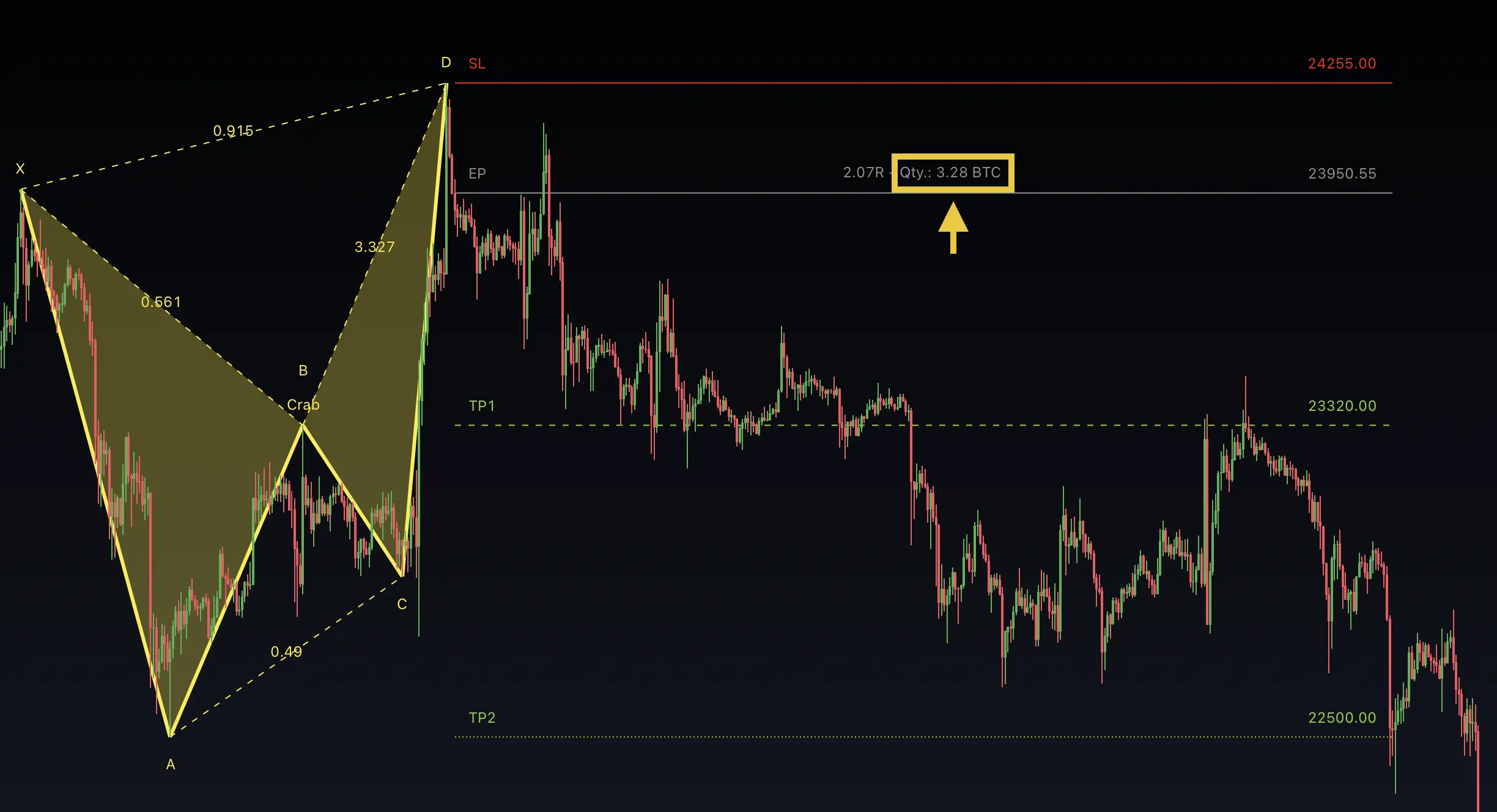
Position Sizing Calculator
| Setting | Default | What It Controls |
|---|---|---|
| Use Risk Management | Off | Enable the position sizing calculator |
| Account Size | 10,000 | Your trading account balance |
| Risk % | 1.0% | Maximum risk per trade as percentage of account |
When enabled, the Harmonic Patterns Suite calculates the appropriate position size for each trade. The calculated quantity can be displayed alongside the TP/SL labels.
Trade Visualization
The Harmonic Patterns Suite offers detailed visualization controls:
| Setting | Default | What It Controls |
|---|---|---|
| Compact Mode | On | Condensed display with essential information only |
| TP/SL Line Length | 0 (auto) | Line extension — 0 = matches pattern bar length |
| Pattern Point Labels | On | Display X, A, B, C, D labels |
| Harmonic Types | On | Display pattern type name (e.g., "Gartley") |
| Ratios | On | Display Fibonacci ratio lines between swing legs |
| Show Old Entries | Historic | Display old entry markers (Off, Historic, All) |
Enable Ratios to see the Fibonacci relationships between each swing leg. This helps you understand the pattern's geometric quality at a glance.
FAQ
How are take profit targets calculated for each harmonic pattern?
Each harmonic pattern has its own configurable target type that defines which swing points or leg lengths are used for TP projection. For example, Gartley uses Points C and A by default, while Crab uses Points B and A. TP1 defaults to 100% and TP2 to 150% of the selected projection distance.
What is the minimum risk/reward ratio filter?
The minimum RR ratio filter (default 1.1) prevents the Harmonic Patterns Suite from displaying trade setups where the risk/reward is unfavorable. Patterns that complete at point D but produce a risk/reward below the threshold are hidden from the chart and do not trigger alerts.
Where is the stop loss placed for harmonic patterns?
The stop loss is automatically placed at a level based on the pattern's XABCD geometry — typically beyond the pattern's extremes at the X point or beyond the D point extension. The exact placement depends on the specific pattern type and its Fibonacci structure.
How does the position sizing calculator work?
The optional position sizing calculator takes your account size and risk percentage per trade, then calculates the appropriate position size based on the distance between entry and stop loss. The calculated quantity is displayed alongside the TP/SL labels when enabled.