Consolidation Pattern Usage Guide
This guide covers practical trading strategies and workflows for Consolidation and Range Pattern. Each strategy includes recommended settings and step-by-step execution.
Strategy 1: Confirmed Range Breakouts
Confirmed range breakouts are the highest-probability use of the Consolidation and Range Pattern — waiting for price to close beyond a well-established range boundary.
Setup
- Set Min Touch Points to 4 or higher for well-validated ranges
- Keep Smart Breakout Detection enabled
- Set Min RR Ratio to 1.5 or higher for quality filtering
- Enable the Statistics table to validate performance
Execution
- Wait for the indicator to detect a valid consolidation range
- When price closes beyond a boundary, a confirmed breakout triggers
- The indicator automatically displays entry, stop loss, and TP1/TP2/TP3 levels
- Check the RR ratio — if below your minimum, the trade setup is not displayed
- Monitor the trade against the projected TP and SL levels
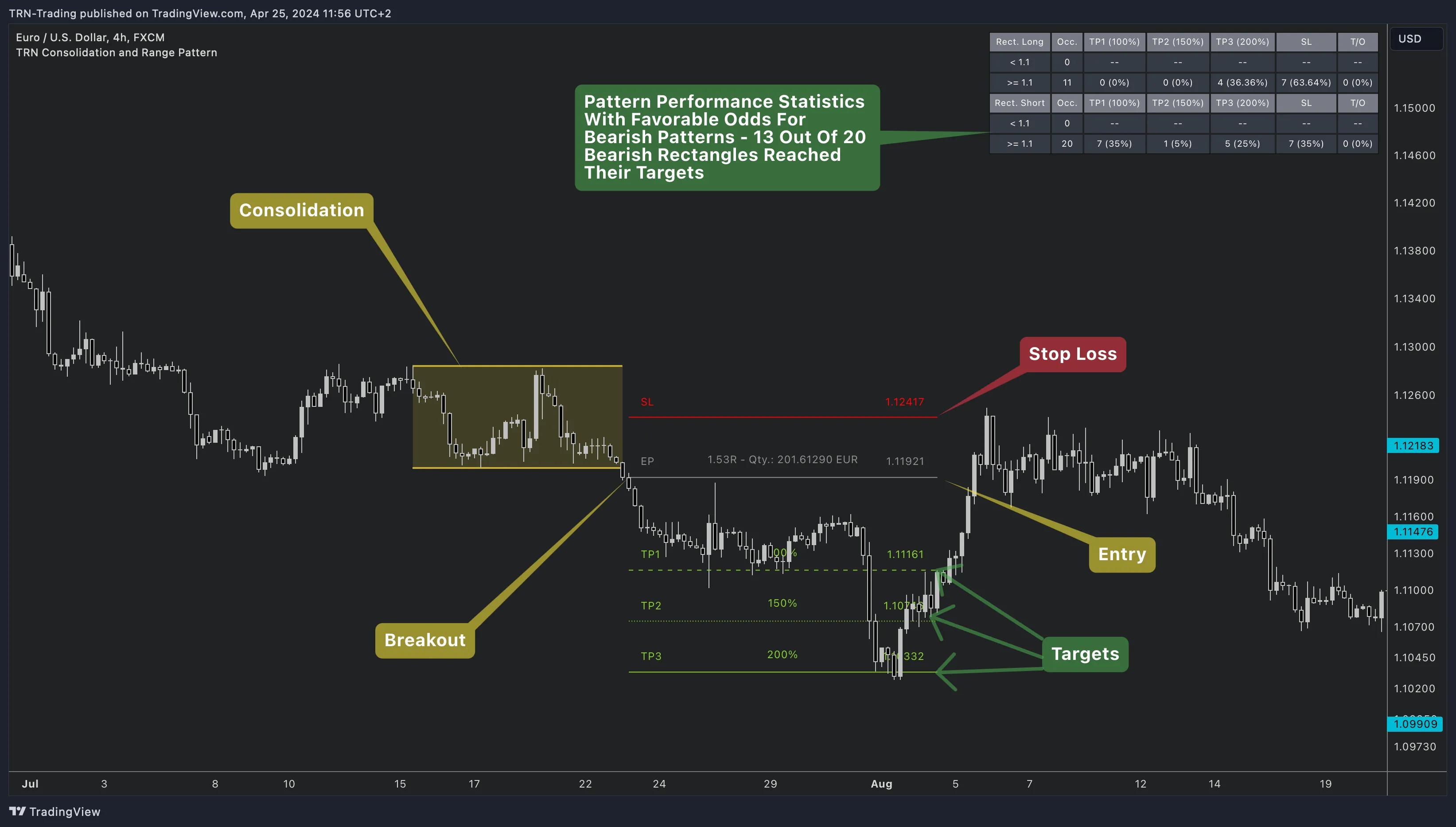
Combine with Trend Bars Pro to confirm breakout direction. A consolidation breakout aligned with Trend Bars momentum carries higher conviction than the range breakout alone.
Strategy 2: Multi-Scale Detection
Use both Pattern 1 and Pattern 2 to identify ranges at different structural levels simultaneously.
Setup
- Enable Pattern 2 in Features
- Set Pattern 1 to a smaller size (e.g., Very Small) and Pattern 2 to a larger size (e.g., Medium)
- Watch for confluence — when both sizes detect a range in the same price area
Execution
- Pattern 1 detects tighter, shorter-term consolidation zones
- Pattern 2 detects broader, more significant trading ranges
- When both patterns identify a range in the same area, the structural confluence signals a higher-confidence setup
- Use the Statistics table to compare performance between the two sizes
Strategy 3: Target Box Trading
Target Boxes provide visual price projection zones above and below the range, marking where price is likely to travel after a breakout.
Setup
- Enable Target Boxes in Features
- Set TP percentages to your preferred targets (default: 100%/150%/200%)
- Use Target Boxes as visual reference zones alongside the precise TP lines
Execution
- On breakout, Target Boxes appear as shaded zones in the breakout direction
- TP1/TP2/TP3 lines provide precise levels within or beyond the Target Box
- Consider partial exits as price enters each target zone
Recommended Settings by Timeframe
| Style | Pattern 1 | Pattern 2 | Accuracy | Min Touch | Min RR |
|---|---|---|---|---|---|
| Scalping (1-5min) | Tiny (2) | Very Small (4) | Medium | 3 | 1.1 |
| Day Trading (5-15min) | Very Small (4) | Small (7) | Medium | 4 | 1.5 |
| Swing Trading (1H-Daily) | Small (7) | Medium (10) | High | 4-5 | 1.5 |
| Position Trading (Weekly) | Medium (10) | Large (16) | High | 5-6 | 2.0 |
These settings are starting points. Use the Statistics table to validate performance on your specific instrument and timeframe.
Combining with Other TRN Indicators
Trend Bars Pro
Use Trend Bars Pro to confirm the overall trend direction before trading range breakouts. Breakouts aligned with Trend Bars momentum carry higher conviction.
Price Action Suite
Identify key support and resistance levels near your target zones. If a TP level aligns with a major Fair Value Gap or order block, consider adjusting your exit strategy.
Consolidation & H&S Scanner
Use the Consolidation & Head and Shoulders Scanner to monitor up to 20 symbols simultaneously for consolidation patterns — then switch to the Consolidation and Range Pattern for detailed analysis and trade execution on the best setups.
FAQ
What is the best strategy for consolidation pattern trading?
The most reliable approach is trading confirmed breakouts from well-established ranges (4+ touch points) with Smart Breakout Detection enabled. Combining the Consolidation and Range Pattern with Trend Bars Pro for trend confirmation adds an additional filter layer for higher-probability entries.
How do I avoid false breakouts with the Consolidation and Range Pattern?
Enable Smart Breakout Detection (on by default), increase the minimum touch points to 5-6 for stronger ranges, and use confirmed breakout alerts instead of unconfirmed. Combining with Trend Bars Pro for momentum confirmation further reduces false signals.
Which TRN indicators work best with the Consolidation and Range Pattern?
Trend Bars Pro confirms breakout momentum. Price Action Suite identifies key support and resistance levels near targets. The Consolidation and Head and Shoulders Scanner monitors up to 20 symbols simultaneously for consolidation patterns.