Consolidation Pattern Statistics
Consolidation and Range Pattern includes a built-in statistics table that tracks the historical performance of detected consolidation patterns on your chart. The statistics let traders validate whether their settings produce profitable range breakout setups on their instrument.
Statistics Table
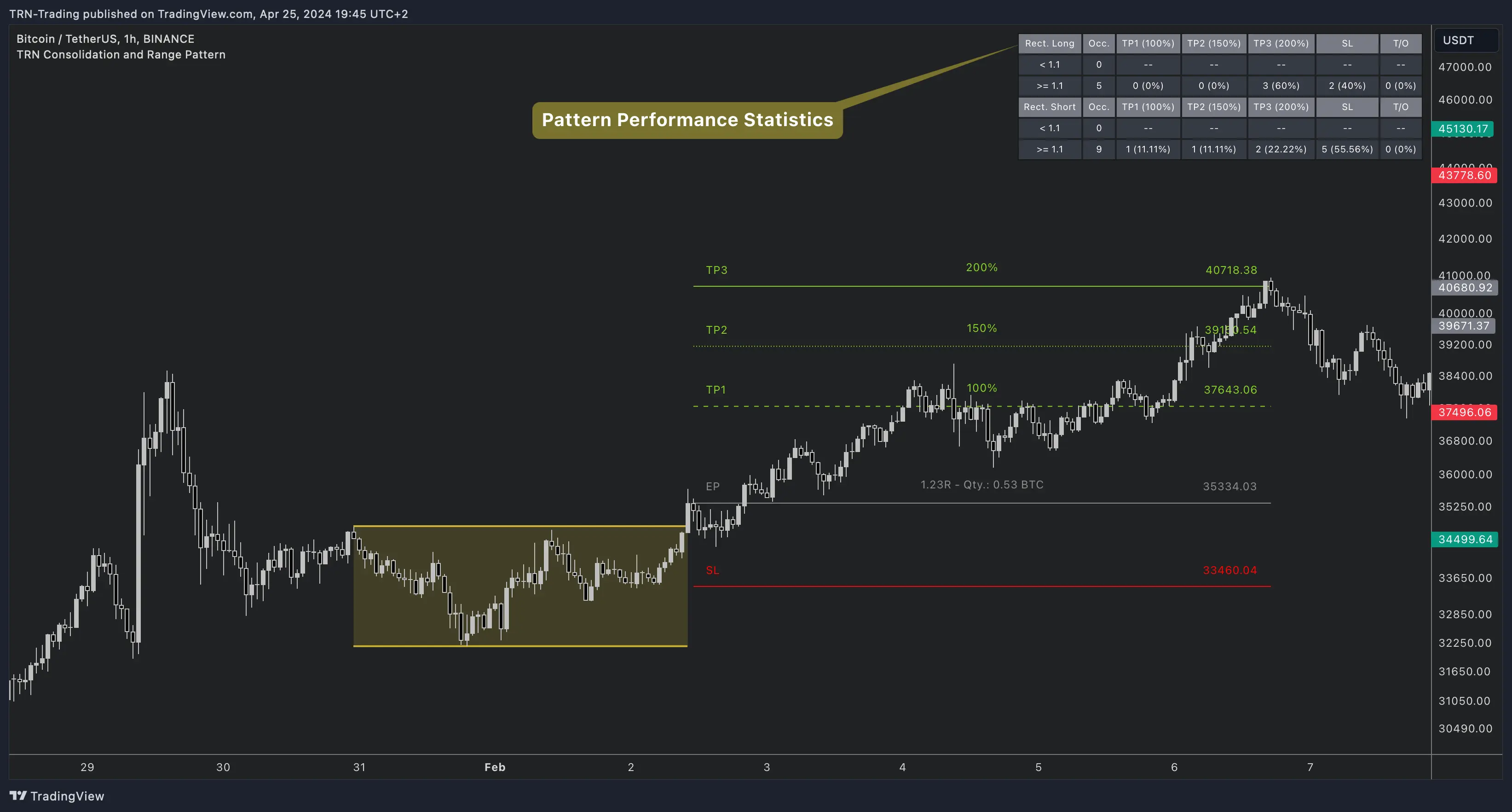
The statistics table displays performance metrics separately for long (bullish breakout) and short (bearish breakout) directions.
| Column | What It Shows |
|---|---|
| Occ. | Total number of completed trades (occurrences) |
| TP1 | Trades that hit the first take profit target — count and percentage |
| TP2 | Trades that hit the second target (if enabled) — count and percentage |
| TP3 | Trades that hit the third target (if enabled) — count and percentage |
| SL | Trades that hit stop loss — count and percentage |
| T/O | Trades that expired (timed out) — count and percentage |
Trade Timeout
The trade timeout determines the maximum duration before a trade is automatically closed. The Consolidation and Range Pattern supports two timeout modes:
| Mode | Default | How It Works |
|---|---|---|
| Dynamic | Factor 3.0 | Timeout = pattern bar length × multiplier. Longer patterns get more time |
| Fixed | N/A | Absolute number of bars regardless of pattern size |
Dynamic timeout is the default and recommended mode — it scales naturally with the pattern's duration, giving larger consolidation ranges more time to reach their targets.
Settings
| Setting | Default | What It Controls |
|---|---|---|
| Statistics | Off | Toggle the statistics table on or off |
| Styling Preset | Dark | Table color theme — Dark or Light |
| Location | Top Right | Table position on the chart |
| Text Size | 10 | Font size for table content |
| Trade Timeout | Dynamic (3.0) | Maximum trade duration mode and value |
Using Statistics to Optimize
The statistics table is designed for systematic testing. Change one variable at a time and compare performance across different configurations.
Variables to test:
- Pattern Size — Compare different swing sizes for your instrument's volatility
- Accuracy — Test stricter vs. looser boundary alignment requirements
- Min Touch Points — Compare 3 vs. 4 vs. 5+ required touches
- Target percentages — Adjust TP1/TP2/TP3 percentages and compare hit rates
- Min RR Ratio — Raise or lower the threshold and observe trade quality changes
Focus on the markets and timeframes where the statistics show the best TP1 hit rates and lowest SL rates. Adjust detection settings to filter for higher-quality patterns.
FAQ
What statistics does the Consolidation and Range Pattern track?
The Consolidation and Range Pattern tracks occurrences, TP1 hit rate, TP2 hit rate (if enabled), TP3 hit rate (if enabled), stop loss hit rate, and timeout rate. All metrics are displayed separately for long and short directions.
What is the trade timeout in Consolidation and Range Pattern?
The trade timeout determines the maximum duration before a trade is closed. The Consolidation and Range Pattern supports two timeout modes — Dynamic (scales with the pattern's bar length using a multiplier) and Fixed (absolute number of bars). Default is Dynamic with a 3.0 multiplier.
How does the RR category filter work in the statistics?
The statistics table categorizes trades by whether their risk/reward ratio is above or below the minimum RR threshold. This helps traders see how pattern quality (measured by RR) correlates with actual trade outcomes.