Consolidation Pattern Alerts
Consolidation and Range Pattern provides 5 alert types for automated monitoring of pattern formation and breakout signals. Alerts are configured in two steps — enable the alert types in the indicator settings, then create the TradingView alert.
Alert Types
| Alert | Default | When It Fires |
|---|---|---|
| Pattern Active | Off | A new consolidation range has been validated (minimum touch points met) |
| B/O Up Confirmed | On | Bullish breakout confirmed — price closed above the upper boundary |
| B/O Up Unconfirmed | Off | Bullish breakout intra-bar — price crossed the upper boundary but bar hasn't closed |
| B/O Down Confirmed | On | Bearish breakout confirmed — price closed below the lower boundary |
| B/O Down Unconfirmed | Off | Bearish breakout intra-bar — price crossed the lower boundary but bar hasn't closed |
Confirmed vs. Unconfirmed
Confirmed alerts fire only after the breakout bar closes beyond the boundary. The signal is validated — the bar maintained its breakout through close. Confirmed breakouts are more reliable.
Unconfirmed alerts fire intra-bar when price first crosses the boundary. Unconfirmed alerts provide earlier notification but carry the risk that price may retrace before the bar closes, resulting in a false breakout.
Use confirmed alerts for trade execution and unconfirmed alerts for watchlist monitoring. Combining both gives you early awareness plus validated entry signals.
Setting Up Alerts
Step 1: Enable Alert Types
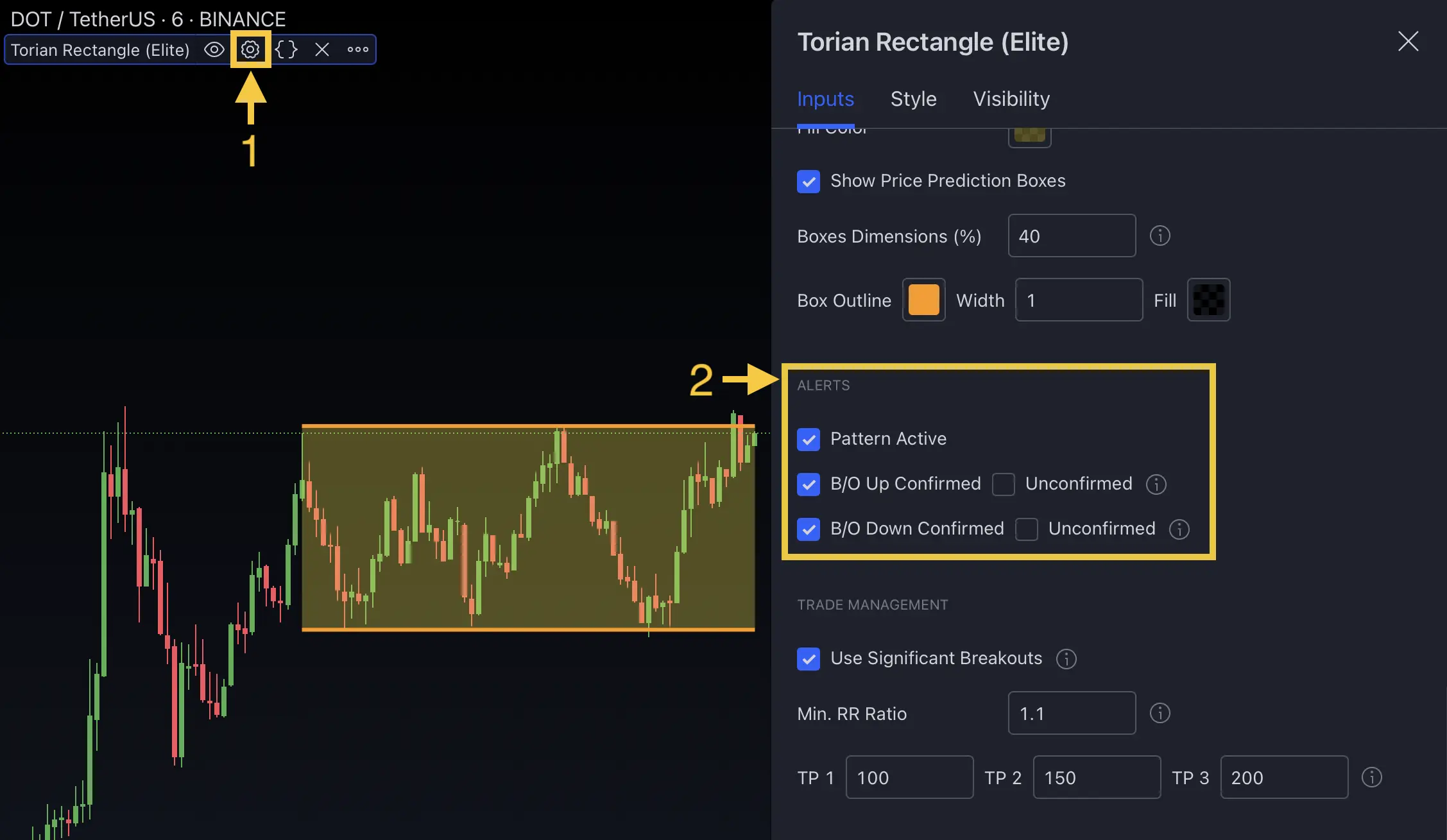
- Open the Consolidation and Range Pattern indicator settings
- Navigate to the Alerts section (under Features)
- Enable the alert types you want:
- Pattern Active — for new range notifications
- B/O Up Confirmed / B/O Down Confirmed — for validated breakouts
- Unconfirmed options — for early intra-bar signals
Step 2: Create the TradingView Alert
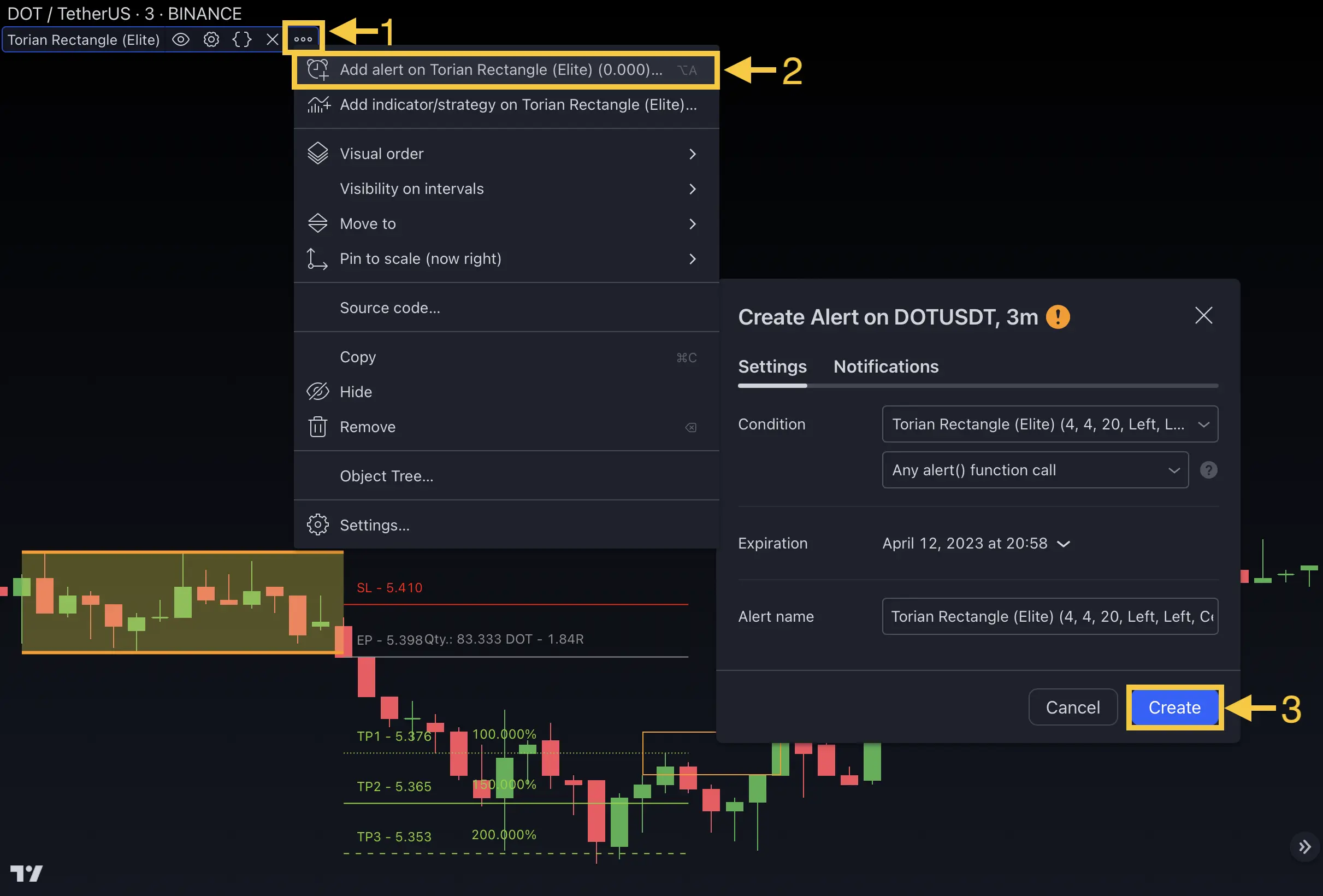
- Right-click the indicator on your chart → select Add Alert (or click "More" → "Add Alerts on...")
- In the Condition dropdown, select Any Alert Function Call
- Configure your notification method — popup, email, or webhook
- Set the alert name and expiration
- Click Create to activate
The Consolidation and Range Pattern uses runtime alert() calls (not alertcondition()). Always select Any Alert Function Call as the condition type when creating alerts in TradingView.
FAQ
What alert types does the Consolidation and Range Pattern provide?
The Consolidation and Range Pattern provides 5 alert types — Pattern Active (new range detected), Breakout Up Confirmed, Breakout Up Unconfirmed, Breakout Down Confirmed, and Breakout Down Unconfirmed. Confirmed alerts fire only after bar close; unconfirmed alerts fire intra-bar for earlier notification.
What is the difference between confirmed and unconfirmed breakout alerts?
Confirmed breakout alerts fire only after the breakout bar closes beyond the boundary, ensuring the signal is validated. Unconfirmed breakout alerts fire intra-bar when price first crosses the boundary, providing earlier notification but with the risk that price may retrace before the bar closes.
How do I set up alerts for the Consolidation and Range Pattern?
First enable the desired alert types in the indicator's Alerts settings group (under Features). Then right-click the indicator on your chart, select Add Alert, and configure your notification method. The indicator uses runtime alerts, so select Any Alert Function Call as the condition.