Consolidation Pattern Detection
Consolidation and Range Pattern identifies rectangular trading ranges by detecting horizontal price boundaries with validated touch points. Smart Breakout Detection filters false breakouts automatically, and dual-size scanning identifies ranges at multiple scales on the same chart.
Pattern Formation
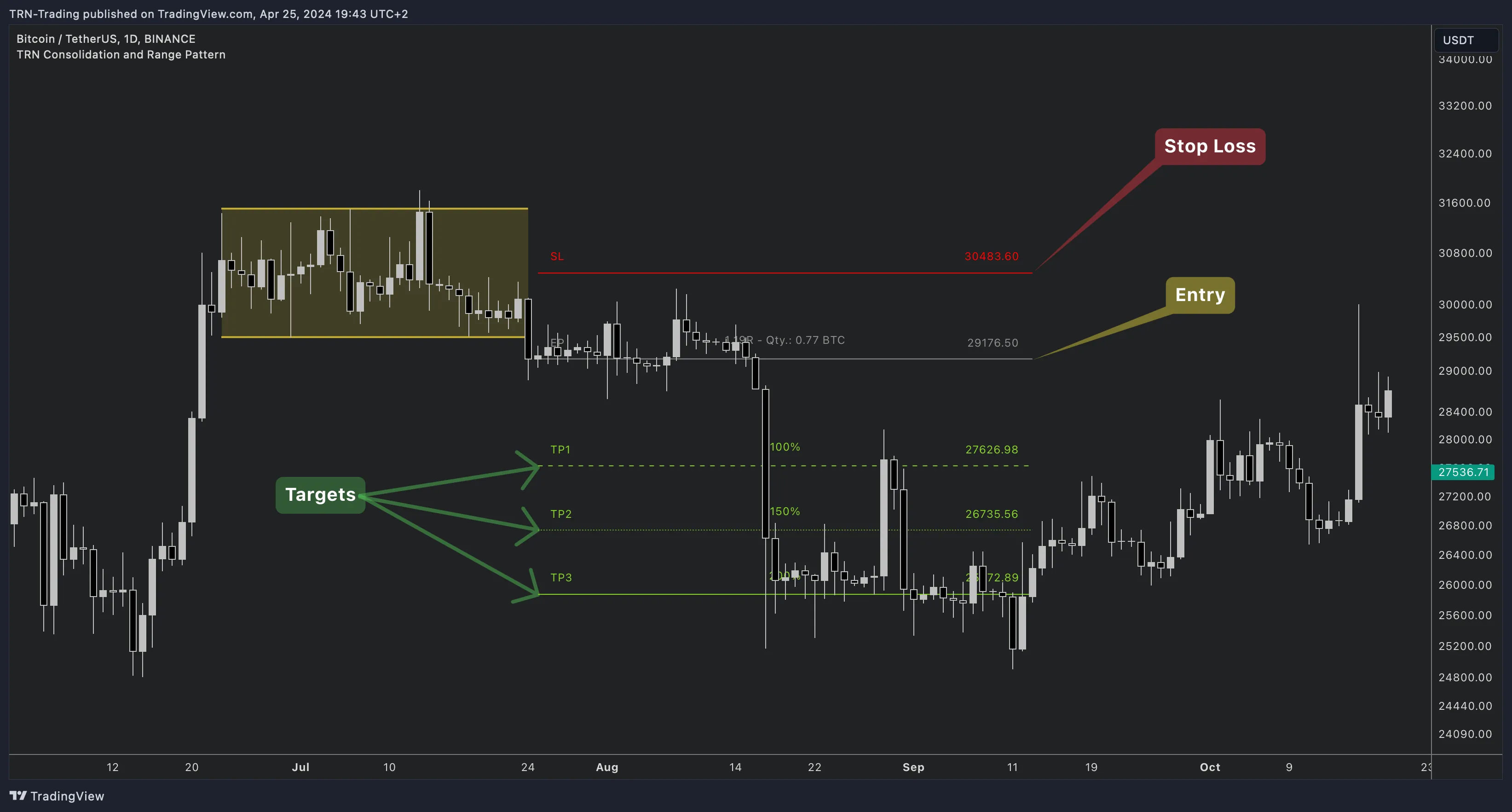
A consolidation pattern forms when price moves between parallel horizontal support and resistance levels. The Consolidation and Range Pattern indicator validates each boundary by counting how many times price has touched it — more touches mean a more established range.
Key Components
- Upper Boundary (Resistance) — Horizontal price ceiling where selling pressure has repeatedly pushed price back down
- Lower Boundary (Support) — Horizontal price floor where buying pressure has repeatedly pushed price back up
- Touch Points — Each validated contact with a boundary. More contacts confirm a stronger range
- Trading Range — The price zone between the two boundaries where price consolidates
Touch Point Validation
Unlike simple horizontal line indicators, the Consolidation and Range Pattern indicator requires a minimum number of boundary contacts before recognizing a valid pattern.
| Setting | Default | What It Controls |
|---|---|---|
| Min Touch Points | 4 | Minimum boundary contacts required to validate a range (range 3-20) |
Higher touch point requirements produce fewer but more established ranges — and higher-probability breakouts when they occur. Lower values detect ranges faster but with less structural confirmation.
Smart Breakout Detection
Smart Breakout Detection is enabled by default. This filter distinguishes between price briefly touching a boundary (a normal range interaction) and genuinely breaking through it.
When Smart Breakout Detection is active, the indicator uses a tolerance threshold based on the instrument's volatility. Closes within the tolerance zone are classified as new touch points rather than breakouts — reducing the false breakout signals that make range trading frustrating.
| Setting | Default | What It Controls |
|---|---|---|
| Smart Breakout Detection | On | Enable or disable the ATR-based breakout filter |
Keep Smart Breakout Detection enabled for most instruments. Disable it only if you want to capture every boundary cross, including minor wicks and fakeouts.
Dual-Size Detection
The Consolidation and Range Pattern indicator supports two independent detection layers running simultaneously.
| Layer | Default Size | Purpose |
|---|---|---|
| Pattern 1 | Very Small (4) | Tighter consolidation zones — more frequent detections |
| Pattern 2 | Medium (10) | Broader trading ranges — less frequent, more significant |
Pattern 2 is disabled by default. When enabled, both layers operate independently with their own swing sensitivity, producing separate pattern detections on the same chart.
Accuracy Control
The Accuracy setting controls how precisely the upper and lower boundaries must align to qualify as a valid consolidation range. Higher accuracy requires tighter horizontal structure.
| Preset | What It Does |
|---|---|
| Very Low | Most permissive — detects more patterns with looser boundary alignment |
| Low | Relaxed constraints |
| Medium (default) | Balanced detection quality |
| High | Stricter boundary alignment |
| Very High | Most strict — only near-perfect horizontal ranges qualify |
| Custom | Manual control (0-100 scale) |
Log Scale
The Consolidation and Range Pattern indicator uses logarithmic scale by default for all internal calculations. Log scale normalizes boundary detection across different price levels, ensuring consistent pattern quality on any instrument.
| Setting | Default | What It Controls |
|---|---|---|
| Log Scale | On | Whether calculations use logarithmic or linear price scale |
Pattern Lifecycle
- Formation — Horizontal boundaries are identified as price repeatedly touches support and resistance levels
- Validation — The pattern qualifies when minimum touch point and accuracy requirements are met
- Breakout — Price closes beyond a boundary (filtered by Smart Breakout Detection if enabled), triggering the trade setup
- Invalidation — If the pattern fails to produce a favorable risk/reward, drawings are cleaned up (unless "Show Historic Failed Patterns" is enabled)
FAQ
What are touch points in consolidation pattern detection?
Touch points are the number of times price contacts the upper or lower boundary of a consolidation range. The Consolidation and Range Pattern indicator requires a configurable minimum number of touches (default 4, range 3-20) before recognizing a valid pattern. More touch points mean a more established range with higher breakout probability.
How does Smart Breakout Detection work?
Smart Breakout Detection uses an ATR-based tolerance threshold to distinguish between price briefly touching a boundary and genuinely breaking through it. When enabled, only closes beyond the tolerance threshold are classified as breakouts — closes within tolerance are treated as new touch points instead.
What is the difference between Pattern 1 and Pattern 2?
Pattern 1 and Pattern 2 are two independent detection layers with different swing sensitivities. Pattern 1 (default Very Small, swing size 4) catches tighter consolidation zones. Pattern 2 (default Medium, swing size 10) identifies broader trading ranges. Both run simultaneously when Pattern 2 is enabled.
Does the indicator use logarithmic scale?
Yes, the Consolidation and Range Pattern indicator uses logarithmic scale by default for all calculations. Log scale ensures consistent detection quality across different price levels and instrument types.