Wedge Pattern Scanner & Trend Bars Pro
The Wedge Pattern Scanner discovers wedge breakouts across up to 20 symbols, and Trend Bars Pro adds a momentum confirmation layer on the breakout bar. The scanner answers "where is a wedge breaking?" across the watchlist; Trend Bars Pro answers "does the breakout bar carry genuine momentum?" on the chart. Two independent factors aligning on one trade.
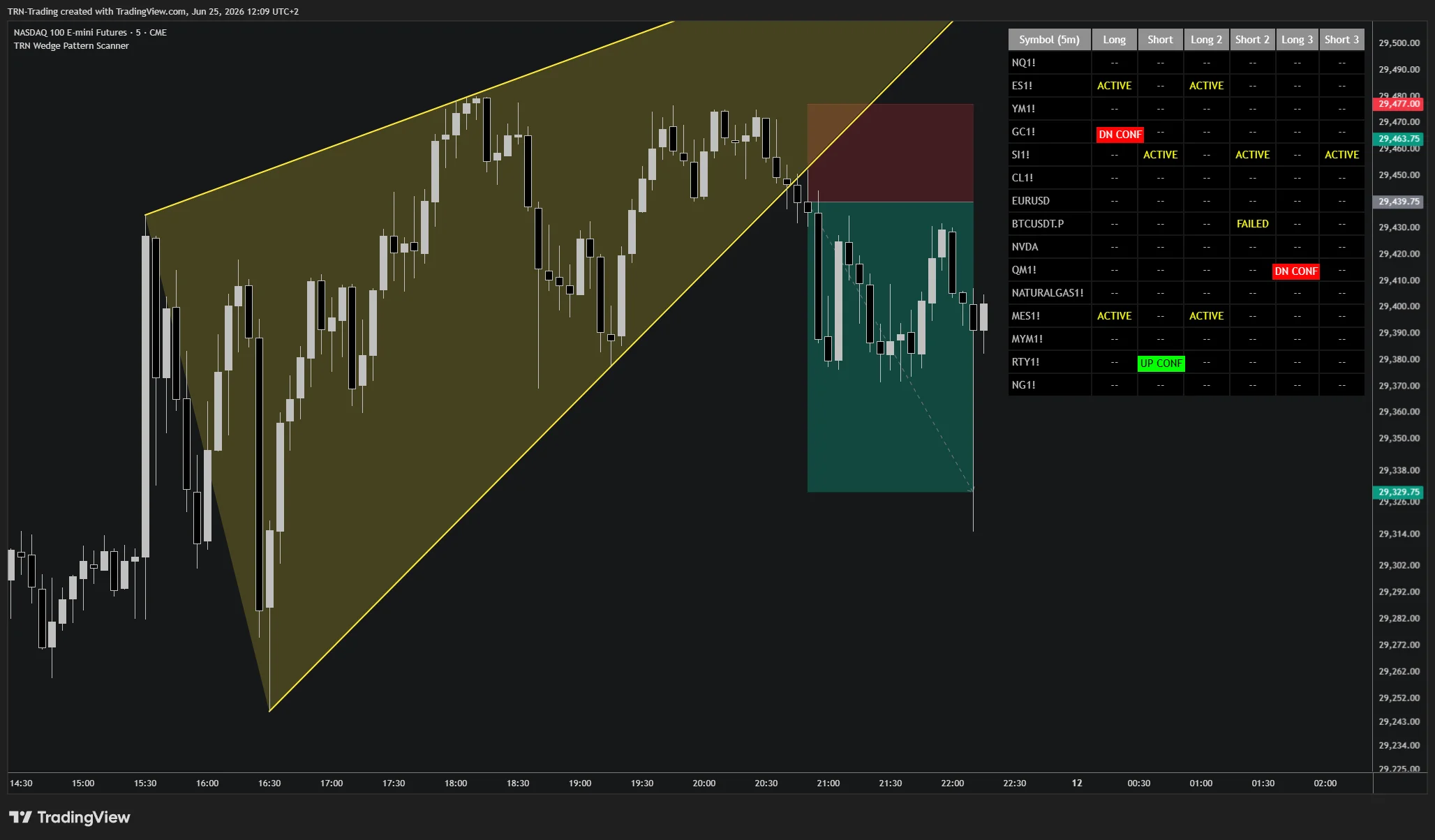
If you have not already, read the Wedge Pattern Scanner and Trend Bars Pro sections to understand how each works independently before combining them.
The Workflow: Discover, Then Confirm Momentum
| Stage | Tool | What It Does |
|---|---|---|
| Discovery | Wedge Pattern Scanner | Scans 20 symbols and flags a cell when a wedge breaks out. |
| Momentum check | Trend Bars Pro | On the flagged chart, confirms whether the breakout bar is a signal bar closing in the breakout direction. |
| Decision | Both | Structure plus momentum aligning is a higher-conviction entry; momentum disagreeing is a reason to pass. |
How It Works
- Run the Wedge Pattern Scanner on a dedicated chart with your watchlist
- When a cell flips to
UP CONForDN CONF, the scanner has confirmed a breakout by a follow-through close - Open the flagged symbol on a separate chart with Trend Bars Pro applied
- Check whether the breakout bar is a Trend Bars Pro signal bar (such as a breakout or reversal bar) closing in the breakout direction
- When structure and momentum agree, take the entry; when the breakout bar lacks a momentum signal, treat the break as weaker and consider passing
The scanner's confirmation is structural (a close beyond the trendline). Trend Bars Pro adds an independent momentum read, so a clean wedge that breaks on a strong signal bar is a stronger setup than one that drifts across the line.
Trade Management After Entry
Trend Bars Pro monitoring does not stop at the entry. After the breakout, signal bar transitions and trend color changes help you trail a stop, scale, or plan an exit if momentum fades. The scanner keeps surfacing the next setups while Trend Bars Pro manages the open trade.
Why This Combination Works
The Wedge Pattern Scanner and Trend Bars Pro are independent. One reads pattern structure across the watchlist; the other reads momentum on the bar. Because they are independent, their agreement is meaningful confluence rather than two views of the same input. Note that the chart-level Wedge Pattern Pro already integrates Trend Bars Pro as an optional breakout condition, so traders who validate on the chart can have the same momentum filter built in. See the Trend Bars Pro & Chart Patterns guide for that integrated approach.
FAQ
Why combine the Wedge Pattern Scanner with Trend Bars Pro?
The Wedge Pattern Scanner finds wedge breakouts across 20 symbols, and Trend Bars Pro adds an independent momentum check on the breakout bar. When the scanner confirms a breakout and that same bar is a Trend Bars Pro signal bar, two independent factors — pattern structure and momentum — align on the same trade. That confluence filters out weak breaks.
How does Trend Bars Pro confirm a wedge breakout flagged by the scanner?
When a cell in the Wedge Pattern Scanner flips to UP CONF or DN CONF, open that symbol on a chart with Trend Bars Pro applied. If the breakout bar closes as a Trend Bars Pro signal bar in the breakout direction, momentum agrees with the structure. Wait for the bar to close before acting; the confirmation is only valid once the bar is complete.
Does the Wedge Pattern Scanner have Trend Bars Pro built in?
No. The Wedge Pattern Scanner is a table-only multi-symbol tool. The chart-level Wedge Pattern Pro has Trend Bars Pro integrated as an optional breakout condition. With the scanner, you add Trend Bars Pro on the flagged chart to confirm the breakout bar's momentum after the scanner surfaces the setup.