Wedge Pattern Scanner & Wedge Pattern Pro
The Wedge Pattern Scanner and Wedge Pattern Pro are designed to work together as a discovery-to-execution pipeline. The scanner monitors up to 20 symbols simultaneously for rising and falling wedges. Wedge Pattern Pro draws the detailed wedge structure with trendlines, entry, stop, and target on the specific chart. Same detection engine, different purposes.
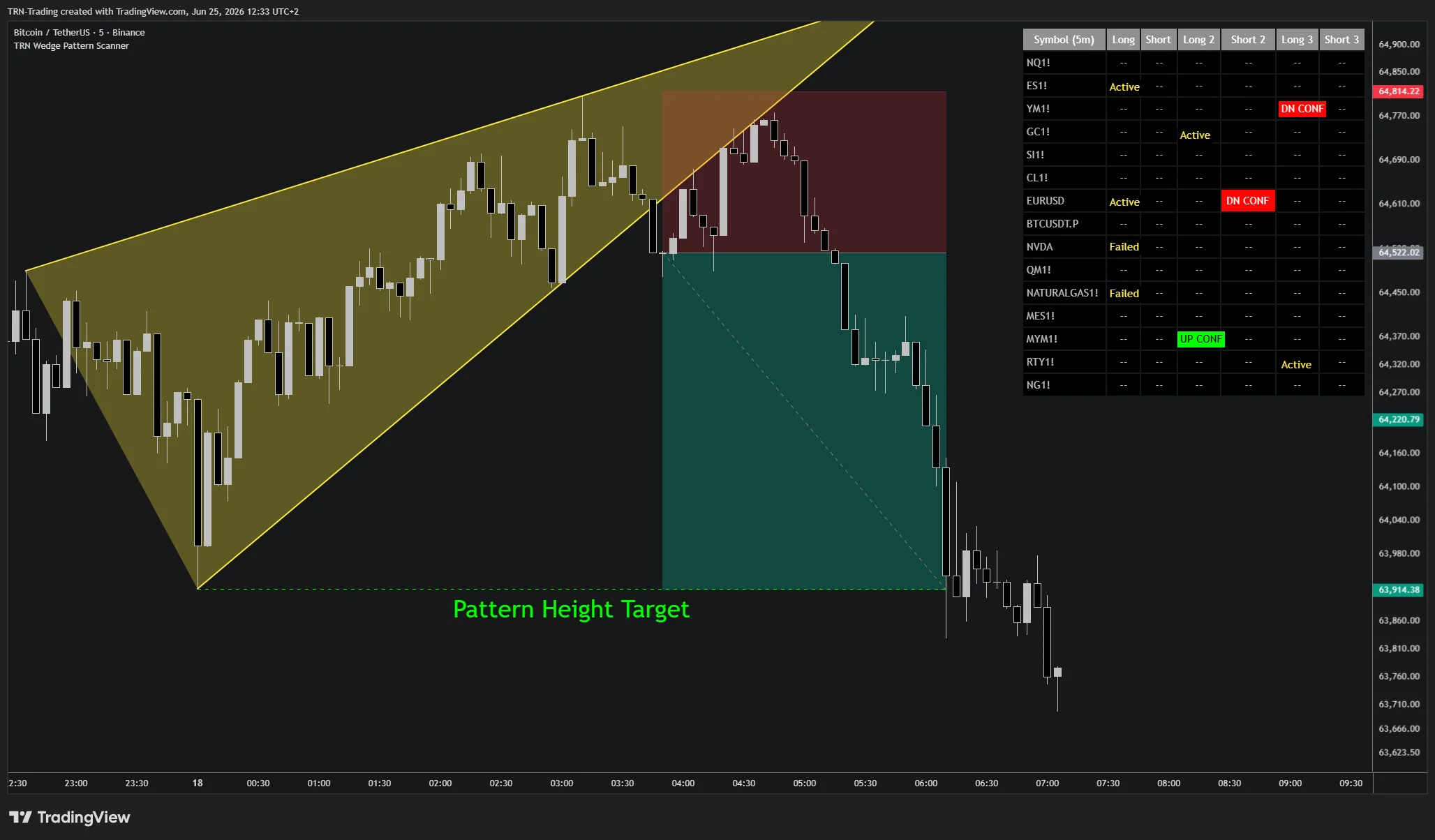
If you have not already, read the Wedge Pattern Scanner section and the Wedge Pattern Pro section to understand how each indicator works independently before combining them.
The Discovery-to-Execution Pipeline
The two indicators cover three distinct stages of the workflow:
| Stage | Tool | What It Does |
|---|---|---|
| Discovery | Wedge Pattern Scanner | Scans 20 symbols for active wedges. Flags cells when valid setups form. |
| Validation | Wedge Pattern Pro | Draws the full wedge with trendlines and trade plan on the flagged chart. |
| Execution | Both | Scanner fires the confirmation alert (with optional webhook JSON); Wedge Pattern Pro displays the live entry, stop, and target. |
Workflow 1: Scanner Triggers, Pattern Pro Validates
The primary combination workflow.
How It Works
- Add the Wedge Pattern Scanner to a dedicated chart with your watchlist of up to 20 symbols
- Wait for a cell to flip from
--toACTIVEin the scanner table - Open the flagged symbol on a separate chart
- Add Wedge Pattern Pro to that chart with the same detection size as the scanner column where the signal appeared
- Wedge Pattern Pro draws the wedge that triggered the scanner — verify the trendline convergence, the swing geometry, and the proposed trade levels
- Plan your order based on Wedge Pattern Pro's entry, stop, and target
This workflow lets you screen 20 symbols passively while reserving full chart attention for symbols that actually have valid wedges forming.
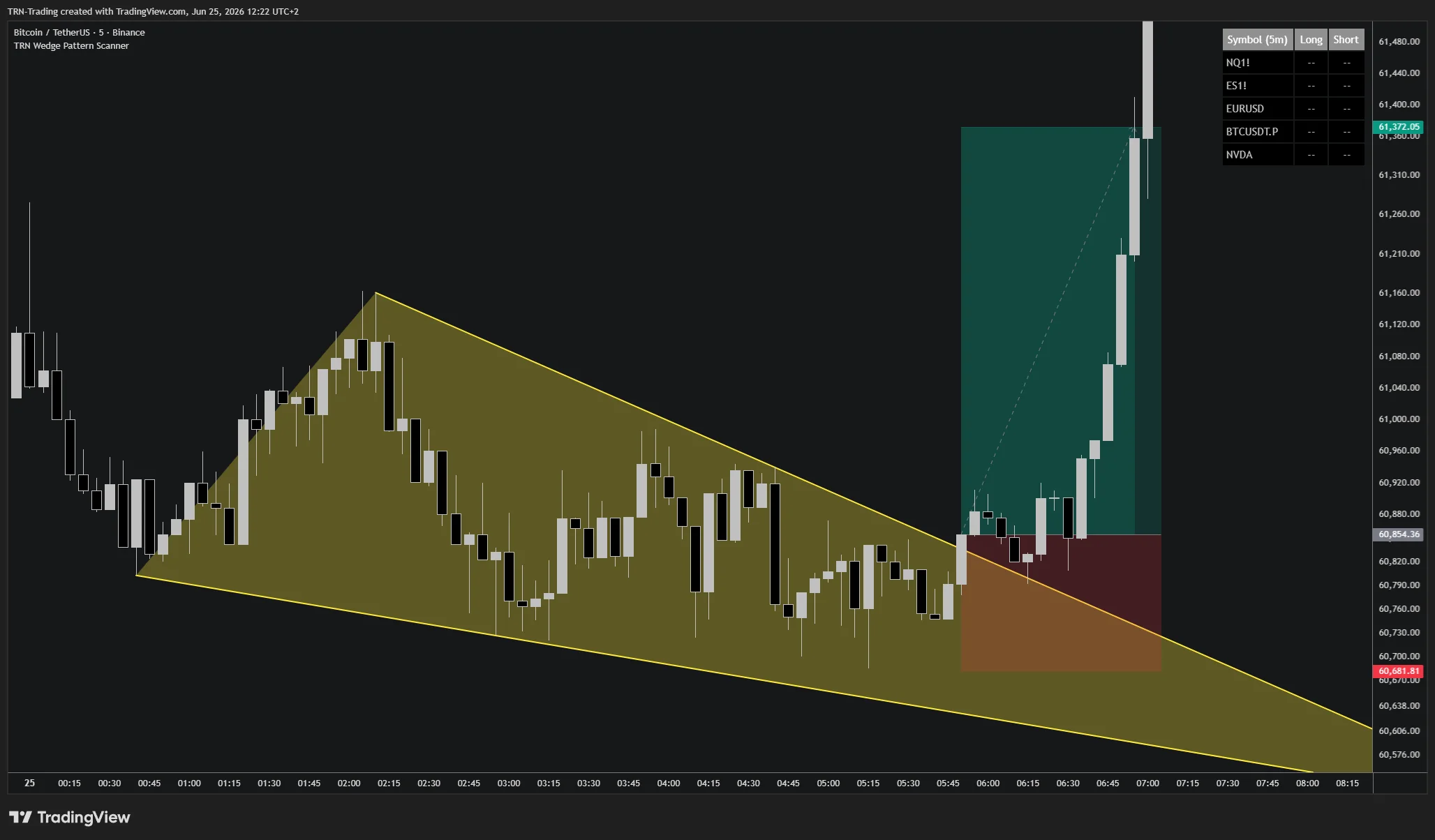
Workflow 2: Multi-Scale Confirmation
When the scanner shows the same direction across more than one detection scale, cross-scale alignment becomes a high-conviction filter.
How It Works
- Keep all three detection scales enabled in the Wedge Pattern Scanner — the table shows Long/Short, Long 2/Short 2, Long 3/Short 3
- Watch for symbols where two or more scales reach
ACTIVEor confirm together - On the flagged chart, run Wedge Pattern Pro with the matching sizes enabled
- Wedge Pattern Pro draws the wedge at those scales — confirm each is clean and the trade levels align
When several scales agree, the same compression is being recognized at multiple swing sensitivities, which is signal-strength evidence beyond what any single scale provides.
Workflow 3: Webhook Discovery, Manual Validation
For traders running execution automation via TradersPost or similar.
How It Works
- Configure the Wedge Pattern Scanner with Use Custom Alert Message enabled and a TradersPost webhook URL set in TradingView's alert notifications
- Confirmed breakouts fire JSON containing entry, stop, target, RR, and computed position size — orders route automatically
- After the order routes, open the symbol with Wedge Pattern Pro for post-trade visualization
- Wedge Pattern Pro draws the wedge and the entry/stop/target levels — useful for trade journaling, post-mortem analysis, and confirming the structure was clean
This workflow separates discovery (scanner + automation) from validation (Wedge Pattern Pro on the chart), useful when you want to be away from the chart but still review trades after they fire.
Why This Combination Works
Both indicators share the same detection engine. The Wedge Pattern Scanner's ACTIVE state and Wedge Pattern Pro's drawn wedge are not just similar — they are the same pattern, identified by the same swing logic and converging-trendline validation. This means:
- Same swing points and trendlines
- Same convergence and log-scale slope measurement
- Same breakout and confirmation logic
- Same target calculation when Target Type matches
The detection itself is identical, so there is never a geometry or signal-logic discrepancy: a wedge the scanner flags is the same wedge Wedge Pattern Pro draws. The difference is scope. The scanner watches every enabled detection size at once and can flag wedges of more than one size on the same symbol, while Wedge Pattern Pro highlights one wedge per direction on the chart. If the scanner flags a smaller-size wedge while a larger one is active, set Wedge Pattern Pro to the same Size as the scanner column to draw that exact wedge. The scanner finds; Wedge Pattern Pro renders. The trader's job is to inspect, decide, and execute.
The scanner is a surveyor, the chart indicator is a focuser. The scanner monitors every size across 20 symbols so nothing is missed. Wedge Pattern Pro concentrates on one clean wedge per direction so the chart stays readable. When a scanner cell flags a setup you do not see on the chart, match Wedge Pattern Pro's Size to that column to bring it up.
FAQ
Why use the Wedge Pattern Scanner together with Wedge Pattern Pro?
The Wedge Pattern Scanner and Wedge Pattern Pro share the same swing-based converging-trendline detection but serve different purposes. The scanner surfaces wedge setups across 20 symbols in a single table — it tells you WHERE to look. Wedge Pattern Pro draws the full wedge with trendlines, entry, stop, and target on the specific chart — it tells you HOW to trade it. Together they form a complete discovery-to-execution workflow.
How do I switch from the Wedge Pattern Scanner to Wedge Pattern Pro efficiently?
When a cell in the Wedge Pattern Scanner flips to ACTIVE on a symbol, open that symbol on a chart and add Wedge Pattern Pro. The wedge is already detected by the same engine, so Wedge Pattern Pro draws the matching structure with trendlines, breakout level, and trade plan when you set the same detection size.
Should I use the same detection size in both the scanner and the chart-level indicator?
Yes. The Wedge Pattern Scanner and Wedge Pattern Pro use the same swing detection logic. The scanner tracks every detection size independently, so one symbol can show wedges at more than one size at the same time. Wedge Pattern Pro highlights one wedge per direction on the chart, so match its Size setting to the scanner column where the signal triggered (the scanner runs Sizes 7, 14, and 21) to draw the exact wedge that flagged. Wedge Pattern Pro adds a fourth, larger scale that the scanner does not run.