Trend Bars Pro & Divergence
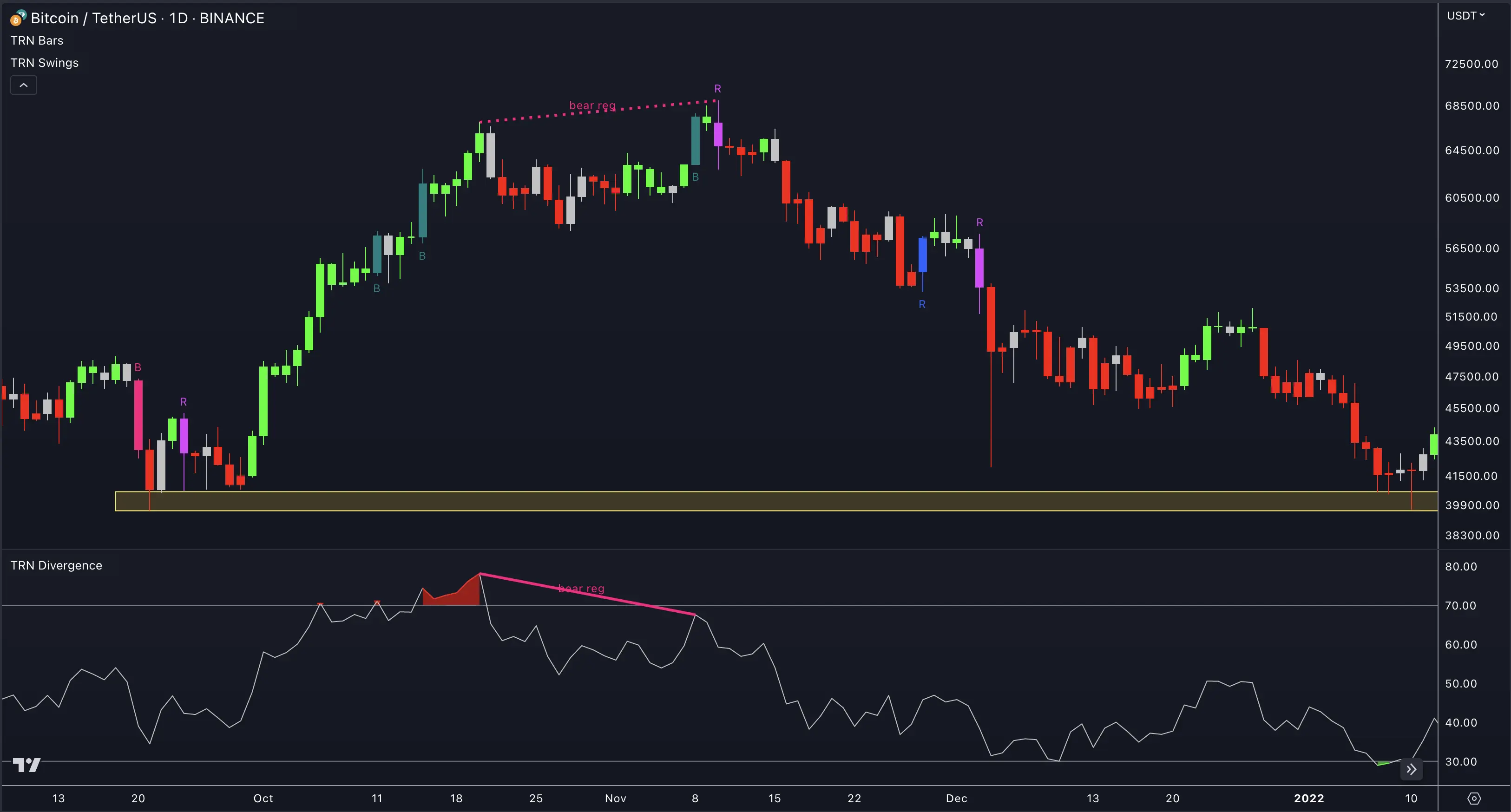
Combining Trend Bars Pro with the SMT/Divergence Suite creates a powerful synergy that enhances the accuracy of your entries. The divergence identifies momentum exhaustion or continuation potential, while the signal bar provides precise timing for execution. This effect becomes particularly pronounced when these signals manifest within significant support and resistance zones — areas you can identify with the Price Action Suite.
Be sure to study the Trend Bars Pro Signal Bars and SMT/Divergence Suite sections to fully understand how to spot and trade these signals properly.
How To Trade Trend Bars Pro & Divergence
1. Identify The Setup
Add Trend Bars Pro and the SMT/Divergence Suite to your chart and look for bullish and bearish regular and hidden divergences on the asset and timeframe of your choice. You can also use the built-in divergence detector in the Swing Suite to identify divergences. When you find a divergence, look for a signal bar, such as a reversal or breakout bar, as the subsequent swing forms.
These signals are strongest when they appear directly at important support or resistance zones. Use the Price Action Suite to identify fair value gaps, order blocks, and liquidity levels where reversals are most likely to occur.
2. Wait For Confirmation And Place Your Order
Exercise patience and wait for the signal bar to complete its closure, as it is only at that point that the signal can be deemed confirmed. Once confirmed, take immediate action by initiating a trade, setting your entry near the closing price of the signal bar.
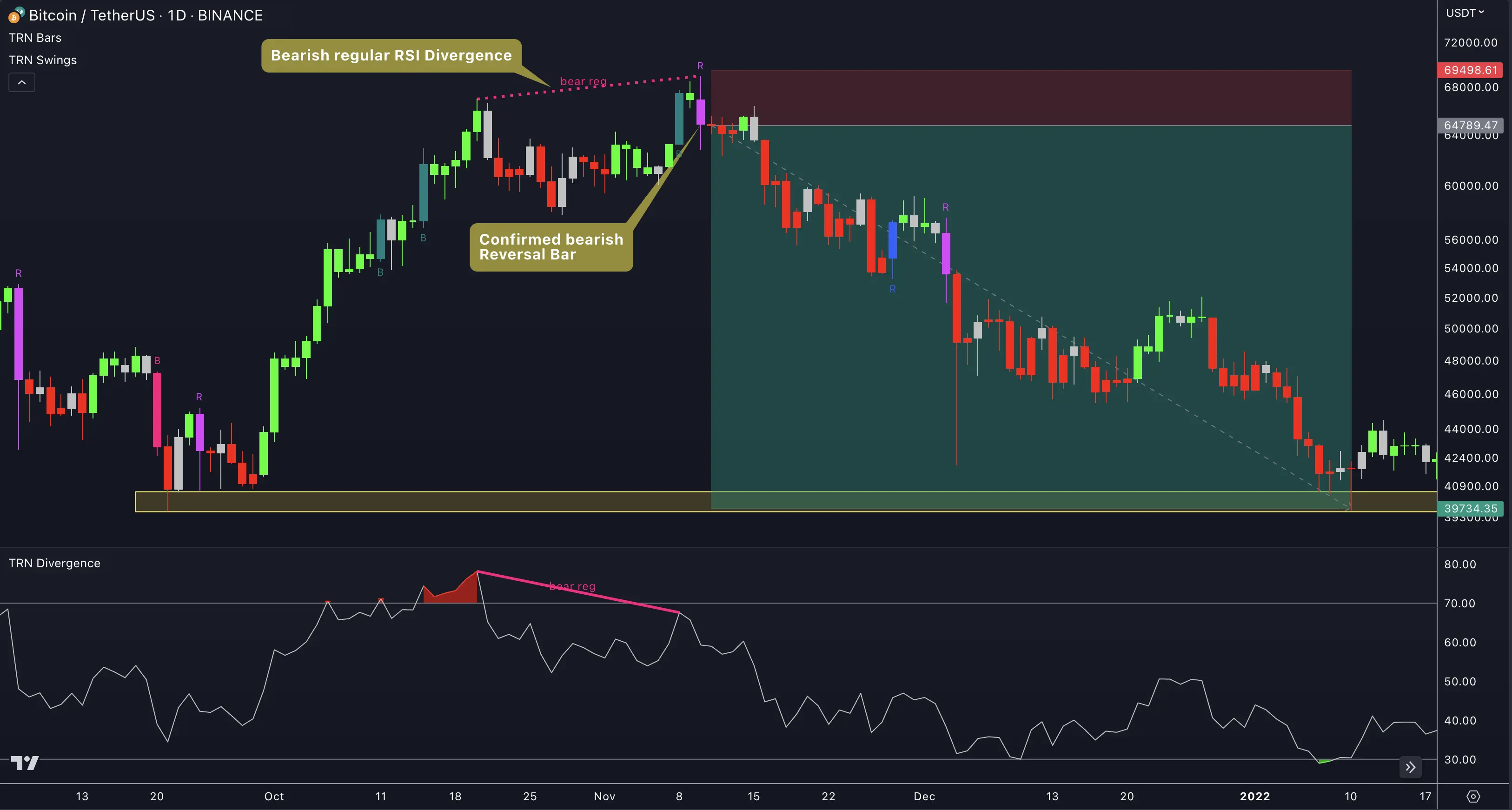
This applies specifically to scenarios involving a blue reversal bar or a bullish breakout bar subsequent to a bullish divergence. In the case of a bearish divergence combined with a pink reversal bar (as depicted in the illustration below) or a bearish breakout bar, opt for a short trade and enter near the closing price of the bearish signal bar.
3. Set Stop-Loss And Take-Profit Levels
In the case of a long trade, place your stop-loss order just below the low of the signal bar. For the take-profit level, consider targeting a nearby resistance level or use double the height of the signal bar as a potential target.
For a short trade, position your stop-loss order directly above the high of the signal bar. For the take-profit level, aim for a nearby support level, as illustrated in the example, or use double the height of the signal bar as a target.
Enhance the precision of your stop-loss and take-profit orders by leveraging the Swing Suite Statistics feature. Swing length and relation data provide data-driven context for setting realistic targets and stop distances — replacing guesswork with statistical evidence.
4. Monitor Your Trade
Once you have entered the trade, monitor it closely. Adjust your stop-loss and profit target as the price moves, and consider exiting the trade if the price starts to move against you.
Use Trend Bars Pro to monitor your active trades. The Trend Bars Pro Usage Guide explains how signal bar transitions and trend color changes inform trade management decisions.
Signals from Trend Bars Pro and the SMT/Divergence Suite are not infallible. Many external factors affect price movement. Always consider your risk tolerance and investment goals, and apply proper position sizing to every trade.
FAQ
What makes a Trend Bars Pro and divergence setup valid?
Look for a divergence pattern forming first, then wait for a signal bar — reversal or breakout — to appear as the next swing develops. The highest-probability setups occur when the signal bar forms directly at a key support or resistance zone identified by the Price Action Suite.
When should I enter a trade using this combination?
Wait for the signal bar to complete its closure and confirm its signal status. Enter near the closing price of the confirmed signal bar. Entering before the bar closes risks the signal invalidating — patience is essential with this workflow.
How should I set stop-loss and take-profit levels?
For long trades, place your stop-loss below the signal bar's low. For short trades, place it above the signal bar's high. Target nearby support or resistance levels, or use the Swing Suite Statistics feature to determine average swing length for data-driven target placement.
Can I use Swing Suite divergence detection instead of the SMT/Divergence Suite?
Yes. The Swing Suite includes built-in divergence detection that works well with this strategy. You can also combine both — the SMT/Divergence Suite offers 11 oscillators and Smart Money Tool integration for deeper momentum analysis.