Trend and Reversal Scanner Alerts
The Trend and Reversal Scanner supports 18 alert types organized into two tiers: Confirmed alerts that fire after bar close validates the signal, and In-Progress alerts that provide early warnings during bar formation. A single TradingView alert on the Trend and Reversal Scanner covers all enabled signal types across all scanned symbols.
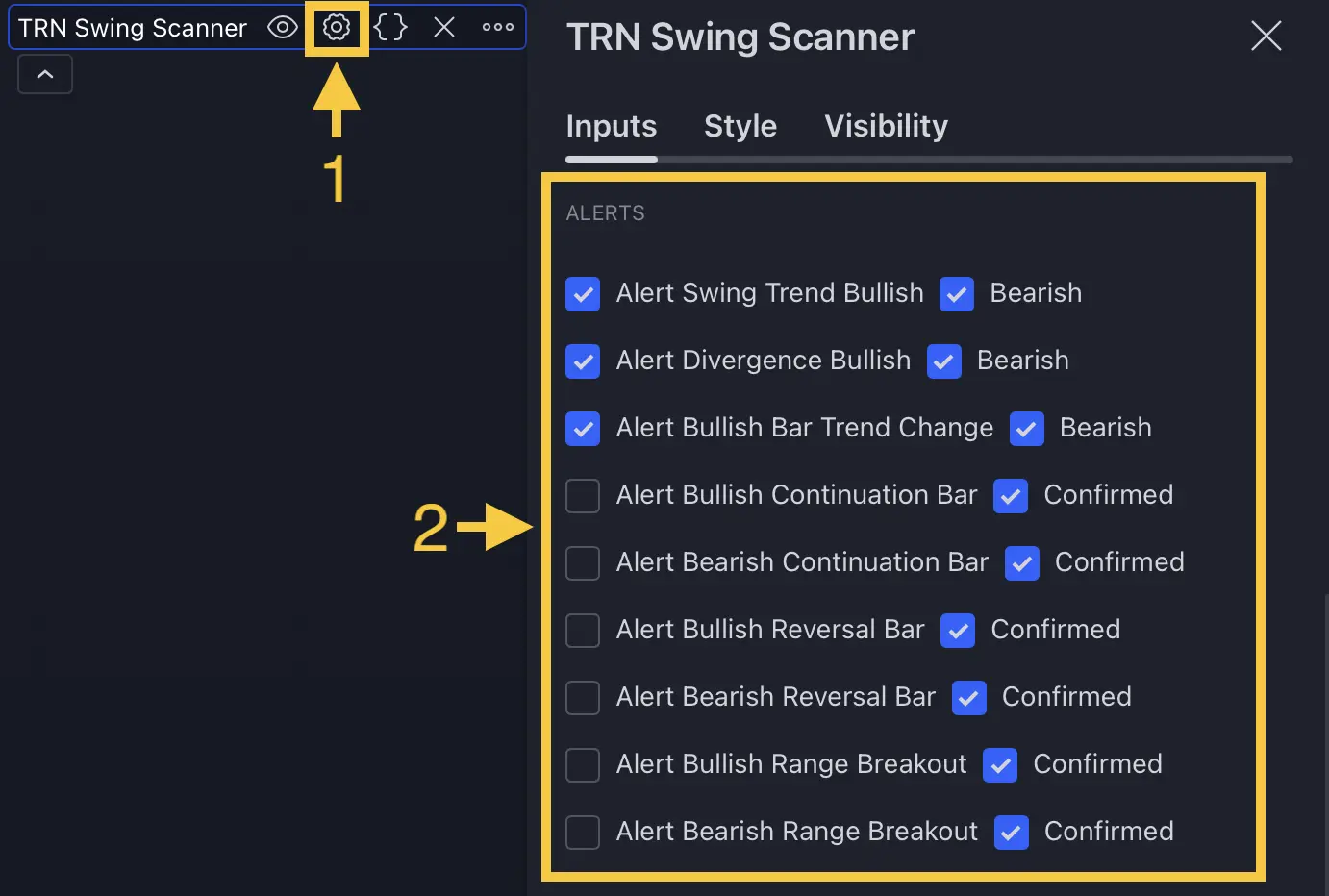
Alert Tiers
The Trend and Reversal Scanner separates every signal type into two confirmation tiers. Understanding this distinction is essential for managing alert quality and frequency.
Confirmed Alerts
Confirmed alerts fire only after the bar closes and the signal is validated. The Trend and Reversal Scanner enables all 12 Confirmed alert types by default because these represent the highest-confidence signals. Confirmed alerts are suitable for direct trade decisions and notification workflows.
In-Progress Alerts
In-Progress alerts fire during bar formation before close. The Trend and Reversal Scanner disables all 6 In-Progress alert types by default because the signal may not hold once the bar closes. Use In-Progress alerts when you need early heads-up notifications and can tolerate occasional false signals.
Complete Alert Reference
Confirmed Signal Alerts (12 types)
| Category | Bullish Alert | Bearish Alert |
|---|---|---|
| Swing Trend | Swing Trend Bullish | Swing Trend Bearish |
| Divergence | Divergence Bullish | Divergence Bearish |
| Bar Trend Change | Bar Trend Change Bullish | Bar Trend Change Bearish |
| Reversal Bar | Reversal Bar Bullish | Reversal Bar Bearish |
| Continuation Bar | Continuation Bar Bullish | Continuation Bar Bearish |
| Range Breakout | Range Breakout Bullish | Range Breakout Bearish |
In-Progress Alerts (6 types)
| Category | Bullish Alert | Bearish Alert |
|---|---|---|
| Reversal Bar | Reversal Bar Bullish | Reversal Bar Bearish |
| Continuation Bar | Continuation Bar Bullish | Continuation Bar Bearish |
| Range Breakout | Range Breakout Bullish | Range Breakout Bearish |
Start with only Confirmed alerts enabled. Add In-Progress alerts selectively for the signal types where early notification matters most — for example, range breakouts on instruments you actively trade. The Trend and Reversal Scanner lets you enable each of the 18 alert types independently.
Alert Message Format
Every alert from the Trend and Reversal Scanner follows a consistent message format:
SYMBOL - TIMEFRAME - Signal Description
For example:
BTCUSDT - 4h - Bullish Reversal Bar ConfirmedNQ1! - 1h - Bearish Range BreakoutEURUSD - 15 - Trend UP
The Display Exchange Names setting in the Styling section controls whether the exchange prefix (e.g., "BINANCE:") appears in alert messages. Set it to "Alerts" or "Table + Alerts" to include exchange names.
Creating an Alert
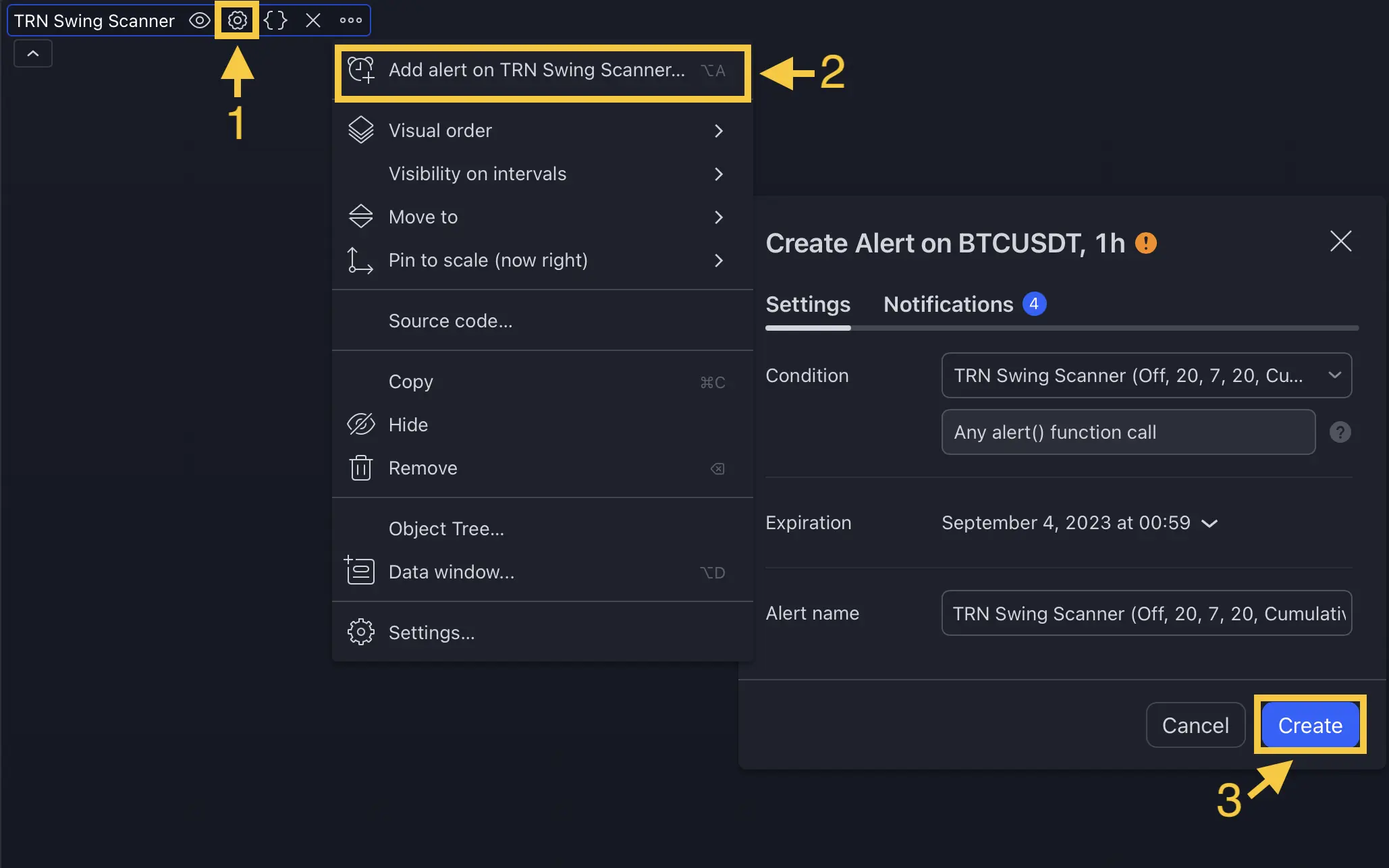
- Open the Trend and Reversal Scanner indicator settings
- Navigate to Alerts (Confirmed Signal) and enable the signal types you want
- Optionally enable types under Alerts (In Progress) for early warnings
- Right-click the indicator on your chart and select Add alert on Trend and Reversal Scanner...
- Set the condition to Any alert() function call
- Configure notification delivery (pop-up, email, push, webhook)
- Click Create
One alert instance covers all enabled signal types across all symbols in the Trend and Reversal Scanner. You do not need separate alerts per symbol or per signal type.
Combining with Other TRN Alerts
The Trend and Reversal Scanner works as a watchlist-level screener. When a scanner alert fires, switch to the individual symbol's chart where dedicated indicators provide deeper analysis:
- Swing trend alerts → confirm with Swing Suite divergence detection
- Bar trend alerts → validate with Trend Bars Pro signal bars
- Range breakout alerts → check context with Price Action Suite levels and market structure
FAQ
What is the difference between Confirmed and In-Progress alerts in the Trend and Reversal Scanner?
The Trend and Reversal Scanner organizes alerts into two tiers. Confirmed alerts fire only after bar close validates the signal — these are higher-reliability notifications suitable for trade decisions. In-Progress alerts fire during bar formation before close, providing early warnings that may not hold. Confirmed alerts are enabled by default; In-Progress alerts are disabled by default.
How many alert types does the Trend and Reversal Scanner support?
The Trend and Reversal Scanner supports 18 alert types: 12 Confirmed alerts (swing trend, divergence, bar trend change, reversal bar, continuation bar, and range breakout — each in bullish and bearish) and 6 In-Progress alerts (reversal bar, continuation bar, and range breakout — each in bullish and bearish).
Do Trend and Reversal Scanner alerts include the symbol name?
Yes, every alert message from the Trend and Reversal Scanner includes the symbol name and timeframe in the format "SYMBOL - TIMEFRAME - Signal Type". For example, "BTCUSDT - 4h - Bullish Reversal Bar Confirmed". The Exchange Names setting controls whether the exchange prefix appears in alert messages.
How do I create an alert on the Trend and Reversal Scanner in TradingView?
To create an alert on the Trend and Reversal Scanner, first enable the desired alert types in the indicator settings under Alerts (Confirmed Signal) and Alerts (In Progress). Then right-click the indicator on your chart, select "Add alert on Trend and Reversal Scanner", choose "Any alert() function call" as the condition, and click Create. One alert covers all enabled signal types across all scanned symbols.