Multi-Symbol Scanning
The Trend and Reversal Scanner monitors up to 20 symbols simultaneously in a real-time table overlay. Each symbol is evaluated across five analysis dimensions — Bar Trend, Swing Trend, Bar Ranges, Bullish Divergence, and Bearish Divergence — with color-coded cells that update on every bar.
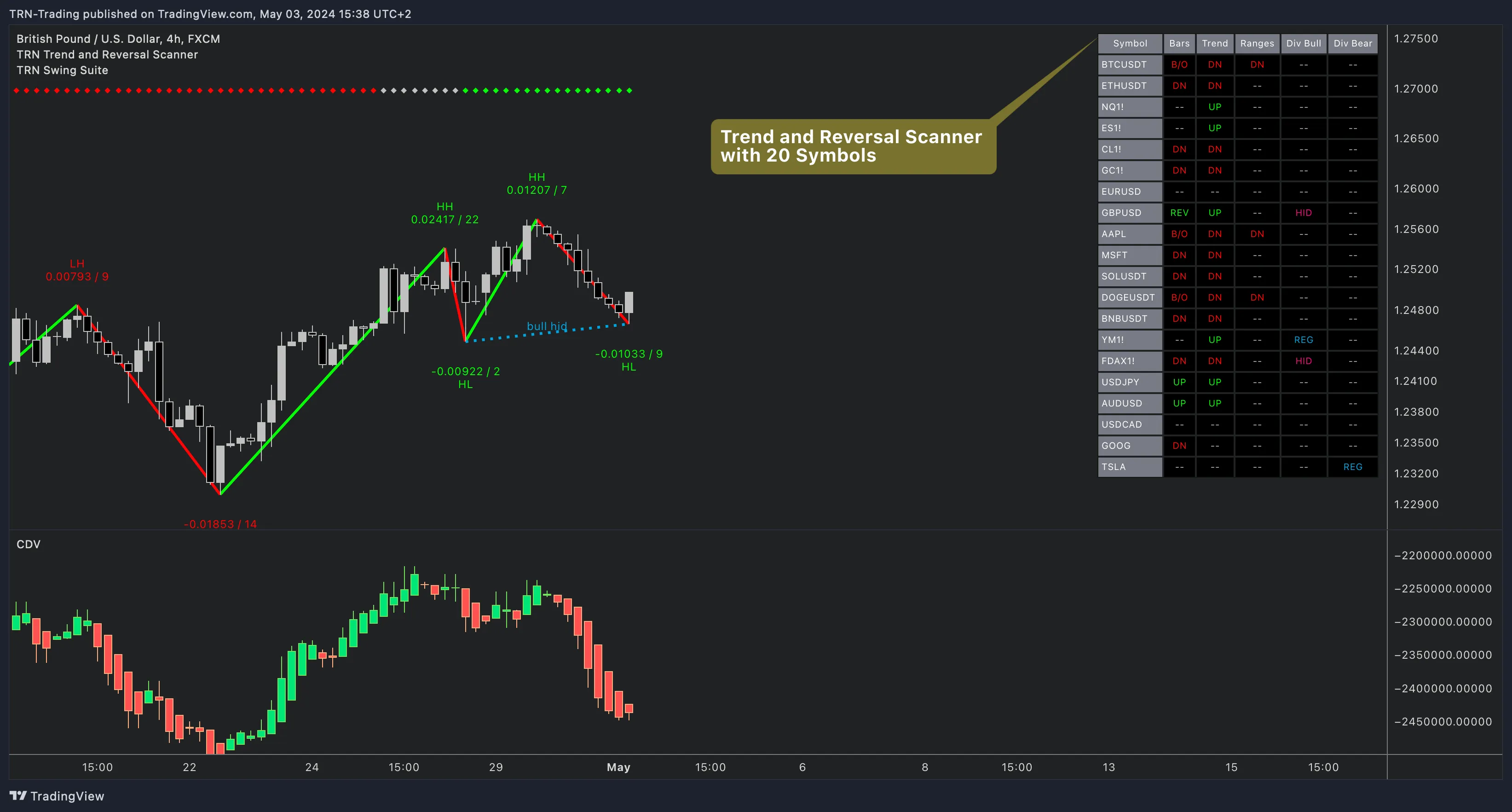
Symbol Configuration
The Trend and Reversal Scanner offers two methods for configuring your watchlist, both accessible through the indicator settings panel.
Standard Symbol Selection
The Symbols settings group provides 20 individual symbol inputs. Each slot has an enable/disable checkbox and a TradingView symbol selector. Ten symbols are enabled by default:
| Slot | Default Symbol | Market |
|---|---|---|
| 1–2 | BTCUSDT, ETHUSDT | Crypto |
| 3–4 | NQ, ES | US Index Futures |
| 5–6 | CL, GC | Energy & Metals |
| 7–8 | EURUSD, GBPUSD | Forex Majors |
| 9–10 | AAPL, MSFT | US Stocks |
| 11–20 | SOL, DOGE, BNB, YM, DAX, USDJPY, AUDUSD, USDCAD, GOOG, TSLA | Disabled by default |
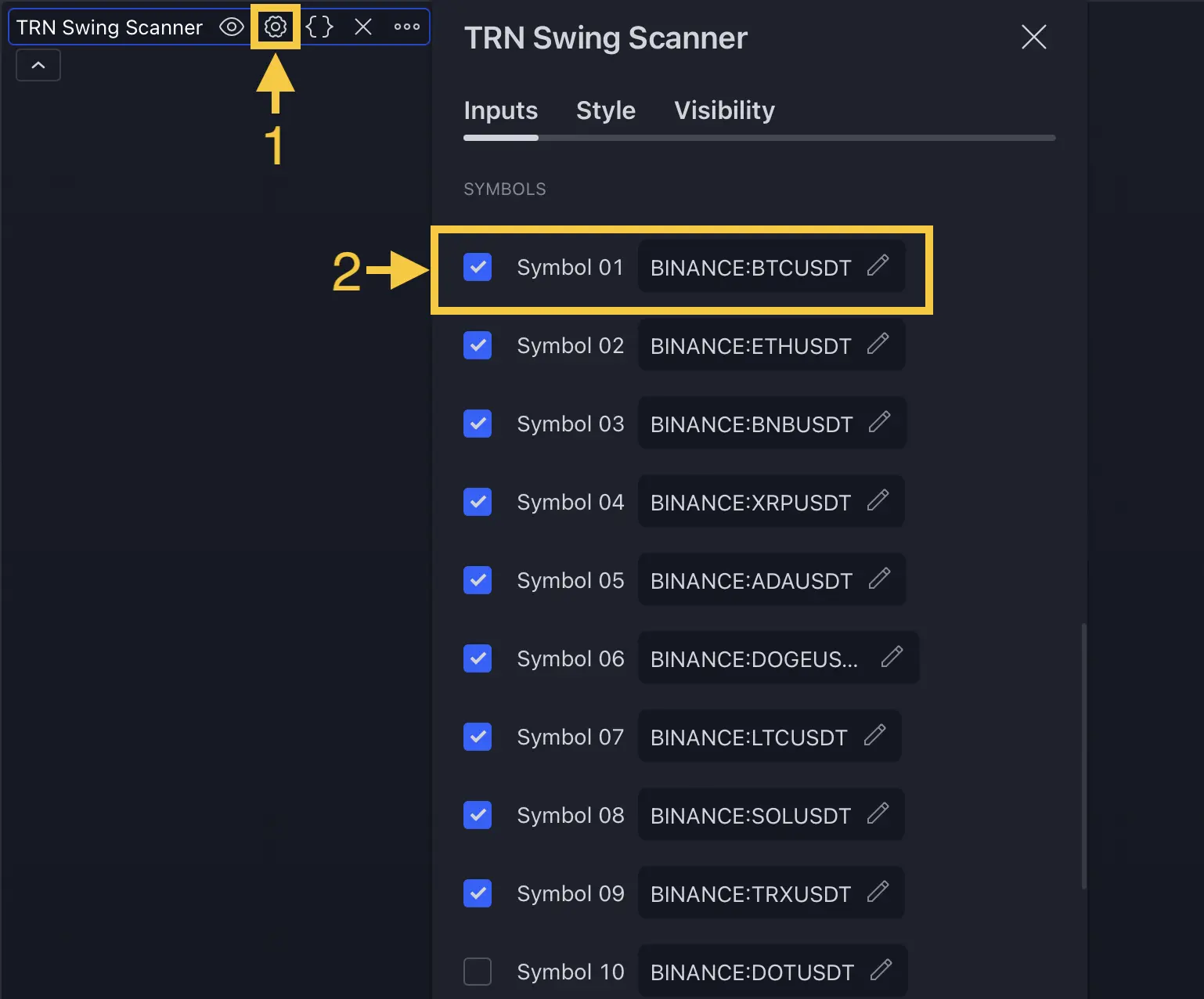
Group similar instruments together — for example, crypto in slots 1–5, futures in 6–10, forex in 11–15, and stocks in 16–20. The Trend and Reversal Scanner processes symbols in order, so grouping helps you scan the table faster.
Advanced Symbol Input
The Advanced settings group provides a text area where you can paste a comma-separated or newline-separated list of up to 20 symbols. Enable the "Use this symbol list instead of symbol selection above" toggle to switch from the standard selector to the text input. The Trend and Reversal Scanner validates the list and shows an error if more than 20 symbols are provided.
Analysis Columns
Each column in the Trend and Reversal Scanner can be independently enabled or disabled in the Columns settings group. Disabling a column removes it from the table and also disables its underlying calculations and alerts.
Column Reference
| Column | What It Tracks | Possible States |
|---|---|---|
| Bars | Bar-level trend direction and signal bars | UP, DN, REV, CON, B/O |
| Trend | Swing-level trend based on swing progression | UP, DN |
| Ranges | Range formations and breakouts | --, ACTIVE, UP, DN, UP CONF, DN CONF |
| Div Bull | Bullish regular and hidden divergences | --, REG, HID, REG CONF, HID CONF |
| Div Bear | Bearish regular and hidden divergences | --, REG, HID, REG CONF, HID CONF |
Reading Signal States
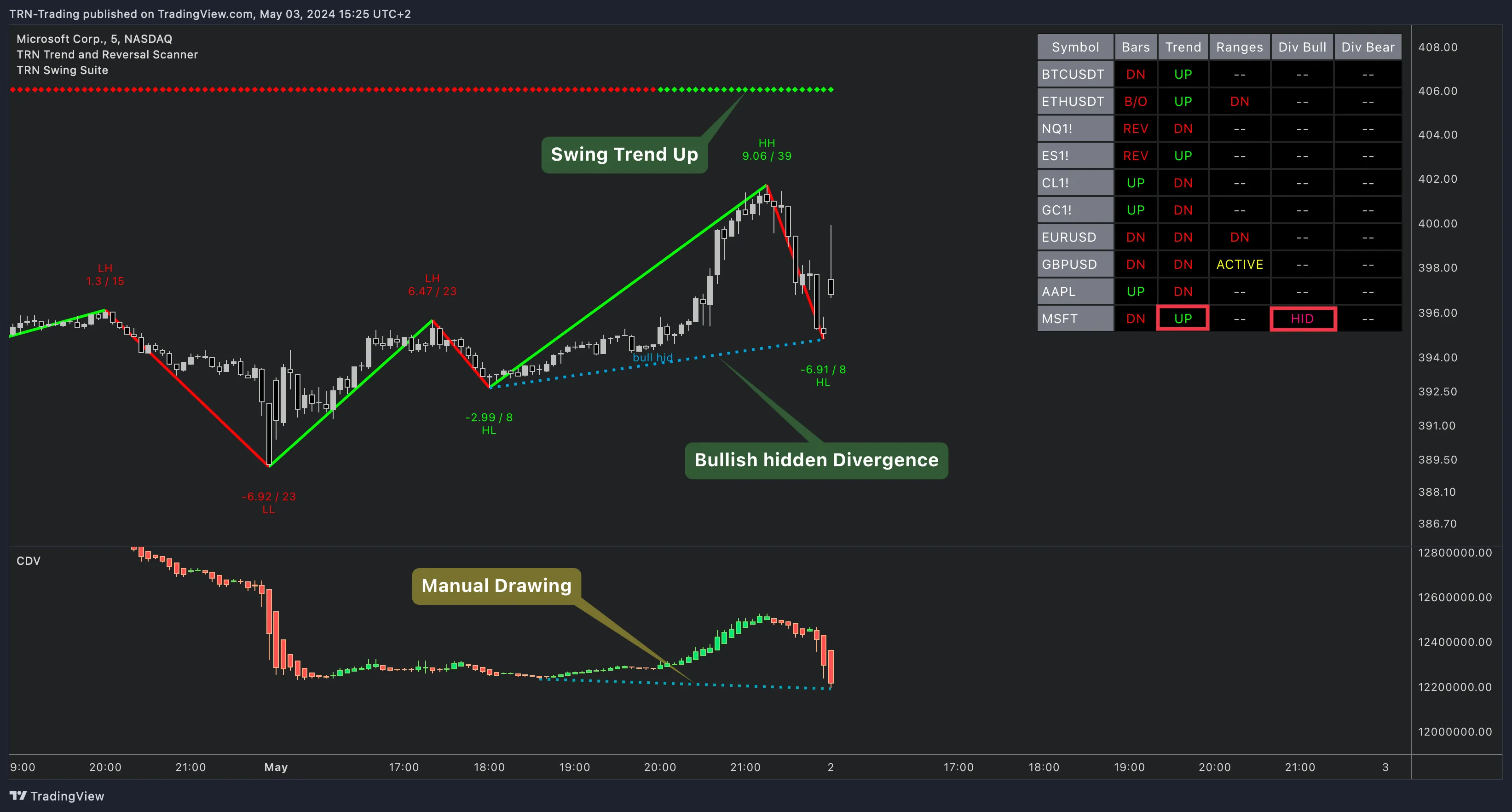
The Trend and Reversal Scanner uses a consistent color coding system across all columns:
- Green text — Bullish signal (UP, UP CONF, B/O bullish)
- Red text — Bearish signal (DN, DN CONF, B/O bearish)
- Yellow text — Active/forming state
- Cyan text — Regular divergence detected
- Pink text — Hidden divergence detected
- Green/Red background — Confirmed breakout (highest priority signals)
Signal Confirmation
The Trend and Reversal Scanner distinguishes between forming and confirmed states. A signal like "UP" in the Ranges column means a breakout is detected but not yet confirmed. "UP CONF" means the breakout held through bar close. This two-tier confirmation system reduces false signals and is reflected in the alert categories as well.
Timeframe Behavior
The Trend and Reversal Scanner runs all calculations on the chart's current timeframe. The scanner table header displays the active timeframe (e.g., "Symbol (4h)") so you always know which timeframe the signals represent. To monitor multiple timeframes, open the Trend and Reversal Scanner on separate charts with different timeframe settings.
FAQ
How do I add custom symbols to the Trend and Reversal Scanner?
The Trend and Reversal Scanner provides two methods for symbol configuration. The standard method uses 20 individual symbol inputs in the Symbols settings group — enable the checkbox and select any TradingView instrument. The advanced method accepts a comma-separated or newline-separated text list in the Advanced settings group, which is useful for quickly pasting watchlists.
What do the signal states mean in the Trend and Reversal Scanner table?
The Trend and Reversal Scanner uses color-coded abbreviations for each signal state. Bar Trend shows UP, DN (direction), REV (reversal bar), CON (continuation bar), and B/O (range breakout). Swing Trend shows UP or DN for bullish or bearish trend. Bar Ranges shows ACTIVE (range forming), UP/DN (breakout), and UP CONF/DN CONF (confirmed). Divergence columns show REG (regular), HID (hidden), REG CONF, and HID CONF.
Can I hide certain columns in the Trend and Reversal Scanner?
Yes, the Trend and Reversal Scanner allows each of its five analysis columns — Bar Trend, Swing Trend, Bar Ranges, Divergence Bullish, and Divergence Bearish — to be independently enabled or disabled in the Columns settings group. Disabling a column also disables its calculations and alerts, reducing computational load.
What symbols does the Trend and Reversal Scanner include by default?
The Trend and Reversal Scanner ships with 10 symbols enabled by default: BTCUSDT, ETHUSDT, NQ, ES, CL, GC, EURUSD, GBPUSD, AAPL, and MSFT. These cover major crypto pairs, US index futures, energy and metals futures, forex majors, and large-cap stocks. All 20 slots are fully customizable.