Trend and Reversal Scanner Settings
The Trend and Reversal Scanner organizes its settings into five groups: Columns, Swing Trend, Divergence Detection, Styling, and Advanced. This guide covers every configurable parameter so you can optimize the scanner for your trading instruments and workflow.
Columns
The Columns group controls which analysis dimensions appear in the Trend and Reversal Scanner table. Each toggle enables or disables both the table column and its underlying calculations — disabling unused columns reduces computational load.
| Setting | Default | What It Controls |
|---|---|---|
| Bar Trend | On | Bar-level direction and signal bar detection (REV, CON, B/O) |
| Swing Trend | On | Higher-level trend based on swing progression |
| Bar Ranges | On | Range formation and breakout status |
| Divergence Bullish | On | Bullish regular and hidden divergence detection |
| Divergence Bearish | On | Bearish regular and hidden divergence detection |
Swing Trend
The Swing Trend group configures how the Trend and Reversal Scanner identifies higher-level trend direction. These parameters affect both the Trend column in the table and swing-trend-based alerts.
| Setting | Default | What It Controls |
|---|---|---|
| Use Log Scale | On | Computes swings on a logarithmic price scale — improves accuracy on volatile instruments like crypto |
| Swing Size | 10 | Number of bars on each side of a pivot to confirm a swing point (1–300). Smaller values detect more frequent trend changes; larger values identify only major swings |
| DTB Strength | 20 | Tolerance for double top/bottom matching. Higher values classify more swing points as equal highs or lows |
For crypto and high-volatility instruments, the default Swing Size of 10 works well. For forex or lower-timeframe charts, try reducing to 5–7 for more responsive trend detection. For daily charts on stocks, increase to 15–20 to filter minor fluctuations. The Trend and Reversal Scanner applies the same swing settings to all scanned symbols.
Divergence Detection
The Trend and Reversal Scanner detects divergences using a configurable oscillator engine shared with the Swing Suite and SMT/Divergence Suite.
Oscillator Selection
| Setting | Default | What It Controls |
|---|---|---|
| Divergence Indicator | Cumulative Delta (approx.) | Which oscillator powers divergence detection across all scanned symbols |
The Trend and Reversal Scanner supports 14 oscillator options:
- Off — Disables divergence detection entirely
- External Indicator — Connects to any TradingView indicator output
- Awesome Oscillator (AO), CCI, Cumulative Delta, CMF, MACD, MFI, Momentum, OBV, RSI, Stochastic %K, Stochastic %D, Williams %R
Oscillator Parameters
Three configurable parameters adapt to whichever oscillator is selected:
| Parameter | Typical Use | Default |
|---|---|---|
| 1st Parameter | Length (RSI, CCI, MFI, Momentum, OBV, CMF) or Fast Length (MACD) or %K Length (Stochastic) | 12 |
| 2nd Parameter | Smoothing (CCI) or Slow Length (MACD) or %K Smoothing (Stochastic) | 26 |
| 3rd Parameter | Signal Smoothing (MACD) or %D Smoothing (Stochastic) | 9 |
External Indicator Input
When "External Indicator" is selected, two source inputs become active:
- External Indicator (High) — Primary oscillator output. For single-output indicators, connect this input only
- External Indicator Low — Secondary output for dual-output indicators like Cumulative Delta bars. Set to the same source as High if the indicator has only one output
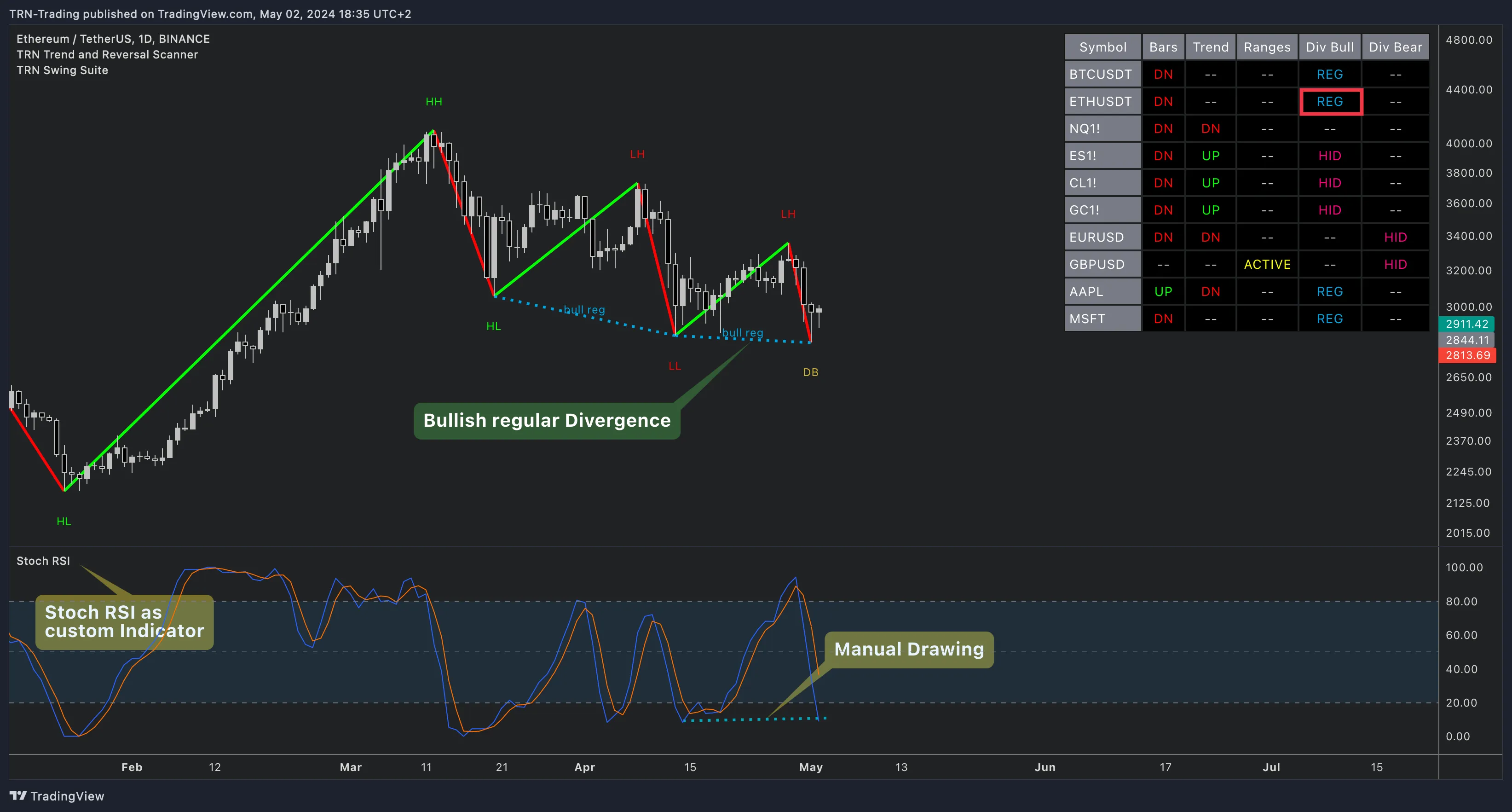
Styling
The Styling group controls the visual appearance of the Trend and Reversal Scanner table. A styling preset system simplifies configuration.
Presets
| Preset | Description |
|---|---|
| Dark | Dark header and cell backgrounds with light text — optimized for dark TradingView themes |
| Light | Light backgrounds with dark text — optimized for light TradingView themes |
| Custom | Unlocks all individual color controls for full customization |
Selecting Dark or Light overwrites all color settings. Switch to Custom to adjust individual colors.
Table Layout
| Setting | Default | What It Controls |
|---|---|---|
| Location | Top Right | Table position on chart — 9 options (Top/Middle/Bottom × Left/Center/Right) |
| Header Text Size | 10 | Font size for column headers in pixels (8–50) |
| Cell Text Size | 10 | Font size for data cells in pixels (8–50) |
| Display Exchange Names | Off | Whether exchange prefixes appear in the table and/or alert messages (Off, Alerts, Table, Table + Alerts) |
Color Controls (Custom preset)
When the Custom preset is active, the Trend and Reversal Scanner exposes individual color controls for:
- Header background and text colors
- Border and frame colors
- Cell background (default, confirmed up, confirmed down)
- Text colors (default, active, failed, breakout up/down, confirmed up/down)
- Divergence colors (hidden, regular, hidden confirmed, regular confirmed)
Advanced
| Setting | Default | What It Controls |
|---|---|---|
| Use this symbol list | Off | Switches from individual symbol selectors to the text area input |
| Symbols text area | Default 10 symbols | Comma-separated or newline-separated list of up to 20 symbols |
FAQ
Which divergence oscillator works best in the Trend and Reversal Scanner?
The Trend and Reversal Scanner defaults to Cumulative Delta for divergence detection, which works well for futures and crypto where volume data is reliable. RSI is a strong alternative for forex and stocks. The scanner supports 14 oscillator options — choose based on the instruments in your watchlist.
How do I change the Trend and Reversal Scanner table position?
The Trend and Reversal Scanner table can be placed in any of nine chart positions — Top/Middle/Bottom combined with Left/Center/Right. Open indicator settings, navigate to the Styling group, and change the Location dropdown. The default position is Top Right.
What do the Dark and Light styling presets control in the Trend and Reversal Scanner?
The Trend and Reversal Scanner includes Dark and Light styling presets that automatically configure all table colors — header background, cell background, text colors, border colors, and divergence highlighting. Select Custom to override individual colors. The preset overwrites all color settings when Dark or Light is selected.
Can I use an external indicator for divergence detection in the Trend and Reversal Scanner?
Yes, the Trend and Reversal Scanner accepts external indicator input for divergence detection. Set the Divergence Indicator to "External Indicator" and connect any TradingView indicator's output via the External Indicator (High) and External Indicator Low source selectors. This lets you use custom or third-party oscillators.
What does DTB Strength control in the Trend and Reversal Scanner?
DTB Strength in the Trend and Reversal Scanner controls the accuracy of double top and double bottom detection within the swing trend calculation. A higher DTB Strength value allows more tolerance when matching swing highs or lows, producing more double top/bottom classifications. The default value is 20.