Head and Shoulders Usage Guide
This guide covers practical trading strategies and workflows for the Head and Shoulders Pattern indicator. Each strategy includes recommended settings and step-by-step execution.
Strategy 1: Confirmed Neckline Breakouts
Confirmed neckline breakouts are the highest-probability use of the Head and Shoulders Pattern — waiting for price to close beyond the neckline of a validated H&S formation.
Setup
- Set Accuracy to Medium for balanced pattern quality
- Set Min RR Ratio to 1.5 or higher for quality filtering
- Enable the Statistics table to validate performance
- Use Sloped Neckline (default) for more accurate breakout levels
Execution
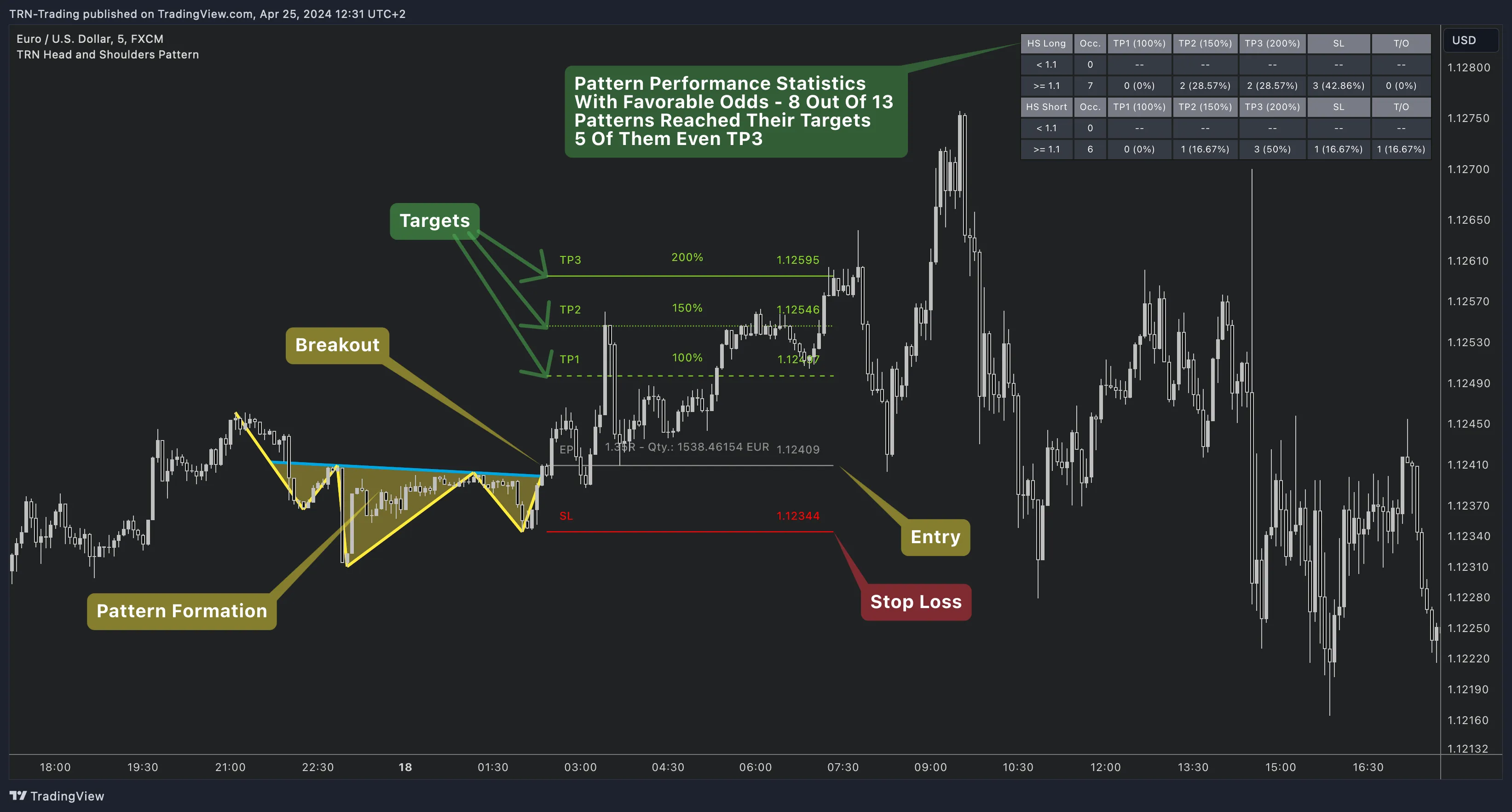
- Wait for the Head and Shoulders Pattern indicator to detect a complete H&S or inverse H&S formation
- When price closes beyond the neckline, a confirmed breakout triggers
- The indicator automatically displays entry, stop loss (at the head), and TP1/TP2/TP3 levels
- Monitor the trade against the projected targets
Combine with Trend Bars Pro to confirm breakout momentum. A neckline break aligned with a Trend Bars signal carries higher conviction than the pattern breakout alone.
Strategy 2: Multi-Scale Detection
Use both detection sizes to identify H&S patterns at different structural levels simultaneously.
Setup
- Set Pattern 1 to a smaller size (e.g., Very Small) for shorter-term reversals
- Set Pattern 2 to a larger size (e.g., Medium or Large) for major structural reversals
- Watch for confluence — when both sizes detect a reversal in the same price area
Execution
- Smaller-size patterns detect shorter-term trend reversals more frequently
- Larger-size patterns identify major structural tops and bottoms
- When both sizes signal a reversal at similar levels, the multi-scale confluence indicates a higher-confidence setup
Strategy 3: Staged Profit-Taking
Use the three TP levels for systematic position management after a neckline breakout.
Setup
- Set TP1 to 100% (classic measured move)
- Set TP2 to 150% and TP3 to 200% for extended targets
- Plan your position sizing to allow partial exits at each level
Execution
- Take partial profits at TP1 (the classic measured move — highest hit rate)
- Move stop to breakeven after TP1 is reached
- Let remaining position run toward TP2 and TP3
- Review the Statistics table to see TP1/TP2/TP3 hit rates on your instrument
Alert Setup
The Head and Shoulders Pattern provides 5 alert types for automated monitoring.
| Alert | Default | When It Fires |
|---|---|---|
| Pattern Active | Off | A complete H&S or inverse H&S formation has been detected |
| B/O Up Confirmed | On | Inverse H&S breakout confirmed — price closed above neckline |
| B/O Up Unconfirmed | Off | Inverse H&S breakout intra-bar — not yet confirmed by close |
| B/O Down Confirmed | On | Classic H&S breakout confirmed — price closed below neckline |
| B/O Down Unconfirmed | Off | Classic H&S breakout intra-bar — not yet confirmed by close |
Setting Up Alerts on TradingView
- Enable the desired alert types in the indicator's Alerts settings group
- Right-click the indicator on your chart → select Add Alert
- In the Condition dropdown, select Any Alert Function Call
- Configure your notification method — popup, email, or webhook
- Click Create to activate
The Head and Shoulders Pattern uses runtime alert() calls. Always select Any Alert Function Call as the condition type when creating alerts in TradingView.
Recommended Settings by Trading Style
| Style | Pattern 1 | Pattern 2 | Accuracy | Min RR |
|---|---|---|---|---|
| Day Trading (5-15min) | Tiny (2) | Very Small (5) | Low | 1.1 |
| Swing Trading (1H-4H) | Very Small (5) | Small (7) | Medium | 1.5 |
| Position Trading (Daily) | Small (7) | Medium (10) | Medium | 1.5 |
| Conservative | Medium (10) | Large (16) | High | 2.0 |
Combining with Other TRN Indicators
Trend Bars Pro
Use Trend Bars Pro to confirm breakout momentum direction. A neckline break aligned with Trend Bars signal carries higher conviction.
Consolidation & H&S Scanner
Use the Consolidation & Head and Shoulders Scanner to monitor up to 20 symbols simultaneously for H&S patterns — then switch to the Head and Shoulders Pattern for detailed analysis on the best setups.
Price Action Suite
Identify key support and resistance levels near your TP zones. If a target aligns with a major Fair Value Gap, consider adjusting your exit strategy.
FAQ
What is the best strategy for head and shoulders pattern trading?
The most reliable approach is waiting for a confirmed neckline breakout with the minimum RR ratio filter set to 1.5 or higher. Combining the Head and Shoulders Pattern with Trend Bars Pro for momentum confirmation adds an additional filter layer for higher-probability entries.
How do I set up alerts for head and shoulders patterns on TradingView?
Enable the desired alert types in the indicator's Alerts settings (Pattern Active, Breakout Up/Down Confirmed/Unconfirmed). Then right-click the indicator, select Add Alert, choose Any Alert Function Call as the condition, and configure your notification method.
How do I avoid false head and shoulders breakouts?
Increase the Accuracy setting to Medium or High for stricter pattern geometry. Use confirmed breakout alerts (not unconfirmed). Combine with Trend Bars Pro for momentum confirmation. Set a higher minimum RR ratio to filter weak setups.
Which detection sizes should I use?
For day trading on 5-15 minute charts, use Tiny to Very Small (2-5). For swing trading on 1H-Daily charts, use Small to Medium (7-10). For position trading on Daily-Weekly, use Medium to Large (10-16). Enable both detection layers for multi-scale coverage.