Head and Shoulders Risk Management
Head and Shoulders Pattern provides a complete trade management framework with three configurable take profit targets based on the head-to-neckline distance, a minimum risk/reward ratio filter, and an integrated position sizing calculator.
Three Take Profit Targets
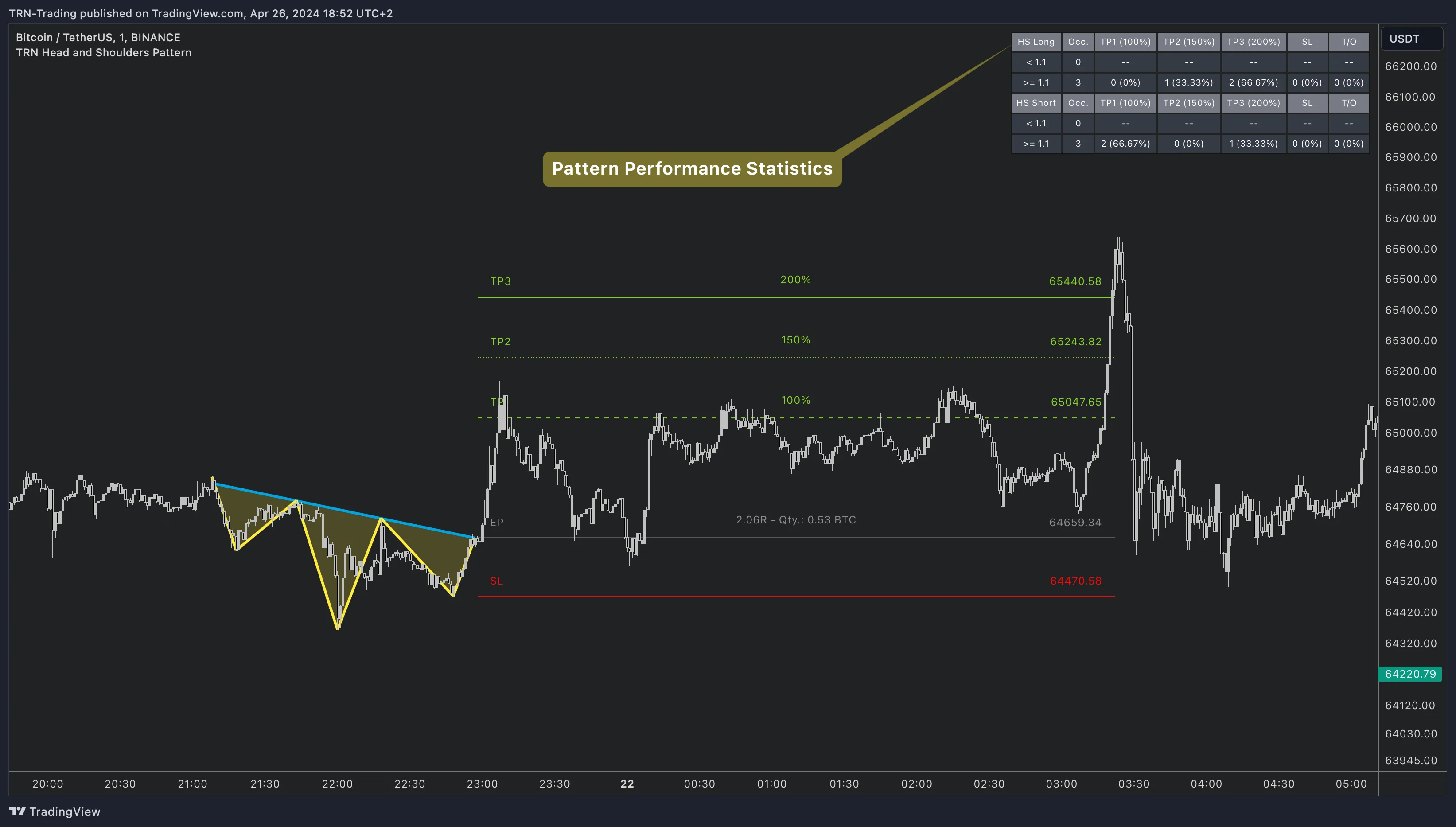
The Head and Shoulders Pattern indicator projects up to three take profit levels based on the head-to-neckline distance — the vertical distance from the head's extreme to the neckline at the breakout point.
| Setting | Default | What It Controls |
|---|---|---|
| TP1 (%) | 100% | First target — the classic measured move (head-to-neckline distance) |
| TP2 (%) | 150% | Second target — 1.5x the measured move (optional) |
| TP3 (%) | 200% | Third target — 2x the measured move (optional) |
TP2 and TP3 can be independently enabled or disabled by setting their percentage to 0. Only TP1 is used for the risk/reward ratio calculation that gates whether a trade setup is displayed.
Minimum Risk/Reward Filter
The minimum RR ratio filter prevents the Head and Shoulders Pattern indicator from displaying trade setups where the risk/reward is unfavorable.
| Setting | Default | What It Controls |
|---|---|---|
| Min Risk-Reward Ratio | 1.1 | Minimum RR based on TP1. Trades below this threshold are hidden |
This filter ensures every trade setup shown on the chart meets your minimum profitability criteria. Detected patterns with poor risk/reward geometry (e.g., very shallow head relative to neckline distance) are filtered out.
Stop-Loss Placement
The stop loss is placed at the head of the pattern:
- Classic H&S (bearish): Stop above the head's peak
- Inverse H&S (bullish): Stop below the head's trough
This represents the structural invalidation level — if price exceeds the head, the entire H&S pattern thesis is negated.

Position Sizing Calculator
An optional position sizing calculator integrates your account parameters directly into the trade setup.
| Setting | Default | What It Controls |
|---|---|---|
| Use Risk Management | Off | Enable the position sizing calculator |
| Account Size | 10,000 | Your trading account balance |
| Risk % | 1.0% | Maximum risk per trade as percentage of account |
When enabled, the Head and Shoulders Pattern indicator calculates the appropriate position size for each trade. The calculated quantity can be displayed alongside the TP/SL labels.
Trade Visualization
The Head and Shoulders Pattern indicator offers detailed control over how trade levels are displayed:
| Setting | Default | What It Controls |
|---|---|---|
| Compact Mode | On | Condensed display with essential information only |
| TP/SL Line Length | 0 (auto) | Line extension length — 0 = matches pattern length |
| Label Position | Left | Where TP/SL labels appear (Off, Left, Center, Right) |
| Price Position | Right | Where price values appear |
| Percentage Position | Center | Where TP percentages appear |
| RRR Position | Center | Where risk/reward ratios appear |
Start with Compact mode enabled for a clean chart. Disable Compact mode when you want to see all labels, percentages, and RRR values for detailed analysis.
FAQ
How are take profit targets calculated for head and shoulders patterns?
The Head and Shoulders Pattern indicator calculates take profit targets as a percentage of the head-to-neckline distance. TP1 defaults to 100% (the classic measured move), TP2 to 150%, and TP3 to 200%. All three percentages are configurable. The classic measured move (100%) is the most commonly used target in head and shoulders trading.
What is the minimum risk/reward ratio filter?
The minimum RR ratio filter (default 1.1) prevents the Head and Shoulders Pattern indicator from displaying trade setups where the risk/reward is unfavorable. If a breakout produces a risk/reward below the threshold based on TP1, the TP/SL lines are not drawn and no alert is triggered.
Where does the Head and Shoulders Pattern place the stop loss?
The stop loss is placed at the head of the pattern — above the head for classic H&S (bearish) trades, and below the head for inverse H&S (bullish) trades. This represents the structural invalidation level where the entire pattern thesis would be negated.
How does the position sizing calculator work?
The optional position sizing calculator takes your account size and risk percentage per trade, then calculates the appropriate position size based on the distance between entry and stop loss. Enable it in the Risk Management settings group. The calculated quantity can be displayed alongside the trade levels.