Multi-Symbol Scanning
The Harmonic Patterns Scanner displays all monitored symbols in a real-time table with color-coded pattern status and pattern type identification. The scanner tracks the full pattern lifecycle from initial buildup through breakout confirmation or failure.
Scanner Table
The scanner table has 3 columns showing the current harmonic pattern status for each symbol:
| Column | What It Shows |
|---|---|
| Symbol | The instrument ticker + timeframe |
| Long | Bullish harmonic pattern status and type name |
| Short | Bearish harmonic pattern status and type name |
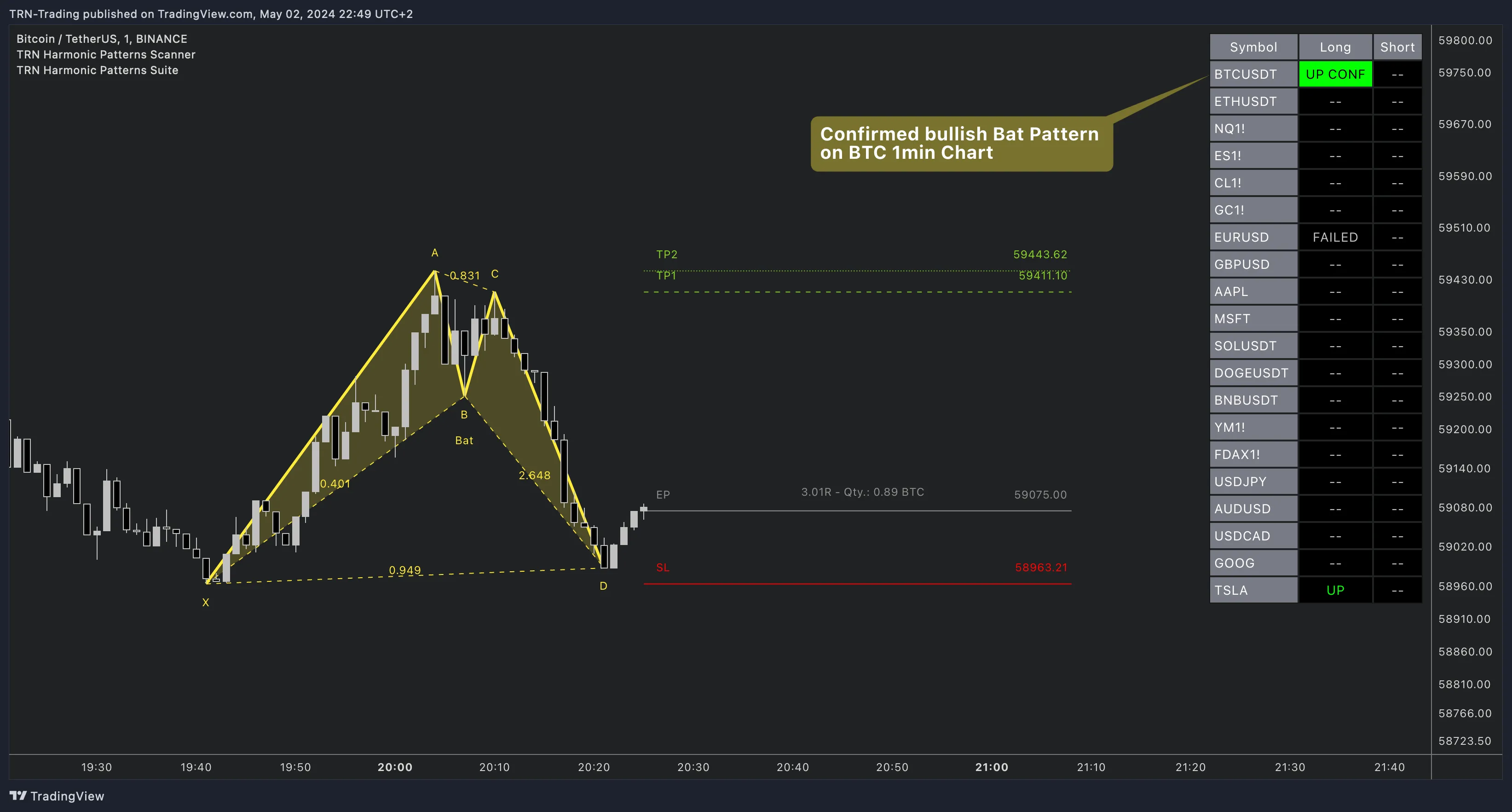
Pattern States
Each cell in the scanner table shows the current state of harmonic pattern detection for that symbol and direction:
| State | Color | Meaning |
|---|---|---|
-- | Gray | No active pattern |
Build Up | Light Yellow | Incomplete pattern forming — X, A, B points identified |
[Pattern Name] | Yellow | Complete XABCD pattern detected, awaiting breakout |
UP / DN | Light Green/Red | Unconfirmed breakout — price crossed trigger level intra-bar |
UP CONF / DN CONF | Green/Red | Confirmed breakout — bar closed beyond trigger level |
FAILED | Gray | Breakout attempt failed or was invalidated |
Pattern Lifecycle
- Build Up — The scanner detects an incomplete pattern forming (X, A, B points established)
- Active — A complete XABCD pattern is identified. The pattern name appears in the cell (e.g., "Crab", "Gartley")
- Breakout — The selected breakout condition triggers. Status changes to
UP/DN(unconfirmed) or directly toUP CONF/DN CONF(confirmed) - Resolution — The breakout either confirms on bar close or fails and returns to
FAILED
Monitor the "Build Up" state as an early warning. When a symbol shows Build Up, the pattern is forming but not yet complete — this gives you time to prepare before the pattern activates. When it transitions to Active with a pattern name, switch to the Harmonic Patterns Suite on that instrument for detailed XABCD visualization.
7 Breakout Conditions
The scanner uses the same 7 breakout confirmation methods as the Harmonic Patterns Suite:
| Condition | Confirmation Level |
|---|---|
| Close Below/Above 2 Lows/Highs | Fast |
| Close 3 Lows/Highs | Moderate |
| Swing Flip | Moderate |
| MACD Crossing | Moderate |
| RSI Crossing | Moderate |
| TRN Bars Signals | Strong |
| TRN Bars Signals + Trend (default) | Strongest |
FAQ
What do the different states mean in the Harmonic Patterns Scanner table?
The Harmonic Patterns Scanner tracks multiple states — inactive (--), Build Up (incomplete pattern forming), ACTIVE (complete pattern detected), UP/DN (unconfirmed breakout), UP CONF/DN CONF (confirmed breakout), and FAILED (breakout failed). The table cell shows the pattern name (e.g., "Crab", "Bat") alongside the state.
What is the difference between Build Up and Active states?
Build Up means an incomplete harmonic pattern is forming — the X, A, and B points have been identified but the pattern is not yet complete. Active means a complete XABCD pattern has been detected and is awaiting a breakout condition. Build Up is an early warning; Active is a confirmed pattern.
Can I see which specific harmonic pattern was detected on each symbol?
Yes, the scanner table displays the pattern type name directly in the cell. When a pattern is detected on a symbol, the Long or Short column shows the pattern name (e.g., "Crab", "Bat", "Shark") with color coding indicating the current state.