Wedge Pattern Pro Risk Management
Wedge Pattern Pro provides a complete trade management framework with three target calculation modes, a dedicated reverse breakout target setting, and automatic stop-loss placement. Every detected breakout generates a full trade setup — entry, stop, and target — so traders can evaluate the risk/reward before committing.
Target Modes
Wedge Pattern Pro offers three methods to calculate the take profit level for classic breakouts.
Fixed Risk Reward
Fixed Risk Reward projects the target as a configurable multiple of the stop-loss distance.
| Setting | Default | What It Controls |
|---|---|---|
| Fixed Risk Reward | 2.0 | Multiplier applied to the distance between entry and stop loss |
Example: If the stop distance is 50 points and the multiplier is 2.0, Wedge Pattern Pro places the target 100 points from entry.
Pattern Height
Pattern Height projects the wedge's full vertical span — measured from the widest point of the wedge — from the breakout point. Pattern Height targets scale naturally with the pattern's size, producing larger targets for bigger wedge formations.
Maximum
Maximum uses the larger of Fixed Risk Reward and Pattern Height for each trade. Maximum mode ensures Wedge Pattern Pro never leaves potential profits on the table when one calculation method produces a significantly larger target than the other.
| Setting | Default | What It Controls |
|---|---|---|
| Target Type | Fixed Risk Reward | How the take profit is calculated for classic breakouts |
Reverse Breakout Target
Reverse breakouts have their own separate target type setting, independent of the classic breakout target.
| Setting | Default | What It Controls |
|---|---|---|
| Reverse Breakout | Off | Enable to trade counter-trend breakouts (rising wedge up, falling wedge down) |
| Reverse Target Type | Fixed Risk Reward | Target mode for reverse breakout trades — supports Fixed Risk Reward and Pattern Height |
The Maximum option is not available for reverse breakouts since the geometric relationship between pattern height and risk differs from classic breakouts.
Stop-Loss Placement
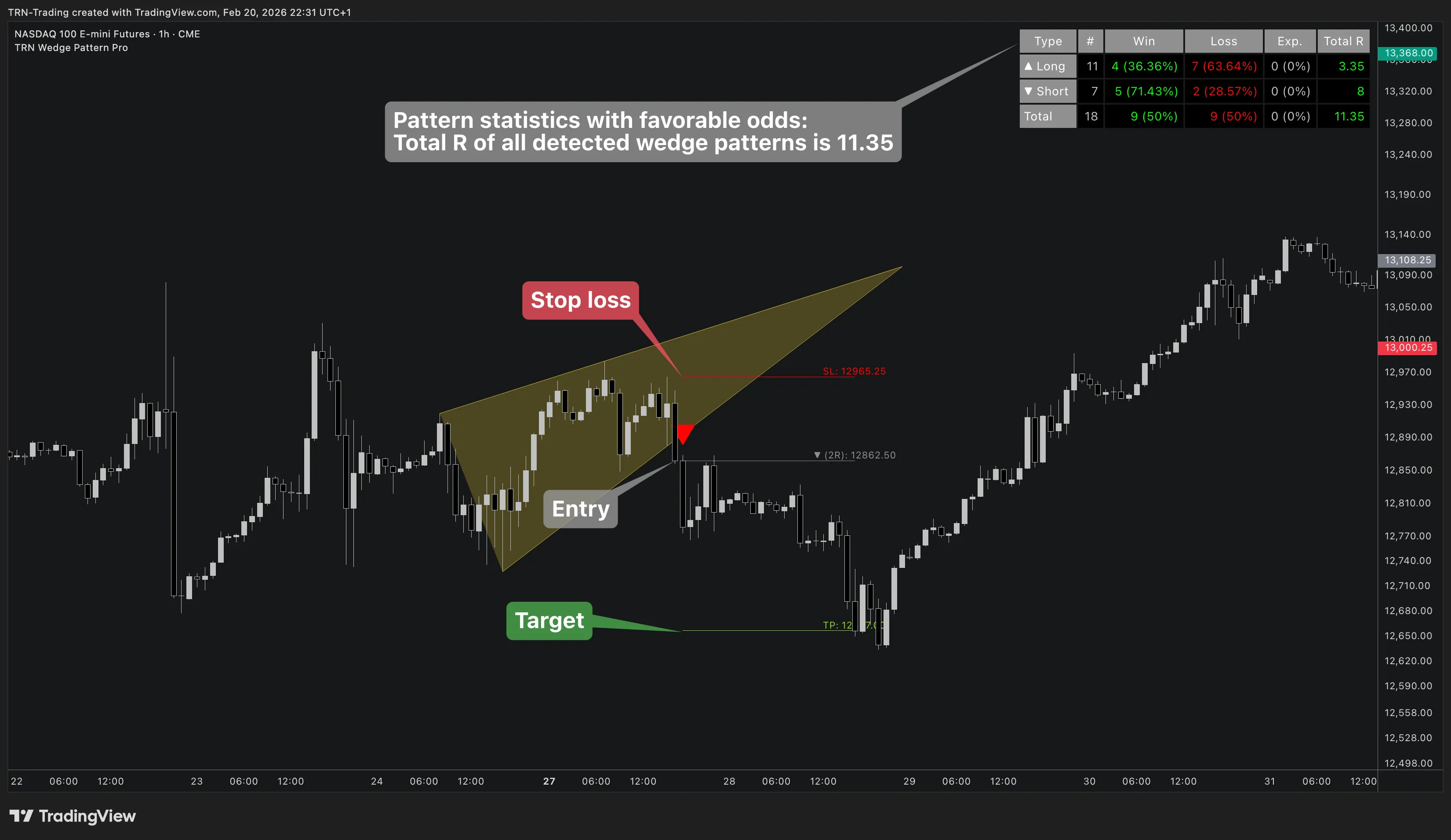
Wedge Pattern Pro automatically places the stop loss at the most recent swing extreme opposite to the trade direction:
- Long trades (falling wedge breakout): Stop below the most recent swing low
- Short trades (rising wedge breakout): Stop above the most recent swing high
This approach positions the stop at a structurally significant level where the breakout thesis would be invalidated.
Trade Direction Filter
| Setting | Default | What It Controls |
|---|---|---|
| Trade Directions | Long + Short | Limits which trade directions generate setups |
The Trade Directions setting offers three options: Long + Short, Long Only, and Short Only. Classic falling wedge breakouts are long trades; classic rising wedge breakouts are short trades. Filtering by direction is useful for aligning Wedge Pattern Pro with your market bias.
Trade Visualization
When a breakout triggers, Wedge Pattern Pro projects horizontal lines for the entry point (EP), stop loss (SL), and take profit (TP). Each line displays price and RRR labels. All line elements support independent color, style, and width customization through the Trade Visualization settings group.
FAQ
Where does Wedge Pattern Pro place the stop loss?
Wedge Pattern Pro automatically places the stop loss at the most recent swing extreme opposite to the trade direction. For long trades from falling wedge breakouts, the stop is below the most recent swing low. For short trades from rising wedge breakouts, the stop is above the most recent swing high.
What are the three target modes in Wedge Pattern Pro?
Wedge Pattern Pro offers three target modes. Fixed Risk Reward applies a configurable multiplier (default 2.0) to the stop-loss distance. Pattern Height projects the wedge's full vertical span from the breakout point. Maximum uses the larger of both calculations for optimal target placement.
Does the reverse breakout use the same target settings?
No, reverse breakouts in Wedge Pattern Pro have their own separate target type setting. Reverse breakout targets support Fixed Risk Reward and Pattern Height modes, but not the Maximum option since the geometry differs from classic breakouts.