Wedge Pattern Detection
Wedge Pattern Pro identifies rising and falling wedge formations by analyzing swing-based converging trendlines. Up to four concurrent detection layers let traders monitor wedge patterns at multiple scales simultaneously on the same chart.
Pattern Types
Wedge patterns form when price moves between two converging trendlines, signaling a potential breakout as the range compresses.
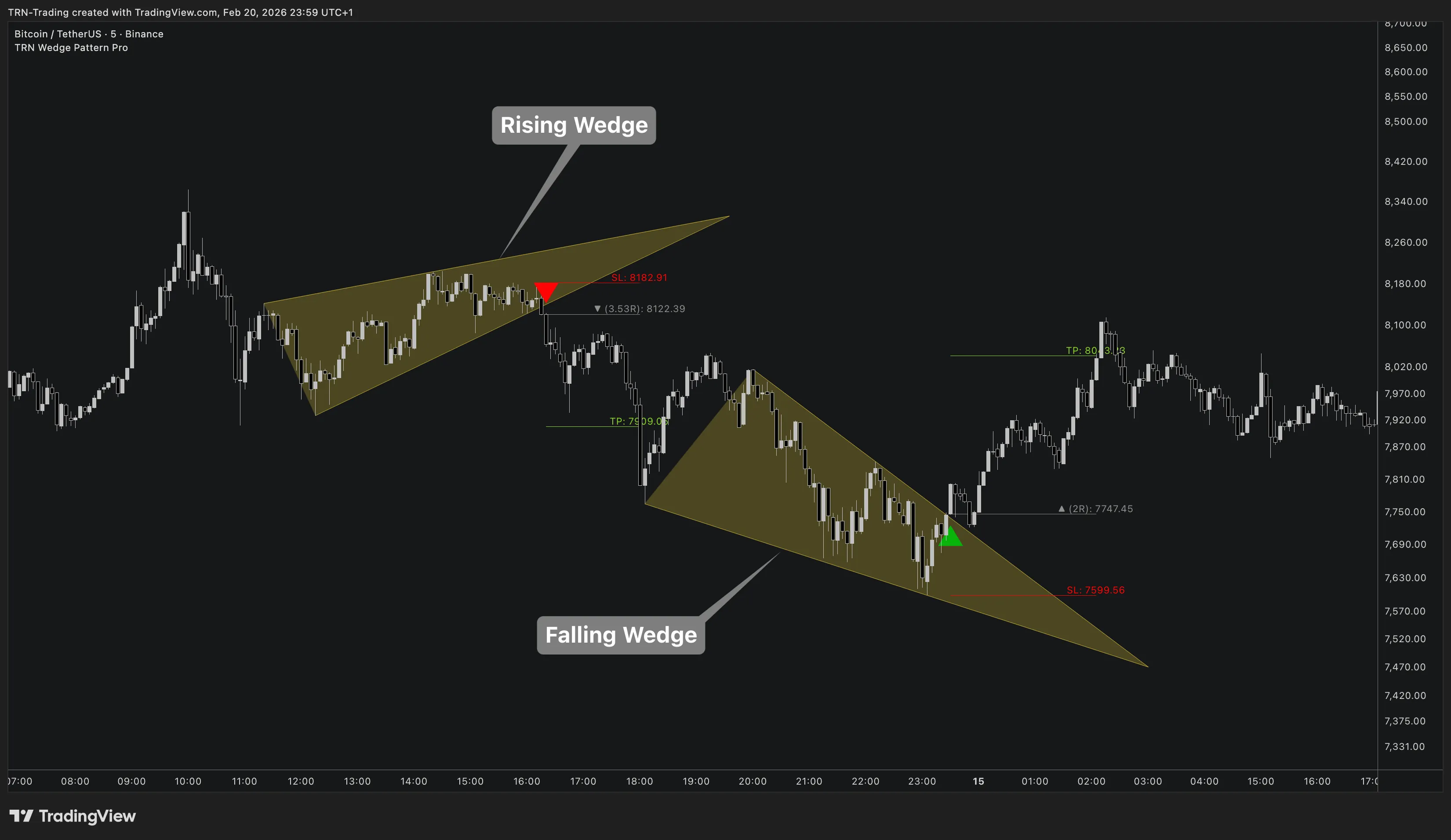
Rising Wedge (Bearish)
A rising wedge forms when both swing highs and swing lows are rising, but the lower trendline rises more steeply than the upper trendline. Rising wedges signal weakening buying momentum — each push higher gains less ground — and typically break downward through the lower trendline.
Falling Wedge (Bullish)
A falling wedge forms when both swing highs and swing lows are falling, but the upper trendline falls more steeply than the lower trendline. Falling wedges signal weakening selling momentum — each push lower loses steam — and typically break upward through the upper trendline.
Quad-Size Detection
Wedge Pattern Pro runs up to four independent detection layers simultaneously. Each layer uses its own swing sensitivity and maximum pattern length, ensuring patterns at different structural scales are captured on the same chart.
| Layer | Default Size | Default Max Length | Enabled | Color |
|---|---|---|---|---|
| Detection 1 | 7 | 200 bars | Always | Gold |
| Detection 2 | 14 | 200 bars | Yes (toggleable) | Orange |
| Detection 3 | 21 | 250 bars | Yes (toggleable) | Dark Orange |
| Detection 4 | 35 | 300 bars | No (toggleable) | Red |
Smaller swing sizes detect shorter-term wedge formations more frequently. Larger swing sizes identify more significant structural wedges that take longer to develop. Detection sizes must be entered in ascending order — Wedge Pattern Pro validates this at startup.
Each detection layer renders in its own color scheme, making it easy to visually distinguish small-scale wedges from larger structural formations on the same chart.
Log Scale
Wedge Pattern Pro uses logarithmic price scale by default for slope and steepness calculations. Log scale normalizes the trendline geometry across different price levels, ensuring consistent detection quality on any instrument — from penny stocks to high-priced assets like Bitcoin.
| Setting | Default | What It Controls |
|---|---|---|
| Use Log Scale | On | Whether slope calculations use logarithmic or linear price scale |
Log scale is recommended for most instruments. Disable it only if you have a specific reason to use linear scale (e.g., low-priced, narrow-range instruments).
Middle Line
Each detection layer offers an optional middle line — a trend line drawn between the upper and lower wedge boundaries. The middle line represents the center of the wedge structure.
The middle line can serve as an intermediate support/resistance reference during the pattern's formation. Traders watching for a breakout can use the middle line to gauge whether price is compressing toward the upper or lower boundary.
Breakout Detection
Wedge Pattern Pro confirms a breakout when price closes beyond one of the converging trendlines.
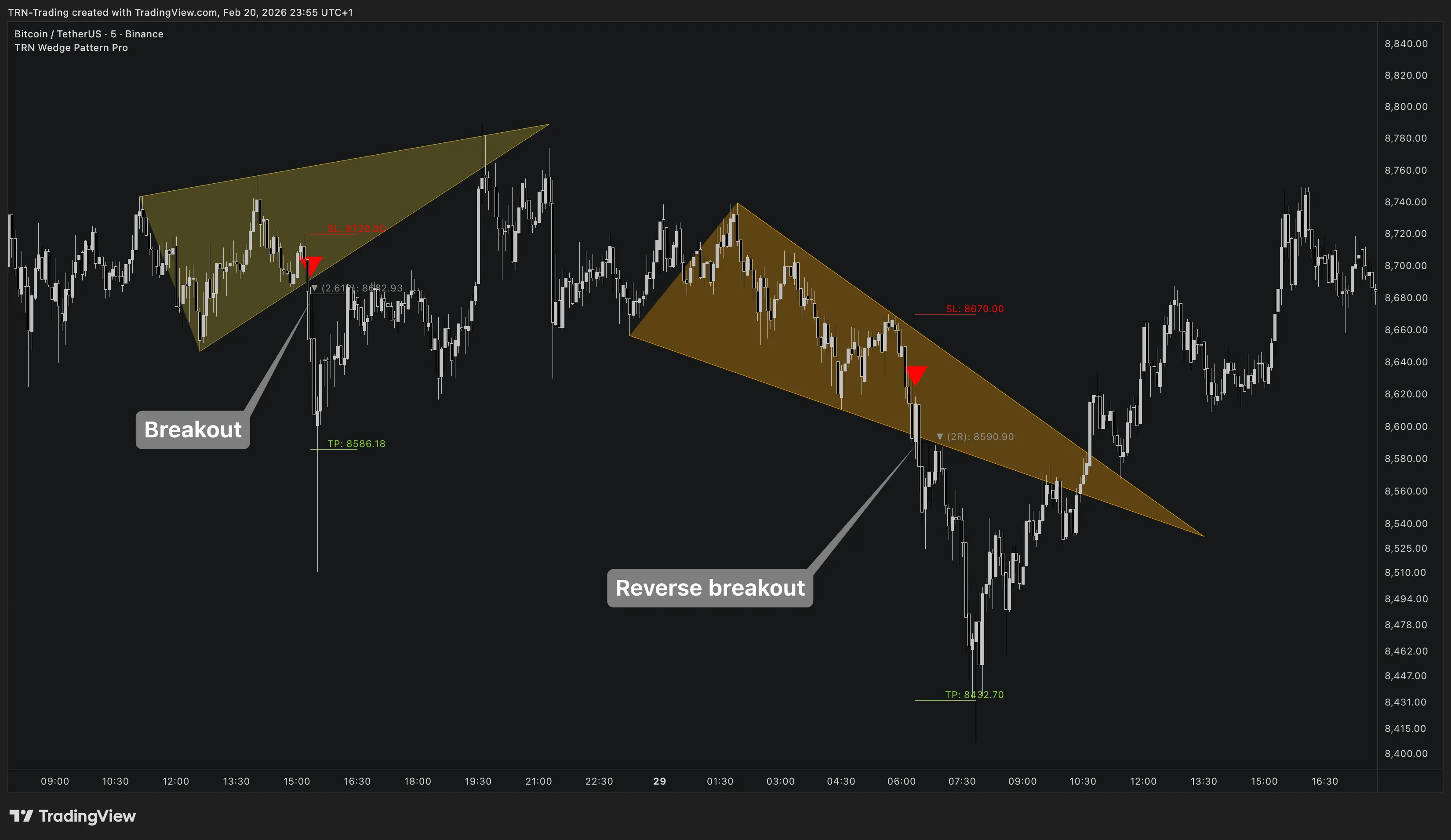
Classic Breakout
Classic breakouts follow the expected direction:
- Rising wedge → price breaks downward through the lower trendline (bearish)
- Falling wedge → price breaks upward through the upper trendline (bullish)
Reverse Breakout
Reverse breakouts move counter to the expected direction:
- Rising wedge → price breaks upward through the upper trendline (bullish continuation)
- Falling wedge → price breaks downward through the lower trendline (bearish continuation)
Reverse breakouts are disabled by default. When enabled, Wedge Pattern Pro trades both classic and reverse breakouts, each with their own configurable target type.
Combine Wedge Pattern Pro with Trend Bars Pro for enhanced breakout confirmation. A wedge breakout aligned with the Trend Bars momentum direction carries higher conviction.
Pattern Lifecycle
- Formation — Converging trendlines are drawn as swing points develop within the wedge structure
- Monitoring — Trendlines adjust dynamically as new swing points form, refining the wedge geometry
- Breakout — Price closes beyond a trendline boundary, triggering the trade setup with entry, SL, and TP levels
- Invalidation — If the pattern fails to break out or produces an unfavorable risk/reward, drawings are cleaned up (unless "Show Historic Failed Patterns" is enabled)
FAQ
How does Wedge Pattern Pro detect wedge patterns?
Wedge Pattern Pro uses swing-based converging trendline analysis to identify wedge formations. The indicator computes slope relationships between swing highs and swing lows, validates convergence geometry, and filters for steepness and duration constraints. Up to four detection layers run simultaneously at different swing sensitivities.
What is a reverse breakout in wedge pattern trading?
A reverse breakout occurs when a rising wedge breaks upward or a falling wedge breaks downward — counter to the expected direction. Wedge Pattern Pro supports trading these counter-trend breakouts with a dedicated reverse breakout mode and separate target type setting.
Why does Wedge Pattern Pro use log scale by default?
Wedge Pattern Pro uses logarithmic price scale by default because log scale normalizes slope calculations across different price levels. This ensures consistent detection quality whether analyzing a $10 stock or a $50,000 cryptocurrency. Log scale is recommended for most instruments.
What is the middle line in Wedge Pattern Pro?
The middle line is an optional trend line drawn between the upper and lower wedge boundaries. The middle line represents the center of the wedge structure and can serve as an intermediate support/resistance level or a visual reference for the pattern's equilibrium.