Consolidation & H&S Scanner Alerts
The Consolidation & Head and Shoulders Scanner provides real-time alert notifications when patterns are detected or breakouts occur across any of your monitored symbols. A single TradingView alert covers all 20 symbols simultaneously.
Alert Types
Consolidation Alerts
| Alert | When It Fires |
|---|---|
| Consolidation Found | A validated consolidation range has been detected on any symbol |
| B/O Long Unconfirmed | Price crossed above the upper boundary intra-bar |
| B/O Long Confirmed | Price closed above the upper boundary (bar confirmed) |
| B/O Short Unconfirmed | Price crossed below the lower boundary intra-bar |
| B/O Short Confirmed | Price closed below the lower boundary (bar confirmed) |
Head and Shoulders Alerts
| Alert | When It Fires |
|---|---|
| H&S Bullish Found | An inverse head and shoulders pattern detected (bullish reversal) |
| H&S Bearish Found | A classic head and shoulders pattern detected (bearish reversal) |
| B/O Long Unconfirmed | Bullish neckline break intra-bar (inverse H&S) |
| B/O Long Confirmed | Bullish neckline break confirmed on bar close |
| B/O Short Unconfirmed | Bearish neckline break intra-bar (classic H&S) |
| B/O Short Confirmed | Bearish neckline break confirmed on bar close |
Each alert fires per-symbol — the alert message includes the ticker and timeframe so you know exactly which instrument triggered.
Setting Up Alerts
Step 1: Enable Alert Types
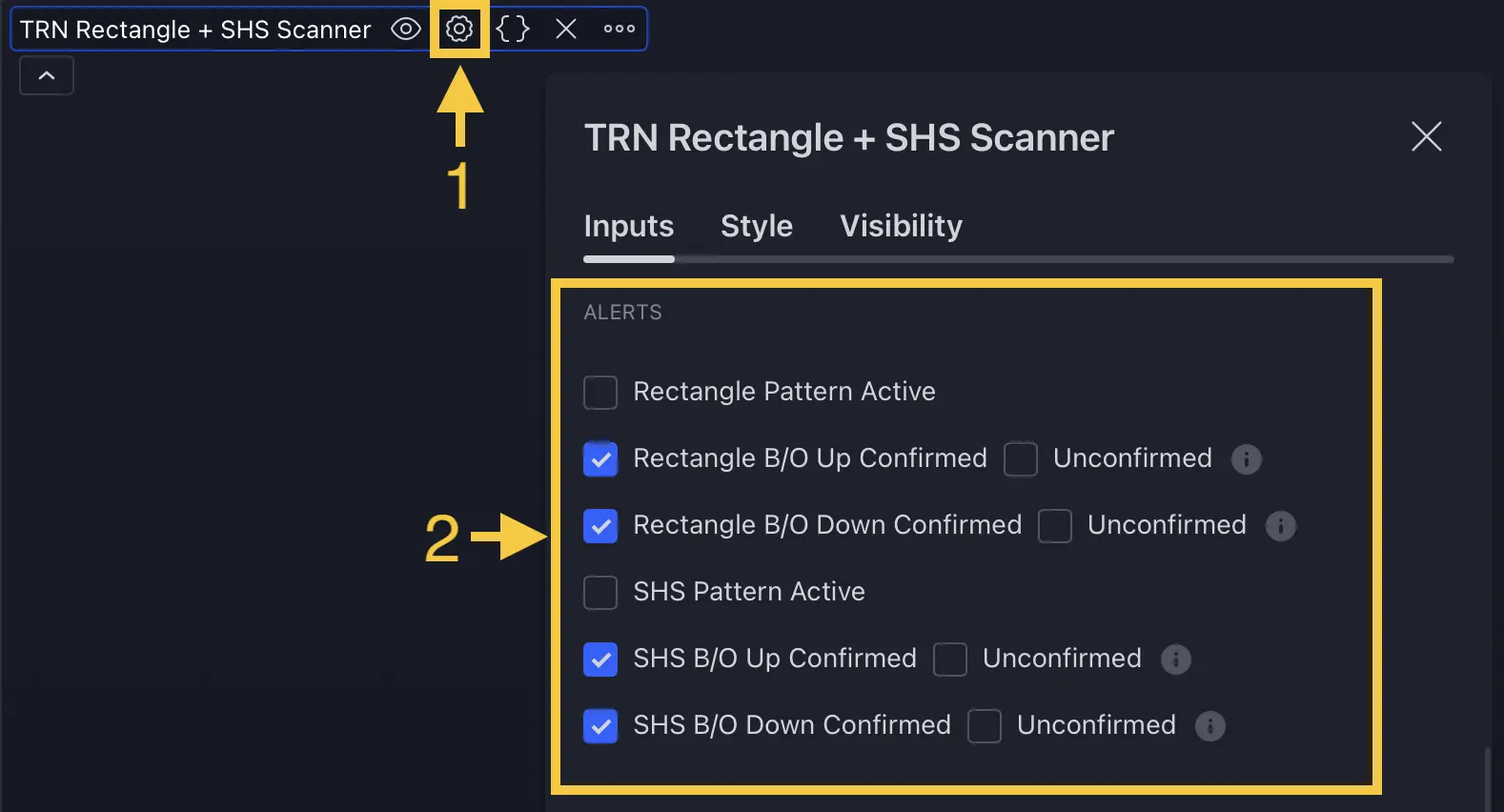
- Open the scanner indicator settings
- Navigate to the Alerts section
- Enable the alert types you want — confirmed breakouts are enabled by default
Step 2: Create the TradingView Alert
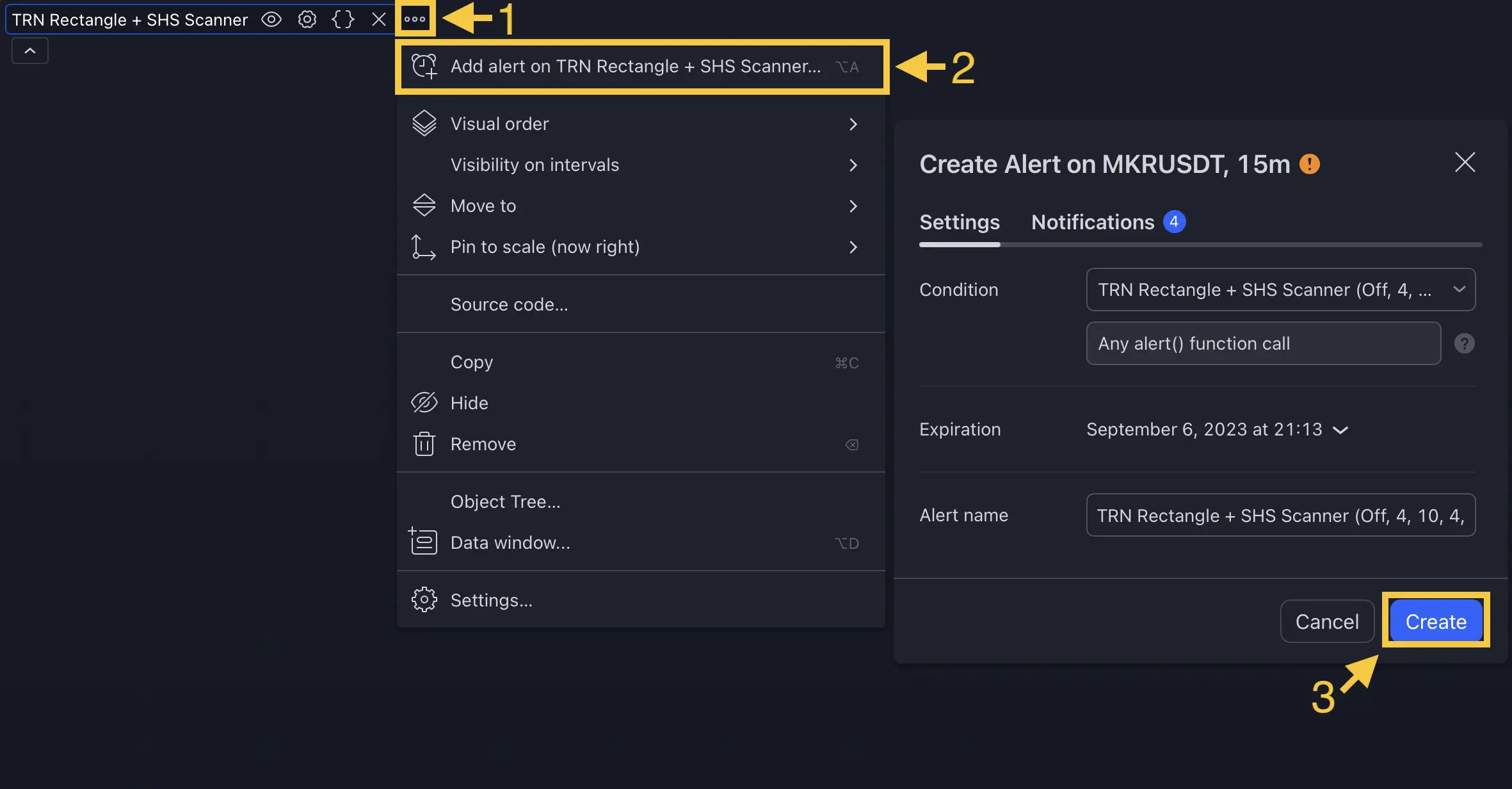
- Right-click the scanner indicator → select Add Alert
- Select Any Alert Function Call as the condition
- Configure your notification method — popup, email, or webhook
- Click Create — one alert covers all 20 symbols
The scanner uses runtime alert() calls. Always select Any Alert Function Call as the condition type. The alert message will include the symbol name and timeframe automatically.
Set up one confirmed breakout alert for your primary watchlist. Use unconfirmed alerts only for secondary monitoring where you want the earliest possible notification.
FAQ
How many alert conditions does the Consolidation and H&S Scanner provide?
The Consolidation and H&S Scanner provides alert conditions for pattern detection (consolidation found, H&S bullish found, H&S bearish found) and breakout confirmation (long/short, confirmed/unconfirmed) for each pattern family. Alerts fire per-symbol, so a single alert setup monitors all 20 symbols.
What is the difference between confirmed and unconfirmed breakout alerts?
Confirmed breakout alerts fire after the breakout bar closes beyond the pattern boundary, ensuring the signal is validated. Unconfirmed alerts fire intra-bar when price first crosses the boundary, providing earlier notification but with the risk that price may retrace before bar close.
Do alerts fire for all symbols or just one?
The scanner fires alerts for every monitored symbol individually. When you create one TradingView alert on the scanner, it covers all 20 symbols. The alert message includes the symbol ticker and timeframe so you know which instrument triggered.